


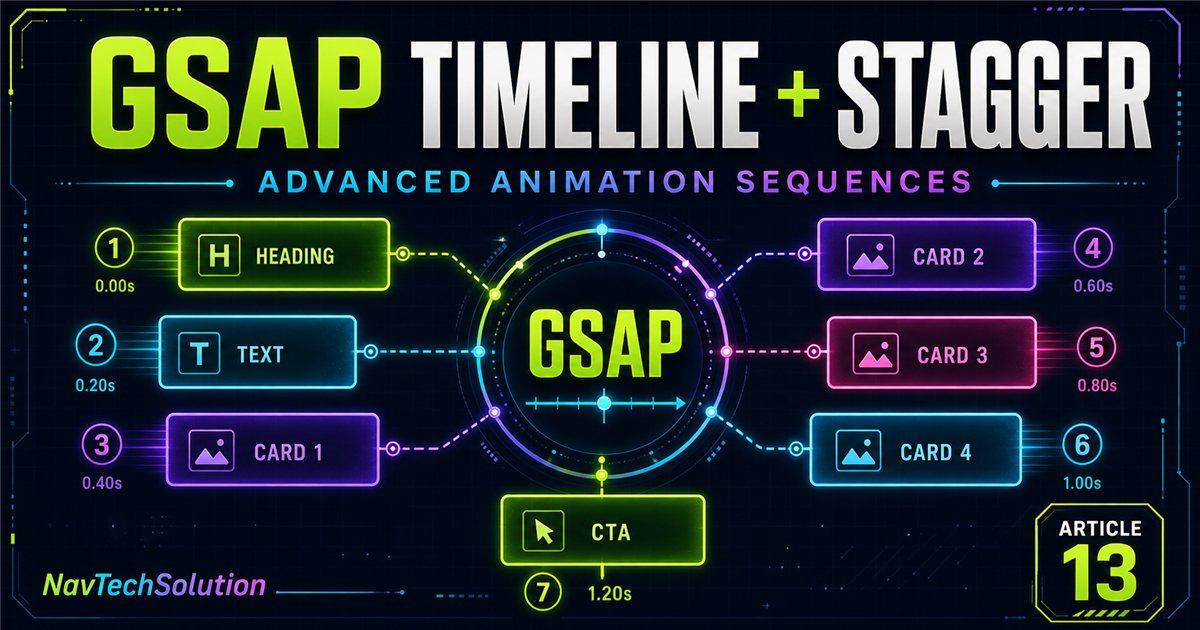
Imagine a section with a heading, paragraph, four cards and a call to action. Separate tweens work, but repeat the same setup. A timeline plus one staggered card tween expresses the structure clearly.
const tl = gsap.timeline();

tl.from(".section-title", { y: 30, opacity: 0, duration: 0.6 })
  .from(".section-text", { y: 20, opacity: 0, duration: 0.5 })
  .from(".feature-card", {
    y: 30, opacity: 0, duration: 0.6, stagger: 0.12
  })
.from(".section-cta", { scale: 0.85, opacity: 0, duration: 0.5 });Timeline: Heading → Paragraph → Cards → CTA. Stagger: Card 1 → Card 2 → Card 3 → Card 4.
What you will learn
Sequence major UI groups
Distribute targets with each or amount
Choose start, center, end, edges or random
Combine stagger with position overlaps
Control and rebuild timelines safely
Adapt motion for mobile and accessibility
1. Timeline vs stagger
A GSAP timeline coordinates different steps. Stagger offsets multiple targets inside a step.
2. Basic timeline + stagger
const tl = gsap.timeline();
tl.from(".demo-title", { y: 30, opacity: 0, duration: 0.6 })
  .from(".demo-card", { y: 30, opacity: 0, duration: 0.5, stagger: 0.1 });
The title is one child animation. The card group is another child animation targeting several elements.
3. Understanding the timing
4. stagger: 0.1
Card 1 starts first. Every later card begins approximately 0.1 seconds after the previous card. The value changes start spacing—not each card’s duration.
5. Timeline + stagger + position parameter
tl.from(".title", { y: 40, opacity: 0, duration: 0.8 })
  .from(".card", {
    y: 30, opacity: 0, duration: 0.6, stagger: 0.12
  }, "-=0.3");
"-=0.3" moves the whole card tween earlier. stagger: 0.12 distributes the cards after that group start.
6. Two levels of timing
"-=0.3"When does the group begin?
each: 0.12How are its targets distributed?
7. Interactive basic stagger timeline
Coordinated cards
Timeline step: Ready · Stagger: 0.12s
8. Sequential vs overlapping stagger
Sequential placement waits for the title. Overlap starts the group before the title finishes.
Compare timing
Mode: Sequential
9. stagger.each
stagger: { each: 0.12 }each explicitly sets time between starts. Object syntax makes room for origin, grid and axis options.
10. stagger.amount
stagger: { amount: 0.8 }amount distributes all starts across one overall stagger span.
11. each vs amount
12. Stagger from
GSAP 3 supports origins including "start", "center", "end", "edges" and "random".
13. From start
{ each: 0.1, from: "start" } follows target order: 1 → 2 → 3 → 4 → 5.
14. From center
from: "center" begins near the middle and spreads outward—useful for symmetrical icon or card groups.
15. From end
from: "end" distributes starts from the last target. That is different from reversing the complete timeline’s playback.
16. Random stagger
from: "random" creates decorative variation. Avoid it for instructions, forms or navigation where order carries meaning.
17. Interactive stagger direction lab
Stagger origin: Start
18. Stagger with easing
Stagger controls start timing; ease controls movement. Combine them without confusing their jobs.
tl.from(".feature-card", {
  y: 35, opacity: 0, scale: 0.95,
  duration: 0.6, ease: "power2.out", stagger: 0.1
});
19. Different ease for the group
back.out(1.2) can add personality to small badges, but may feel excessive on large content panels. Review Power and Sine and Back, Bounce and Expo.
20. Timeline defaults + stagger
const tl = gsap.timeline({ defaults: { duration: 0.6, ease: "power2.out" } });
tl.from(".title", { y: 40, opacity: 0 })
  .from(".card", { y: 30, opacity: 0, stagger: 0.1 }, "-=0.2");
21. Build a feature card reveal
Build better digital products
Coordinate a section introduction and its related cards.
Ready
22. Navigation link reveal
This isolated demo leaves the real website navigation untouched.
23. Hero + stats sequence
Build Better Digital Experiences
Modern websites, AI solutions and interactive experiences.
24. Team/profile cards
Use generic roles—Developer, Designer, AI Specialist and SEO Specialist—then animate skill badges as a second group. No nested timeline is required.
25. Parent group + child group timing
26. Multiple stagger groups
tl.from(".service-card", { y: 30, opacity: 0, stagger: 0.1 })
  .from(".technology-badge", { scale: 0.8, opacity: 0, stagger: 0.05 }, "-=0.2")
  .from(".action-button", { y: 15, opacity: 0 }, "-=0.1");
27. Grid stagger
GSAP 3 supports grid-aware distributions such as { each: 0.08, grid: "auto", from: "center" } for galleries, dashboards and feature matrices.
28. Grid from center
The center cell begins first and the animation spreads across the two-dimensional layout.
29. Grid from edges
from: "edges" makes outer cells lead and works inward.
30. Grid axis
axis: "x" emphasizes columns; axis: "y" emphasizes rows. Omit axis for a two-dimensional distribution.
31. Interactive grid stagger lab
Origin: Start · Axis: Both · Stagger: 0.08s
32. Timeline controls + stagger
Timeline controls manage the complete sequence, including every staggered target.
33. Reverse a staggered timeline
tl.reverse() plays the timeline backward. It is not the same as changing stagger.from.
34. Timeline progress with stagger
tl.progress(0.5) moves to the midpoint of the whole timeline, including the staggered tween’s expanded timing.
Complete sequence
Progress: 0%
35. Stagger timing playground
Stagger: 0.10s · Origin: Start
36. Too fast vs too slow
37. Stagger and element count
Ten targets with a 0.3-second stagger create a much longer tail than three targets. Consider total perceived duration, not the stagger value alone.
38. Stagger and reading order
Visual order should support logical structure. Reserve random order for decoration—not critical messages, forms or ordered steps.
39. Build a pricing card sequence
A subtle sequence can introduce a label, heading, description, generic Starter/Professional/Business cards and a CTA. Avoid delaying access to plan details.
40. Build a portfolio grid reveal
41. Build a dashboard sequence
42. Timeline as choreographer
TimelineChoreographer
PositionGroup cue
StaggerSpacing between performers
EaseMovement style
ControlsPlayback system
43. Architecture for larger sequences
Prefer timelines around logical sections—hero, features, projects and CTA—instead of one enormous page timeline.
44. Reusable timeline functions
function createCardTimeline(container) {
  const title = container.querySelector(".demo-title");
  const cards = container.querySelectorAll(".demo-card");
  return gsap.timeline({ paused: true })
    .from(title, { y: 30, opacity: 0 })
    .from(cards, { y: 30, opacity: 0, stagger: 0.1 });
}
45. Scoped selectors
Query from each demo root. A local demo.querySelectorAll(".stagger-card") cannot accidentally animate another example.
46. Main advanced sequence demo
Advanced Animation Sequences
Combine timelines, overlaps, stagger and easing to coordinate complex UI motion.
47. Main lab progress
The progress controls seek through the entire rebuilt timeline. Configuration changes kill the previous instance first, preventing stacked timelines.
48. Main lab timeline visualization
The bars below the lab expose the conceptual group order. Overlap mode moves later groups earlier while their internal stagger remains intact.
49. Common mistakes
50. Performance
For many targets, properties such as x, y, scale, rotation and opacity are usually practical. More targets, long durations, large stagger and complex effects can increase rendering or perceived cost. Test real devices.
51. Accessibility
const reduceMotion = window.matchMedia(
  "(prefers-reduced-motion: reduce)"
).matches;
Reduce distances, duration and stagger when requested. Keep all content immediately available and never depend on motion to communicate meaning.
52. Mobile considerations
Four desktop cards may become a long vertical stack on mobile. Shorter stagger can prevent unnecessary waiting; accessibility preference still takes priority over viewport assumptions.
53. Mini challenge
Build Better Animation Sequences
Combine timelines and stagger to create coordinated motion.
Show suggested solution
challengeTl
  .from(".challenge-label", { y: -15, opacity: 0, duration: 0.4 })
  .from(".challenge-title", { y: 35, opacity: 0, duration: 0.7 }, "-=0.1")
  .from(".challenge-text", { y: 20, opacity: 0, duration: 0.5 }, "-=0.3")
  .from(".challenge-card", { y: 30, opacity: 0, duration: 0.6, stagger: 0.12 }, "-=0.2")
  .from(".challenge-cta", { y: 15, opacity: 0, duration: 0.4 }, "-=0.2");
54. Quick reference
| Technique | Example | Purpose |
|---|---|---|
| Timeline | gsap.timeline() | Organize steps |
| Basic stagger | stagger: 0.1 | Offset targets |
| Stagger each | { each: 0.1 } | Space each start |
| Stagger amount | { amount: 0.8 } | Distribute an overall span |
| Start origin | { from: "start" } | Begin from start |
| Center origin | { from: "center" } | Spread from center |
| End origin | { from: "end" } | Begin from end |
| Position overlap | "-=0.3" | Start before current end |
| Same start | "<" | Use previous start |
| Timeline control | tl.play() | Play sequence |
| Reverse | tl.reverse() | Reverse sequence |
55. Cheat sheet graphic
"-=0.3"overlaps groups56. Final mental model
What moves?Tween properties
How does it move?Ease
When does the group start?Timeline position
How are targets distributed?Stagger
How is the sequence organized?Timeline
How do we control it?play · pause · reverse · restart
57. Preview Blog #14: ScrollTrigger
So far, animations have started automatically, from buttons or through timeline controls. Modern pages often start motion when a section enters the viewport. That is where ScrollTrigger enters.
gsap.from(".section", {
  y: 60,
  opacity: 0,
  scrollTrigger: { trigger: ".section", start: "top 80%" }
});
This is only a preview; the next lesson will teach ScrollTrigger in depth.
Continue the GSAP series
Review Getting Started, targeting, gsap.to(), gsap.from(), gsap.fromTo(), stagger, easing, timelines, timeline controls and position parameters.
Frequently asked questions
Can I use stagger inside a GSAP timeline?
Yes. Add stagger to a tween that targets multiple elements, then place that tween on the timeline like any other child animation.
What is the difference between GSAP timeline and stagger?
A timeline organizes major animation steps. Stagger distributes the start times of multiple targets inside one tween.
How do I stagger cards in a GSAP timeline?
Target the cards in a timeline tween and add stagger: 0.1 or an object such as stagger: { each: 0.1 }.
Can stagger and the timeline position parameter be used together?
Yes. The position parameter places the group tween; stagger controls the timing of targets within that group.
What does stagger each mean in GSAP?
The each value sets the time between the start of one target and the next.
What does stagger amount mean in GSAP?
Amount distributes all target start times across one overall stagger window.
How do I stagger from the center?
Use stagger: { each: 0.1, from: "center" }.
Can I reverse a staggered GSAP timeline?
Yes. timeline.reverse() plays the complete sequence backward, including its staggered timing.
How many elements should I stagger?
There is no universal limit. Consider target count, total sequence length, device performance and the user’s context.
Can I use GSAP timeline and stagger on a PHP website?
Yes. PHP renders the document while GSAP runs the animation in the browser.
Is random stagger good for navigation?
Usually not. Important navigation should preserve a predictable visual and reading order.
How do I make stagger animations accessible?
Respect prefers-reduced-motion, keep content available and never make essential information depend on motion.
