


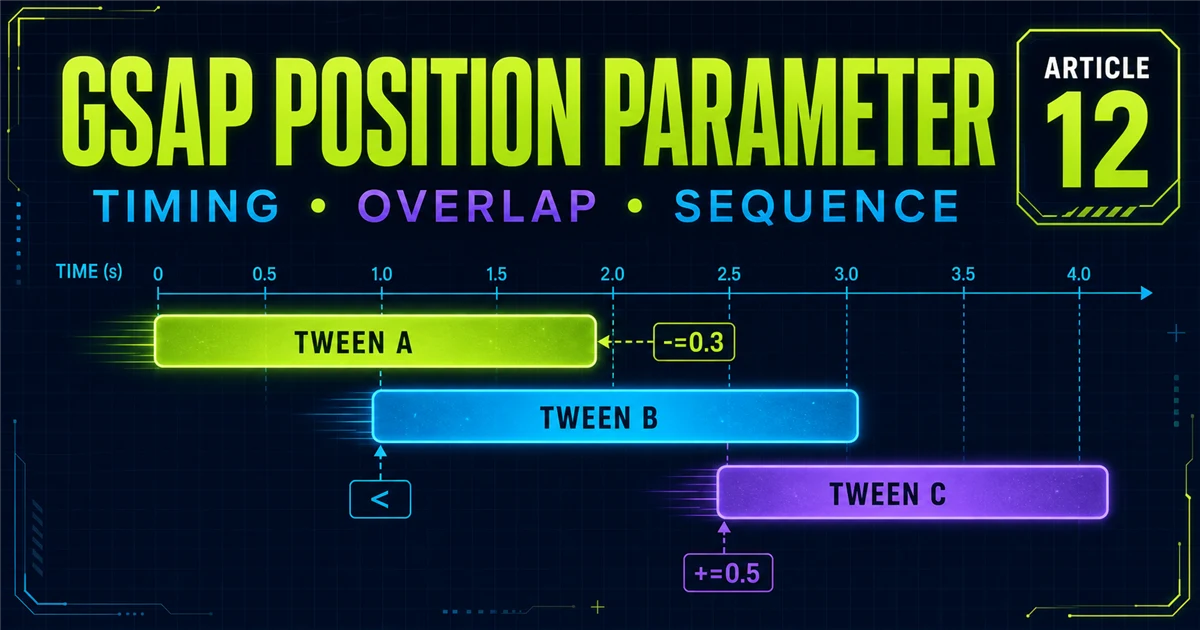
Timelines sequence child tweens, while timeline controls move their playhead. The position parameter answers the next question: exactly when does each child begin?
tl.from(".title", { y:40, opacity:0, duration:1 })
  .from(".text", { y:20, opacity:0, duration:1 }, "-=0.4")
  .from(".button", { scale:.8, opacity:0, duration:1 }, "-=0.3");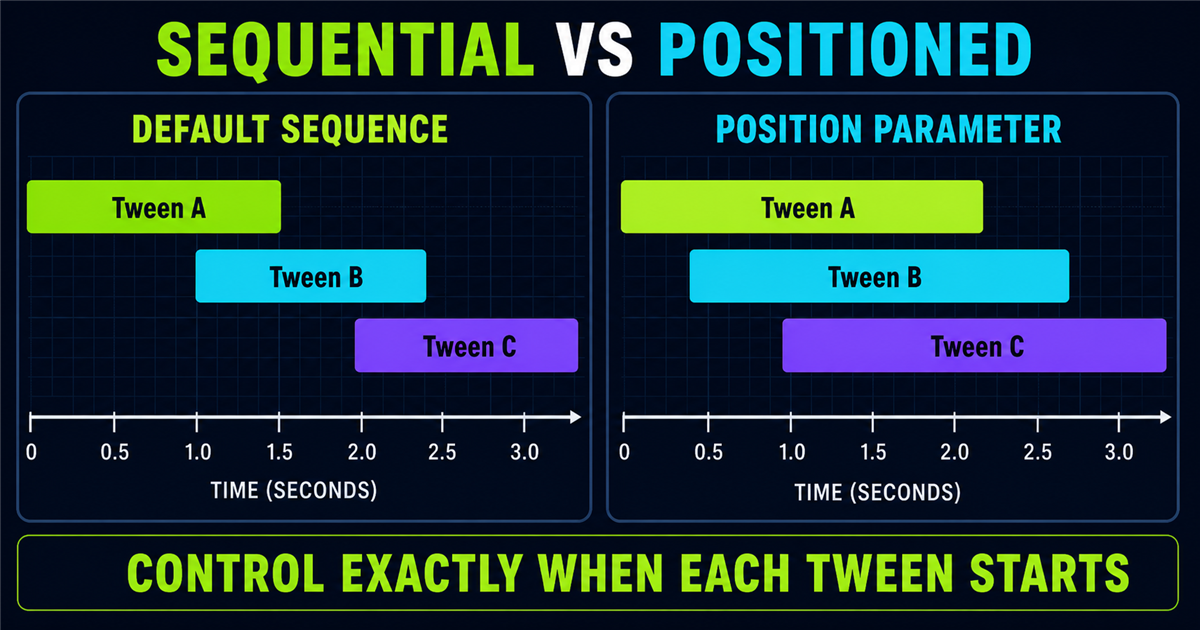
1. What is the position parameter?
tl.to(".box", { x: 200, duration: 1 }, 0.5);2. Default sequential timing
Without a position argument, a child is placed at the current timeline end: A from 0–1s, B from 1–2s, then C from 2–3s.
3. Absolute position
Numeric positions such as 0, 0.5 and 1 are timeline seconds. They are precise, but too many hard-coded values can be harder to maintain.
4. Add a gap with +=
"+=0.5" places the next child half a second after the current timeline end, adding intentional empty space.
5. Create overlap with -=
"-=0.3" starts the child 0.3 seconds before the current end. Overlap can connect movement, but is not automatically better.
6. Interactive += vs -= demo
Mode: Sequential
7. The < position symbol
"<" aligns a child with the start of the most recently added animation.
8. <0.2 and <+=0.2
"<0.2" starts 0.2 seconds after the previous start. "<+=0.2" expresses the same forward offset explicitly.
9. The > position symbol
">" aligns a child with the end of the most recently added animation—not necessarily the entire timeline end.
10. Offsets from >
">+=0.2" adds a gap after the previous child’s end; ">-=0.2" begins shortly before that end.
11. < vs > mental model
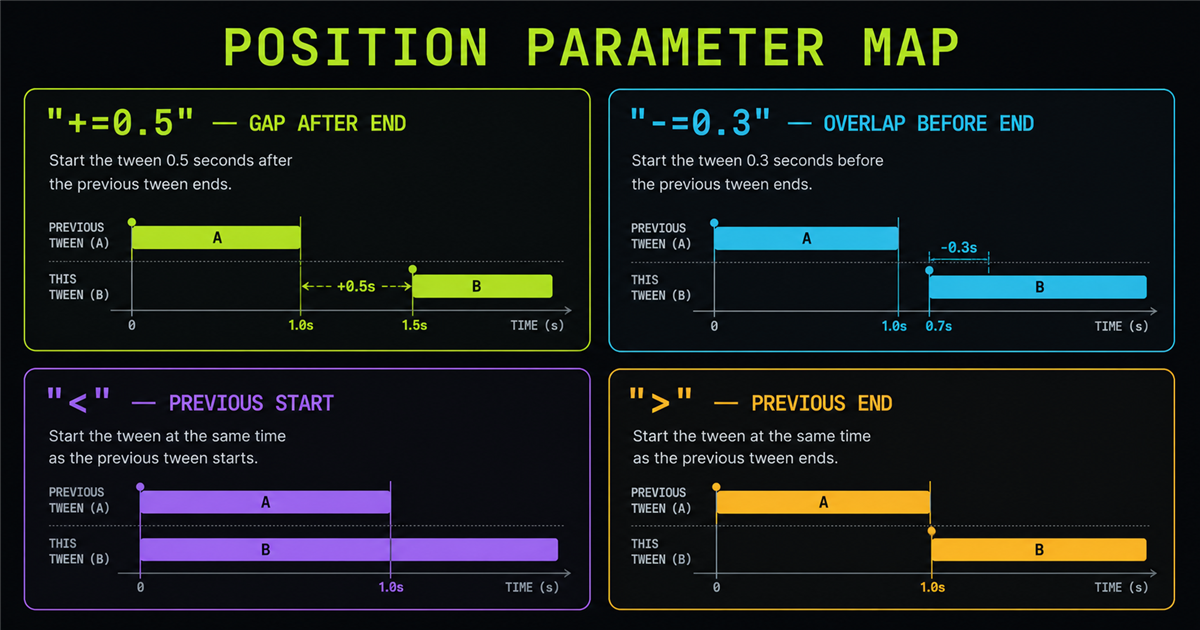
< references the previous start; > references the previous end.12. Start two animations together
tl.to(".one", { x:150, duration:1 })
  .to(".two", { x:150, duration:1 }, "<");
13. Start partway through the previous tween
Use "<0.3" to begin 0.3 seconds after the previous tween begins, creating a readable relationship.
14. Timeline labels
tl.addLabel("content") names an important position so later code communicates intent instead of only seconds.
15. Add multiple labels
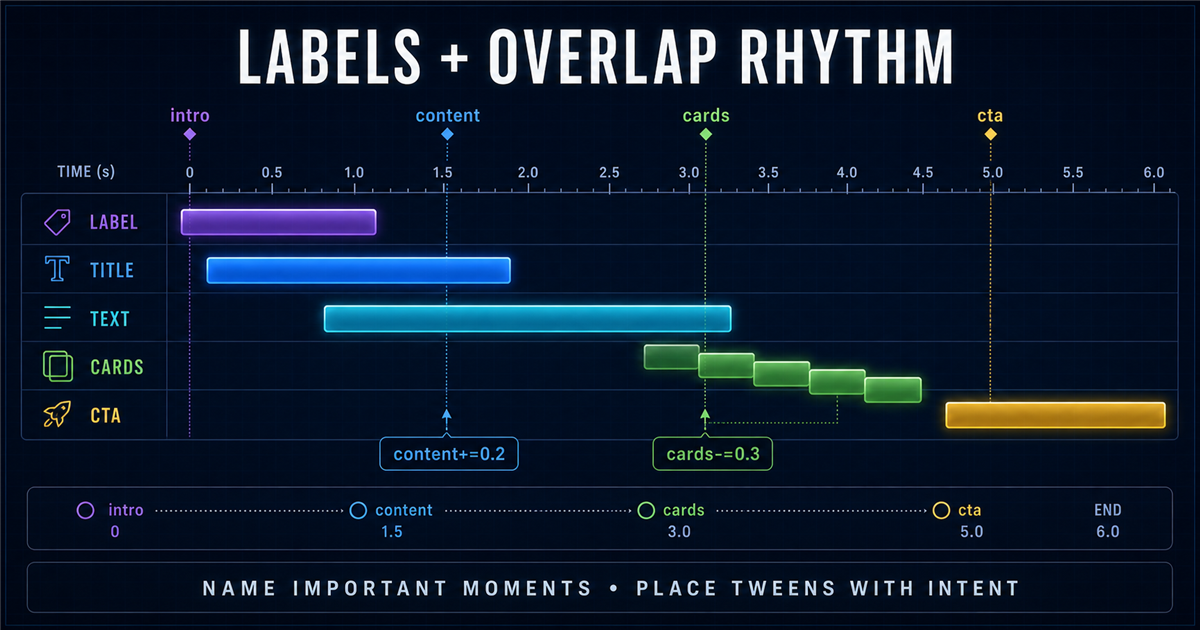
Names such as intro, content, cards and cta create a navigable storyboard.
16. Absolute label position
tl.addLabel("content", 1.2) places the label at exactly 1.2 seconds.
17. Relative position from a label
"content+=0.2" places a child 0.2 seconds after the named moment.
18. seek() with labels
tl.seek("cards") moves the playhead to the label. The label playground below demonstrates this.
19. Position parameter + from()
Add the third argument after the vars object: tl.from(target, vars, "-=0.3").
20. Position parameter + to()
tl.to(target, vars, "<") aligns destination motion with the previous child’s start.
21. Position parameter + fromTo()
For fromTo(), position is the fourth argument after target, from-vars and to-vars.
22. Position parameter + stagger
Position places the entire staggered tween; stagger offsets the tween’s individual targets.
23. Position parameter + easing
Position controls when a tween starts. Easing controls how its speed changes. They solve different design problems.
24. Build a natural hero sequence
Build Connected Experiences
Intentional overlap makes each entrance feel related.
25. Hero sequential vs overlap comparison
Sequential timing is clear and deliberate. Moderate overlap is more connected and compact. Choose the rhythm that supports the content.
26. Build a section reveal
Place the section label first, overlap the heading, then position a staggered card tween before the description fully finishes.
27. Cinematic timeline example
A cinematic sequence can layer background, label, title, supporting copy and CTA with controlled overlap. Restraint keeps the story readable.
28. Timeline visualization
29. Position parameter playground
Position mode: Sequential
30. Label playground
Current label: intro
31. Position parameters vs delay
delay belongs to one tween’s configuration. A position parameter describes the child’s relationship inside its parent timeline.
32. Position parameters vs stagger
Position coordinates timeline children; stagger offsets multiple targets within one child tween.
33. Absolute vs relative timing
34. Readability and maintainability
Prefer syntax that communicates intent. Labels help with named scenes; relative offsets help when timing should adapt to nearby durations.
35. Common position-parameter mistakes
- Putting position inside the vars object.
- Confusing timeline seconds with duration.
- Assuming
<means timeline start. - Assuming
>means timeline end. - Overlapping everything.
- Hard-coding too many absolute seconds.
- Using unclear label names.
- Combining delay and position accidentally.
- Rebuilding timelines on each click.
- Ignoring reduced motion.
36. Designing better overlaps
Begin with small overlap values, watch content hierarchy, and ensure the viewer can understand each step without rushing.
37. Animation rhythm
Rhythm comes from alternating movement, overlap and breathing room. Uniform overlap can feel mechanical; variation should still remain consistent.
38. Accessibility
Reduced-motion mode shortens sequences and removes large movement while preserving order, controls and visible final content.
39. Performance
Position syntax itself is lightweight; performance still depends on targets and properties. Prefer transforms and opacity for these demos.
40. Mini challenge
Create label, heading, paragraph, three cards and CTA. Start the heading with "-=0.2", cards with "-=0.3", and CTA with ">+=0.1".
41. Quick reference
| Position | Meaning |
|---|---|
0.5 | Absolute time |
+=0.5 | Gap after current end |
-=0.3 | Overlap current end |
< | Previous start |
<0.2 | After previous start |
> | Previous end |
>+=0.2 | After previous end |
content | At label |
content+=0.2 | After label |
42. Position parameter cheat sheet
Use absolute seconds for fixed placement, +=/-= relative to the current end, </> relative to the previous child, and labels for named moments.
43. Mental model
The timeline is a time canvas. Every child occupies a range. The position parameter chooses the child’s starting coordinate on that canvas.
44. Preview: timeline + stagger
The next lesson combines timeline-level sequencing with detailed stagger patterns to build advanced animation systems. It remains unlinked until created.
Review GSAP basics, targeting, to(), from(), fromTo() and expressive easing.
Frequently asked questions
What is the GSAP timeline position parameter?
It is the optional argument that tells GSAP where a child animation starts on its parent timeline.
How do I overlap animations in a GSAP timeline?
Use a relative position such as "-=0.3" or a previous-start reference such as "<".
What does +=0.5 mean in a GSAP timeline?
It adds a 0.5-second gap after the current timeline end before placing the tween.
What does -=0.3 mean in a GSAP timeline?
It places the tween 0.3 seconds before the current end, creating overlap.
What does the less-than symbol mean in a GSAP timeline?
The < position aligns a tween with the start of the most recently added animation.
What does the greater-than symbol mean in a GSAP timeline?
The > position aligns a tween with the end of the most recently added animation.
What are GSAP timeline labels?
Labels are readable names for important timeline positions.
Can I combine stagger with the position parameter?
Yes. The position places the staggered tween, while stagger offsets its individual targets.
Should I use position parameters instead of delay?
Use position parameters for relationships inside a timeline; delay remains useful for local tween timing.
Can I use GSAP timeline positions on a PHP website?
Yes. PHP renders the markup and GSAP controls timeline timing in the browser.
