


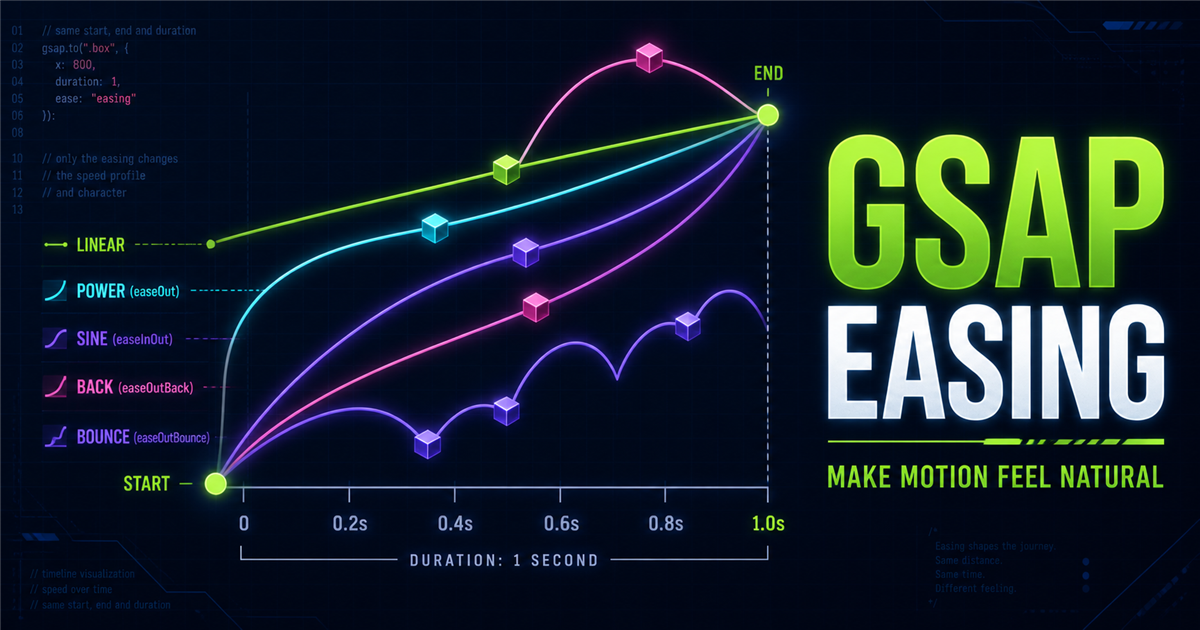
Animation properties define what changes. Duration defines how long it takes. Easing defines how speed changes during that time.
gsap.to(".box", { x: 300, duration: 1, ease: "power2.out" })1. What is easing?
Easing controls progress through time. power2 is the family and out is the direction.
2. The three main easing directions
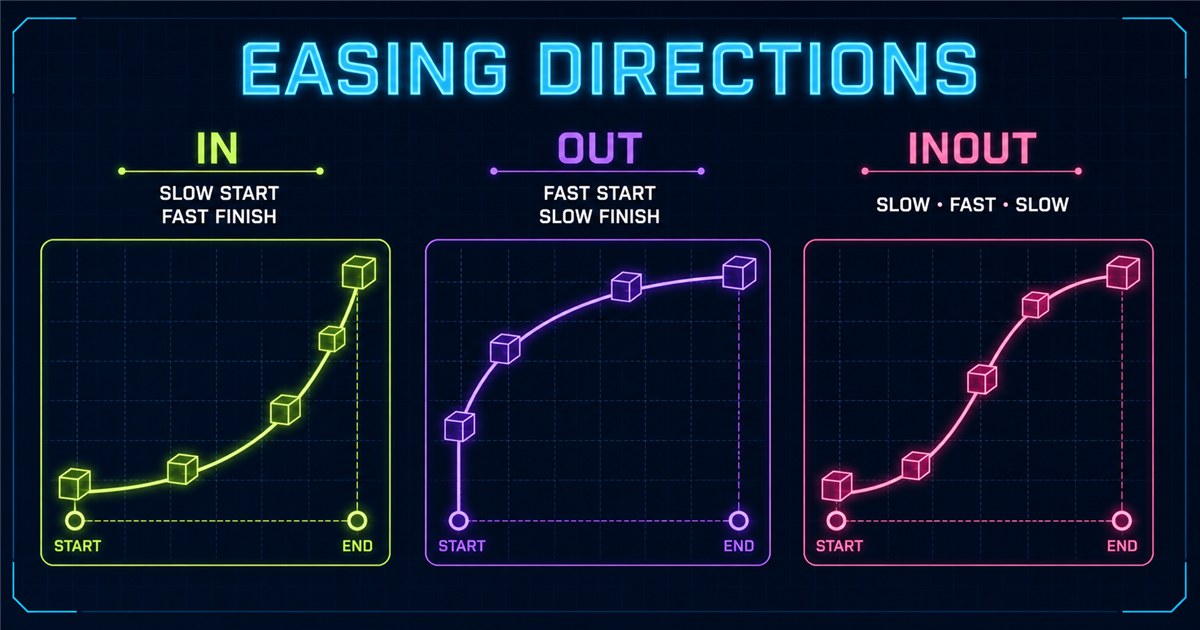
in accelerates, out decelerates, and inOut eases both ends.3. Easing vs duration
4. Your first easing demo
Current ease: none
5. ease: "none"
Constant-rate progress suits some progress visuals, marquees and mechanical effects.
6. Power easing
power1 through power4 provide increasingly pronounced acceleration or deceleration.
7. Power In
power2.in starts gently and accelerates, which can suit exits.
8. Power Out
power2.out starts quickly and settles, often useful for UI entrances.
9. Power InOut
power2.inOut has a slow start, faster middle and slow finish.
10. Interactive power comparison
11. Sine easing
sine.in, sine.out and sine.inOut create gentle transitions.
12. Sine interactive demo
Use the main playground with sine.inOut to compare calm movement.
13. Back easing
back.out(1.7) slightly overshoots before settling; the number controls strength.
14. Back In, Out and InOut
Back can overshoot near the beginning, ending, or both.
15. Practical back-ease card
16. Bounce easing
bounce.out gives a bounce-like finish, not a physical simulation.
17. Bounce use cases
Reserve bounce for playful feedback, badges and game-like UI; frequent large bounces can distract.
18. Expo easing
expo.out creates dramatic deceleration useful for strong entrances and panels.
19. Expo comparison
Compare expo.in, expo.out and expo.inOut with identical distance and duration.
20. Back vs Bounce vs Expo
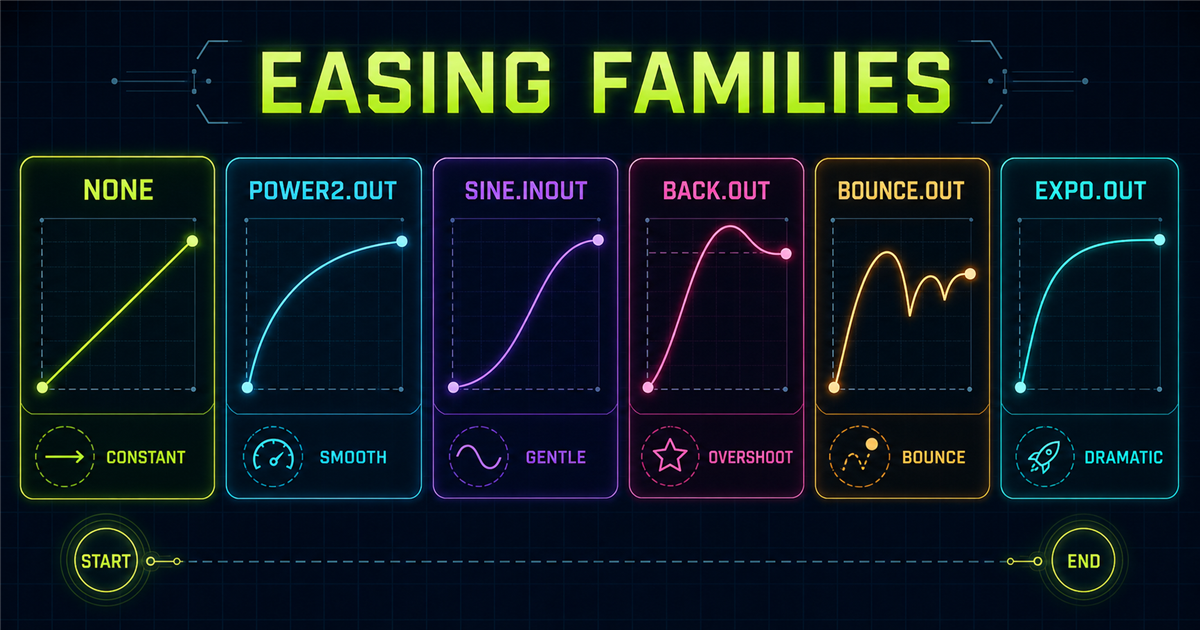
21. Easing with gsap.to()
to() keeps easing in its config object.
22. Easing with gsap.from()
from() uses easing to shape entrances.
23. Easing with gsap.fromTo()
fromTo() places easing in the destination object.
24. Easing with stagger
Review GSAP stagger.
25. Interactive easing playground
The playground above supports the same track and duration for a fair comparison. Add power, sine, back, bounce and expo without changing endpoints.
26. Side-by-side race
Every lane finishes in roughly the same duration; the purpose is comparing speed profiles, not winners.
27. Choosing the right ease
- Entrances: power or sine out.
- Balanced movement: power or sine inOut.
- Playful overshoot: back.out.
- Bounce feedback: bounce.out.
- Dramatic entrance: expo.out.
- Constant motion: none.
28. Common easing mistakes
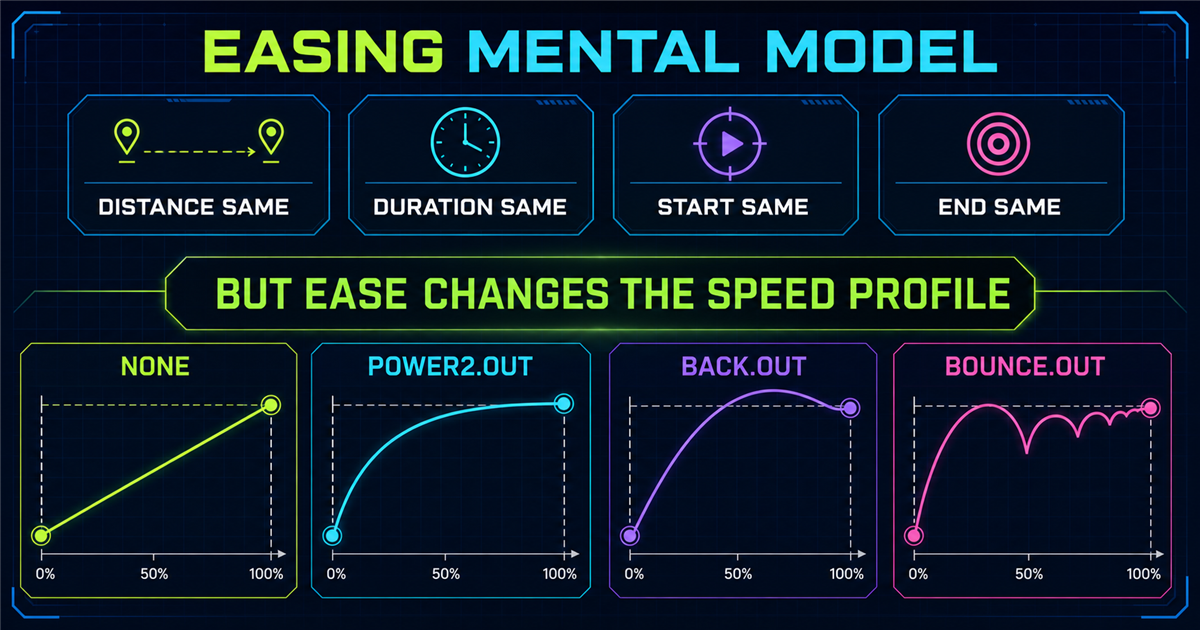
- Thinking easing changes destination or duration.
- Using bounce everywhere.
- Excessive overshoot.
- Random eases across one interface.
- Invalid ease strings.
- Comparing different distances or durations.
- Ignoring reduced motion.
29. Consistency in UI motion
Build a small motion language: perhaps power2.out entrances, power2.inOut transitions and restrained back easing for playful badges.
30. Accessibility
Reduced-motion mode skips decorative travel, bounce and overshoot while preserving controls and information.
31. Performance
Prefer suitable properties such as x, y, scale, rotation and opacity.
32. Mini challenge
Move A–D by 150px for one second using none, power2.out, back.out(1.4) and bounce.out.
33. Quick reference
| Ease | Character |
|---|---|
| none | constant |
| power2.in | accelerating |
| power2.out | decelerating |
| sine.inOut | gentle |
| back.out(1.4) | overshoot |
| bounce.out | bounce finish |
| expo.out | dramatic deceleration |
34. Easing mental model
35. Preview: Power and Sine easing
The next lesson will compare power1–power4 and sine directions in greater detail.
Frequently asked questions
What is easing in GSAP?
Easing controls how animation speed changes from start to finish.
What does ease: "none" mean?
It creates constant-rate progress through the tween.
What is the difference between ease and duration?
Duration sets how long the tween lasts; ease shapes its speed profile.
What do .in, .out and .inOut mean?
.in emphasizes the start, .out the finish, and .inOut both ends.
Which ease is good for UI entrances?
Power or sine out eases are useful starting points, but the right choice depends on the interface.
What does back.out() do?
It can overshoot the destination slightly before settling.
What does bounce.out do?
It creates a bounce-like finish rather than physical simulation.
Can easing work with stagger?
Yes. Stagger controls when targets start; easing controls how each target moves.
Does easing change the destination?
No. It changes progression through time, not the configured endpoint.
Can I use GSAP easing on a PHP website?
Yes. PHP renders HTML and GSAP animates it in the browser.
