


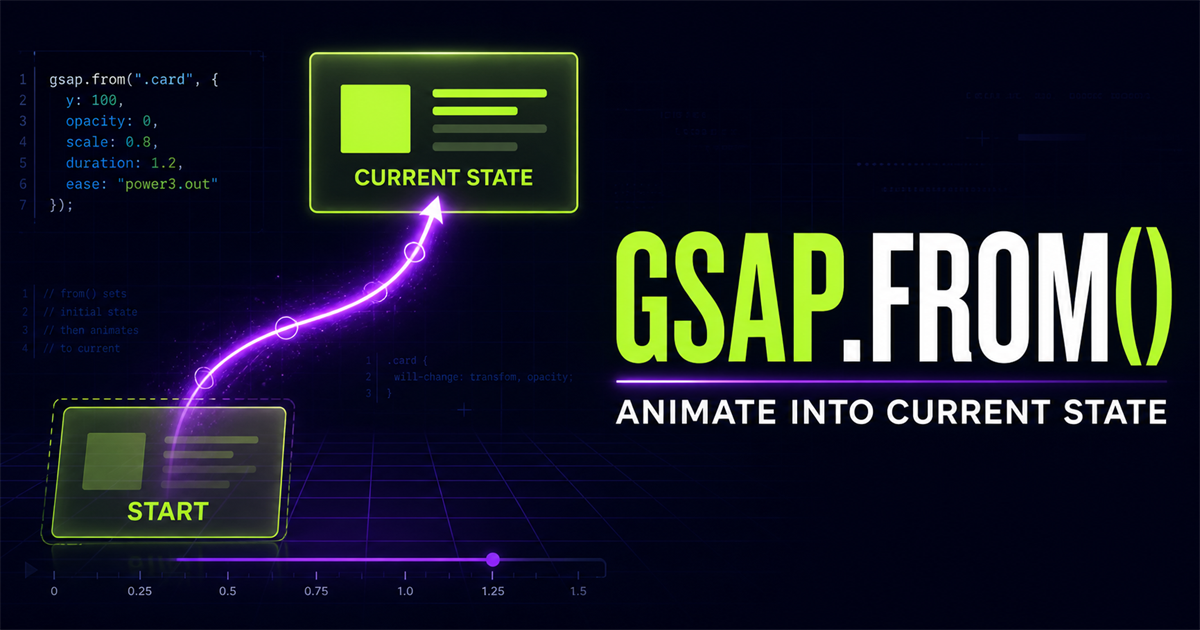
Entrance animation often begins with a simple idea: content starts somewhere else and arrives in its normal layout. gsap.from() expresses that idea directly. It is useful for page-load entrances, heading reveals, cards, images, buttons, and section introductions.
gsap.from(".title", {
  y: 40,
  opacity: 0,
  duration: 1
})
The title temporarily begins 40 pixels lower and invisible. It then animates into its normal CSS position and visibility.
Custom starting state → gsap.from() → current CSS state. The object describes the entrance, while your stylesheet describes the finished layout.
1. What is gsap.from()?
gsap.from() defines starting values. GSAP temporarily applies those values and animates toward the target’s current computed state.
gsap.from(".box", {
  x: -200,
  duration: 1
})x: -200x: 02. gsap.to() versus gsap.from()
The difference is which side of the journey you describe:
Current → destination
gsap.to(".box", { x: 200 })Start where the box is now and finish at x 200.
Custom start → current
gsap.from(".box", { x: -200 })Begin at x -200 and finish where the box is currently styled.
If you need a refresher on destination tweens, read Understanding gsap.to().
3. Your first gsap.from() animation
<div class="from-demo-box"></div>

gsap.from(".from-demo-box", {
  x: -150,
  opacity: 0,
  duration: 1.2,
  ease: "power2.out"
})The box is in its current CSS state.
Before replay, the demo kills an active tween and restores x, opacity, rotation, and scale. It then creates a fresh from() tween.
4. Fade-in animation
gsap.from(".fade-item", {
  opacity: 0,
  duration: 1
})
The normal state remains visible at opacity 1. GSAP begins at opacity 0 and interpolates back to that visible state.
Opacity is currently 1.
5. Slide in from the left
gsap.from(".slide-left", {
  x: -100,
  opacity: 0,
  duration: 1,
  ease: "power2.out"
})
x: -100 places the temporary start 100 pixels left of the final position. In responsive demos, reduce that distance or clip the isolated stage so it cannot widen the page.
6. Slide in from the right
gsap.from(".slide-right", {
  x: 100,
  opacity: 0,
  duration: 1,
  ease: "power2.out"
})
A positive x value begins to the right and returns to the normal x position. The final CSS remains unchanged.
7. Reveal from below
gsap.from(".reveal-up", {
  y: 50,
  opacity: 0,
  duration: 0.9,
  ease: "power2.out"
})
Positive y begins below the normal position. This restrained pattern often suits headings, paragraphs, cards, and CTA blocks.
8. Reveal from above
gsap.from(".reveal-down", {
  y: -50,
  opacity: 0,
  duration: 0.9,
  ease: "power2.out"
})Negative y begins above; positive y begins below. Both end at the same current position.
9. Scale-in animation
gsap.from(".scale-card", {
  scale: 0.8,
  opacity: 0,
  duration: 0.8,
  ease: "back.out(1.4)"
})
scale: 0.8 begins at 80% of the normal size. The back ease adds a small settling character; easing receives a dedicated lesson later.
10. Rotation entrance
gsap.from(".rotate-item", {
  rotation: -15,
  opacity: 0,
  duration: 0.8,
  ease: "power2.out"
})
The element begins rotated counter-clockwise and settles at its normal rotation. Small angles can add direction without making routine interface content feel unstable.
11. Combine multiple starting properties
gsap.from(".feature-card", {
  y: 50,
  opacity: 0,
  scale: 0.9,
  rotation: 2,
  duration: 1,
  ease: "power2.out"
})
Every transform and opacity value above describes the start. The destination remains the card’s current CSS state: y 0, visible opacity, normal scale, and its existing rotation.
12. Hero section entrance example
NavTechSolution
Build Better Digital Experiences
Modern web development with thoughtful motion.
Explore ServicesHero content is in its final state.gsap.from(".hero-demo-title", {
y: 50,
opacity: 0,
duration: 1,
ease: "power2.out"
})The demo animates its isolated hero elements together. Later lessons will show how stagger and timelines create deliberate sequences.
13. Why gsap.from() fits entrances
The HTML and CSS can describe the final, readable interface. JavaScript only describes how it enters:
.title {
  opacity: 1;
}

gsap.from(".title", {
  opacity: 0,
  y: 30
})
If JavaScript does not run, the title remains visible in its normal layout. That is a useful progressive-enhancement foundation.
14. A brief note on immediateRender
From-based tweens can apply their starting values immediately when created. You may notice this more in timelines or when several from/fromTo tweens affect the same target.
gsap.from(".box", {
  opacity: 0,
  immediateRender: false
})
Most beginner entrances do not need to change this option. Treat it as a troubleshooting clue when multiple tweens compete over the same starting values.
15. Use gsap.from() with multiple elements
<div class="from-card">HTML</div>
<div class="from-card">CSS</div>
<div class="from-card">JavaScript</div>

gsap.from(".from-card", {
  y: 30,
  opacity: 0,
  duration: 0.8
})All matches share the same starting values and can enter together. A later lesson shows how stagger makes them enter one after another. Review GSAP targeting elements for selector details.
16. Interactive entrance playground
Each button restores the card’s final state, kills any active tween, and creates a fresh gsap.from() entrance.
Choose a temporary starting state.
17. Practical navigation and UI reveal
The example below is isolated from the real website navigation.
gsap.from(".demo-nav-item", {
  y: -15,
  opacity: 0,
  duration: 0.5
})
18. Practical card reveal
Web Performance
Reduce friction with focused technical improvements.
gsap.from(".service-demo-card", {
  y: 40,
  opacity: 0,
  scale: 0.95,
  duration: 0.8,
  ease: "power2.out"
})
19. Page-load animation
document.addEventListener("DOMContentLoaded", () => {
  gsap.from(".page-heading", {
    y: 40,
    opacity: 0,
    duration: 1
  })
})
On a static PHP page, DOMContentLoaded safely waits until the rendered HTML is available. Do not permanently set essential content to opacity 0 in CSS when JavaScript is the only mechanism that reveals it.
20. CSS defines the final state
.demo-card {
  opacity: 1;
  transform: none;
}

gsap.from(".demo-card", {
  y: 40,
  opacity: 0,
  scale: 0.95
})opacity: 1
transform: noney: 40
opacity: 0
scale: .9521. Common gsap.from() mistakes
x: -100 means begin there and return to normal—not finish there.
Keep important content readable when JavaScript fails or is disabled.
Kill the old tween, restore final values, and create a fresh from tween.
Large offsets can create mobile overflow and distracting travel.
Confirm the class, ID, or DOM reference exists in the isolated component.
Load the CDN before the page-specific script.
Wait for the DOM when the target markup is not yet available.
Review transforms already defined on the element and its interactive states.
Skip decorative entrances and show the final state directly when requested.
The destination is normally the current state. Use fromTo() when both ends must be explicit.
22. gsap.from() versus CSS animation
CSS animations are excellent for simple, declarative effects that belong naturally in a stylesheet. GSAP becomes useful when you need JavaScript control, interaction, sequencing, timelines, ScrollTrigger, or values calculated at runtime. Neither is universally better; choose the tool that keeps the behavior understandable.
23. Performance tips
When appropriate, prefer entrance examples based on x, y, scale, rotation, and opacity. Transform and opacity properties are commonly suitable for interface motion, but target count, element size, effects, and device capability still matter. Test the real page.
24. Accessibility and reduced motion
const reduceMotion = window.matchMedia(
  "(prefers-reduced-motion: reduce)"
).matches

if (reduceMotion) {
  gsap.set(".card", { x: 0, y: 0, opacity: 1 })
} else {
  gsap.from(".card", { y: 40, opacity: 0 })
}
When reduced motion is requested, skip decorative travel and preserve every label, link, and control. All demos in this article show their final state immediately.
25. Mini challenge
<div class="challenge-profile">
  <div class="challenge-avatar"></div>
  <h3>Frontend Developer</h3>
  <p>Building fast and interactive web experiences.</p>
</div>
Make the profile begin 50 pixels lower, at opacity 0 and scale 0.9. Animate for one second with power2.out, finishing in its normal CSS state.
Show one possible solution
gsap.from(".challenge-profile", {
  y: 50,
  opacity: 0,
  scale: 0.9,
  duration: 1,
  ease: "power2.out"
})
26. gsap.from() quick reference
| Property | Starting effect | Example |
|---|---|---|
x | Start left or right | x: -100 |
y | Start above or below | y: 50 |
opacity | Start transparent | opacity: 0 |
scale | Start smaller or larger | scale: 0.8 |
rotation | Start rotated | rotation: -15 |
duration | Animation length | duration: 1 |
delay | Wait before starting | delay: 0.3 |
ease | Motion feel | power2.out |
27. Remember the gsap.from() mental model
x: -150
opacity: 0
scale: 0.8gsap.from(".box", {
x: -150,
opacity: 0,
scale: 0.8
})x: 0
opacity: 1
scale: 1The object passed to gsap.from() mainly describes where the animation begins. The current CSS tells it where to finish.
Frequently asked questions
What does gsap.from() do?
gsap.from() applies temporary starting values and animates the target from those values into its current CSS or computed state.
What is the difference between gsap.to() and gsap.from()?
gsap.to() defines destination values. gsap.from() defines starting values and uses the target’s current state as the destination.
Is gsap.from() good for entrance animations?
Yes. It is well suited to entrances because the normal HTML and CSS can remain in their final usable state while JavaScript describes how they enter.
Can gsap.from() animate opacity?
Yes. Starting from opacity 0 creates a fade into the element’s current opacity, which is usually 1.
Can gsap.from() animate multiple elements?
Yes. A selector, NodeList, or array can supply multiple targets that share the same starting values.
Why does my gsap.from() animation only play once?
The element is already at its destination after the first run. For manual replay, kill the old tween, restore the final state, and create a new from tween.
Can I use gsap.from() on a PHP website?
Yes. PHP renders the HTML and GSAP animates those elements in the browser after the document is available.
Should I hide elements with CSS before using gsap.from()?
Avoid permanently hiding essential content only to reveal it with JavaScript. Let CSS describe the readable final state and let gsap.from() apply temporary starting values when it runs.
Your entrance-animation foundation
You can now build entrances while keeping the final page readable in normal CSS. Revisit the GSAP introduction, targeting elements, or the gsap.to() tutorial whenever you need the earlier mental models.
