


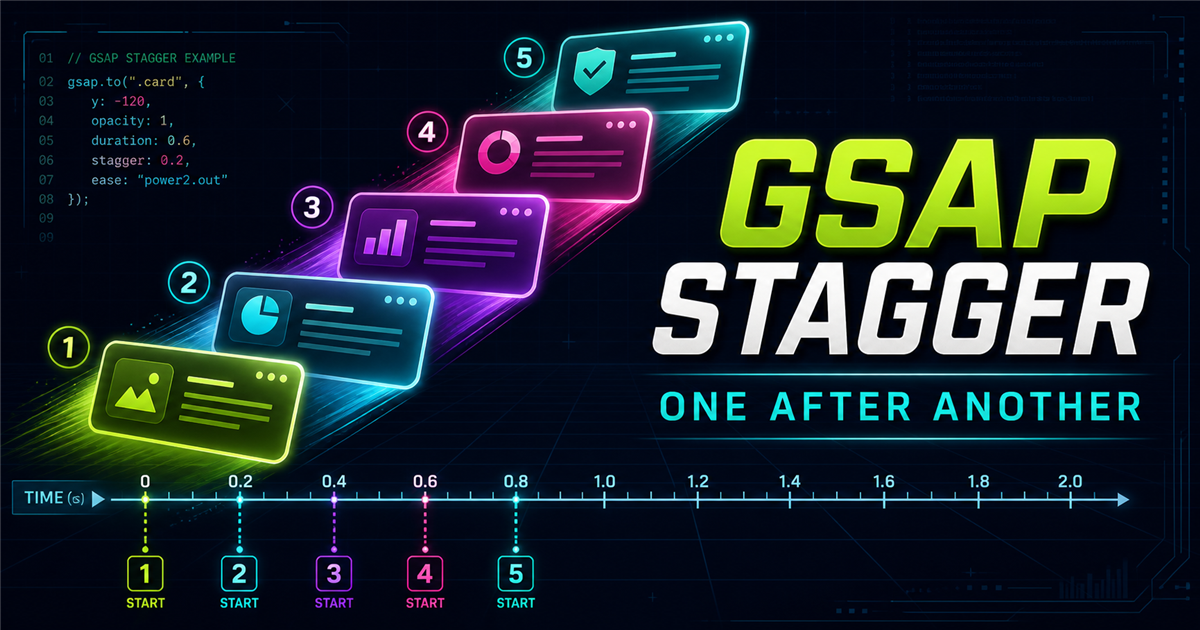
When HTML, CSS and JavaScript cards all begin together, the movement can feel flat. A stagger adds a small start-time gap while allowing the tweens to overlap:
gsap.from(".skill-card", {
  y: 30,
  opacity: 0,
  duration: 0.8,
  stagger: 0.15,
  ease: "power2.out"
})1. What is GSAP stagger?
Stagger offsets animation start times across multiple targets. With stagger: 0.2, target two starts 0.2 seconds after target one, and target three another 0.2 seconds later. It does not need to wait for the previous tween to finish.
2. Why use stagger?
Use stagger to reinforce hierarchy and rhythm in navigation links, feature cards, galleries, lists, statistics, pricing cards, hero copy, social icons and dashboard items. It is most effective when the cascade supports the content rather than decorating everything.
3. Basic stagger syntax
targets→from values→duration→stagger: 0.2gsap.from(".card", {
opacity: 0,
y: 30,
duration: 0.8,
stagger: 0.2
})duration belongs to every target tween; stagger spaces their start times.
4. Your first stagger animation
Cards are at their final state.
5. Stagger timing
Small intervals feel tightly connected; larger intervals make each target more distinct. There is no universal best value.
6. Stagger with gsap.to()
gsap.to() moves every card from its current state toward the same destination.
gsap.to(".to-card", { y: -20, rotation: 5, duration: 0.5, stagger: 0.15 })7. Stagger with gsap.from()
gsap.from() is ideal for cascading entrance animations because the CSS remains the readable final state.
gsap.from(".from-card", { y: 40, opacity: 0, duration: 0.8, stagger: 0.15 })8. Stagger with gsap.fromTo()
With gsap.fromTo(), stagger belongs in the destination object.
gsap.fromTo(".fromto-card",
  { y: 50, opacity: 0, scale: 0.9 },
  { y: 0, opacity: 1, scale: 1, duration: 0.8, stagger: 0.15 }
)
9. Negative stagger
A negative numeric interval reverses how start-time offsets are assigned. For explicit intent, from: "end" is often easier to read.
10. Advanced stagger object
stagger: {
  each: 0.15,
  from: "start"
}
The object form supports each, amount, from, grid and distribution ease.
11. each
each: 0.2 creates a 0.2-second gap between adjacent target starts.
12. amount
Fixed gap per target.
Distributes all offsets across a total one-second span.
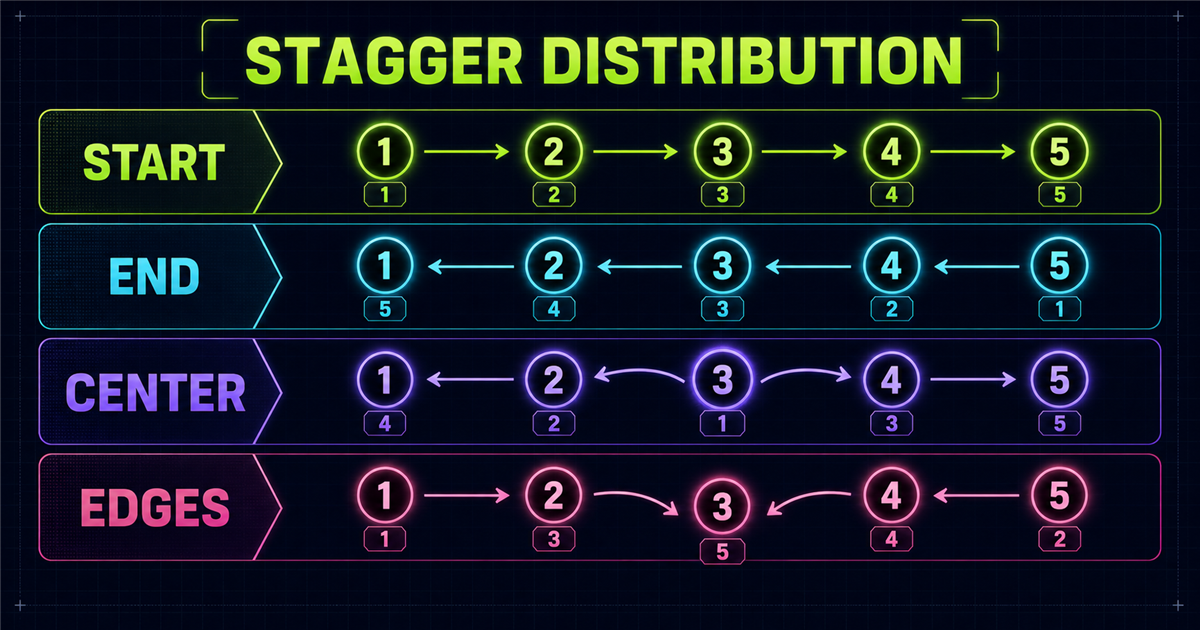
13. from: "start"
The collection begins in natural order: 1 → 2 → 3 → 4 → 5.
14. from: "end"
The offset order begins at the end: 5 → 4 → 3 → 2 → 1.
15. from: "center"
Timing starts near the middle and spreads outward: 3 → 2/4 → 1/5.
16. from: "edges"
Timing begins at the outer targets and moves inward. This is supported by the GSAP 3 distribution utility used by this article.
17. Stagger grid
A grid distribution can radiate timing through rows and columns.
stagger: { amount: 1, grid: "auto", from: "center" }18. Stagger ease
In the object form, an ease can shape how offsets are distributed. The next article will explain easing in depth.
19. Interactive stagger playground
Choose a distribution.
20. Practical navigation reveal
This isolated demo never targets the real site navigation.
21. Practical service cards
Focused digital solutions built for clear business goals.
Focused digital solutions built for clear business goals.
Focused digital solutions built for clear business goals.
Focused digital solutions built for clear business goals.
22. Practical hero reveal
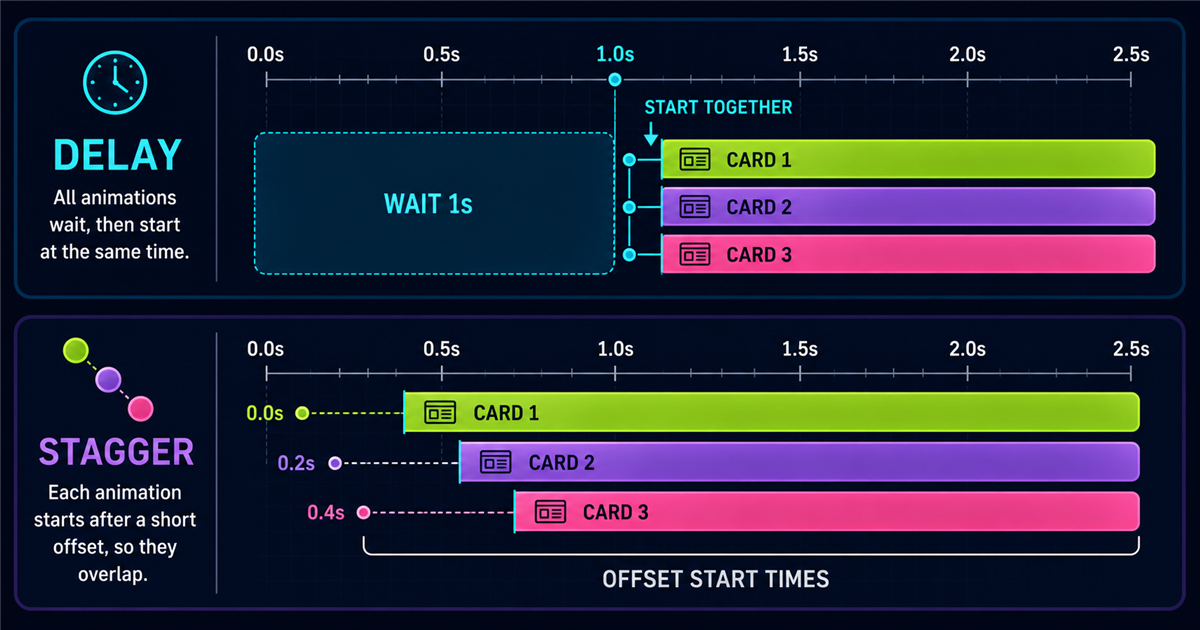
23. Stagger vs delay
delay postpones a tween; stagger offsets the starts of targets inside that tween.
24. Stagger vs timeline
Distribute a similar animation across many targets.
Sequence distinct animation steps with precise control.
25. Common stagger mistakes
- Targeting only one element.
- Using an interval so large that the sequence drags.
- Confusing duration with start-time spacing.
- Confusing delay with stagger.
- Using broad selectors or real site components.
- Creating sequences that are too long.
- Failing to reset before replay.
- Ignoring reduced motion and mobile overflow.
- Using advanced syntax without checking compatibility.
26. Performance
Prefer interface motion based on opacity, x, y, scale and rotation. Keep decorative target counts reasonable and avoid unnecessary layout-heavy animation.
27. Accessibility
When prefers-reduced-motion is enabled, these demos show final states immediately and skip cascading delays. Every fact remains readable without JavaScript.
28. Mini challenge
Reveal five skills from y: 40, opacity: 0 and scale: 0.9, using duration 0.7 and stagger 0.15.
Show solution
gsap.from(".challenge-skill", {
  y: 40, opacity: 0, scale: 0.9,
  duration: 0.7, stagger: 0.15,
  ease: "power2.out"
})
29. Quick reference
| Option | Purpose | Example |
|---|---|---|
| stagger | Basic interval | stagger: 0.2 |
| each | Gap per target | each: 0.15 |
| amount | Total stagger span | amount: 1 |
| from | Distribution origin | from: "center" |
| grid | Grid distribution | grid: "auto" |
30. Stagger mental model
Coming next: easing
Frequently asked questions
What is stagger in GSAP?
Stagger offsets the start times of animations across a group of targets.
What does stagger: 0.2 mean?
Each target starts 0.2 seconds after the previous target in the distribution order.
What is the difference between duration and stagger?
Duration controls each tween length; stagger controls spacing between target start times.
What is the difference between delay and stagger?
Delay postpones the tween as a whole, while stagger offsets targets relative to one another.
Can I use stagger with gsap.from()?
Yes. It is especially useful for revealing groups from a temporary starting state.
Can I use stagger with gsap.fromTo()?
Yes. Put stagger in the destination or toVars object.
How do I reverse a stagger?
Use a negative numeric stagger or an object configuration such as from: "end".
Can GSAP stagger animate a grid?
Yes. Use a grid distribution and choose where its timing should begin.
Is stagger useful for card animations?
Yes, when the timing supports hierarchy and does not make the sequence unnecessarily long.
Can I use GSAP stagger on a PHP website?
Yes. PHP renders the markup and GSAP animates the resulting elements in the browser.
Give groups a clear rhythm
Stagger controls when each target begins. Revisit the GSAP introduction, targeting, to(), from(), or fromTo() as needed.
