


Two tweens can share the same start, end, distance and duration, yet feel different because easing redistributes speed across their journey.
gsap.to(".box", { x: 250, duration: 1, ease: "power2.out" });
gsap.to(".box", { x: 250, duration: 1, ease: "sine.out" });
1. Quick easing refresher
Blog #7 introduced GSAP easing. Here we keep the endpoint fixed and study these two families in detail.
2. Understanding Power easing
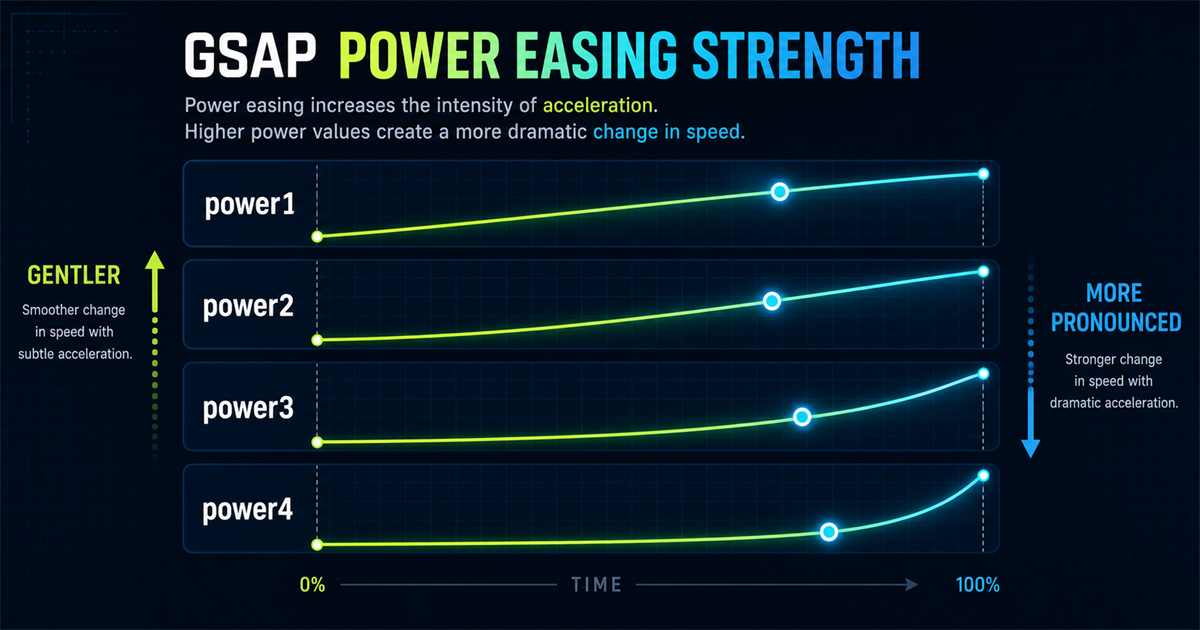
power1 is gentler; power2, power3 and power4 make acceleration or deceleration progressively more pronounced. The number does not change duration.
3. Compare power1, power2, power3 and power4
All four lanes use the same start, end and 1.4-second duration.
4. power1.in
gsap.to(".box", { x: 250, duration: 1, ease: "power1.in" });It starts gently and accelerates toward the end, which can suit a subtle departure or controlled exit.
5. power1.out
power1.out starts faster and settles gently. It produces a restrained interface entrance.
6. power1.inOut
power1.inOut combines a gentle start, faster middle and gentle finish—useful when both endpoints remain visible.
7. power2.in
The acceleration in power2.in is more noticeable than power1.in, while the destination and duration remain unchanged.
8. power2.out
gsap.from(".feature-card", {
  y: 40, opacity: 0, duration: 0.8, ease: "power2.out"
});
This is a practical starting point for cards, panels, headings, buttons, modal-like UI and navigation entrances—not a universal best choice.
9. power2.inOut
power2.inOut gives balanced travel when the reader can see both the start and finish, such as a slider item moving between positions.
10. power3
gsap.from(".panel", {
  x: 80, opacity: 0, duration: 0.9, ease: "power3.out"
});
Its in, out and inOut variants create a stronger speed change than power2.
11. power4
power4.in, power4.out and power4.inOut feel more dramatic. Use that emphasis deliberately, especially for large movement.
12. Power strength comparison graphic
13. Interactive Power playground
Current ease: power2.out
14. What is Sine easing?
Sine easing creates smooth, gentle speed changes that often feel softer than stronger Power curves.
gsap.to(".box", { x: 250, duration: 1, ease: "sine.inOut" });15. sine.in
sine.in begins gently and gradually accelerates. Try it for calm exits and subtle transitions.
16. sine.out
sine.out creates a smooth entrance with gentle settling, useful when stronger deceleration would feel heavy.
17. sine.inOut
A soft beginning, smooth middle and soft finish make sine.inOut suitable for carousels, floating decoration and calm position changes.
18. Interactive Sine comparison
19. Power vs Sine
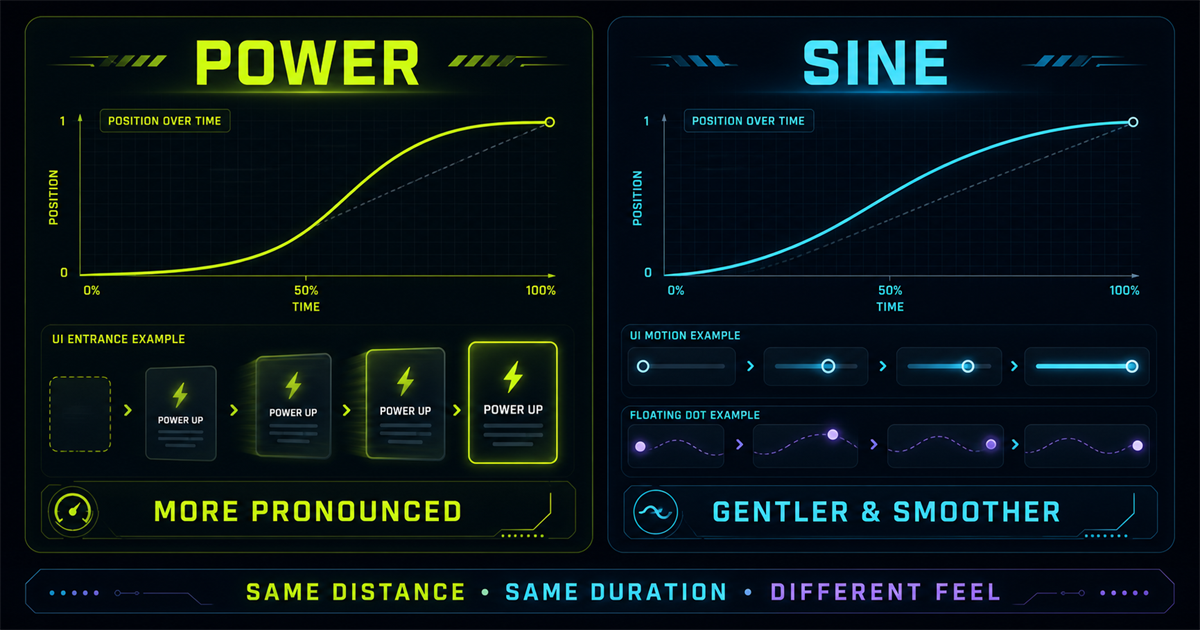
| Family | Feel | Example uses |
|---|---|---|
| Power | More pronounced | UI entrances, panels |
| Sine | Gentler | Subtle movement, sliders |
20. power2.out vs sine.out
Watch the first half and the final settling; both markers arrive after the same duration.
21. power2.inOut vs sine.inOut
Both slow at each end, but Power creates a stronger contrast between the middle and endpoints while Sine stays softer.
22. Practical hero entrance
Modern Web Experiences
Fast, accessible interfaces with intentional motion.
Stagger controls when items begin; power2.out controls how each item moves.
23. Practical card entrance
24. Practical Sine slider movement
25. Floating motion with Sine
sine.inOut avoids abrupt turnarounds during back-and-forth motion. Reduced-motion mode disables this loop.
26. Choosing between power1–power4
- power1: very restrained.
- power2: balanced general-purpose UI motion.
- power3: stronger entrance or transition.
- power4: more dramatic emphasis.
These are starting points. Test the motion with its real size, distance and surrounding content.
27. .in vs .out vs .inOut
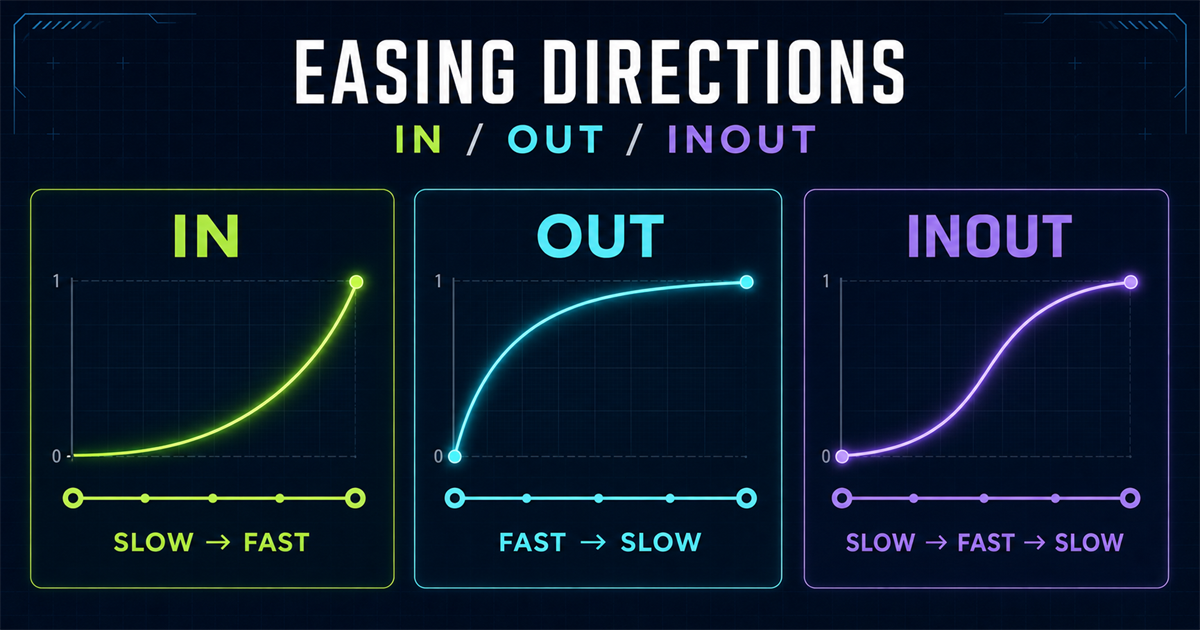
in: slow to fast. out: fast to slow. inOut: slow, fast, then slow.28. Combining Power ease with stagger
gsap.from(".menu-item", {
  y: -15, opacity: 0, duration: 0.5,
  stagger: 0.08, ease: "power2.out"
});
Stagger is the timing offset between targets; ease is the velocity profile of each tween. See the stagger tutorial.
29. Combining Sine with repeat + yoyo
gsap.to(".pulse-item", {
  scale: 1.08, duration: 1, repeat: -1,
  yoyo: true, ease: "sine.inOut"
});
Use gentle repeating motion sparingly and stop non-essential loops for reduced-motion users.
30. Common Power easing mistakes
- Assuming power4 is automatically better.
- Using strong easing for every tiny interaction.
- Choosing random Power levels within one component system.
- Confusing Power number with duration.
- Comparing unequal distances or durations.
- Using
.infor every entrance without testing. - Ignoring reduced motion.
31. Common Sine easing mistakes
- Assuming Sine is too weak for every interface.
- Adding infinite loops everywhere.
- Continuously floating essential content.
- Confusing Sine with linear movement.
- Ignoring
.in,.outand.inOut.
32. Build a small motion system
power2.outpower3.outpower2.inOutsine.inOutsine.inOutA small shared vocabulary makes a site feel intentional. Adjust it to the brand rather than treating it as a rulebook.
33. Interactive easing lab
Selected: power2.out
34. Mini challenge
Animate four cards from y: 40 and opacity: 0 with duration 0.8 and stagger 0.12. Compare power1.out, power2.out, power3.out and sine.out.
gsap.from(".challenge-card", {
  y: 40, opacity: 0, duration: 0.8,
  stagger: 0.12, ease: "power2.out"
});
35. Quick reference
| Ease | General character | Example |
|---|---|---|
| power1.out | restrained deceleration | ease: "power1.out" |
| power2.out | balanced deceleration | ease: "power2.out" |
| power3.out | stronger deceleration | ease: "power3.out" |
| power4.out | dramatic deceleration | ease: "power4.out" |
| sine.in | gentle acceleration | ease: "sine.in" |
| sine.out | gentle deceleration | ease: "sine.out" |
| sine.inOut | gentle both ends | ease: "sine.inOut" |
36. Mental model
Power family
power1 ↓ power2 ↓ power3 ↓ power4
Increasingly pronounced speed changeSine family
sine.in · sine.out · sine.inOut
Gentle, smooth movementPower can feel more assertive and Sine more subtle. Choose with the design context—not the family name alone.
37. Next topic preview
Power and Sine cover many everyday UI animations. The next lesson explores more expressive Back, Bounce and Expo easing. That page is not linked until it exists.
Continue revisiting the foundations: getting started, targeting elements, gsap.to(), gsap.from() and gsap.fromTo().
Frequently asked questions
What is power easing in GSAP?
Power easing is a family of curves that provides increasingly pronounced acceleration or deceleration from power1 through power4.
What is the difference between power1 and power4?
Power1 changes speed gently, while power4 creates a much more pronounced speed change over the same duration.
What does power2.out mean?
Power2 selects the curve strength and out makes motion start faster before settling toward the end.
What is sine easing in GSAP?
Sine easing creates gentle, smooth speed changes with in, out and inOut directions.
What is the difference between power and sine easing?
Power curves generally feel more pronounced; sine curves generally feel softer. Neither family is universally better.
When should I use power2.out?
It is a useful starting point for cards, panels, headings and other UI entrances that should settle clearly.
When should I use sine.inOut?
Try it for sliders, calm position changes, floating decoration and gentle repeated motion.
Can Power easing be used with stagger?
Yes. Stagger offsets target start times while Power easing shapes each target’s velocity.
Can Sine easing be used with repeat and yoyo?
Yes. Sine.inOut can create gentle back-and-forth movement, provided reduced-motion preferences are respected.
Can I use GSAP Power and Sine easing on a PHP website?
Yes. PHP renders the page and GSAP animates its elements in the browser.
