


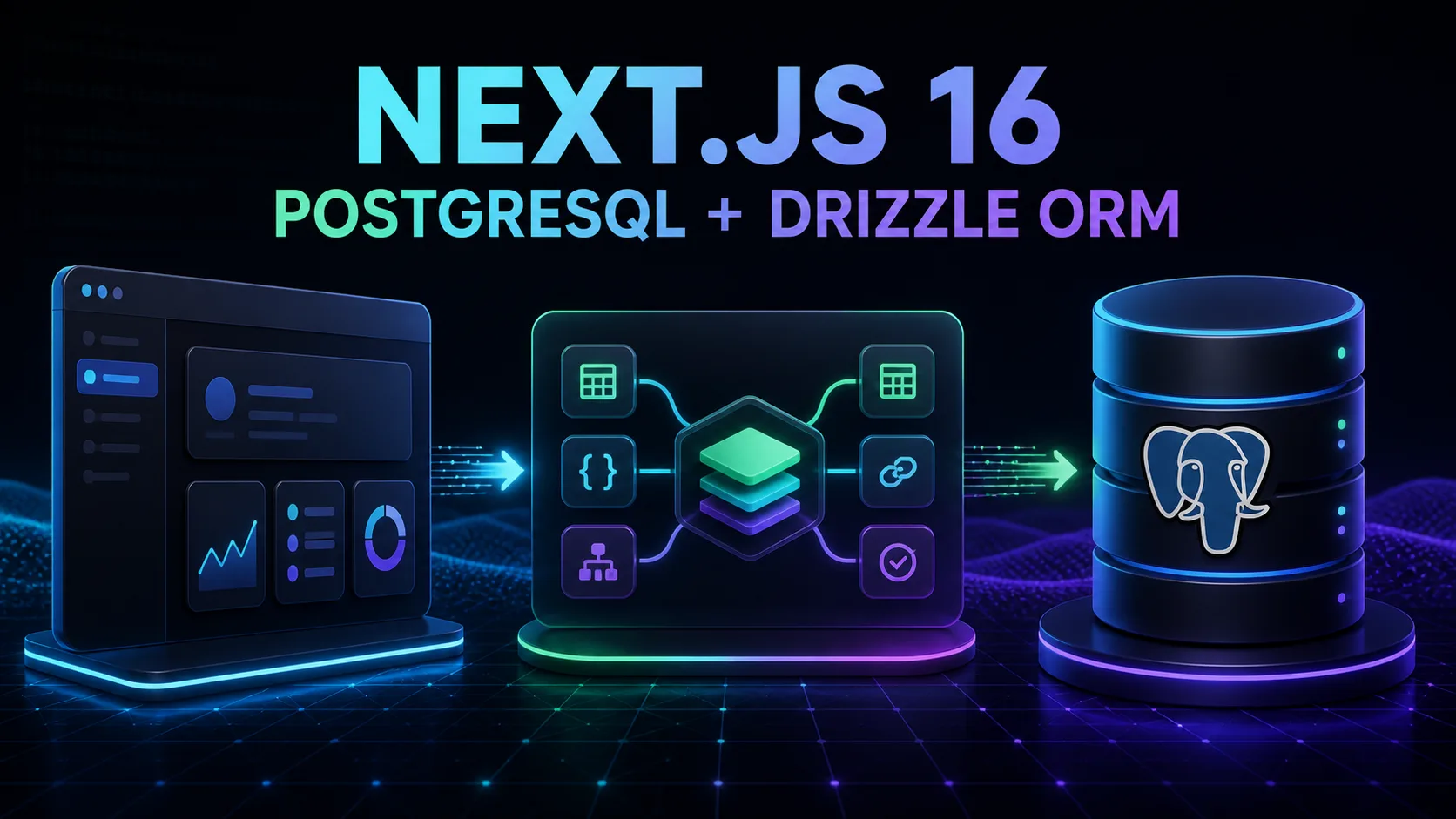
In Blog #18, we built validated forms. The next step is storing trusted values in a real database. This guide connects Next.js 16 to PostgreSQL with Drizzle ORM, then follows the data through schemas, migrations, Server Components, Server Actions, transactions, authorization, caching, pooling, and production deployment.
The examples extend Blog #6: Data Fetching, Blog #7: Server Actions, and Blog #16: Environment Variables & Security. They use the App Router and a Node.js-compatible PostgreSQL driver. Adapt the driver and connection lifecycle to the provider and runtime you actually deploy.
This publishing repository is a PHP website, not an installed Next.js application. It has no root package.json, PostgreSQL provider, Drizzle schema, migrations, Server Actions, or authentication layer. Its downloadable Next.js starter uses unpinned latest dependencies. The educational examples were checked on August 30, 2026 against stable next@16.3.3, drizzle-orm@0.45.2, drizzle-kit@0.31.10, and pg@8.23.0. No project database was migrated.
PostgreSQL + Drizzle at a Glance
Browser code should not open a connection to a private production database. A request reaches trusted Next.js server code: a Server Component for rendering, a Server Action for an application mutation, or a Route Handler when an HTTP API is genuinely needed. That server code validates the request, checks identity and permission, calls Drizzle, and returns only safe results.
PostgreSQL is a mature relational database with transactions, constraints, indexes, SQL tooling, and a strong ecosystem. Those capabilities fit structured application data well, but PostgreSQL is not automatically the best choice for every workload. Choose it because its model and operational needs match the product, not because an ORM makes every database interchangeable.
What Is Drizzle ORM?
Drizzle is a TypeScript-first ORM and SQL query layer. You describe tables in TypeScript, issue typed SQL-like queries, and use Drizzle Kit to generate and apply migrations. Types improve development feedback; they do not replace runtime validation, database constraints, authorization, backups, monitoring, or SQL knowledge.
Typed schema
Table and column definitions become the source for query types.
SQL-like queries
Select, insert, update, delete, filters, joins, and transactions remain recognizable.
Migration tooling
Drizzle Kit compares schema snapshots and generates SQL for review.
Project Architecture
Reuse the real application structure. A small App Router project might keep the connection and schema in src/db, trusted query functions in src/data, validation in src/lib, and mutations in src/actions. Larger projects may group by feature. Avoid adding a second ORM beside an established Prisma, Supabase, or SQL layer unless a deliberate migration plan exists.
src/
|-- app/
|   |-- posts/page.tsx
|   `-- api/posts/route.ts
|-- actions/posts.ts
|-- data/posts.ts
|-- db/index.ts
|-- db/schema.ts
`-- lib/validation.ts
drizzle/
drizzle.config.ts
Install Drizzle
Because this repository has no runnable Next.js database project, the following command is a reproducible educational baseline rather than a modification to the PHP site. Pin and test versions in a real application instead of leaving database packages on floating tags.
npm install drizzle-orm@0.45.2 pg@8.23.0
npm install --save-dev drizzle-kit@0.31.10 @types/pg@8.23.1
This guide uses node-postgres through drizzle-orm/node-postgres. Drizzle also supports PostgreSQL through other adapters, including postgres.js and provider-specific clients. Do not copy this driver blindly into an Edge runtime or a provider architecture that expects HTTP, WebSocket, or a managed pooler.
Configure DATABASE_URL
A connection string can contain a username, password, hostname, database name, and TLS parameters. Store the real value in .env.local for local development and protected environment configuration in production. Commit only a safe template.
DATABASE_URL="postgresql://USER:PASSWORD@HOST:5432/DATABASE"# Wrong: NEXT_PUBLIC_ values can reach browser JavaScript
NEXT_PUBLIC_DATABASE_URL="postgresql://..."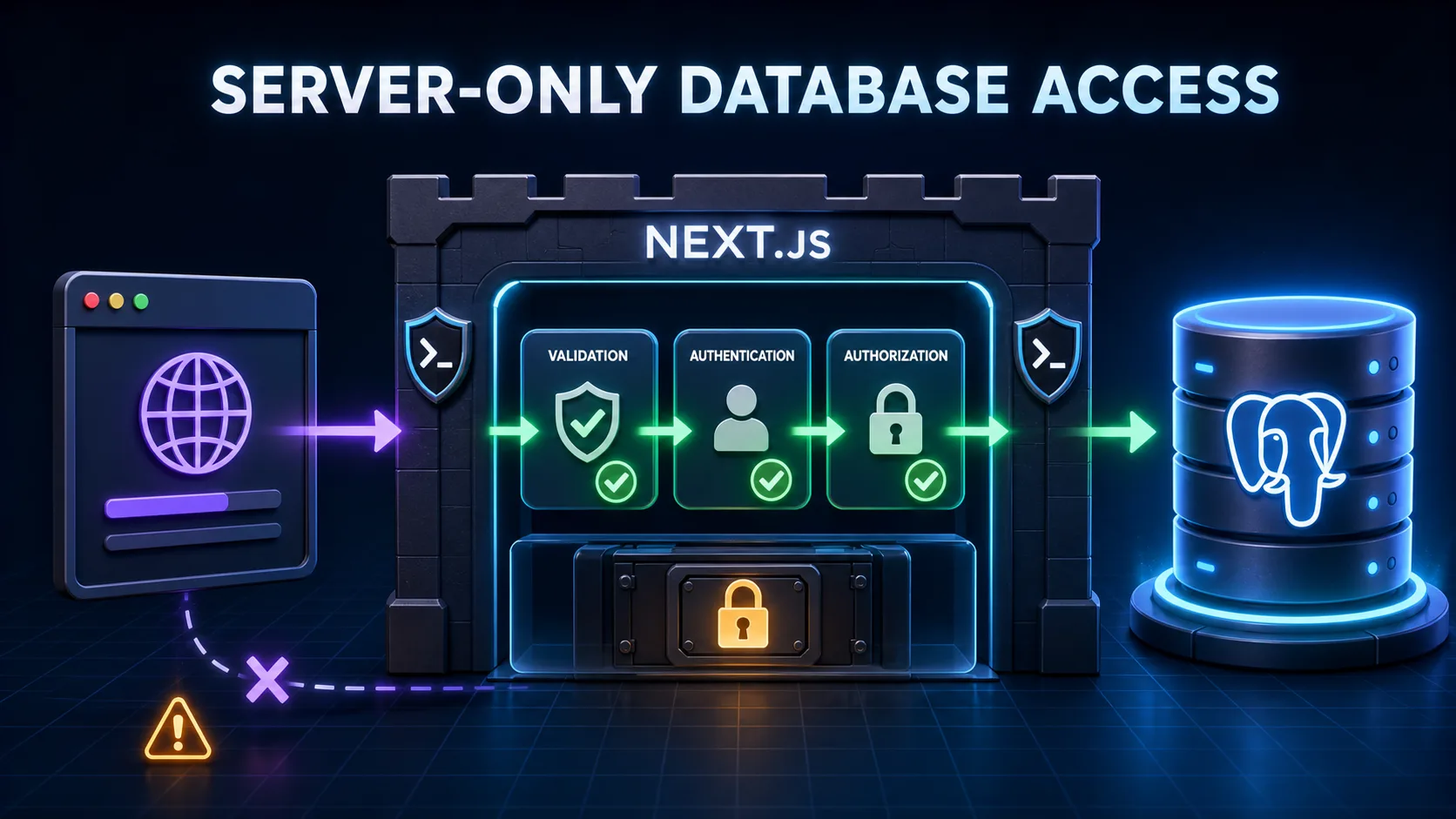
Create the Database Connection
import 'server-only'
import { drizzle } from 'drizzle-orm/node-postgres'
import { Pool } from 'pg'

const databaseUrl = process.env.DATABASE_URL

if (!databaseUrl) {
  throw new Error('DATABASE_URL is required')
}

const globalForDb = globalThis as unknown as {
  postgresPool?: Pool
}

const pool = globalForDb.postgresPool ?? new Pool({
  connectionString: databaseUrl,
})

if (process.env.NODE_ENV !== 'production') {
  globalForDb.postgresPool = pool
}

export const db = drizzle({ client: pool })
The module throws only the missing variable name, never its value. The development global reduces pool recreation during hot reload. It does not define the right production pool size or make this lifecycle correct for every serverless platform. Match timeouts, SSL, pool limits, and shutdown behavior to the selected provider and deployment runtime.
Create a Drizzle Schema
import {
  index,
  serial,
  text,
  timestamp,
  uniqueIndex,
  varchar,
  pgTable,
} from 'drizzle-orm/pg-core'

export const posts = pgTable('posts', {
  id: serial('id').primaryKey(),
  title: varchar('title', { length: 160 }).notNull(),
  slug: varchar('slug', { length: 180 }).notNull(),
  content: text('content').notNull(),
  status: varchar('status', { length: 20 }).default('draft').notNull(),
  authorId: varchar('author_id', { length: 128 }).notNull(),
  createdAt: timestamp('created_at', { withTimezone: true })
    .defaultNow().notNull(),
  updatedAt: timestamp('updated_at', { withTimezone: true })
    .defaultNow().notNull(),
}, (table) => [
  uniqueIndex('posts_slug_unique').on(table.slug),
  index('posts_author_created_idx').on(table.authorId, table.createdAt),
])
Database constraints protect correctness under concurrency. notNull prevents missing required values, the unique slug index prevents duplicates even when two requests race, and the composite index supports the demonstrated author-and-date query pattern. Indexes consume storage and slow writes, so create them for measured access patterns rather than every column.
Configure Drizzle Kit
import 'dotenv/config'
import { defineConfig } from 'drizzle-kit'

if (!process.env.DATABASE_URL) {
  throw new Error('DATABASE_URL is required')
}

export default defineConfig({
  dialect: 'postgresql',
  schema: './src/db/schema.ts',
  out: './drizzle',
  dbCredentials: {
    url: process.env.DATABASE_URL,
  },
})
Keep the migration folder in version control. It records generated SQL and snapshots that reviewers can compare with the intended schema change.
Generate and Run Migrations
npx drizzle-kit generate --name=create_posts
# Inspect the generated SQL before applying it.
npx drizzle-kit migrate
generate compares the TypeScript schema with the previous migration snapshot and writes SQL. migrate checks Drizzle's migration log and applies unapplied files. Generation is not approval: inspect table drops, type conversions, defaults, constraints, locks, backfills, and provider compatibility before a production run.
For production, prefer backward-compatible expand-and-contract changes: add a structure the old and new app can both tolerate, deploy compatible code, backfill if required, then remove obsolete structures in a later reviewed migration. Do not run destructive migrations automatically during every build or on every application replica.
Insert, Query, Update, and Delete
Insert data
import { desc, eq, and } from 'drizzle-orm'
import { db } from '@/db'
import { posts } from '@/db/schema'

export async function createPost(input: {
  title: string
  slug: string
  content: string
  authorId: string
}) {
  const [post] = await db.insert(posts).values(input).returning({
    id: posts.id,
    slug: posts.slug,
  })
  return post
}
Query only required fields
export async function listPosts(page = 1) {
  const pageSize = 20
  return db.select({
    id: posts.id,
    title: posts.title,
    slug: posts.slug,
    createdAt: posts.createdAt,
  })
    .from(posts)
    .orderBy(desc(posts.createdAt), desc(posts.id))
    .limit(pageSize)
    .offset((page - 1) * pageSize)
}
Update with ownership scope
export async function updateOwnedPost(
  id: number,
  authorId: string,
  values: { title: string; content: string }
) {
  return db.update(posts)
    .set({ ...values, updatedAt: new Date() })
    .where(and(eq(posts.id, id), eq(posts.authorId, authorId)))
    .returning({ id: posts.id })
}
Delete with ownership scope
export async function deleteOwnedPost(id: number, authorId: string) {
  return db.delete(posts)
    .where(and(eq(posts.id, id), eq(posts.authorId, authorId)))
    .returning({ id: posts.id })
}
A record ID is not permission. Protected updates and deletes include the verified user or tenant scope in the database condition and treat an empty result as not found or not allowed. Return a safe outcome without revealing another user's record existence unnecessarily.
Query from a Server Component
import { listPosts } from '@/data/posts'

export default async function PostsPage() {
  const posts = await listPosts(1)

  return (
    <main>
      <h1>Posts</h1>
      <ul>
        {posts.map((post) => (
          <li key={post.id}>{post.title}</li>
        ))}
      </ul>
    </main>
  )
}Server Components may query databases through server-safe modules without calling the application's own Route Handler first. Keep a separate HTTP layer when external clients need it, not as ceremony between two pieces of the same server application.
CRUD with Server Actions
'use server'

import { revalidatePath } from 'next/cache'
import { createPost } from '@/data/posts'
import { isUniqueViolation } from '@/data/errors'
import { createPostSchema } from '@/lib/validation'
import { verifySession } from '@/lib/auth'

export async function createPostAction(formData: FormData) {
  const session = await verifySession()
  const parsed = createPostSchema.safeParse({
    title: formData.get('title'),
    slug: formData.get('slug'),
    content: formData.get('content'),
  })

  if (!parsed.success) {
    return { ok: false, errors: parsed.error.flatten().fieldErrors }
  }

  try {
    await createPost({ ...parsed.data, authorId: session.userId })
  } catch (error) {
    if (isUniqueViolation(error)) {
      return { ok: false, message: 'That slug is already in use.' }
    }
    throw error
  }

  revalidatePath('/posts')
  return { ok: true }
}
The validation module is conceptual because this publishing repository has no installed validator or authentication provider. Reuse the real project's schema and session API. Never trust an authorId, role, price, or tenant from FormData; derive protected identity on the server using the architecture in Blog #13: Authentication. Narrow the catch block in production so unexpected failures reach sanitized logging instead of being mislabeled as duplicate slugs.
Database Errors and Conflicts
| Failure | Expected handling | Do not expose |
|---|---|---|
| Validation | Return field messages before query | Internal schema details |
| Unique conflict | Return a safe, useful conflict message | Raw constraint or SQL |
| Not found / forbidden | Deny without leaking private existence | Other user's data |
| Connection failure | Generic UI, retry policy where safe, monitored server log | Host, user, password, stack trace |
| Unexpected bug | Application error boundary and correlation ID | Driver object or full query inputs |
Application validation creates good feedback; constraints settle concurrency. For example, two requests can both pass a pre-insert slug lookup before either insert completes. The unique index is the final authority, and the application translates its verified conflict into a safe message. Use Blog #9: Error Handling to connect unexpected database failures to route boundaries and production-safe logging.
Database Transactions
Use a transaction when several writes must succeed or fail as one unit, such as creating an order, its items, and an inventory update. Keep transactions focused; long-running network calls inside a transaction can hold locks and connections unnecessarily.
await db.transaction(async (tx) => {
  const [order] = await tx.insert(orders).values(orderInput)
    .returning({ id: orders.id })

  await tx.insert(orderItems).values(
    items.map((item) => ({ ...item, orderId: order.id }))
  )

  await tx.update(inventory)
    .set({ reserved: true })
    .where(eq(inventory.id, inventoryId))
})Relations and Foreign Keys
A user can own many posts, while each post points to one author. The database relationship is a foreign key such as posts.author_id → users.id. If an authentication provider owns identity externally, avoid duplicating passwords or inventing a second user authority; an app-owned profile table can reference the provider's stable user ID.
Drizzle's relations API can improve typed relational queries, but it does not create database foreign keys by itself. Define the actual reference in the schema when referential integrity is required, then use relations, joins, or batching according to the installed Drizzle version and query needs.
Pagination, Search, and Indexes
Do not load thousands of rows for one screen. Offset pagination is simple and supports numbered pages, but large offsets can become costly and concurrent inserts can shift results. Cursor pagination uses a stable ordered value such as the last post ID or a date-plus-ID pair; it suits continuous navigation but is not always better for random page jumps.
import { asc, gt } from 'drizzle-orm'

export async function nextPosts(cursor?: number) {
  return db.select({ id: posts.id, title: posts.title })
    .from(posts)
    .where(cursor ? gt(posts.id, cursor) : undefined)
    .orderBy(asc(posts.id))
    .limit(20)
}
Build search with Drizzle operators or safely parameterized SQL templates. Never concatenate a raw user string into SQL. Normalize and bound search input, authorize the dataset first, and index columns only when the actual filter, sort, selectivity, and measured query plan justify it.
// Never build a query by interpolating untrusted input.
`SELECT * FROM posts WHERE title = '${userInput}'`
An ORM reduces injection risk when its parameterized APIs are used correctly. Unsafe raw SQL can still create vulnerabilities. Drizzle's parameterized query builders are the default path; review every escape hatch.
PostgreSQL with Route Handlers
Use a Route Handler when a mobile app, partner integration, webhook, or another HTTP client needs an API. Validate the request, authenticate, authorize, query the database through the same server-only data layer, and return a minimal response. The complete HTTP guidance is in Blog #10: Route Handlers.
Caching Database Queries
A database call does not automatically inherit every fetch() caching behavior. In a Next.js 16 project using Cache Components, a public data function can opt into 'use cache', describe a lifetime, and use a tag for controlled invalidation. Read Blog #8: Caching and Revalidation before applying this to database data.
import { cacheLife, cacheTag } from 'next/cache'

export async function getPublishedPosts() {
  'use cache'
  cacheLife('minutes')
  cacheTag('published-posts')

  return db.select({ id: posts.id, title: posts.title })
    .from(posts)
    .where(eq(posts.status, 'published'))
}
Do not put user accounts, messages, billing, tenant dashboards, or admin data into a globally reusable cache. Authentication inside a caller does not automatically make a globally cached result private. Keep user-specific inputs in the key only when the complete cache design, invalidation, storage, and compliance requirements have been reviewed; otherwise query dynamically.
PostgreSQL Connection Pooling
PostgreSQL has finite connections. Opening a fresh connection for every request can exhaust the database, increase latency, and destabilize the application. A pool reuses a controlled set of connections, queues demand when appropriate, and exposes timeouts and errors that should be monitored.
A long-running Node VPS or container commonly maintains a process-level pool. A serverless platform may start many instances, so a provider pooler, HTTP driver, or serverless adapter may be more appropriate. Neon, for example, documents pooled and direct connection strings plus a serverless driver. Use the adapter and connection type recommended for the real runtime; migration tools may have different requirements from application traffic. Do not invent a universal pool size.
Production Deployment and Security
Keep the app and database in reasonably close regions to reduce network distance, applying the measurement approach from Blog #14: Performance Optimization. Require TLS where the provider requires it, give the application a least-privilege database role, restrict firewall or network access, and do not expose port 5432 publicly without a deliberate reason. Rotate credentials, monitor errors and query latency, and test restoration from backups. Git stores source code; it is not a database backup.
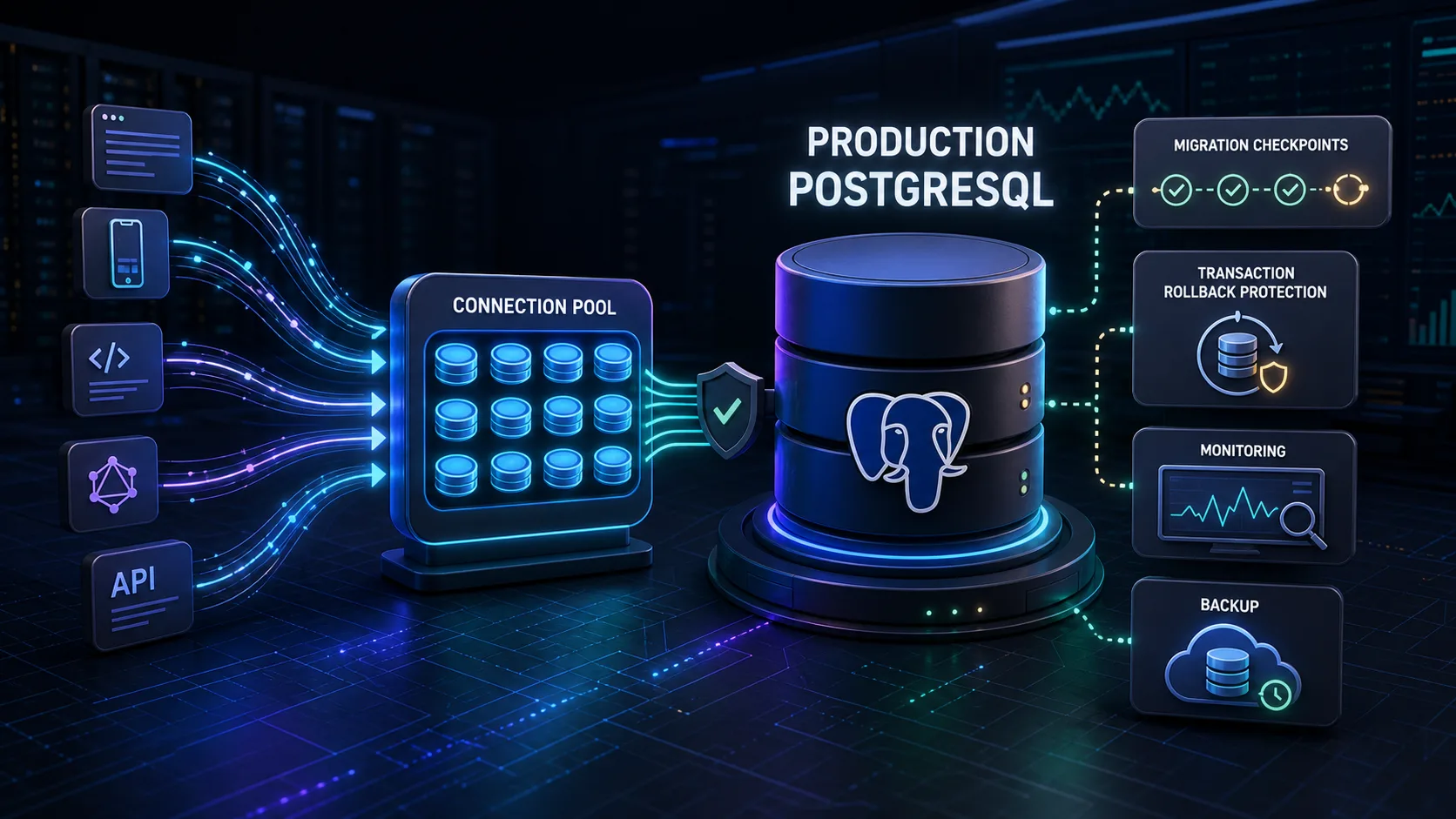
A safe deployment validates configuration and the build, reviews the migration, takes or confirms an appropriate backup, runs the migration once through a controlled step, deploys compatible application code, then checks health and key queries. The exact order depends on whether the change is backward-compatible, but destructive migrations should never be an unreviewed side effect of next build. Plan the release with Blog #15: Next.js Deployment.
Build a PostgreSQL Posts Manager
A complete posts manager combines the pieces without letting the interface own trust. The page lists a bounded set of posts. A form submits to a Server Action. The action parses an explicit input object, validates it, verifies the session, authorizes the operation, writes with Drizzle, translates expected conflicts, revalidates the affected route, and returns safe state.
List posts
Select only card fields, order deterministically, paginate, and scope private results.
Create and edit
Validate values, derive ownership from the session, enforce constraints, and return safe conflicts.
Delete
Authorize the exact record, include ownership in the condition, and revalidate only after success.
Avoid N+1 Queries
An N+1 pattern performs one query for posts and then one additional author query per post. The total grows with the result set. Use a deliberate join, Drizzle relational query, or bounded batch that matches the installed API and fields needed by the page. Measure the query plan and returned data; one enormous join is not automatically better than every alternative.
1 query for posts
+ 1 query per author
= many queries
Common Next.js PostgreSQL Mistakes
Public DATABASE_URL
Never use NEXT_PUBLIC_DATABASE_URL.
Client database access
Connect from server-only code, not Client Components.
Conflicting architecture
Reuse the project's ORM and database patterns.
Wrong driver
Match the provider, runtime, and connection model.
Excess connections
Use provider-appropriate pooling and monitor limits.
No constraints
Application validation alone cannot settle races.
No validation
Validate every write before database access.
ID equals permission
Authenticate and authorize the exact record.
Client-side filtering
Never fetch every user's data and filter in the browser.
Raw SQL concatenation
Use parameterized ORM or query APIs.
Raw errors
Return safe messages and sanitize logs.
Blind migrations
Review SQL, backups, locks, and compatibility.
Unbounded lists
Paginate and select only required columns.
N+1 queries
Join or batch relational access deliberately.
Global private cache
Do not reuse one user's result across users.
Local URL in production
Fail configuration checks instead of falling back.
No backups
Schedule backups and practice restoration.
Next.js 16 PostgreSQL + Drizzle Best Practices
- Keep database access server-side and import
server-onlyin the connection module. - Keep
DATABASE_URLsecret and validate only its presence. - Reuse the application's existing database architecture.
- Choose a driver and pooling strategy for the real provider and runtime.
- Define database constraints and indexes for demonstrated access patterns.
- Generate, inspect, test, and review migrations before production.
- Validate every write and bound untrusted input.
- Authenticate and authorize protected queries and mutations.
- Include verified ownership or tenant scope in protected database conditions.
- Select only required fields and paginate large datasets.
- Use parameterized query APIs and review raw SQL carefully.
- Map expected conflicts to safe messages; never expose raw driver errors.
- Use transactions for genuinely atomic multi-step operations.
- Keep application and database regions reasonably close when possible.
- Cache only data that is safe and useful to reuse.
- Back up production data, monitor errors and latency, and test recovery.
- Follow version-matched Next.js, Drizzle, driver, and provider documentation.
Frequently Asked Questions
How do I connect PostgreSQL to Next.js 16?
Choose a PostgreSQL driver that matches the deployment, keep DATABASE_URL server-side, initialize Drizzle in a server-only database module, define a schema, generate and review migrations, then query from trusted server code.
What is Drizzle ORM?
Drizzle is a TypeScript-first ORM and SQL query layer. It provides typed schemas, SQL-like queries, PostgreSQL adapters, and migration tooling through Drizzle Kit.
Does Next.js include a database?
No. Next.js can run server code that connects to a database, but you choose and operate the database, provider, driver, schema, migrations, security, and backups.
Can Server Components query PostgreSQL directly?
A Server Component can call a server-only data function that uses Drizzle. Authenticate and authorize private queries, select only required fields, and never pass credentials to a Client Component.
Should I create an API route just to query my own database?
Not necessarily. Server Components can call the data layer directly. Use a Route Handler when another HTTP client genuinely needs an API or the HTTP boundary is part of the architecture.
Where should DATABASE_URL be stored?
Keep DATABASE_URL in an ignored local environment file for development and protected deployment configuration in production. Never prefix it with NEXT_PUBLIC_ or print it in logs.
Can I use DATABASE_URL in a Client Component?
No. A private PostgreSQL connection string can contain powerful credentials and must remain in server-only code.
How do I create migrations with Drizzle?
Configure the PostgreSQL dialect, schema path, migration output, and protected database URL in drizzle.config.ts. Run drizzle-kit generate, inspect the SQL, then apply approved migrations with drizzle-kit migrate.
How do I run Drizzle migrations in production?
Run reviewed migrations once in a controlled deployment step using production configuration. Back up important data, prefer backward-compatible changes, and do not let every replica race to run destructive migrations.
How do I insert data with a Server Action?
Parse FormData into an explicit object, validate it, authenticate and authorize protected work, insert through Drizzle, handle expected conflicts safely, then revalidate affected data.
How do I handle duplicate values?
Validate for useful feedback and enforce a database unique constraint for correctness. Catch the expected conflict category and return a safe message without exposing raw database errors.
Do I need connection pooling?
It depends on the driver, provider, runtime, and concurrency model. Long-running Node servers often use a pool; serverless platforms may require a provider pooler or serverless driver. Follow provider limits instead of guessing a universal pool size.
Can I use Neon PostgreSQL with Next.js?
Yes. Neon supports standard, pooled, and serverless connection approaches. Match the connection string and Drizzle adapter to the real runtime and use a direct connection where the selected migration workflow requires it.
Should I cache PostgreSQL queries?
Cache only data that is safe and useful to reuse, such as public catalog or documentation data. Database queries do not automatically inherit every fetch caching behavior, and private user data must remain correctly scoped.
How do I protect user data in PostgreSQL?
Authenticate on the server, authorize the exact operation and record, include the verified user or tenant scope in the query, return minimal fields, and never fetch every user record for browser-side filtering.
Next Steps
You now have a practical boundary from validated form input to typed Drizzle queries, PostgreSQL constraints, secure Server Components and Server Actions, controlled migrations, pooling, caching decisions, and production recovery. Revisit Blog #18: Forms & Validation, package the application in Blog #20, then place the database on a private service network in Blog #21: Docker Compose with PostgreSQL and Redis.
