


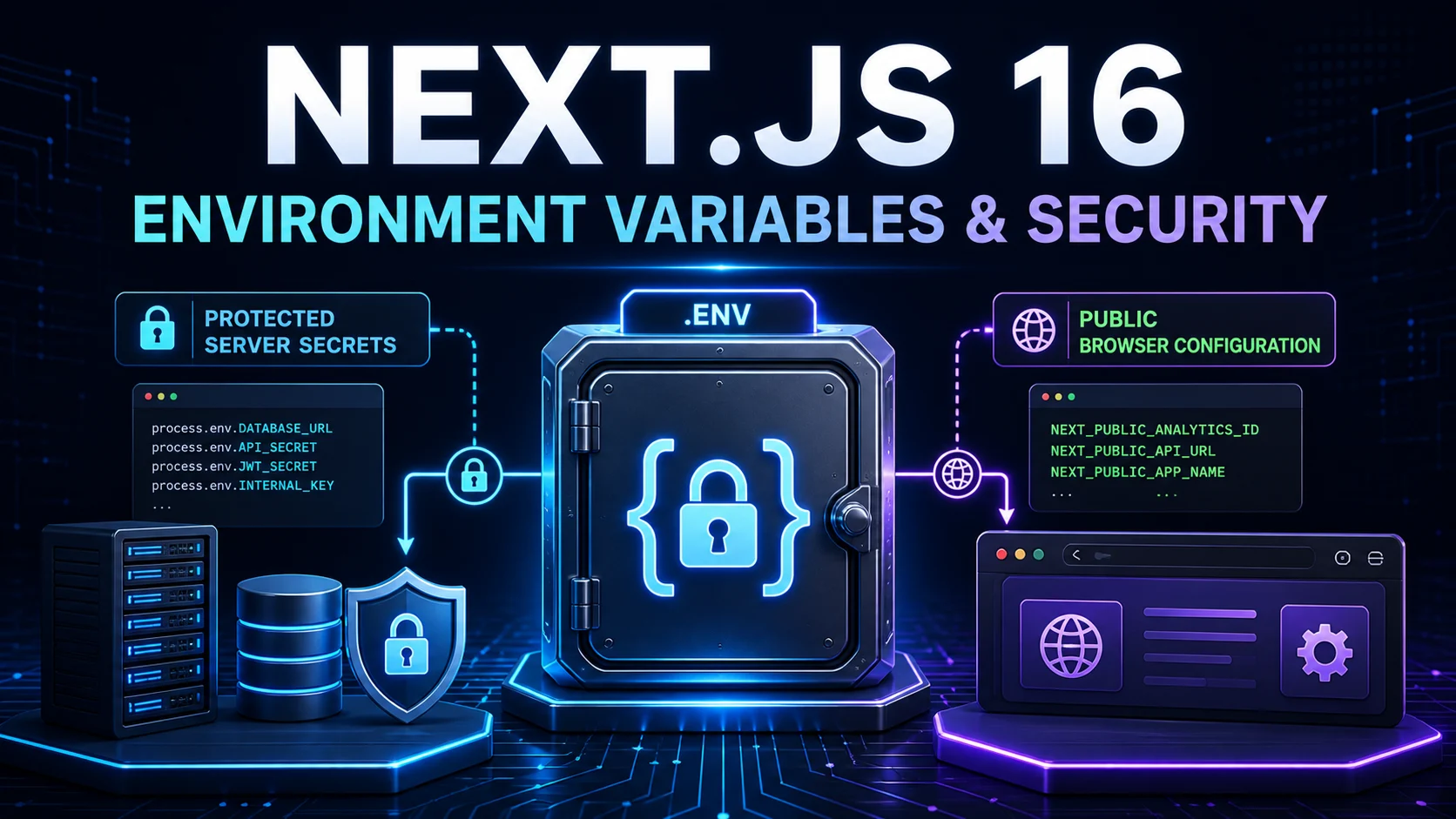
In Blog #15, we deployed a Next.js application to production. Deployment introduces an important responsibility: production secrets must be configured correctly and must never leak into browser code, source control, container layers, logs, screenshots, or error responses.
This guide explains the environment-variable boundary in the App Router, supported environment files, NEXT_PUBLIC_, build-time and runtime behavior, Vercel, Docker and VPS configuration, database and authentication secrets, Git recovery, CSP, Server Action security, Route Handler security, validation, logging, and rotation.
This publishing repository is a PHP website, not an installed Next.js application. It has no root package.json or installed Next.js version. Its downloadable starter declares next: latest, which is not an exact reproducible version. The guidance below was checked against the current official Next.js 16 documentation and the active Next.js 16.3 release line available on August 29, 2026. Pin and inspect the version in your real application before applying version-sensitive configuration.
Environment Variables at a Glance
An environment variable is configuration supplied outside application source. The first decision is not its filename; it is whether the value is secret. A secret stays on the server. A non-secret value should still stay server-only unless browser code genuinely needs it. Only then should it use NEXT_PUBLIC_.
NEXT_PUBLIC_ does not protect a value. It declares that the value is suitable for browser exposure. That single rule prevents many serious configuration mistakes.
What Are Environment Variables?
Environment variables separate configuration from application code. Instead of hard-coding a credential, read a named value at the server boundary:
const apiKey = 'REAL_SECRET'const apiKey = process.env.API_KEYThis separation supports different development, preview, test, and production settings and lets a deployment platform manage values independently of Git. It does not make every use safe. A value can still leak if you return it from a Route Handler, pass it to a Client Component, print it in logs, expose it through an error, or bake it into an image.
Environment Files in Next.js
Next.js loads .env* files from the project root into process.env. If the same key appears more than once, the current documented lookup order stops at the first match:
- Existing
process.env .env.$(NODE_ENV).local.env.local— skipped whenNODE_ENV=test.env.$(NODE_ENV).env
The supported NODE_ENV values are development, production, and test. Keep these files at the project root even when application code lives under src/. Next.js also expands variable references containing $; escape a literal dollar sign when required. For an ORM config or test runner outside the Next.js runtime, the official @next/env package can load the same configuration model.
.env vs .env.local
Use .env only for safe shared defaults when the team intentionally commits it. Use .env.local for developer-machine values that must not enter Git. A safe template can document names without values:
DATABASE_URL="your-database-url"
AUTH_SECRET="your-auth-secret"
INTERNAL_API_KEY="your-api-key"
NEXT_PUBLIC_SITE_URL="https://example.com"
The default create-next-app approach ignores environment files. This repository also ignores .env, .env.*, and common credential files; its local root .env is untracked. An ignored file is not a vault, and an already committed secret remains in Git history.
Server-Only Environment Variables
Non-public variables are available to the server environment by default. Suitable consumers include Server Components, Server Actions, Route Handlers, database utilities, authentication configuration, and server-only data access modules. Prefer reading secrets in a small data or service module rather than mixing them into UI code.
import 'server-only'

export async function getSecureData() {
  const apiKey = process.env.INTERNAL_API_KEY

  if (!apiKey) throw new Error('INTERNAL_API_KEY is required')

  const response = await fetch('https://api.example.com/data', {
    headers: { Authorization: `Bearer ${apiKey}` },
  })

  if (!response.ok) throw new Error('Unable to load data')
  return response.json()
}
The server-only marker causes a build error if a Client Component imports the module. It is a useful guard, not a replacement for returning minimal safe data.

Understanding NEXT_PUBLIC_
Next.js makes a statically referenced value available to browser code when its name starts with NEXT_PUBLIC_. During next build, the reference is replaced with the value from the build environment:
NEXT_PUBLIC_SITE_URL="https://example.com"

const siteUrl = process.env.NEXT_PUBLIC_SITE_URL
After the build, this value is frozen in the generated client JavaScript. Promoting the same Docker image from staging to production does not update the inlined value. If a browser needs mutable runtime configuration, design an endpoint that returns a deliberately public, validated configuration object.
Names such as NEXT_PUBLIC_DATABASE_PASSWORD, NEXT_PUBLIC_AUTH_SECRET, NEXT_PUBLIC_PRIVATE_API_KEY, and NEXT_PUBLIC_SMTP_PASSWORD describe credentials that would be exposed to every visitor.
Build-Time vs Runtime Variables
Build-time configuration affects the artifact created by next build. NEXT_PUBLIC_ values are the clearest example because their static references can be written into client bundles. Server-only runtime variables can be read when a request is dynamically rendered, allowing one server artifact or Docker image to run with different protected values across environments.
import { connection } from 'next/server'

export default async function Page() {
  await connection()
  const region = process.env.SERVICE_REGION
  return <p>Region: {region}</p>
}
Request-time APIs such as cookies and headers also opt a route into dynamic behavior. Do not assume every server read happens at runtime: static rendering and build tooling can evaluate code earlier. Decide whether each value belongs to the build, server startup, or request path, then test the deployed artifact.
Environment Variables in Server and Client Components
As explained in Blog #5, Server and Client Components have different execution and data boundaries. A Server Component may call a server-only data utility and pass a minimal serializable result to interactive UI. Do not pass a database record, session token, provider response, or process environment object wholesale:
import { getSecureData } from '@/lib/private-api'

export default async function Page() {
  const data = await getSecureData()
  return <Dashboard data={data.safeFields} />
}
A Client Component follows browser security assumptions even though it can participate in initial server rendering. Only intentionally public configuration belongs there:
'use client'
const secret = process.env.AUTH_SECRET'use client'
const siteUrl = process.env.NEXT_PUBLIC_SITE_URLReact taint APIs can add a defensive check that prevents selected objects or unique values crossing the Server–Client boundary, but current Next.js guidance warns not to use tainting as the only protection. Model a narrow Data Access Layer, enforce authorization, and return DTOs containing only necessary fields.
Route Handler and Server Action Secrets
A Route Handler may use a secret to call an upstream API, but it must authenticate, authorize, validate and return safe data. Connect this design to the complete Route Handlers guide. CORS controls which browsers may read a cross-origin response; it is not authentication.
import { verifySession } from '@/lib/dal'

export async function GET() {
  const session = await verifySession()
  if (!session) return new Response(null, { status: 401 })

  const report = await loadReport(process.env.REPORT_API_KEY)
  return Response.json({ data: report.safeData })
}
An exported Server Action creates a callable server endpoint. The 'use server' directive does not authorize the caller. Follow the patterns in Blog #7 and Blog #13: validate every client-controlled value, verify the session, authorize the exact resource, limit sensitive operations where appropriate, and return safe expected errors.
'use server'

export async function updateAccount(formData: FormData) {
  const session = await verifySession()
  if (!session) throw new Error('Unauthorized')

  const input = validateAccountInput(formData)
  await authorizeAccountUpdate(session.userId, input.accountId)
  return saveSafeAccountChanges(input)
}
Next.js compares the request origin with the host for Server Actions. Configure serverActions.allowedOrigins only for additional trusted proxy origins that the architecture genuinely requires. A larger allowlist is not a substitute for authorization.
Database and Authentication Secrets
DATABASE_URL can contain a username, password, host, database name, and connection parameters. Treat it as a secret and read it in a server-only data layer or ORM configuration. Browser code should call an authorized application endpoint; it should never receive a general server database credential. The practical Next.js PostgreSQL and Drizzle ORM guide shows the connection module, schema, migrations, CRUD, and production pooling boundary.
Authentication configuration often includes a signing or encryption secret and provider credentials. A provider client ID may be public in some protocols; a client secret is not. Use only the names documented by the authentication provider actually installed. This PHP publishing repository has no Next.js authentication provider, so examples such as AUTH_SECRET, GOOGLE_CLIENT_ID, and GOOGLE_CLIENT_SECRET are conceptual names, not detected project requirements.
Vercel, Docker, VPS and CI/CD Variables
Vercel
Store values in project environment settings and scope them intentionally to Development, Preview, and Production. Preview environments should use isolated credentials where access or data risk requires it. Changing a build-time public variable requires a new deployment; server runtime behavior depends on the route and platform execution model.
Docker
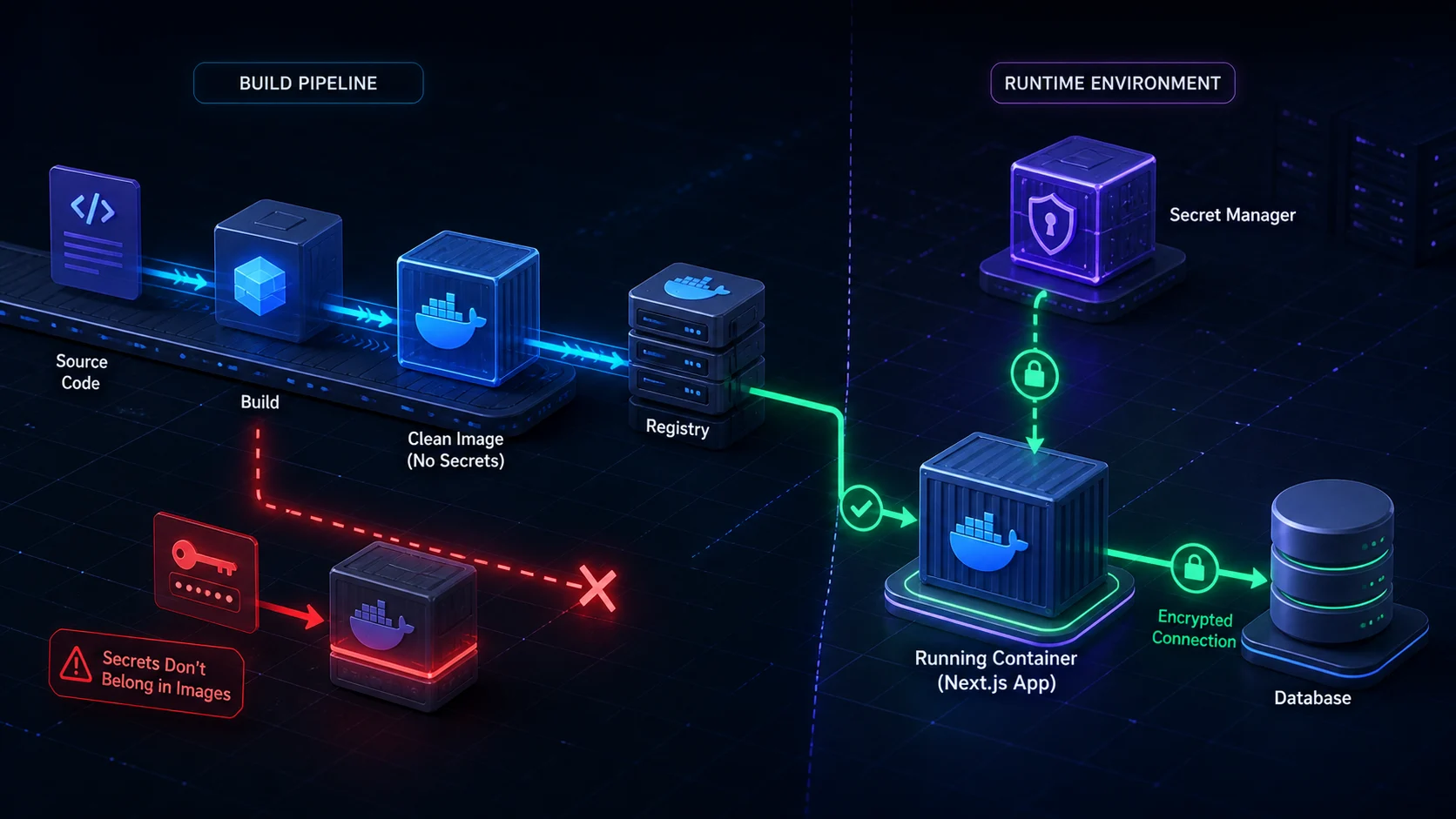
Build a clean image and supply secrets when the container runs. Never write a real database URL into a Dockerfile ENV instruction, copy a secret environment file into an image layer, or expose registry credentials through build arguments. A deleted file can still exist in an earlier layer.
VPS
For self-hosting, use a protected environment file outside web-accessible directories, systemd environment configuration, Docker Compose runtime values, or an appropriate secret manager. Restrict file ownership and permissions, keep backups protected, and avoid printing environment output during support or deployment. Continue with Blog #29 for the complete Docker and VPS hardening checklist.
GitHub Actions
Store deployment credentials in repository or environment secret storage and reference them from the workflow. Do not paste values directly into YAML. Protect workflow permissions, pin or review third-party actions, limit secrets in pull requests, and prevent commands from echoing them.
Keep Secrets Out of Git
Environment files, private keys, service-account JSON, credential exports, and production configuration must not enter Git. Review git status and the staged diff before every commit; do not rely only on .gitignore. A safe template lists required names with non-sensitive placeholders.
What If a Secret Was Committed?
- Treat the value as compromised.
- Rotate or revoke it immediately.
- Update the production application with the replacement.
- Remove the value from current code and configuration.
- Clean repository history when appropriate and coordinate force-updates carefully.
- Review provider logs, permissions, and suspicious use.
Deleting a credential in a later commit does not remove it from earlier history, forks, caches, logs, or clones.
Validate Required Environment Variables
Fail with a clear variable name before the application performs unsafe or partial work. Never include the value in the error:
const databaseUrl = process.env.DATABASE_URL

if (!databaseUrl) {
  throw new Error('DATABASE_URL is required')
}
Use the validation library already selected by the application when one exists, and validate related constraints such as URL format or an allowed environment. Do not install a dependency only to display a blog example.
Security Headers in Next.js
The headers() option in next.config.js can attach response headers to matching paths. Choose values for the real application rather than pasting a giant list. X-Content-Type-Options: nosniff prevents MIME sniffing; Referrer-Policy controls referrer detail; Permissions-Policy limits selected browser capabilities. Use HSTS only after HTTPS and relevant subdomains are correctly configured because browsers remember it.
import type { NextConfig } from 'next'

const nextConfig: NextConfig = {
  async headers() {
    return [{
      source: '/(.*)',
      headers: [{
        key: 'X-Content-Type-Options',
        value: 'nosniff',
      }],
    }]
  },
}

export default nextConfig
Content Security Policy
CSP can reduce the impact of XSS and code injection by restricting allowed scripts, styles, images, fonts, frames, connections, and form targets. A policy copied without testing can break the application, analytics, widgets, fonts, images, inline styles, and framework scripts. Do not call a permissive script-src * policy secure. Continue with Blog #26: Next.js 16 Security Headers & Content Security Policy for directive design, nonce architecture, provider inventory, Report-Only rollout, and production testing.
Current Next.js guidance documents nonce-based CSP for applications that require strict control of inline scripts. A fresh unpredictable nonce is created per request, added to the CSP, and applied to approved scripts. Because the nonce exists only when a request is handled, affected pages require dynamic rendering. That reduces static optimization and can increase server work and CDN complexity.
Logging and Secret Rotation
Never log process.env, a database connection string, a provider token, raw authorization headers, session cookies, or secret-bearing error objects. Logs can be retained by Docker, systemd, a hosting platform, CI/CD, analytics, or monitoring vendors. Record request IDs, safe status, timing, and sanitized error categories instead.
console.log(process.env.DATABASE_URL)
console.log('API key:', apiKey)
Rotate long-lived credentials according to provider capabilities and immediately after suspected exposure. When overlapping credentials are supported, create a replacement, deploy and verify it, then revoke the old value. Do not revoke the active credential before the application can use the replacement.
Production Security Practices That Connect the Boundaries
Environment variables are one layer in a larger security design. Give each credential the minimum provider permissions it needs, keep development and production accounts separate, and avoid sharing one powerful token across unrelated services. Restrict database network access as well as the database password. A leaked credential with narrow scope and short lifetime still requires rotation, but it limits the likely impact.
For multi-instance self-hosting, Server Action encryption needs deliberate coordination. Next.js normally generates an encryption key at build time. When independently built instances must handle the same actions, current self-hosting guidance documents NEXT_SERVER_ACTIONS_ENCRYPTION_KEY as an advanced way to provide one valid base64 AES key across builds. The key is embedded in build output, so protect the build system and never generate or display the value in tutorial content. Also use a deployment identifier and coordinated rollout to reduce version-skew failures.
Webhook endpoints need a provider signature secret, but the secret alone is not the whole control. Read the raw signed payload when the provider requires it, verify the signature before processing, reject stale or replayed deliveries, make side effects idempotent, and return a safe acknowledgement. Never trust a webhook simply because its URL is difficult to guess.
Review browser bundles and network responses as an attacker would. A hidden interface field, minified variable name, obfuscated string, or source-map setting is not secret storage. If information reaches downloaded JavaScript, HTML, serialized React data, an API response, or a public error, assume the user can inspect it. Automated secret scanning, dependency updates, restricted CI permissions, code review, and incident rehearsals support this boundary; none replaces correct authorization in the application.
Common Next.js Environment Variable & Security Mistakes
Putting secrets in NEXT_PUBLIC_
The prefix intentionally exposes a statically referenced value to browser JavaScript.
Committing .env.local
Ignore local secrets and commit only a safe names-and-placeholders template when useful.
Hard-coding or logging credentials
Source, build logs, hosting logs, screenshots, and monitoring systems can retain them.
Passing server objects to clients
Return minimal DTOs rather than database rows, provider responses, sessions, or environment objects.
Trusting a hidden user ID
Load identity from a verified server session and authorize ownership against trusted data.
Assuming use server means secure
Every callable action still requires input validation, authentication, and authorization.
Baking secrets into Docker
Image layers and registries can preserve values even after later removal.
Using CORS as authentication
CORS is a browser response-sharing policy, not proof of identity or permission.
Copying CSP blindly
A permissive policy may protect little; an incompatible one can break production.
Deleting but not rotating a leak
A credential remains usable until its provider revokes or replaces it.
Production Security Checklist
Environment
- No production secrets in Git
- Required variables validated
NEXT_PUBLIC_names reviewed- Local, preview and production values separated
- Least-privilege credentials used
Application
- Server Actions authenticate and authorize
- Route Handlers validate untrusted input
- DAL returns minimal safe data
- Errors and logs contain no secrets
- CORS and webhooks are intentionally protected
Deployment
- HTTPS and trusted origins correct
- CI/CD secrets protected
- Docker images contain no secret files
- VPS environment files are not web-accessible
- Rotation and recovery are documented
Browser
- No database or authentication credentials
- Public variables intentionally public
- Downloaded JavaScript inspected
- CSP tested against production integrations
- Security headers verified in responses
Frequently Asked Questions
How do environment variables work in Next.js 16?
Next.js loads variables from the process environment and supported .env files into process.env. Variables remain server-only by default. Statically referenced variables prefixed NEXT_PUBLIC_ are inlined into browser JavaScript during the build.
What is .env.local?
.env.local is commonly used for developer-machine configuration and secrets that should override shared defaults. It should normally stay out of Git. Next.js does not load it when NODE_ENV is test.
What does NEXT_PUBLIC_ mean?
NEXT_PUBLIC_ marks a value as intentionally available to browser code. Next.js replaces a static reference with its build-time value in the client bundle.
Are NEXT_PUBLIC_ variables secret?
No. Assume users can inspect any NEXT_PUBLIC_ value delivered in downloaded JavaScript. Never use the prefix for passwords, private API keys, database URLs, or authentication secrets.
Can I use environment variables in Client Components?
Only intentionally public variables should be used in Client Components. Keep privileged configuration in server-only modules, Server Components, Server Actions, Route Handlers, or a data access layer.
Where should I store DATABASE_URL?
Store DATABASE_URL in protected deployment configuration or a local ignored environment file. Read it only in server code. A connection string can contain a username, password, hostname, database name, and connection options.
How do I use environment variables with Docker?
Build a secret-free image and supply server-only values when the container starts through the platform runtime, Docker Compose environment configuration, or a secret manager. Public NEXT_PUBLIC_ values needed by client code must be set at build time.
How do I configure production variables on Vercel?
Use the project environment settings and assign values intentionally to Development, Preview, and Production. Redeploy when a build-time public value changes. Do not hard-code secrets in source control.
Should .env.local be committed?
Normally no. The default create-next-app approach ignores environment files because they often contain secrets. Commit a documented .env.example containing names and safe placeholders when the team needs a template.
What if I accidentally commit an API key?
Treat it as compromised. Rotate or revoke it immediately, update the deployed application, remove it from current code, consider cleaning Git history, and review provider access logs. A later deletion commit does not erase history.
Can users see Next.js environment variables?
Users can see values included in client JavaScript, including NEXT_PUBLIC_ values. Server-only variables are not automatically sent to the browser, but developers can still leak them through props, responses, logs, errors, or unsafe code.
How do I secure Server Actions?
Treat every exported Server Action like a public endpoint. Validate input, authenticate the user, authorize the exact operation, return safe errors, rate-limit sensitive work where appropriate, and never trust hidden fields or client-supplied ownership.
How do I secure Route Handlers?
Authenticate, authorize, validate input, constrain CORS intentionally, verify webhook signatures, limit abusive traffic, sanitize errors, and return only safe data. A difficult-to-guess URL is not authentication.
Does Next.js automatically protect my secrets?
No. Next.js provides server and client boundaries and keeps non-public variables on the server by default, but developers remain responsible for storage, authorization, data minimization, logging, deployment, rotation, and avoiding accidental exposure.
Next Steps
You now have a production security model for environment files, public and private variables, build and runtime configuration, server entry points, Git, containers, headers, CSP, logs, and credential rotation. Revisit the deployment guide for platform selection, apply runtime secret injection in Blog #20, and use Blog #28: SSRF Prevention when server-configured API origins are combined with untrusted request data.
Continue with Next.js 16 Proxy Explained: Middleware, Authentication, Redirects & Routing to protect the request boundary without mistaking an early redirect for authorization.
