



In Blog #16, we protected environment variables and production secrets. Now we move to the request boundary: the place where Next.js can inspect an incoming request and decide whether routing should continue, redirect, rewrite, or return a response before a page or endpoint completes.
Older tutorials call this feature Middleware and create middleware.ts. In Next.js 16, the official convention is proxy.ts. The old filename is deprecated, not silently erased, and the rename is deliberate: Proxy should be understood as a focused network boundary, not a place for an application's entire business or authorization system.
This publishing repository is a PHP website, not an installed Next.js app. It has no root package.json, next.config.*, Proxy, Middleware, authentication provider, protected routes, or admin routes to reuse. The examples were verified against the current official Next.js 16 documentation and npm's stable next@16.3.3 release on August 29, 2026. Inspect and pin the exact version in your real app.
What Is Proxy in Next.js 16?
Proxy is a project-level file that runs server-side before matching application routes render. It receives the request and can return NextResponse.next(), redirect to another URL, rewrite internally, adjust a carefully selected set of request or response headers, set response cookies, or produce a response directly.
This makes Proxy useful for narrow concerns that genuinely belong at the request boundary: optimistic authentication checks, locale routing, conditional rewrites, legacy redirects, and controlled experiments. It is not a replacement for a Server Component, Route Handler, Server Action, or server-only data access layer.
Proxy vs Middleware in Next.js 16
Next.js 16 deprecated the middleware file convention and renamed it to proxy to make the feature's purpose clearer. Existing articles and packages may still use “Middleware” because that was the historical name. For a normal Next.js 16 migration, rename middleware.ts to proxy.ts and rename a named middleware export to proxy.
npx @next/codemod@latest middleware-to-proxy .The Next.js 16 upgrade guide also notes a runtime consideration: Proxy uses the Node.js runtime and does not accept a configurable runtime option. If an existing integration specifically requires the Edge runtime, review that library and the current migration guidance instead of renaming blindly.
| Next.js 15-era convention | Next.js 16 convention |
|---|---|
middleware.ts | proxy.ts |
export function middleware() | export function proxy() |
| “Middleware” mental model | Network boundary and routing focus |
Older skipMiddlewareUrlNormalize | skipProxyUrlNormalize |
Where Does proxy.ts Go?
Create exactly one proxy.ts or proxy.js in the project root at the same level as app or pages. When source lives under src, put Proxy inside src beside src/app or src/pages.
my-app/
├── app/
├── public/
├── proxy.ts
├── next.config.ts
└── package.jsonmy-app/
├── src/
│ ├── app/
│ └── proxy.ts
├── public/
└── package.jsonDo not place separate Proxy files inside route folders. Use one boundary and organize pure helper functions in server-safe modules only when they are compatible with its runtime and purpose.
Your First Proxy
import { NextResponse } from 'next/server'
import type { NextRequest } from 'next/server'

export function proxy(request: NextRequest) {
  return NextResponse.next()
}

export const config = {
  matcher: ['/dashboard/:path*'],
}
NextResponse.next() does not mean “allow forever.” It means Proxy has finished and Next.js should continue routing the current request. The selected page, Route Handler, or Server Action remains responsible for its own secure data and operation checks.
Understanding NextRequest
NextRequest extends the standard Web Request API with Next.js conveniences. In Proxy, the most useful surfaces are request.nextUrl for pathname and query information, request.cookies for incoming cookies, and the standard request.headers. Treat every value as untrusted input.
import type { NextRequest } from 'next/server'

export function proxy(request: NextRequest) {
  const pathname = request.nextUrl.pathname
  const theme = request.cookies.get('theme')?.value
  const language = request.headers.get('accept-language')

  // Keep the decision small and defensive.
}
Do not log raw cookies, authorization headers, reset tokens, OAuth codes, or complete URLs containing sensitive query values. Reading a cookie does not validate its signature, expiry, issuer, user, role, or revocation state.
Understanding NextResponse
NextResponse extends the Web Response API with routing helpers. next() continues, redirect() sends the client elsewhere, and rewrite() serves a different destination while preserving the requested URL. Its cookie API operates on the outgoing Set-Cookie header.
import { NextResponse } from 'next/server'

export function proxy() {
  const response = NextResponse.next()
  response.cookies.set('banner', 'hidden', {
    httpOnly: true,
    sameSite: 'lax',
    secure: process.env.NODE_ENV === 'production',
    path: '/',
  })
  return response
}
Cookie options must fit the data and threat model. A preference cookie may differ from a session cookie. Follow the project's actual authentication library for session creation, encryption, rotation, and deletion.
Proxy Matchers
The exported config.matcher tells Next.js which paths can invoke Proxy. A direct matcher is easiest to understand and safest to maintain:
export const config = {
  matcher: ['/dashboard/:path*', '/admin/:path*'],
}
Matcher values must be statically analyzable constants. Next.js also supports documented matcher objects with source, has, and missing conditions, plus regular-expression patterns. Complex negative matching is powerful but easy to get wrong, so test public pages, static assets, image optimization, API endpoints, and prefetched requests.
Excluding Static Assets
A broad site-wide matcher commonly excludes API routes, framework static files, image optimization, and specific public files. Copy a pattern only after understanding it; a small mistake can run Proxy on every asset or break images and scripts.
export const config = {
  matcher: [
    '/((?!api|_next/static|_next/image|.*\\.png$).*)',
  ],
}
For many applications, explicit protected-route matchers are clearer than one giant negative expression.
Redirecting with Proxy
A redirect returns a response that tells the browser to request another URL. It fits an early login redirect, a request-dependent destination, or a routing rule that cannot be expressed as static configuration.
import { NextRequest, NextResponse } from 'next/server'

export function proxy(request: NextRequest) {
  const session = request.cookies.get('session')?.value

  if (!session && request.nextUrl.pathname.startsWith('/dashboard')) {
    const loginUrl = new URL('/login', request.url)
    loginUrl.searchParams.set('next', request.nextUrl.pathname)
    return NextResponse.redirect(loginUrl)
  }

  return NextResponse.next()
}

export const config = { matcher: ['/dashboard/:path*'] }
That cookie is only an optimistic signal. Validate it according to the real session library and repeat secure authorization near the protected data. Keep /login out of the protected condition or a redirect loop will result.
Rewriting Requests
A rewrite changes the internal destination without changing the browser's visible URL. It can support an internal route alias, tenant mapping, localization strategy, or controlled experiment when the decision genuinely depends on request data.
import { NextRequest, NextResponse } from 'next/server'

export function proxy(request: NextRequest) {
  if (request.nextUrl.pathname === '/account') {
    return NextResponse.rewrite(new URL('/dashboard/profile', request.url))
  }
  return NextResponse.next()
}
The user still sees /account, while Next.js resolves /dashboard/profile. The destination route must exist and must enforce the same data and authorization rules as a direct request.
Redirect vs Rewrite
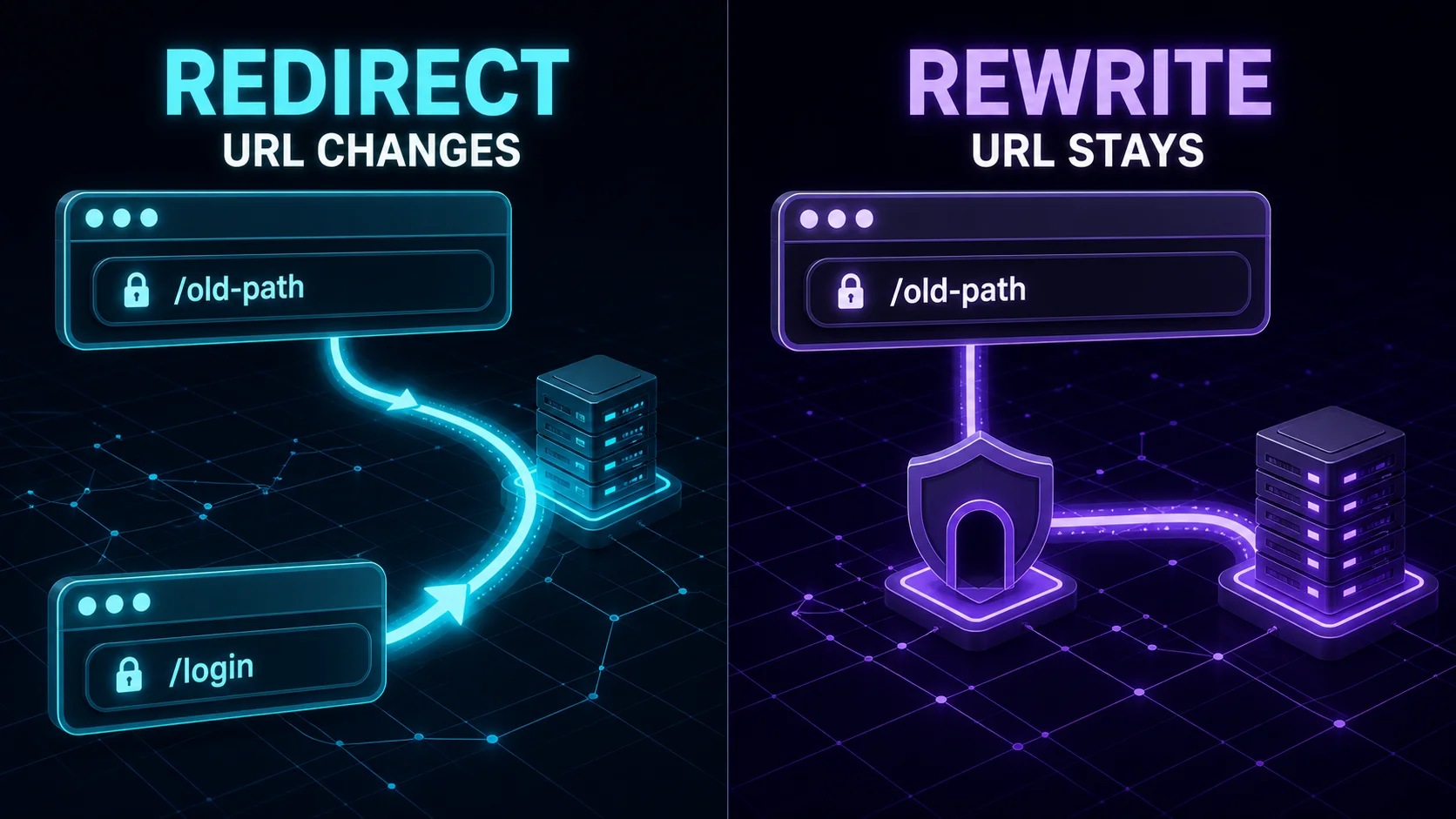
| Behavior | Redirect | Rewrite |
|---|---|---|
| Browser URL | Changes | Stays the same |
| Client receives | Redirect response | Content from another destination |
| Typical use | Login, moved page, canonical destination | Internal routing, tenant or experiment mapping |
| Security effect | Not authorization | Not authorization |
Which Redirect API Should You Use?
| Requirement | Recommended location |
|---|---|
| Known static redirect | redirects in next.config.* |
| Request-dependent early redirect | Proxy |
| Redirect during Server Component rendering | redirect() or permanentRedirect() |
| Redirect after a mutation | Server Action with redirect() |
| HTTP endpoint redirect | Route Handler response |
| Client event navigation | Router navigation when a link is not suitable |
See Blog #4: Linking and Navigation for normal links and programmatic navigation. Static configuration is simpler when a rule does not depend on incoming request state.
Reading and Setting Cookies
In Proxy, incoming cookies are available through request.cookies. Outgoing cookies are set on the NextResponse you return. Do not mix this with the asynchronous cookies() API used in App Router server code unless the documented integration requires it.
export function proxy(request: NextRequest) {
  const locale = request.cookies.get('locale')?.value
  const response = NextResponse.next()

  if (!locale) {
    response.cookies.set('locale', 'en', {
      sameSite: 'lax',
      secure: process.env.NODE_ENV === 'production',
      path: '/',
    })
  }

  return response
}
For an authentication cookie, rely on the provider's current integration. Appropriate protections often include HttpOnly, Secure, SameSite, a narrow Path, deliberate expiry, signed or encrypted content, rotation, and server-side revocation where applicable.
Request and Response Headers
Proxy can clone incoming headers, add a small internal value, and forward that set upstream with NextResponse.next({ request: { headers } }). It can also set response headers sent to the browser. These are different directions.
export function proxy(request: NextRequest) {
  const requestHeaders = new Headers(request.headers)
  requestHeaders.set('x-request-path', request.nextUrl.pathname)

  return NextResponse.next({
    request: { headers: requestHeaders },
  })
}
Prefer an allow-list. Never copy every incoming header by habit, and do not send authorization, cookies, internal tokens, or private user attributes to the browser. The official NextResponse reference warns that incorrectly forwarding response headers can interfere with framework behavior such as Server Actions and streaming.
Protecting Routes with Proxy
Proxy can improve user experience by redirecting a request that clearly lacks an expected session. It can also protect a static route that shares content between users. But it is an early filter, not proof that a caller may read a record or perform a mutation.
Use defense in depth. Proxy makes an optimistic route decision from a validated lightweight session representation. The destination Server Component, data access layer, Server Action, or Route Handler performs the authoritative check using current server-side state.

Authentication with Proxy
This repository does not contain Auth.js, Clerk, Supabase Auth, a custom session module, or any other Next.js authentication provider. Therefore the article does not invent one. In a real app, use the selected provider's current Next.js 16 and Node.js-runtime integration.
Authentication answers “Who are you?” Authorization answers “Are you allowed to do this?” A signed-in normal user is authenticated but is not automatically authorized for /admin. The official authentication guide describes Proxy checks as optional and optimistic, recommends avoiding database checks in Proxy, and puts most secure checks close to the data through a server-only data access layer.
URL hiding and early redirects are not access control. Direct Server Action and Route Handler requests still exist, sessions expire or are revoked, permissions change, and client-controlled values can be forged. Verify identity and permission again for every protected read or operation.
Protecting Admin Routes
Do not use if (cookie) allow() as the final admin policy. A secure architecture validates the session with the actual auth provider, loads current permission state when the operation requires it, applies role plus tenant and resource rules, defaults to deny, and returns only the minimum safe data.
import 'server-only'
import { verifySession } from '@/lib/auth/session'
import { forbidden } from 'next/navigation'

export async function requireAdmin() {
  const session = await verifySession()

  if (!session || session.role !== 'admin') {
    forbidden()
  }

  return session
}
The exact API depends on the real provider and Next.js version. Reuse one server authorization function from protected Server Components, Route Handlers, and Server Actions instead of duplicating slightly different role checks.
Proxy vs Server Components, Route Handlers, and Server Actions
| Need | Proxy | Server Component / server layer |
|---|---|---|
| Early redirect | Good | Possible depending on flow |
| Render protected UI | No | Yes |
| Fetch page data | Avoid as general design | Yes |
| Database-heavy logic | Avoid | Use server data layer |
| Authorization close to data | Not enough alone | Required |
Proxy vs Route Handlers
Proxy is a request boundary for routing decisions. A Route Handler is an API endpoint that parses HTTP input, validates it, authenticates and authorizes the operation, runs business logic, and returns a deliberate HTTP response. Do not move a full API into Proxy. Continue with Blog #10: Route Handlers.
Proxy vs Server Actions
Proxy may answer “Can this request reach the page?” A Server Action must answer “Can this verified user perform this exact mutation on this exact resource?” Both checks can exist, but the action cannot trust the earlier redirect. Review Blog #7: Server Actions.
Proxy vs next.config Redirects and Rewrites
Prefer redirects() or rewrites() in next.config.* for known static rules. Use Proxy when the decision depends on incoming cookies, headers, pathname state, or other supported request information. Configuration runs in a documented order: headers and redirects from next.config are evaluated before Proxy, while rewrite phases surround filesystem routing.
| Requirement | Recommended location |
|---|---|
| Static permanent redirect | next.config.* or the appropriate redirect API |
| Request-dependent redirect | Proxy |
| Internal rewrite | Proxy or config, depending on need |
| Render page data | Server Component |
| API endpoint | Route Handler |
| Form mutation | Server Action |
| Database authorization | Server/data layer |
| Early protected-route redirect | Proxy where appropriate |
| Secret API call | Server layer |
| Client interaction | Client Component |
Internationalization, Personalization, and Feature Flags
Proxy may participate in locale routing, tenant mapping, or A/B routing because those are request-dependent routing decisions. Keep provider-specific geolocation APIs out of portable Next.js examples; deployment platforms expose different request metadata. If a decision requires a platform feature, document that dependency explicitly.
For an experiment, assign a stable group using an approved cookie or server decision, rewrite to the matching internal experience, and keep analytics and consent requirements in mind. Do not put the entire experiment engine in Proxy.
Proxy Performance
Proxy sits in the path of every matching request and may also see prefetched requests. Keep it small: precise matching, cheap parsing, a bounded cookie or header check, and a routing result. Avoid heavy database queries, slow external APIs, CPU-intensive work, oversized dependencies, and duplicated business logic. Validate runtime and host behavior using the production checks in Blog #15: Next.js 16 Deployment.
Security Considerations
- Treat request data as untrusted. Validate paths, query values, cookies, and headers.
- Use defense in depth. Repeat authoritative authorization in the server layer close to data.
- Do not expose secrets. Never copy session tokens, authorization headers, internal keys, or private claims into client response headers.
- Use least privilege. A valid session is not universal permission.
- Keep matching precise. Unnecessary scope adds performance cost and increases failure surface.
- Prevent redirect loops. Keep required public, login, and callback routes reachable.
- Follow the actual auth provider. Do not invent session verification or cryptography.
For secrets, logging, headers, deployment, and incident response, return to Blog #16: Environment Variables & Production Security. For session, RBAC, ownership, and DAL patterns, read Blog #13: Authentication. If server-side redirect or proxy logic fetches an external destination, apply the separate URL, DNS, redirect, and egress controls in Blog #28: SSRF Prevention.
Prevent Open Redirects
Never take ?next=https://malicious.example and redirect to it blindly. Accept only normalized internal paths that begin with one slash, reject protocol-relative values such as //example.com, and fall back to a known route.
function safeInternalPath(value: string | null) {
  if (!value || !value.startsWith('/') || value.startsWith('//')) {
    return '/dashboard'
  }
  return value
}
A production policy may need a stricter allow-list. Parse and normalize once, and do not decode or concatenate a value repeatedly in ways that change its meaning.
Common Next.js 16 Proxy Mistakes
Following old Middleware tutorials
Use the current proxy.ts convention and migration guidance.
Wrong file location
Keep one Proxy beside app or pages, including under src when used.
Running on every asset
Use precise matchers and verify framework/static exclusions.
Redirect loops
Never protect the login or callback route needed to resolve the redirect.
Proxy-only authorization
Repeat secure session and permission checks close to every protected operation.
Heavy request-path work
Avoid database queries, slow APIs, large dependencies, and business logic.
Confusing rewrite and redirect
Decide whether the browser URL should change before choosing the API.
Trusting cookie presence
Presence does not prove validity, current permission, or revocation state.
Leaking values in headers
Allow-list safe upstream headers and separate them from browser response headers.
Open redirects
Validate destinations as approved internal routes.
Provider-specific assumptions
Geolocation and auth capabilities differ by platform and library.
Duplicated auth logic
Centralize authoritative policy in a server-only authorization layer.
Proxy Troubleshooting
Proxy does not run
Check the Next.js version, filename, placement, export, and matcher.
Runs on too many routes
Reduce matcher scope and test exclusion patterns.
Infinite redirect
Exclude login, signup, callbacks, and public assets from the condition.
Static assets stop loading
Inspect _next/static, _next/image, and file-extension exclusions.
Authentication always redirects
Verify cookie name, scope, Secure behavior, domain, expiry, and provider integration.
Rewrite returns 404
Confirm the internal destination exists and path parameters are correct.
Only production fails
Check HTTPS cookies, host configuration, environment variables, runtime compatibility, and deployment routing.
Testing Proxy
Next.js documents experimental utilities in next/experimental/testing/server. unstable_doesProxyMatch can test matcher behavior, while isRewrite, getRewrittenUrl, and getRedirectUrl can inspect outcomes. The package and API names are experimental, so pin the project version and consult its version-matched docs.
import { unstable_doesProxyMatch } from 'next/experimental/testing/server'
import { config } from '../proxy'

expect(unstable_doesProxyMatch({
  config,
  nextConfig: {},
  url: '/dashboard',
})).toBe(true)

expect(unstable_doesProxyMatch({
  config,
  nextConfig: {},
  url: '/_next/static/app.js',
})).toBe(false)
Integration tests should cover public, protected, authenticated, anonymous, admin, denied, redirect, rewrite, and matcher-exclusion paths. Also test expired sessions, invalid cookies, direct API and action calls, login loops, unsafe redirect destinations, and production cookie settings.
Next.js 16 Proxy Best Practices
- Use the current
proxy.tsconvention and verify Middleware migration guidance. - Place Proxy beside
apporpages. - Keep it small and use precise, tested matchers.
- Exclude routes and assets that do not need request interception.
- Avoid database work, slow external calls, large dependencies, and business logic.
- Validate redirect destinations and prevent login loops.
- Treat cookies and headers as untrusted.
- Use the real authentication provider's current Node.js-compatible integration.
- Perform authoritative authorization in the server/data layer.
- Never expose secrets, tokens, or private claims through headers or logs.
- Use Route Handlers for HTTP APIs, Server Actions for mutations, and Server Components for server rendering and data access.
- Prefer static redirects and rewrites when dynamic request logic is unnecessary.
- Test matchers and routing behavior under the exact production version and deployment platform.
Complete Request Lifecycle
Frequently Asked Questions
What is Proxy in Next.js 16?
Proxy is request-boundary code in proxy.ts or proxy.js. It runs before matching routes render and can continue, redirect, rewrite, modify selected request or response headers, set cookies, or return a response.
Did Next.js 16 replace Middleware with Proxy?
Next.js 16 deprecated the middleware filename convention and renamed it to proxy to clarify its network-boundary and routing purpose. The feature is a migration and terminology change, not a general-purpose security layer.
What happened to middleware.ts in Next.js 16?
middleware.ts is deprecated for the primary Next.js 16 convention. Most projects should migrate the file to proxy.ts and rename a middleware export to proxy. Review runtime compatibility before migrating an Edge-only integration.
Where should proxy.ts be placed?
Place one proxy.ts file in the project root, at the same level as app or pages. If the project uses a src directory, place it inside src beside src/app or src/pages.
How do I redirect a user with Next.js Proxy?
Create a destination with new URL using the incoming request URL as the base, then return NextResponse.redirect(destination). Exclude the destination from the redirect condition to prevent loops.
How do Proxy matchers work?
The exported config.matcher statically selects the paths on which Proxy can run. It accepts path patterns and documented matcher objects. Keep values build-time analyzable and test exclusions for assets, APIs, and public routes.
What is the difference between redirect and rewrite?
A redirect tells the browser to navigate to another URL, so its address bar changes. A rewrite serves a different internal destination while preserving the requested URL in the address bar.
Can I protect routes with Proxy?
Proxy can perform an early optimistic session check and redirect an anonymous request. Protected data and actions must still verify the session and authorization in the server page, data access layer, Server Action, or Route Handler.
Is Proxy enough to secure an admin route?
No. A cookie or role claim checked in Proxy can be stale or invalid. Perform an authoritative server-side session, role, tenant, ownership, and resource check close to the database or operation.
Can Proxy access cookies?
Yes. NextRequest exposes incoming cookies and NextResponse can set response cookies. Treat every incoming cookie as untrusted until it has been cryptographically and semantically validated by the project session system.
Can Proxy modify headers?
Yes. It can forward selected request headers upstream and set response headers. Use an allow-list, avoid copying authorization or cookie values, and do not accidentally expose server-only information to the client.
Should I query my database inside Proxy?
Usually no. Proxy is in the request path and may also run for prefetched requests. Official authentication guidance recommends lightweight cookie-based optimistic checks and secure database-backed authorization close to the data.
What is the difference between Proxy and Route Handlers?
Proxy influences a request before routing. A Route Handler is an HTTP endpoint that owns API parsing, validation, authorization, business operations, and responses.
What is the difference between Proxy and Server Actions?
Proxy can decide whether a request should reach a route. A Server Action performs a server mutation and must validate, authenticate, and authorize that exact operation independently.
How do I prevent infinite redirect loops?
Keep login, signup, callback, and other required public routes out of protected redirect conditions. Test both authenticated and anonymous requests and validate any post-login destination as a safe internal path.
Does Proxy run on every request?
Proxy is part of the request path for matching requests. Use config.matcher and explicit conditions to control scope and exclude routes and static assets that do not need interception.
Next Steps
You now understand the current Proxy convention, Middleware migration, file placement, matchers, redirects, rewrites, cookies, headers, authentication, layered authorization, performance, security, testing, and troubleshooting. Revisit Blog #16 for the production secrets behind secure auth and routing.
Continue with Next.js 16 Forms & Validation: Server Actions, Zod & Error Handling to turn protected routes into secure, accessible mutations.
