


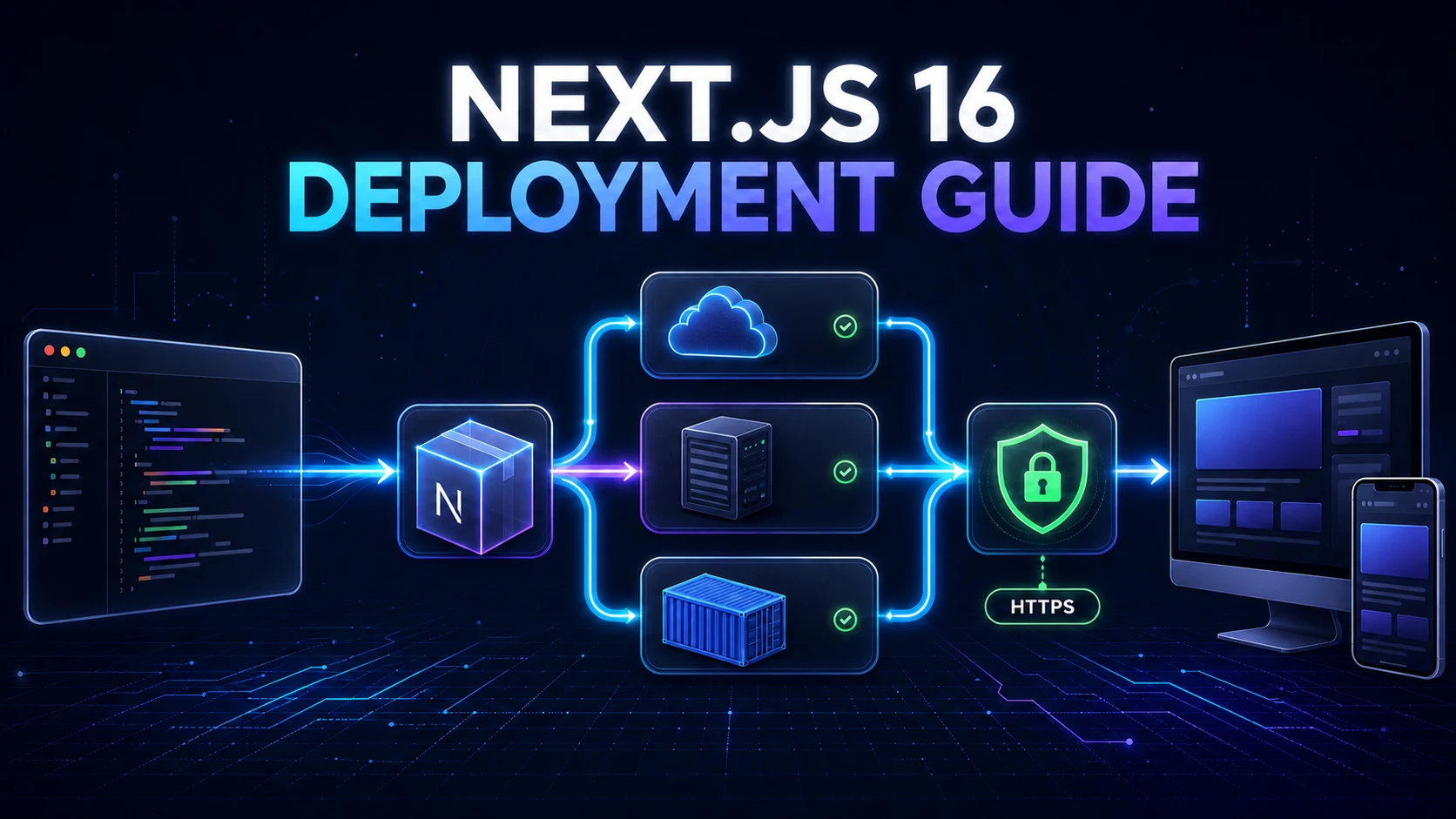
In Blog #14, we optimized the application for production. The final foundation step is deploying it correctly so those improvements actually reach users. Deployment includes the build, runtime, domain, HTTPS, configuration, data services, process lifecycle, observability, and recovery—not merely uploading a folder.
This guide compares Vercel, managed Node hosting, VPS, Docker, standalone output, and compatible static export. It then builds a production checklist around environment variables, databases, images, caching, authentication, CI/CD, health checks, logs, monitoring, rollback, and security.
Deployment at a Glance
Current Next.js guidance supports a Node.js server, Docker container, static export, and platform adapters. A Node.js server or Docker container supports the full framework. Static export has limited feature support because there is no Next.js runtime after the build. Managed platforms automate more infrastructure; self-hosting gives you more control and more operational responsibility.
This website is PHP-based and currently exposes Apache-style HTTPS, non-www, compression, browser-cache, robots, and sitemap configuration. Its downloadable Next.js starter is separate: it has only app/, a package file with npm scripts, and dependencies declared as latest. It has no lockfile, installed dependency tree, exact Next.js patch, next.config, Docker, Compose, Vercel, VPS, proxy, workflow, database, auth provider, image config, cache config, or health route. The examples below are educational and do not alter or pretend to deploy working infrastructure.
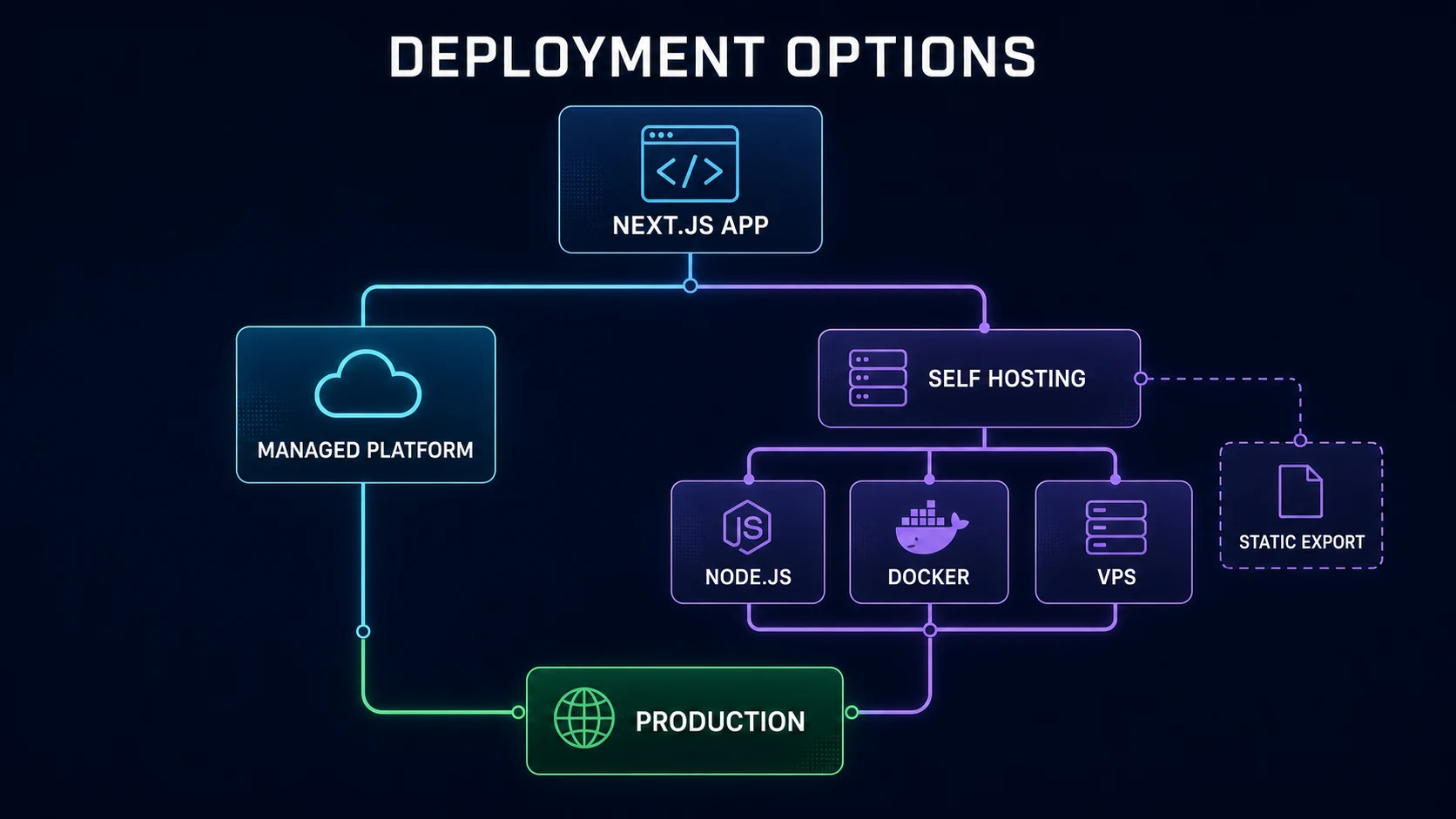
| Option | Best fit | Infrastructure work | Control |
|---|---|---|---|
| Vercel | Integrated managed Next.js delivery | Low | Medium |
| Managed Node host | Full runtime without managing a complete VPS | Medium | Medium |
| VPS | Teams needing infrastructure control | High | High |
| Docker | Reproducible runtime across container hosts | Medium–High | High |
| Static export | Applications compatible with static-only output | Low | Limited runtime features |
Prepare Your App for Production
Remove debug-only code and unsafe logging. Inventory every server-only and public environment variable. Verify database networking, migrations, production auth callbacks, canonical origin, sitemap, robots rules, remote image hosts, uploads, storage, Route Handlers, Server Actions, cache invalidation, error boundaries, and critical user journeys. Review the Node setup introduced in Blog #1.
Next.js 16 requires Node.js 20.9.0 or newer. Record a supported Node release in the project’s tooling and container, and keep it consistent across local development, CI, and production. This starter has no engines declaration or lockfile, so it cannot provide a reproducible build yet. Replace floating latest dependencies with tested versions and commit the lockfile before using npm ci.
Run a Production Build Locally
The starter uses npm and defines build as next build and start as next start. Those are the correct production commands for a regular Node deployment:
npm run build
npm run start
next dev is not a production environment. Next.js 16 uses Turbopack by default for development and builds, but the optimized build and runtime behavior still differ from developer mode. A production build can reveal TypeScript errors, invalid server/client imports, missing build-time variables, incompatible dynamic behavior, broken image configuration, asynchronous request-API mistakes, and provider-specific code.
Next.js 16 removed next lint, and next build no longer runs lint automatically. Use the repository’s configured ESLint or Biome script. This starter has no lint, typecheck, test, TypeScript configuration, or installed packages, so none of those commands can be truthfully run here.
Deploying Next.js 16 to Vercel
Vercel is a managed option, not a requirement. Connect the Git repository, verify framework detection and the selected root directory, define separate Preview and Production variables, configure the custom domain, deploy, then test production routes and logs. A common Git workflow creates previews from pull-request branches and production releases from a selected production branch, but verify the actual repository policy rather than assuming main.
Preview URLs must not become canonical production URLs. Use distinct databases and credentials where isolation matters, do not expose private preview content to indexing, and ensure production OAuth callbacks list the real HTTPS domain. Managed infrastructure removes many server tasks, but you still own application security, data migrations, secrets, dependency health, and observability.
Deploy Next.js as a Node.js Server
Any host that supplies a supported Node.js runtime can run the full framework with npm run build and npm run start. Provide runtime variables, bind the expected port, supervise the process, forward signals, collect logs, and put a reverse proxy or platform gateway in front. Do not keep production alive by manually running npm start in an SSH session; use systemd, an appropriate process manager, a container, or the host’s managed lifecycle.
A single next start instance supports Server Components, streaming, Server Actions, Route Handlers, Proxy, image optimization, Cache Components, and other framework behavior. Platform quality still affects latency, streaming, caching, scaling, and failure recovery.
Self-Hosting on an Ubuntu VPS
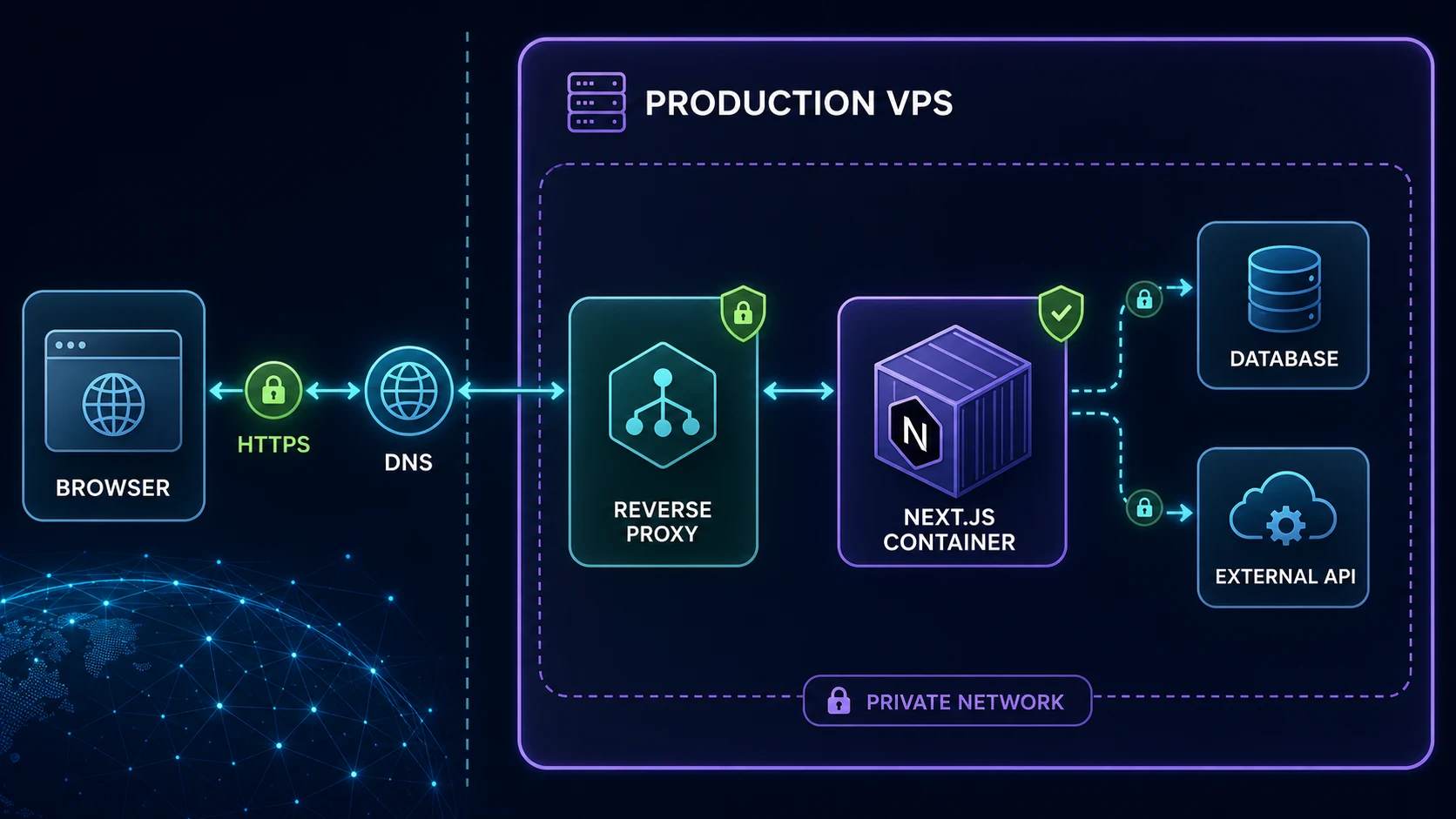
A VPS exposes the full operating environment. Create a non-root deployment account where practical, authenticate SSH with keys, close unused firewall ports, patch the operating system and runtime, keep secrets in protected configuration, restrict database access, back up persistent data, and expose the application through HTTPS. Only ports such as 80/443 and the necessary administration path should be public; the internal Next.js port should normally stay behind the proxy.
Deploy Next.js with Docker
Containers make the runtime reproducible and separate the build environment from the production process. They also introduce image builds, registry security, networking, persistent-storage decisions, resource limits, health checks, and patch responsibility. Docker does not automatically create backups, HTTPS, shared cache coordination, or zero downtime.
The following educational multi-stage outline assumes a committed npm lockfile, which the downloadable starter currently lacks. Node 22 is used as a supported modern line; production teams should pin and regularly update an exact tested image or digest.
FROM node:22-alpine AS deps
WORKDIR /app
COPY package.json package-lock.json ./
RUN npm ci

FROM node:22-alpine AS builder
WORKDIR /app
COPY --from=deps /app/node_modules ./node_modules
COPY . .
RUN npm run build

FROM node:22-alpine AS runner
WORKDIR /app
ENV NODE_ENV=production
RUN addgroup -S nodejs && adduser -S nextjs -G nodejs
COPY --from=builder --chown=nextjs:nodejs /app/public ./public
COPY --from=builder --chown=nextjs:nodejs /app/.next/standalone ./
COPY --from=builder --chown=nextjs:nodejs /app/.next/static ./.next/static
USER nextjs
EXPOSE 3000
ENV PORT=3000 HOSTNAME=0.0.0.0
CMD ["node", "server.js"]
Do not bake .env, registry credentials, SSH keys, or database secrets into layers. Supply them using the platform’s secret or runtime configuration. Use a .dockerignore to exclude Git data, local dependencies, build output, logs, and environment files. The build stage needs development dependencies; the final runtime only needs traced production files.
Understanding Standalone Output
Add output: 'standalone' only when the chosen self-hosting or container design benefits from it:
import type { NextConfig } from 'next'

const nextConfig: NextConfig = {
  output: 'standalone',
}

export default nextConfig
next build then traces required files into .next/standalone and produces a minimal server.js. The standalone directory does not automatically copy the project’s public or .next/static folders. Serve them through a CDN or copy them into .next/standalone/public and .next/standalone/.next/static as the Docker example does. Monorepos may require an appropriate tracing root.
- Next.js project
- next build
- Traced runtime
- public + .next/static
- Production artifact
Reverse Proxy with Nginx or Traefik
Official self-hosting guidance recommends a reverse proxy rather than exposing the Next.js server directly. It can terminate TLS, reject malformed or slow traffic, enforce payload limits and rate limits, normalize redirects, route domains, and forward requests to the internal port. Nginx fits conventional manually configured servers; Traefik can discover Docker routes and certificates dynamically. Neither is universally better.
Preserve the original host, scheme, forwarding headers, streaming behavior, and request sizes required by the application. Nginx buffering can prevent progressive App Router streaming; official guidance describes sending X-Accel-Buffering: no and ensuring every proxy and load balancer in the path supports streaming. Validate Server Actions behind the real proxy and add extra allowedOrigins only for trusted proxy origins when the architecture truly requires it.
HTTPS, DNS, and the Production Domain
Point the domain’s DNS record to the managed platform, VPS IP, or proxy target. Choose either the www or non-www host as canonical and redirect the other exactly once. Terminate TLS with the platform, Nginx, Traefik, or another trusted edge, automate certificate renewal, redirect HTTP to HTTPS, and test expiry and redirect behavior. Secure authentication cookies depend on HTTPS.
This website already canonicalizes to https://navtechsolution.com and redirects www/HTTP through its Apache configuration. Blog #11’s canonical and metadataBase examples use the same production domain, and the current robots.txt points to the production sitemap. A deployed Next.js project must perform the equivalent checks for its own final origin.
Production Environment Variables
Non-NEXT_PUBLIC_ variables are server-only by default. Values prefixed NEXT_PUBLIC_ are inlined into browser JavaScript at build time and are permanently public; changing the runtime container variable does not change an already built client bundle. This matters when promoting the same image across environments. Read server variables during dynamic rendering when runtime selection is required.
Keep local .env.local files out of Git. Configure production values in the platform environment UI, CI secret store, container secret system, or protected service configuration. Names such as DATABASE_URL and AUTH_SECRET are educational unless the project actually adopts them. A public site origin may use a NEXT_PUBLIC_ variable, but it contains no secret.
Production Database Configuration
Do not let production fall back to a local database URL. Permit connections only from the deployed application’s network or identity, use TLS when required, set sensible timeouts, and use provider-appropriate pooling and connection limits. Keep the database private where possible. Back up the database and test restoration; Git is not a database backup.
Run migrations through the ORM and scripts the real project already uses. This starter has no database or migration tool, so inventing a command would be unsafe. Review migrations before deployment, make a backup, and prefer expand-and-contract changes: add backward-compatible structures, deploy code that works with both versions, migrate data, then remove the old structure later. Starting every replica with a destructive migration risks concurrency and rollback failures.
Static Assets and Image Optimization
next/image works with zero configuration under next start; platform deployments may provide their own compatible image service. A self-hosted platform needs the image optimizer’s runtime dependency and enough CPU, memory, and cache storage. When a CDN or proxy sits in front, forward the browser’s Accept header so format negotiation works. Restrict remote sources and current quality configuration as covered in the Image Optimization guide.
Do not disable optimization merely to make a deployment error disappear. For standalone artifacts, confirm public and .next/static are present or intentionally served by a CDN. For static export, default runtime image optimization is unavailable; configure a custom image loader or pre-optimize assets.
Caching and Multiple Instances
Production makes cache lifetime and invalidation visible. Review the Caching and Revalidation guide, then test real deployments, not just local development. A single persistent next start instance uses its local server cache. Ephemeral or multi-instance deployments need deliberate durable/shared cache behavior.
Multiple replicas introduce version skew, Server Action encryption-key consistency, shared cache, tag invalidation coordination, sessions, uploads, scheduled work, and local filesystem problems. Use the same build artifact across replicas, configure a consistent NEXT_SERVER_ACTIONS_ENCRYPTION_KEY, a deployment identifier for rolling-version protection, and shared cache/tag coordination where required. Never store shared user uploads only on one replica’s local filesystem.
When Can You Use Static Export?
Set output: 'export' only when every route is compatible. The build writes HTML, CSS, and JavaScript into out/ for a static server or object host. There is no Next.js runtime afterward, so runtime server features are not available. Static export cannot provide Server Actions, Proxy, runtime sessions, request-dependent rendering, dynamic server APIs, or default runtime image optimization. Only supported static Route Handler output patterns can be generated at build time.
A marketing site can be an excellent export candidate. An authenticated dashboard with protected reads and mutations is not. Do not redesign a server application around static output merely because a shared host lacks Node.js support; select a compatible runtime instead.
Authentication in Production
Production callback URLs, OAuth redirect URIs, trusted origins, cookie domain, site URL, and provider settings must use the final HTTPS host. Generate a strong auth secret, keep it server-only, mark browser session cookies Secure and HttpOnly as appropriate, and verify logout, expiry, revocation, roles, ownership, and direct API calls. The Authentication guide remains the security model; deployment must not weaken it.
CI/CD and GitHub Actions
A provider-neutral continuous-delivery pipeline checks out the exact commit, installs dependencies from the lockfile, runs configured lint, type, test, and build commands, creates an immutable artifact or container image, deploys it, verifies health, and promotes or rolls back. The repository has no workflow, lockfile, tests, or deployment credentials, so this article does not add automatic production deployment.
name: validate-nextjs
on: [pull_request]

jobs:
  build:
    runs-on: ubuntu-latest
    steps:
      - uses: actions/checkout@v4
      - uses: actions/setup-node@v4
        with:
          node-version: 22
          cache: npm
      - run: npm ci
      - run: npm run lint --if-present
      - run: npm run typecheck --if-present
      - run: npm test --if-present
      - run: npm run build
Pin and review third-party actions. Store API tokens, registry credentials, VPS host information, and SSH keys in protected repository or environment secrets, scope permissions minimally, require approval for production where appropriate, and never echo secret material. If deploying by SSH, use a restricted key to pull a versioned image or artifact, restart through the service manager, and perform a health check.
Health Checks, Logging, and Monitoring
A health endpoint should reveal no configuration or topology. A liveness response can be as small as {"status":"ok"}. Readiness may verify critical dependencies with strict timeouts, but return only a safe result. A Route Handler is appropriate when the application has a server runtime; see Blog #10.
export function GET() {
  return Response.json(
    { status: 'ok' },
    { headers: { 'Cache-Control': 'no-store' } },
  )
}
Collect startup and deploy failures, request errors, database failures, authentication denials, and external-service errors without logging passwords, cookies, authorization headers, access tokens, private keys, or full sensitive payloads. Apply the safe patterns from Error Handling. Monitor uptime, error rate, latency, CPU, memory, disk, container restarts, database health, certificate expiry, and production Core Web Vitals. Connect those results to the measurement loop in Blog #14.
Zero-Downtime and Rollbacks
Stopping the old process, building on the production server, and then starting the new process creates avoidable downtime. A safer rollout builds an immutable artifact first, starts the new version beside the old one, checks readiness, switches traffic, drains in-flight requests, and stops the old version. Send SIGINT or SIGTERM and allow Next.js to finish in-flight work and pending after() callbacks. Plain Docker Compose alone does not guarantee zero downtime.
Retain a previous image, platform deployment, Git commit, or artifact. A rollback is only reliable if configuration and database schema remain compatible. Use forward-compatible migrations and practice recovery. Back up the database, user uploads, and critical configuration; source code in Git does not replace those backups.
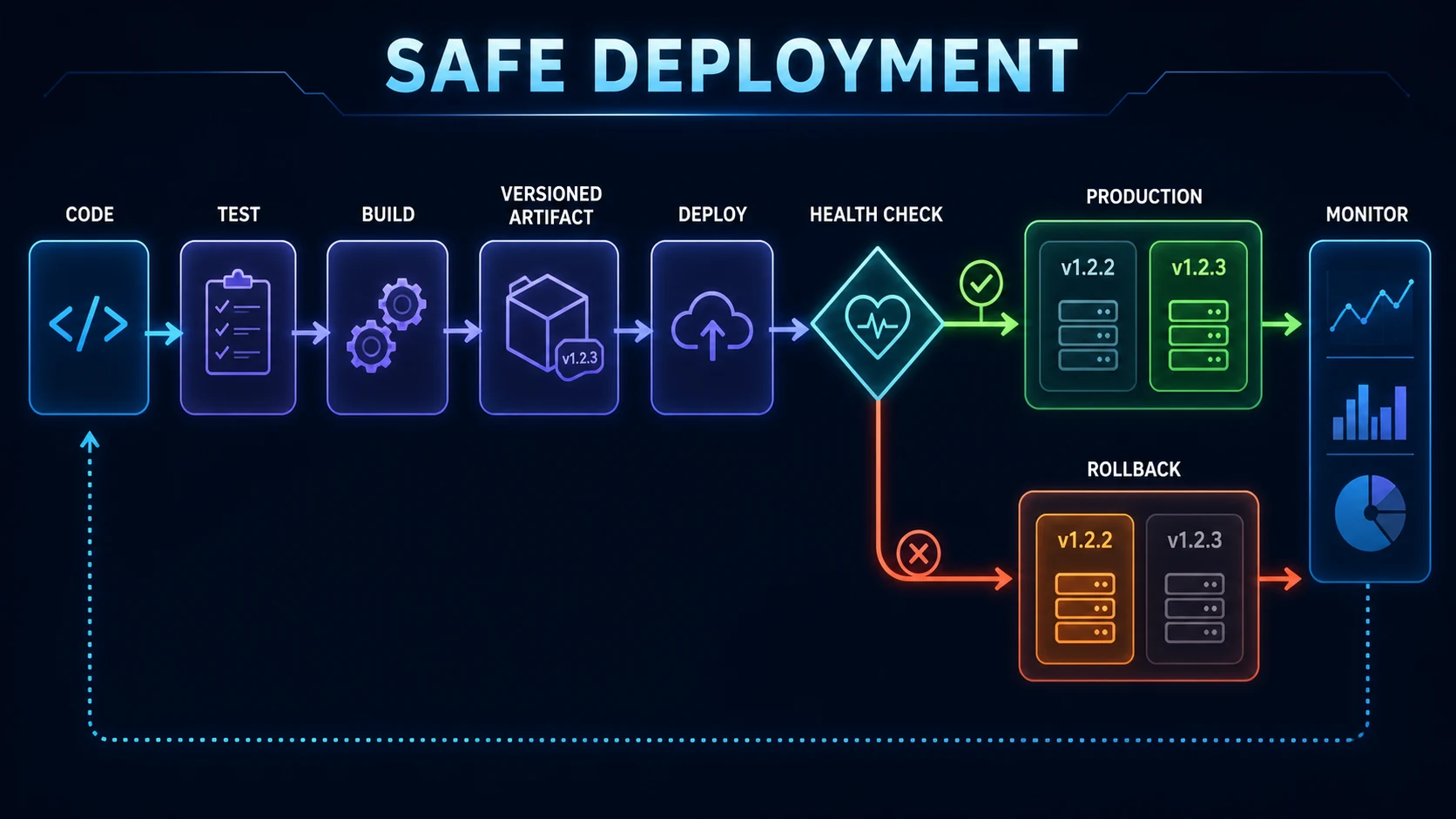
- Git commit
- CI validation
- Versioned build
- Deploy
- Health gate
- HTTPS users
- Monitor / rollback
Deployment Security Checklist
- Use HTTPS everywhere and redirect HTTP without loops.
- Keep secrets out of Git, images, browser bundles, logs, and health responses.
- Use strong auth secrets, secure cookies, verified webhooks, rate limits, and correct CORS.
- Use SSH keys, least privilege, a firewall, patched OS/runtime, and no exposed admin ports.
- Keep databases private where possible and encrypt required connections.
- Protect the Docker socket; never expose it publicly or mount it casually.
- Scan and update application dependencies, base images, and CI actions.
- Use appropriate security headers and strict origin rules.
- Back up data and uploads, then test restoration.
- Redact sensitive data from logs while preserving useful incident context.
Deployment does not make an application secure. Recheck authorization on every protected server operation, validate all input, and keep secrets server-only.
Common Next.js Deployment Problems
Build works locally but fails remotely
Compare Node versions, environment variables, lockfile state, Linux case-sensitive imports, native dependencies, and the exact build command.
502 Bad Gateway
Confirm the app process is running, the proxy targets the correct host and port, the container network is reachable, and health checks pass.
Domain works but HTTPS fails
Inspect DNS propagation, certificate issuance, proxy router rules, ports 80/443, renewal logs, and redirect configuration.
Environment variable is undefined
Determine whether it is needed during build or runtime. Confirm its environment scope, spelling, deployment assignment, and whether a public value was frozen into the build.
OAuth works only locally
Update provider callback and trusted-origin settings to the canonical HTTPS production host and verify secure cookie configuration.
Database ECONNREFUSED
Check the production host, port, private network, firewall, TLS, credentials, service readiness, and container DNS—not only the password.
Images fail in production
Verify remote patterns, current quality configuration, optimizer dependency, proxy Accept forwarding, asset paths, and standalone copies.
Server Actions fail
Check proxy host/origin forwarding, allowed trusted origins only when required, consistent build and encryption key across replicas, and deployment version skew.
Stale data differs by replica
Review shared cache, tag coordination, revalidation calls, CDN behavior, and whether multiple instances use isolated local caches.
App disappears after reboot
Add a systemd/process-manager service or container restart policy and verify it starts only after required networking and storage are ready.
Container continuously restarts
Use docker compose ps and docker logs <container>; inspect the startup command, missing variables, health probe, memory, and runtime files.
Sitemap contains localhost
Fix the trusted production origin that feeds metadata and sitemap generation, rebuild, deploy, and inspect the public file directly.
Production Deployment Checklist
Before deployment
- Exact dependency versions and lockfile recorded
- Supported Node version aligned
- Configured lint, type, tests, and production build pass
- Secrets, database, migrations, storage, and backups reviewed
- Auth callbacks, public origin, domain, images, APIs, and cache tested
- Versioned artifact, health check, monitoring, and rollback ready
After deployment
- Homepage and critical direct routes load
- Login, logout, Server Actions, APIs, uploads, and images work
- HTTPS, canonical host, certificate, robots, and sitemap are correct
- Health check passes and logs contain no secrets or repeated failures
- Mobile layouts and production performance are measured
- Alerts, backup schedule, reboot behavior, and rollback are verified
FAQ
How do I deploy a Next.js 16 application?
Create and test a production build, configure production environment variables and external services, then deploy to a supported Node.js platform, Docker platform, managed provider, or static host when every feature is export-compatible. Verify the domain, HTTPS, logs, health, and rollback afterward.
What is the easiest way to deploy Next.js?
A managed Next.js platform usually requires the least infrastructure work. Self-hosted Node.js or Docker provides more control but makes your team responsible for TLS, process lifecycle, security updates, monitoring, cache coordination, backups, and rollbacks.
Can I deploy Next.js 16 on a VPS?
Yes. Use Node.js 20.9 or newer, production environment variables, a supervised process or container, and a reverse proxy for HTTPS and request protection. Configure automatic restarts, monitoring, backups, and a rollback path.
Can Next.js run in Docker?
Yes. Official deployment guidance supports Docker with the full feature set. A multi-stage build and standalone output can produce a smaller runtime image, but you still own container networking, secrets, health checks, persistent data, security updates, and operations.
What is Next.js standalone output?
Setting output to standalone makes next build create a traced .next/standalone runtime containing the minimal server and required dependencies. Public and .next/static assets must be served separately or copied into the expected standalone locations.
Should I use Vercel or a VPS for Next.js?
Choose based on operational needs. Vercel reduces infrastructure work and integrates deployment workflows; a VPS offers more control and portability but requires stronger operations skills. Neither option is universally correct.
Do I need Nginx or Traefik for Next.js?
Not on every managed platform. For self-hosting, a reverse proxy is recommended rather than exposing the Next.js process directly. Nginx fits manually configured servers, while Traefik is often convenient for dynamic Docker routing.
How do production environment variables work in Next.js?
Server-only variables remain on the server. Variables prefixed NEXT_PUBLIC_ are inlined into browser JavaScript during next build and cannot be treated as secrets. Supply production values through the hosting platform, CI system, or protected runtime configuration.
Why does my Next.js app work locally but fail after deployment?
Common causes include a Node version mismatch, missing environment variables, case-sensitive Linux imports, a missing lockfile, unavailable database networking, incorrect auth callback URLs, remote image configuration, or a proxy forwarding to the wrong port.
How do I deploy Next.js with GitHub Actions?
Use a workflow that installs from the lockfile, runs configured lint, type, test, and build commands, creates an immutable artifact or image, deploys with repository secrets, performs a health check, and rolls back or stops promotion on failure.
How should database migrations run during deployment?
Use the migration tool and commands already selected by the project. Review migrations, back up important data, prefer backward-compatible expand-and-contract changes, run the migration once in a controlled step, and do not start every replica with an unsafe destructive migration.
Can I statically export an App Router application?
Yes when its routes and features are compatible with output export. Features requiring a Next.js runtime, including Server Actions, runtime authentication, Proxy, and dynamic server behavior, need a server deployment. Image optimization requires a custom loader for static export.
How do I update Next.js without downtime?
Start the new version beside the healthy old version, verify readiness, switch traffic, drain in-flight requests, and retain the previous artifact for rollback. Plain Docker Compose does not automatically provide zero-downtime orchestration.
What should a Next.js health endpoint return?
Return a small non-sensitive status such as status ok. A deeper readiness check may test critical dependencies, but public responses and logs must never reveal credentials, connection strings, internal topology, or private error details.
Official Resources
- Next.js: Deploying
- Next.js: Deploying to platforms
- Next.js: Self-hosting
- Next.js: Static exports
- Next.js: Environment variables
- Next.js: Output and standalone mode
- Next.js: Production checklist
Continue with Advanced Next.js
The first fifteen-part Next.js foundation track is complete. The advanced track begins by protecting the configuration and credentials that production deployment depends on. Continue with Blog #16: Next.js 16 Environment Variables & Production Security. When you are ready for the complete VPS implementation, use Blog #20: Docker, Traefik, HTTPS & GitHub Actions.
