



In the previous tutorial, you learned why Server Components are the App Router default. One major advantage is that they can call server-side APIs, databases, and services before rendering route content.
This guide explains modern Next.js data fetching without mixing in Pages Router APIs. You will use async Server Components, compare API and database access, coordinate sequential and parallel work, add route loading UI, stream slow sections, and pass minimal data into interactive client controls.
Data Fetching at a Glance
A request reaches a Next.js route. Its Server Components can call an external API, a database, or server-only application logic. After the data resolves, React renders the relevant component output and Next.js sends useful route results to the browser.
Why Fetch Data in Server Components?
Server Components can use private credentials without adding them to the client bundle, query supported databases directly, and colocate data access with the server-rendered UI that consumes it. They can also reduce an extra browser request when the initial page already needs the data.
These are architectural capabilities, not an automatic performance guarantee. Network distance, query quality, caching decisions, deployment runtime, response size, and UI boundaries still matter. Keep authorization close to the data source and return only fields the interface needs.
Fetching Data with fetch
type Post = { id: number; title: string }

async function getPosts(): Promise<Post[]> {
  // Public demo service for this tutorial only.
  const response = await fetch(
    'https://jsonplaceholder.typicode.com/posts?_limit=5'
  )

  if (!response.ok) {
    throw new Error('Failed to fetch posts')
  }

  return response.json()
}

export default async function BlogPage() {
  const posts = await getPosts()

  return (
    <main>
      <h1>Latest Posts</h1>
      {posts.map((post) => (
        <article key={post.id}><h2>{post.title}</h2></article>
      ))}
    </main>
  )
}
The component is async, so it can await a promise before returning JSX. response.ok catches HTTP failures that do not reject the fetch promise by themselves. Finally, response.json() parses the response into the typed list used for rendering.
fetch requests are not cached by default. Identical fetch requests in the same React component tree are memoized, which avoids duplicated work during one render. Persistent caching is an explicit decision—do not copy older tutorials that claim every fetch is cached automatically.
For the complete model—including Cache Components, "use cache", lifetimes, tags, and invalidation—read how caching and revalidation work in Next.js 16.
Understanding Async Server Components
export default async function Page() {
  const data = await getData()
  return <div>{data.title}</div>
}
An async Server Component can pause its own rendering while it waits for server I/O. A Client Component cannot simply become async and await data in the same component-body pattern. For initial route data, consider a Server Component first; later sections cover legitimate client-side cases.
Fetching Data Directly from a Database
Because a Server Component runs in a server environment, it can call a server-only database or ORM module when the deployment runtime supports that library:
import 'server-only'
import { db } from '@/lib/db'

export default async function ProductsPage() {
  const products = await db.query.products.findMany()

  return (
    <main>
      <h1>Products</h1>
      {products.map((product) => (
        <article key={product.id}>{product.name}</article>
      ))}
    </main>
  )
}
The repository does not contain a Next.js database stack, so this stays intentionally generic rather than inventing Prisma, Drizzle, MongoDB, or another dependency. The server-only guard helps prevent accidental client imports. Authentication and authorization are still required. For a complete typed SQL example, learn how to connect Next.js to PostgreSQL with Drizzle ORM.
API Fetch vs Direct Database Query
fetch()- Third-party service
- Existing service boundary
- HTTP response handling
- Application-owned data
- Direct authorized query
- No unnecessary internal HTTP hop
Calling your own Route Handler from a Server Component may add an HTTP layer you do not need when both share the same server and data-access logic. It can still make sense when an HTTP boundary serves multiple consumers, applies gateway behavior, or deliberately separates services. See the complete Next.js Route Handlers guide for that decision.
Sequential Data Fetching
Sequential work is correct when a later request requires an earlier result. A playlist lookup, for example, cannot begin until the artist lookup returns an ID:
const artist = await getArtist(username)
const playlists = await getPlaylists(artist.id)- Get artist
- Receive artist ID
- Get playlists
- Render results
Do not label every sequence a mistake. Optimize the first dependency, cache deliberately when the data is reusable, or stream the dependent section behind Suspense if the page can show other content first.
Parallel Data Fetching
When requests are independent, start their promises before awaiting them together:
const postsPromise = getPosts()
const categoriesPromise = getCategories()

const [posts, categories] = await Promise.all([
  postsPromise,
  categoriesPromise,
])
Both operations begin when their functions are called. Promise.all waits for both and rejects if either rejects. If partial results are acceptable, design explicit error boundaries or consider Promise.allSettled with careful per-result handling.
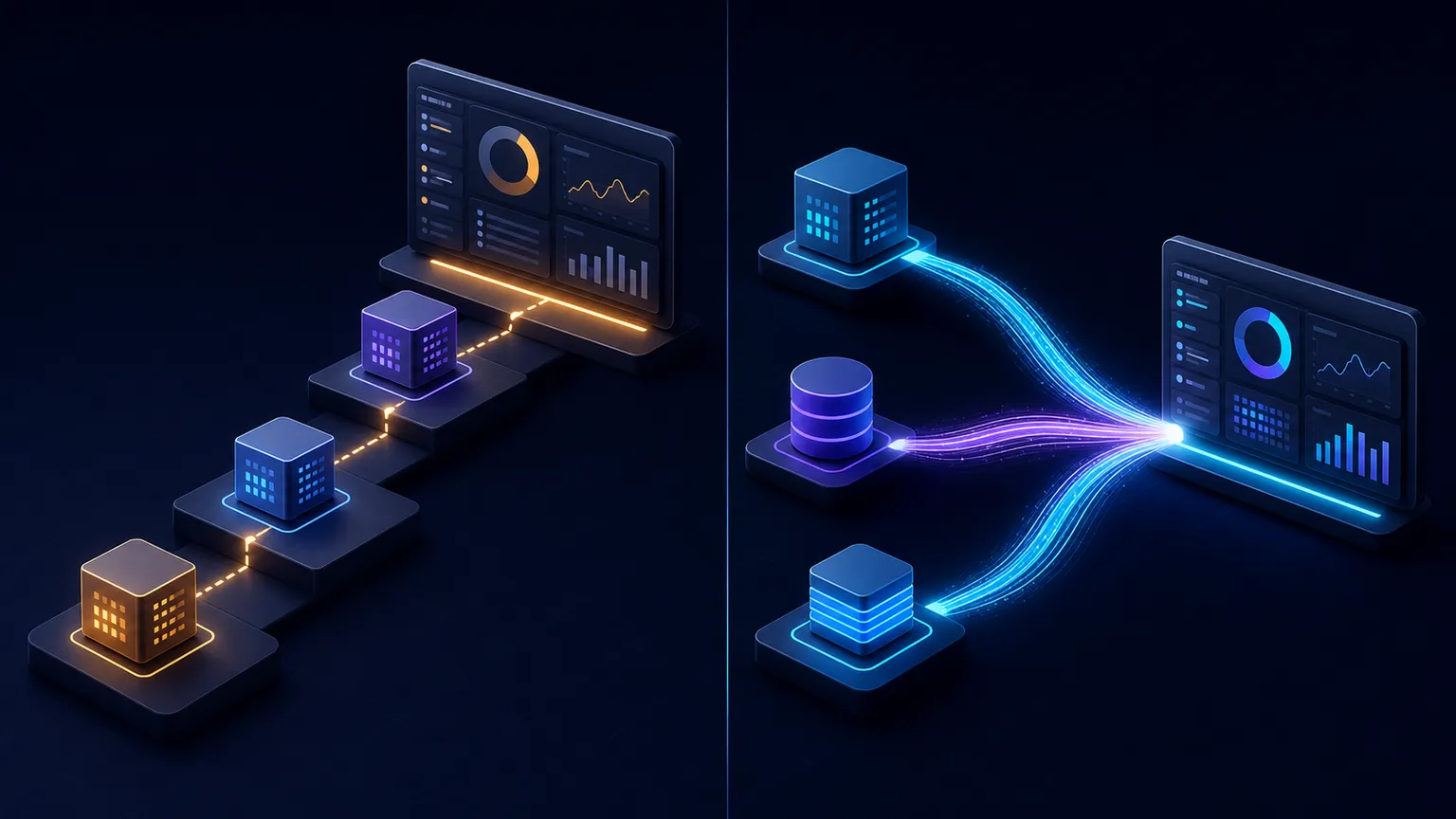
Sequential
- Request A
- Request B
- Request C
- Render
Parallel
Preventing Request Waterfalls
A waterfall occurs when later work waits for earlier work. Sometimes that dependency is real; sometimes code structure created it accidentally. Start independent operations eagerly, keep required dependencies sequential, and split slow independent sections into components that can stream.
Colocation also matters. A dashboard can let Profile, Analytics, and Notifications fetch their own relevant data. This can clarify ownership and allow component-level streaming. Centralized fetching may be better when one query provides all fields efficiently or several sections must share one transaction. Choose based on data relationships, not a universal rule.
Loading UI with loading.tsx
app/
`-- dashboard/
    |-- loading.tsx
`-- page.tsxexport default function Loading() {
return <p>Loading dashboard...</p>
}The special file supplies fallback UI for the route segment. Next.js automatically places the page and descendants below it inside a Suspense boundary. During navigation, the fallback can be prefetched, shared layouts remain interactive, and the completed content replaces the fallback when ready.
- User opens route
- Loading UI appears
- Server work resolves
- Page content replaces fallback
Place uncached or runtime work where the boundary can cover it. A slow layout above the same-segment loading boundary can still delay navigation. Use a closer Suspense boundary when only one section is slow.
What Is Streaming in Next.js?
Streaming lets the server progressively send useful route sections instead of holding the entire response until every slow task finishes. Users may see stable page structure and loading fallbacks while later sections resolve. This is still server rendering; it does not require moving the page into a Client Component.

Streaming with React Suspense
import { Suspense } from 'react'
import { LatestPosts } from './latest-posts'

export default function Page() {
  return (
    <main>
      <h1>Dashboard</h1>
      <Suspense fallback={<p>Loading posts...</p>}>
        <LatestPosts />
      </Suspense>
    </main>
  )
}export async function LatestPosts() {
const posts = await getPosts()
return (
<ul>
{posts.map((post) => (
<li key={post.id}>{post.title}</li>
))}
</ul>
)
}The heading is outside the boundary and can appear without waiting for LatestPosts. While that async component suspends, React renders the fallback; its completed output replaces the fallback when available.
Passing Fetched Data to Client Components
// app/products/[id]/page.tsx
import { ProductActions } from './product-actions'

export default async function ProductPage() {
  const product = await getProduct()
  return <ProductActions productId={product.id} />
}

// app/products/[id]/product-actions.tsx
'use client'

export function ProductActions({ productId }: { productId: string }) {
  return <button type="button">Add {productId} to cart</button>
}
The server fetches the record and passes only a serializable ID into interactive UI. Review the Server and Client Component prop boundary before passing richer values.
When Should You Fetch in a Client Component?
Client fetching can be appropriate for browser-only APIs, a request triggered after interaction, polling or realtime screens, and applications already standardized on a client data library. It also carries browser loading, error, cancellation, and hydration considerations.
Do not turn initial route fetching into a useEffect habit without a reason. Consider a Server Component first when the page needs the data immediately and the server already has secure access. No new client data library is required for this tutorial.
Handling Data-Fetching Errors
if (!response.ok) {
  throw new Error('Failed to fetch posts')
}
A thrown rendering error can reach the nearest App Router error.tsx boundary. Log enough server context to diagnose the problem without exposing credentials or private response data. Blog #9 will cover recovery, reset behavior, and error boundaries in depth after it is published.
Keep API Keys and Database Credentials Server-Side
Never pass database passwords, private API keys, or service-role credentials to a Client Component. Variables prefixed with NEXT_PUBLIC_ are intended for browser exposure and must not contain secrets. Validate user identity and permissions before every protected query.
Build a Blog Dashboard with Parallel Data Fetching
type Post = { id: string; title: string }
type Category = { id: string; name: string }
type Stats = { published: number }

export default async function DashboardPage() {
  const postsPromise: Promise<Post[]> = getPosts()
  const categoriesPromise: Promise<Category[]> = getCategories()
  const statsPromise: Promise<Stats> = getStats()

  const [posts, categories, stats] = await Promise.all([
    postsPromise,
    categoriesPromise,
    statsPromise,
  ])

  return (
    <main>
      <h1>Blog Dashboard</h1>
      <LatestPosts posts={posts} />
      <CategoryList categories={categories} />
      <p>Published: {stats.published}</p>
    </main>
  )
}
The helpers represent your own server-side data layer; they are not fake production endpoints. Because the three results are independent, their promises start together.
Common Next.js Data Fetching Mistakes
- Fetching everything in Client Components. Initial route data often fits a Server Component with less browser coordination.
- Using Pages Router APIs.
getServerSidePropsandgetStaticPropsare not the App Router's primary model. - Calling an unnecessary internal endpoint. A Server Component can often call shared server data code directly, though an intentional HTTP boundary can still be valid.
- Awaiting independent requests one by one. Start them together and use
Promise.all. - Parallelizing dependent work. Preserve required order when request B needs request A.
- Ignoring
response.ok. A 404 or 500 response does not automatically rejectfetch. - Exposing secrets. Keep private credentials and privileged data in server-only modules.
- Assuming old cache defaults. Current fetch requests are not cached by default; choose caching and revalidation deliberately.
Next.js Data Fetching Best Practices
- Prefer Server Components for initial server-side data when appropriate.
- Fetch close to where data is used when that clarifies ownership.
- Query databases only from authorized server-safe code.
- Start independent requests together and keep genuine dependencies sequential.
- Check HTTP failures and design route error boundaries.
- Use
loading.tsxfor meaningful route fallback UI. - Use Suspense to stream slow sections when it improves the experience.
- Pass minimal serializable data into Client Components.
- Verify caching and revalidation against the installed Next.js version.
Frequently Asked Questions
How do you fetch data in Next.js 16?
In the App Router, make a Server Component async and await fetch, an ORM call, a database query, or another server-side data function.
Can I use fetch in a Server Component?
Yes. Server Components can call fetch directly. Check response.ok before parsing and choose caching behavior deliberately.
Can a Next.js Server Component query a database directly?
Yes, when the selected runtime and data library support it. Keep credentials and authorization in server-only code.
What is the difference between server-side and client-side data fetching?
Server fetching can use private resources before rendering UI. Client fetching runs in browser-side code and suits interaction-driven, browser-only, polling, or live-data cases.
What is parallel data fetching in Next.js?
Independent requests are started together and awaited together, commonly with Promise.all, so one does not unnecessarily wait for another.
What is a request waterfall?
A request waterfall occurs when later work waits for earlier work to finish. Some dependencies require this; independent work can often start in parallel.
What does loading.tsx do?
It defines route-segment fallback UI and automatically wraps the page and descendants below it in a Suspense boundary.
Should I use getServerSideProps in the App Router?
No. getServerSideProps and getStaticProps are Pages Router APIs. App Router pages use Server Components and current caching or rendering controls.
Official Resources
Use the official Next.js Fetching Data guide as the source of truth. The loading.tsx reference documents route fallbacks and streaming behavior, while the Server and Client Components guide explains the component boundary.
Next Steps
You can now fetch server data, choose API or database access, distinguish required dependencies from avoidable waterfalls, and build useful loading and streaming boundaries. Fetching handles reading data. When your application needs to create, update, or delete records, continue with our Next.js 16 Server Actions guide.
