



Server Actions are ideal for many mutations inside a Next.js UI, but sometimes you need a real HTTP endpoint for a mobile app, webhook, external service, or public API. That is where Next.js Route Handlers fit. They use the Web Request and Response APIs and live inside the App Router.
This tutorial continues from Blog #9 on error handling. You will build GET, POST, PUT, PATCH, and DELETE endpoints; read JSON, forms, parameters, headers, and cookies; then add validation, authentication, CORS, webhook verification, caching, and consistent responses.
Route Handlers at a Glance
| Question | Answer |
|---|---|
| Where? | route.ts inside app |
| Input? | Standard Request or extended NextRequest |
| Output? | Standard Response or NextResponse |
| Methods? | GET, POST, PUT, PATCH, DELETE, HEAD, OPTIONS |
| Default GET caching? | Dynamic, not cached by default |
The downloadable Next.js starter declares "next": "latest" and has no lockfile or installed dependency tree in this website backup. Therefore, an exact patch version cannot be verified from the repository. The examples below target the current official Next.js 16 App Router documentation; pin a real version and commit its lockfile before using “exact version” in deployment records.
What Is route.ts?
route.ts is the App Router file convention for a custom request handler. Export a function named for each supported HTTP method. A route.ts file cannot share the same route segment level as page.tsx, because both would own the same URL.
export async function GET() {
  return Response.json({
    message: 'Hello from Next.js',
  })
}
Response.json() serializes the value, sets a JSON content type, and returns a standard Web Response. Use NextResponse only when its Next.js-specific helpers improve the endpoint.
Your First GET Route
export async function GET() {
  const posts = [
    { id: 1, title: 'Next.js' },
    { id: 2, title: 'React' },
  ]

  return Response.json({ data: posts })
}
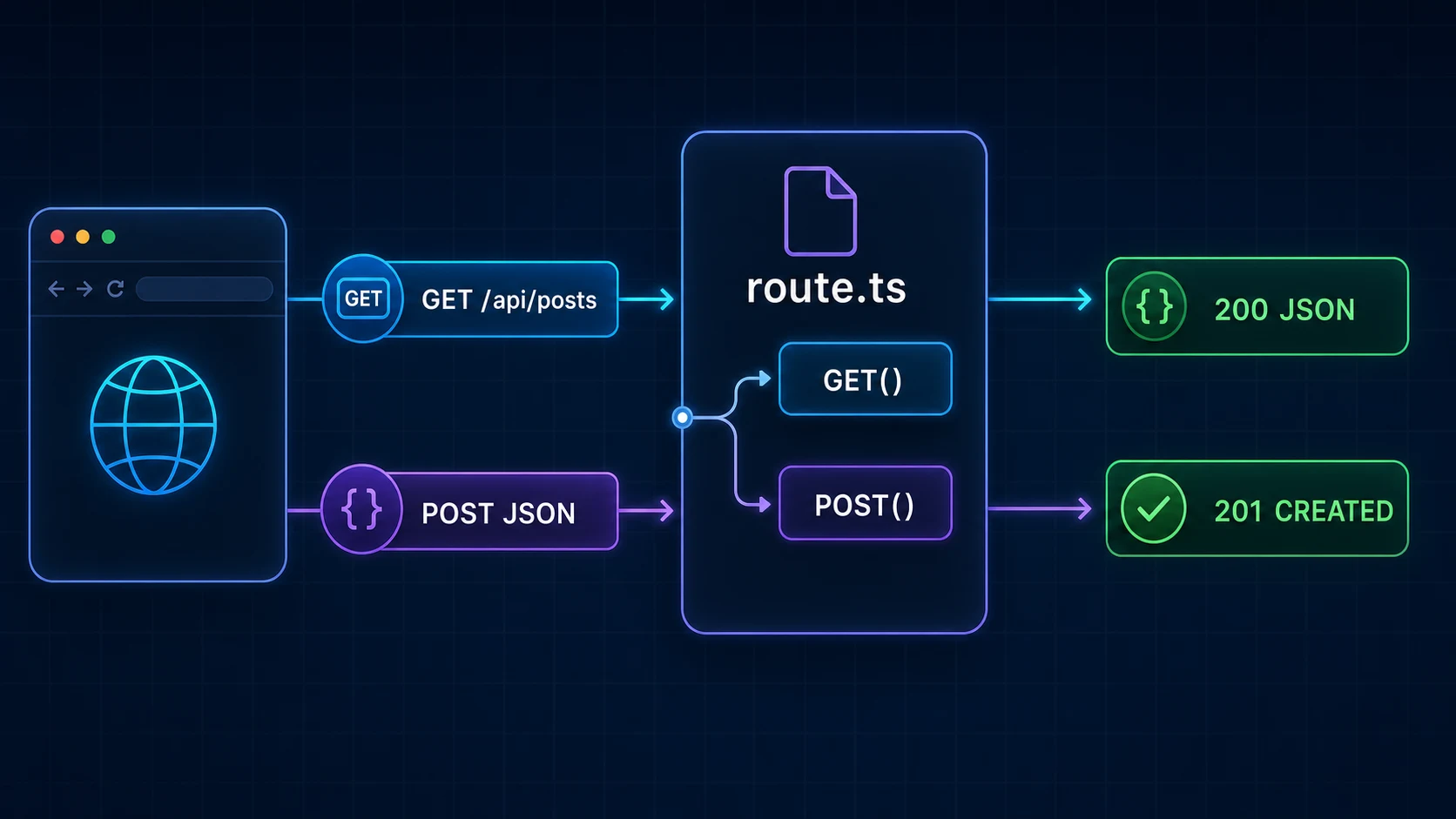
The exported name selects the HTTP method. The returned Response becomes the network response. This array is deliberately mock data; production handlers should call a reusable server-only data function.
- Client
- GET /api/posts
- route.ts → GET()
- Read data
- 200 JSON
Handling POST Requests and JSON
export async function POST(request: Request) {
  const body: unknown = await request.json()

  // Validate body before using it in production.
  return Response.json(
    { received: body },
    { status: 201 }
  )
}
request.json() parses JSON; it does not validate required fields, types, lengths, ownership, or permission. A request body is untrusted even when your own form sent it. Do not pass the whole body into a database insert: mass assignment can let callers set fields such as role, ownerId, or published.
- POST JSON
- Parse once
- Validate
- Authorize + write
- 201 Created
Reading FormData
export async function POST(request: Request) {
  const formData = await request.formData()
  const name = formData.get('name')

  if (typeof name !== 'string' || name.trim().length < 2) {
    return Response.json({ error: 'Invalid name' }, { status: 400 })
  }

  return Response.json({ data: { accepted: true } }, { status: 201 })
}
JSON is convenient for application APIs. FormData matches browser forms and file uploads. Both require validation and input-size limits. Read a request body only once; its stream is consumed.
URL Search Parameters and Safe Pagination
export async function GET(request: Request) {
  const { searchParams } = new URL(request.url)
  const rawPage = Number(searchParams.get('page') ?? '1')
  const rawLimit = Number(searchParams.get('limit') ?? '20')

  const page = Number.isInteger(rawPage) && rawPage > 0 ? rawPage : 1
  const limit = Number.isInteger(rawLimit)
    ? Math.min(100, Math.max(1, rawLimit))
    : 20

  return Response.json({ data: [], meta: { page, limit } })
}
Query values are strings. Parse them, handle NaN, reject or normalize invalid values, and cap limits so ?limit=1000000 cannot turn one request into an abusive database scan.
Dynamic Route Parameters
Put the item endpoint at app/api/posts/[id]/route.ts. In current Next.js 16, params is a Promise. The globally generated RouteContext helper can provide route-literal types after next dev, next build, or next typegen.
export async function GET(
  _request: Request,
  context: RouteContext<'/api/posts/[id]'>
) {
  const { id } = await context.params
  const post = await getPostById(id)

  if (!post) {
    return Response.json({ error: 'Post not found' }, { status: 404 })
  }

  return Response.json({ data: post })
}PUT vs PATCH vs DELETE
| Method | Typical purpose | Common success |
|---|---|---|
| GET | Read | 200 |
| POST | Create or trigger an action | 201 or 200 |
| PUT | Replace a complete representation | 200 or 204 |
| PATCH | Update selected fields | 200 or 204 |
| DELETE | Remove | 200 or 204 |
These are HTTP conventions, not business rules enforced by Next.js. Document your contract. A 204 No Content response must not include a JSON body. When a supported method is not exported, Next.js returns 405 Method Not Allowed. It can automatically implement OPTIONS with an appropriate Allow header when you do not define one.
Request, Response, NextRequest, and NextResponse
Prefer Web APIs when they are enough: request.url, request.headers, request.json(), request.formData(), and Response.json(). NextRequest extends Request with features such as parsed nextUrl and cookie access. NextResponse extends Response with Next.js helpers. They are useful, not mandatory.
import type { NextRequest } from 'next/server'

export async function GET(request: NextRequest) {
  const q = request.nextUrl.searchParams.get('q')
  return Response.json({ data: { q } })
}
Headers and Cookies
export async function GET(request: Request) {
  const requestId = request.headers.get('x-request-id')

  return Response.json(
    { data: { requestId } },
    { headers: { 'X-Content-Type-Options': 'nosniff' } }
  )
}
Header names are case-insensitive. Never log raw authorization headers. For cookies, Next.js 16 uses the asynchronous cookies() API. Let your existing authentication system create session cookies; do not hand-roll auth tokens.
import { cookies } from 'next/headers'

export async function POST() {
  const cookieStore = await cookies()
  cookieStore.set('preferences', 'compact', {
    httpOnly: true,
    secure: true,
    sameSite: 'lax',
    path: '/',
  })
  return Response.json({ data: { saved: true } })
}
Status Codes and Response Shapes
| Code | Meaning | Example |
|---|---|---|
| 200 | OK | Successful read or update |
| 201 | Created | New resource |
| 204 | No Content | Successful bodyless response |
| 400 | Bad Request | Invalid input |
| 401 | Unauthorized | Authentication required |
| 403 | Forbidden | Known caller lacks permission |
| 404 | Not Found | Resource absent |
| 409 | Conflict | Duplicate or state conflict |
| 429 | Too Many Requests | Rate limit |
| 500 | Internal Server Error | Unexpected failure |
Do not return 200 for every outcome. Keep success and error envelopes consistent, for example { "data": ... } and { "error": { "code": "INVALID_INPUT", "message": "..." } }. Consistency matters more than one universal shape.
Validate Every API Request
The downloadable starter does not include a validation package, so this tutorial does not pretend Zod is installed. Reuse the project schema library when one exists. Otherwise, validate an unknown value and create a new safe object containing only allowed fields.
type CreatePostInput = { title: string; content: string }

function readCreatePost(value: unknown): CreatePostInput | null {
  if (!value || typeof value !== 'object') return null
  const input = value as Record<string, unknown>
  if (typeof input.title !== 'string' || typeof input.content !== 'string') {
    return null
  }

  const title = input.title.trim()
  const content = input.content.trim()
  if (title.length < 3 || title.length > 120 || content.length === 0) {
    return null
  }
  return { title, content }
}Authentication and Authorization
For complete session, DAL, RBAC, and ownership patterns, read the Next.js 16 Authentication guide. For the request boundary—and why it should route or pre-filter rather than contain full API logic—continue with the Next.js 16 Proxy guide.
Authentication answers “who is calling?” Authorization answers “may this caller perform this operation on this resource?” A valid session does not permit every delete or admin read. Resolve identity through the project's real auth utility, then check role, ownership, tenant, and resource policy on the server. Never trust a client body such as { "role": "admin" } as proof.
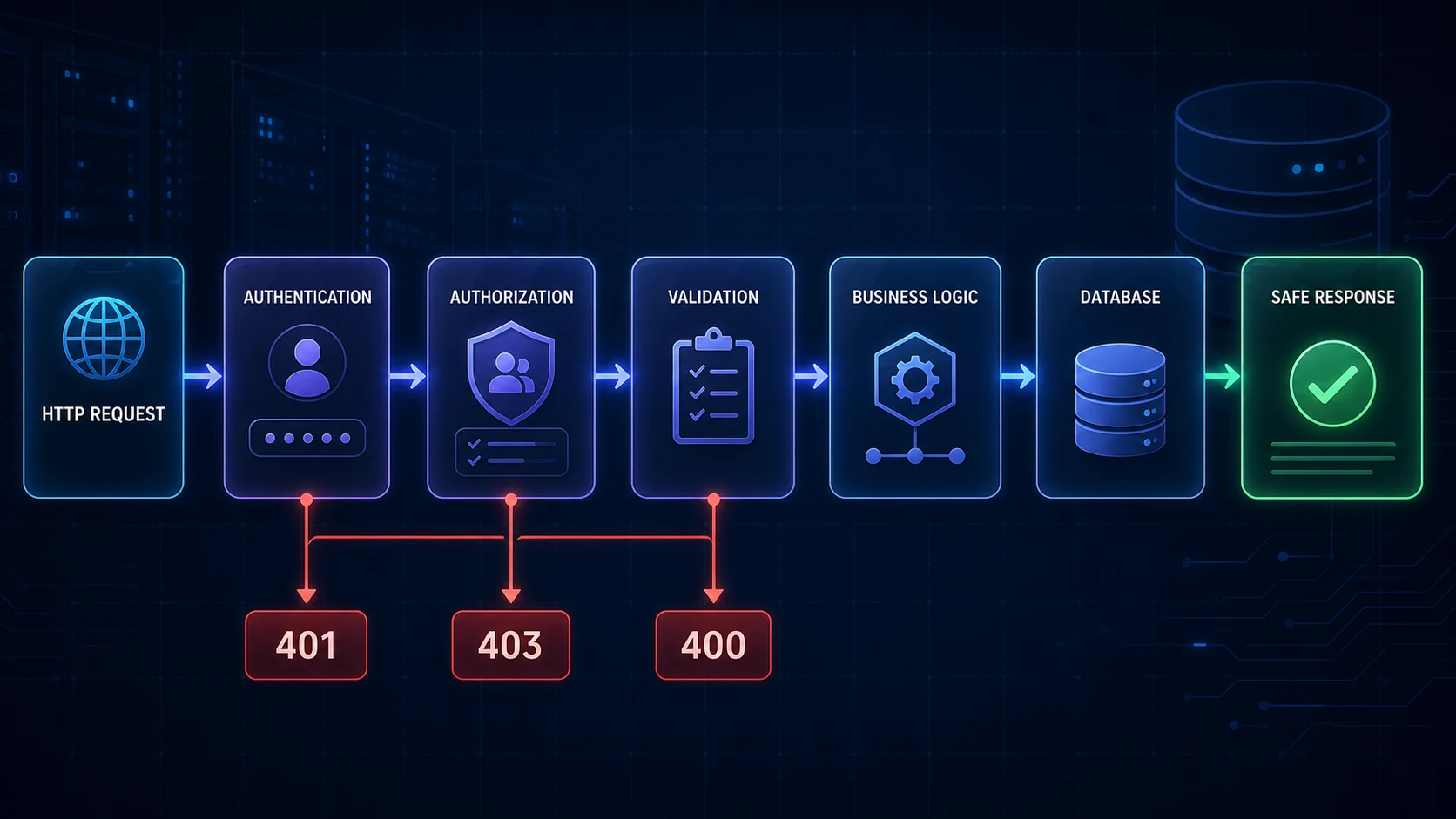
- Request
- Authenticate
- Authorize
- Validate
- Business logic
- Database
- Safe response
Handling Route Handler Errors
Translate expected failures close to the boundary: invalid input to 400, missing data to 404, and conflicts to 409. Log unexpected failures on the server with safe context, then return a generic 500 response. The Next.js error handling guide explains why raw database errors, stack traces, tokens, and request headers must stay out of public responses.
export async function GET() {
  try {
    return Response.json({ data: await getPosts() })
  } catch (error) {
    console.error('GET /api/posts failed', {
      errorType: error instanceof Error ? error.name : 'UnknownError',
    })
    return Response.json(
      { error: { code: 'INTERNAL_ERROR', message: 'Unable to load posts.' } },
      { status: 500 }
    )
  }
}
Keep framework control-flow helpers such as redirects outside broad catch blocks so they are not accidentally swallowed.
CORS Is Not Authentication
CORS tells browsers which origins may read a cross-origin response. It does not stop servers, scripts, or command-line clients from calling the endpoint. Allow specific trusted origins, methods, and headers; avoid reflecting arbitrary origins, especially with credentials.
const corsHeaders = {
  'Access-Control-Allow-Origin': 'https://app.example.com',
  'Access-Control-Allow-Methods': 'GET, POST, OPTIONS',
  'Access-Control-Allow-Headers': 'Content-Type, Authorization',
}

export async function OPTIONS() {
  return new Response(null, { status: 204, headers: corsHeaders })
}
Return the matching CORS headers on the actual GET or POST response too; a successful preflight alone does not make the final browser response readable.
Secure Webhook Endpoints
A Route Handler is a natural webhook receiver, but the sender is outside your application. Read the raw body with request.text() before JSON parsing when the provider signs raw bytes. Verify the signature using the provider's official library or documented algorithm, use constant-time comparison where required, check timestamp tolerance, reject replayed event IDs, and make processing idempotent.
export async function POST(request: Request) {
  const rawBody = await request.text()
  const signature = request.headers.get('provider-signature')

  if (!signature || !verifyProviderSignature(rawBody, signature)) {
    return Response.json({ error: 'Invalid signature' }, { status: 401 })
  }

  const event = parseVerifiedEvent(rawBody)
  await processEventOnce(event.id, event)
  return Response.json({ received: true })
}- Provider POST
- Read raw body
- Verify signature
- Reject replay
- Process once
- 2xx acknowledgement
Caching and Revalidation
GET Route Handlers are dynamic by default in current Next.js 16. Do not repeat the old assumption that every GET endpoint is automatically static. Opt into caching only for responses that are safe to share. Personalized or cookie-dependent responses should remain dynamic. Depending on whether the project enables Cache Components, use the matching current caching model rather than mixing examples.
export const dynamic = 'force-static'

export async function GET() {
  return Response.json({ data: await getPublicCatalog() })
}
After mutations, revalidateTag(tag, 'max') can mark tagged cached data stale with stale-while-revalidate behavior, while revalidatePath() invalidates data associated with a path. Route Handlers can call both. See Blog #8 on caching and revalidation before adding cache policy.
Server Actions vs Route Handlers
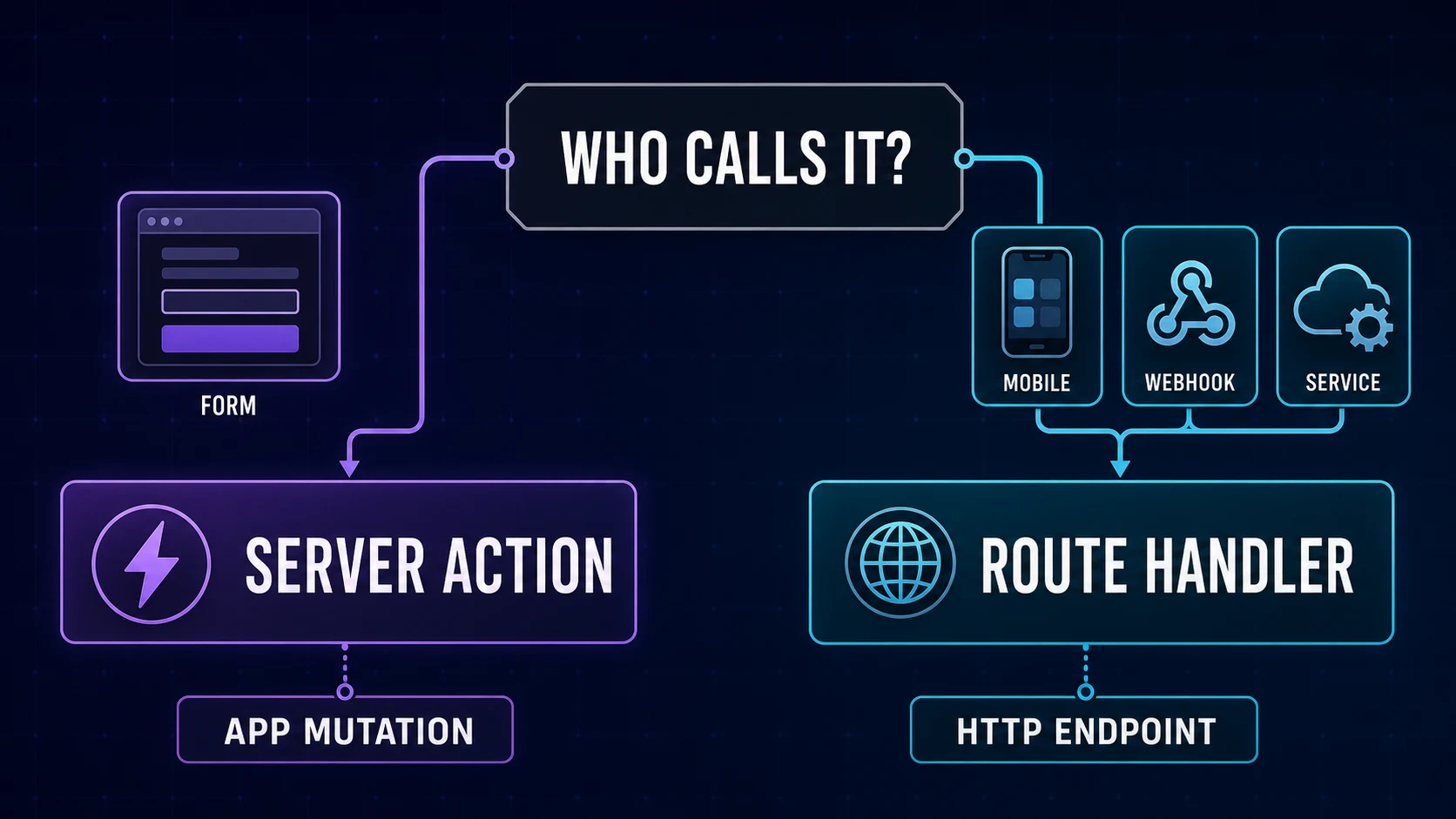
| Need | Usually choose |
|---|---|
| Form mutation inside one Next.js UI | Server Action |
| Mobile or third-party client | Route Handler |
| Webhook receiver | Route Handler |
| Public REST endpoint | Route Handler |
| Progressive-enhancement form | Server Action |
Do not call your own Route Handler from a Server Component merely to reach the database. Import the same server-only service or repository function instead. This avoids a redundant HTTP hop and keeps data logic reusable, as explained in Blog #6 on data fetching.
If the caller boundary is unclear, revisit Server and Client Components: browser-only interactions and external consumers need different contracts from server-only code that can import a trusted data module directly.
Pages Router API Routes vs Route Handlers
Legacy Pages Router endpoints use pages/api/*.ts with Node-style request and response objects. App Router Route Handlers use route.ts and Web APIs. Keep stable existing Pages Router APIs until you have a reason and tests to migrate; do not mix both conventions for the same URL.
Complete CRUD API Architecture
A maintainable posts API uses two route files and shared server functions. This project has no ORM or database helper, so the example intentionally does not invent Prisma, Drizzle, or Mongoose calls.
import { createPost, listPosts } from '@/server/posts'
import { readCreatePost } from '@/server/posts-validation'

export async function GET(request: Request) {
  const { searchParams } = new URL(request.url)
  const posts = await listPosts({ cursor: searchParams.get('cursor') })
  return Response.json({ data: posts })
}

export async function POST(request: Request) {
  const user = await requireApiUser(request)
  if (!user) return Response.json({ error: 'Authentication required' }, { status: 401 })

  const input = readCreatePost(await request.json())
  if (!input) return Response.json({ error: 'Invalid request' }, { status: 400 })

  const post = await createPost(user.id, input)
  return Response.json({ data: post }, { status: 201 })
}export async function PATCH(
request: Request,
context: RouteContext<'/api/posts/[id]'>
) {
const user = await requireApiUser(request)
if (!user) return Response.json({ error: 'Authentication required' }, { status: 401 })
const { id } = await context.params
const input = readPostPatch(await request.json())
if (!isValidPostId(id) || !input) {
return Response.json({ error: 'Invalid request' }, { status: 400 })
}
if (!(await canEditPost(user, id))) {
return Response.json({ error: 'Forbidden' }, { status: 403 })
}
const post = await updatePost(id, input)
return post
? Response.json({ data: post })
: Response.json({ error: 'Post not found' }, { status: 404 })
}export async function DELETE(
request: Request,
context: RouteContext<'/api/posts/[id]'>
) {
const user = await requireApiUser(request)
if (!user) return Response.json({ error: 'Authentication required' }, { status: 401 })
const { id } = await context.params
if (!isValidPostId(id)) {
return Response.json({ error: 'Invalid post ID' }, { status: 400 })
}
if (!(await canDeletePost(user, id))) {
return Response.json({ error: 'Forbidden' }, { status: 403 })
}
const deleted = await deletePost(id)
return deleted
? new Response(null, { status: 204 })
: Response.json({ error: 'Post not found' }, { status: 404 })
}Notice that 204 returns no JSON body. A PUT handler can reuse the same identity, ID, authorization, and validation pipeline but should require the documented complete resource representation. Public APIs may use a stable prefix such as /api/v1/posts; internal handlers do not need versioning by default.
Production Controls and Thin Handlers
Validation protects meaning, but production APIs also need resource controls. Enforce body and upload limits at the earliest reliable layer in your deployment, cap pagination, time out expensive upstream work, and rate-limit routes according to their cost and abuse risk. A password attempt, AI generation request, search query, and public cached GET do not need identical policies. Return 413 for a body that is too large and 429 when the caller exceeds a documented rate policy.
Keep route.ts focused on transport concerns: parse the request, resolve identity, validate allowed fields, call a service or domain function, and translate its result to HTTP. Put reusable business rules and database access in server-only modules. That architecture lets a Route Handler, Server Action, scheduled job, and Server Component call the same trusted function without making HTTP requests to one another.
Before deployment, test malformed JSON, wrong content types, missing and invalid credentials, denied ownership, duplicate requests, huge query limits, absent records, database failures, webhook replay, preflight requests, and 204 responses. Also confirm that logs redact authorization headers, cookies, tokens, signed webhook payloads, personal data, and database connection details.
Common Next.js Route Handler Mistakes
- Using
page.tsxwhen the URL should return an HTTP response rather than UI. - Placing
page.tsxandroute.tsat the same route segment level. - Treating
request.json()as validation. - Returning 200 for authentication, validation, and server failures.
- Exposing raw database errors or logging secrets.
- Authenticating a user without authorizing the resource.
- Calling an internal Route Handler unnecessarily from a Server Component.
- Using a Route Handler for every same-app form mutation.
- Assuming GET caching behavior from an older Next.js version.
- Using CORS as security or accepting arbitrary credentialed origins.
- Verifying a webhook after modifying its signed raw body.
- Allowing unlimited pages, bodies, uploads, or request rates.
For API keys, database URLs, webhook secrets, deployment configuration, and browser exposure rules, continue with Blog #16: Environment Variables & Production Security.
Next.js Route Handler Best Practices
- Use standard Request and Response APIs when they are sufficient.
- Keep handlers thin: parse, authenticate, validate, call a service, map the result.
- Validate every external value, including path and query parameters.
- Authenticate private endpoints and authorize each protected resource.
- Return meaningful status codes and consistent safe envelopes.
- Limit body, upload, pagination, and execution costs.
- Verify webhook signatures before parsing and make delivery idempotent.
- Rate-limit endpoints according to abuse and cost risk.
- Share server-only data functions instead of making internal HTTP calls.
- Cache only responses that are safe to share and deliberately revalidate them.
- Document public request, response, error, and version contracts.
FAQ
What is a Route Handler in Next.js 16?
A Route Handler is an App Router endpoint defined in route.ts or route.js. It receives an HTTP request and returns a Web Response.
What is route.ts used for?
It defines custom HTTP handlers such as GET, POST, PUT, PATCH, DELETE, HEAD, and OPTIONS for one route segment.
How do I create a GET API in the App Router?
Create app/api/posts/route.ts, export a GET function, and return a Response. Response.json is a convenient standards-based JSON response helper.
How do I handle POST requests in Next.js?
Export POST, read the body once with request.json, request.formData, or request.text, validate it, authorize the operation, and return an appropriate status.
What is the difference between Route Handlers and Server Actions?
Server Actions are designed for server-side mutations invoked by a Next.js UI. Route Handlers expose an HTTP contract for browsers, mobile apps, webhooks, and external services.
Can a Route Handler access a database?
Yes. It runs on the server and can call server-only data modules. Keep database and domain logic outside route.ts so pages, actions, and handlers can reuse it.
How do dynamic API routes work?
Place route.ts inside a dynamic segment such as app/api/posts/[id]. In Next.js 16, context.params is a Promise and must be awaited.
Are GET Route Handlers cached in Next.js 16?
No, not by default. GET Route Handlers are dynamic by default. Opt into caching deliberately only when the response is safe to share and the project caching model supports it.
How do I secure a Next.js API endpoint?
Validate all input, authenticate the caller, authorize the resource operation, limit abuse, protect secrets, and return only safe response data.
Can Route Handlers receive webhooks?
Yes. Read the raw body, verify the provider signature using its official SDK or documented algorithm, reject invalid or replayed events, and make processing idempotent.
Should Server Components call internal Route Handlers?
Usually not when both can call the same server-only data function. An internal HTTP hop adds latency and can complicate caching and deployment.
Do Route Handlers support CORS?
You can set CORS response headers and export OPTIONS for preflight behavior. CORS controls browser access; it is not authentication or authorization.
Official Resources
- Next.js: Route Handlers
- Next.js:
route.tsreference - Next.js: Dynamic Segments
- Next.js:
cookies() - Next.js: Revalidating
Next Steps
You can now design a real HTTP boundary with current Next.js 16 APIs, safe input handling, deliberate permissions, meaningful statuses, secure webhooks, and explicit caching. When a handler calls external services, continue with Blog #28: Next.js SSRF Prevention before accepting any user-influenced destination. Protect costly and abuse-sensitive endpoints with the shared atomic patterns in Next.js 16 Redis Caching & Rate Limiting.
Testing this boundary: continue with Blog #34 on Route Handler and API testing with Vitest, integration tests and Playwright.
