



You now know how to build pages, data flows, mutations, and HTTP endpoints with Route Handlers. The next step is making sure every important page has accurate metadata for search engines, browsers, and social sharing.
Metadata is not a ranking trick. It describes a page and helps platforms present it, while sustainable SEO also depends on useful content, crawlability, crawlable internal links, performance, accessibility, search intent, and site reputation.
Metadata at a Glance
The Metadata API turns typed configuration into document head tags. Static pages can export metadata; data-driven pages can export generateMetadata; special files can define icons, manifests, social images, robots rules, and sitemaps.
| Need | App Router tool |
|---|---|
| Known title and description | Static metadata |
| Post-specific values | generateMetadata |
| Canonical and absolute social URLs | metadataBase + URL metadata fields |
| Icons and social images | Metadata fields or file conventions |
| Robots and sitemap endpoints | robots.ts and sitemap.ts |
| Structured data | Safely serialized JSON-LD script |
The downloadable starter declares "next": "latest" without a lockfile or installed dependency tree. No exact patch version can be verified. These examples follow the current official Next.js 16 documentation; production projects should pin a version and commit the lockfile.
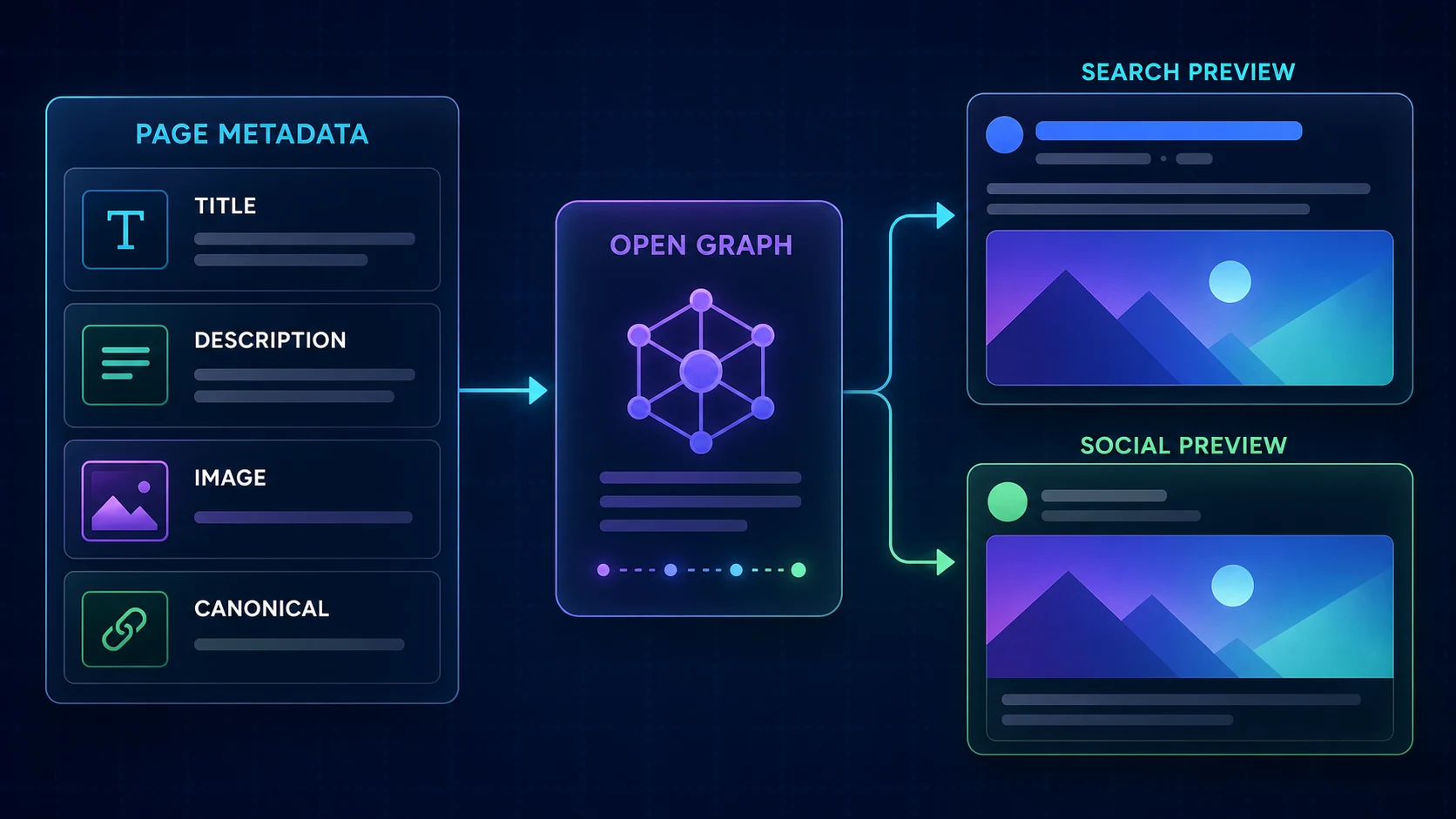
Title · description · canonicalSocial
Image · title · summaryBrowser
Tab title · icon
Static Metadata with metadata
Export a typed object from a layout.tsx or page.tsx Server Component when values do not depend on request or content data. Metadata exports are not supported in Client Components. Keep the page server-side and move interactive UI into a child Client Component.
import type { Metadata } from 'next'

export const metadata: Metadata = {
  title: 'About NavTech Solution',
  description: 'Learn about NavTech Solution and our development work.',
}

export default function AboutPage() {
  return <main>...</main>
}
Layouts, Pages, and Metadata Merging
Metadata is evaluated from the root layout through nested layouts to the final page. Fields are shallowly merged, and later duplicate keys replace earlier values. This matters for nested objects: defining openGraph in a child replaces the parent openGraph object instead of deeply merging missing properties. Share reusable fragments explicitly when needed. Review layouts and pages for the underlying segment hierarchy.
- Root layout
site defaults - Blog layout
section fields - Post page
specific fields - Final metadata
shallow merge
Title Templates
import type { Metadata } from 'next'

export const metadata: Metadata = {
  title: {
    default: 'NavTech Solution',
    template: '%s | NavTech Solution',
  },
}
A template needs a default and applies to titles in child route segments, not the page at the same segment where the template is declared. A child title of Next.js Metadata Guide becomes Next.js Metadata Guide | NavTech Solution. Use title.absolute when a route must intentionally ignore a parent template.
Writing Useful Meta Descriptions
Give important indexable pages a concise, specific description matching visible content and search intent. Avoid repeated boilerplate, keyword lists, fabricated benefits, and claims the article cannot support. A supplied description is a suggestion: search engines may generate a different query-specific snippet.
Dynamic Metadata with generateMetadata
In Next.js 16, dynamic route params are Promises. Await the slug, load the same trusted post record used by the page, and return typed metadata. You cannot export both static metadata and generateMetadata from the same segment.
import type { Metadata } from 'next'
import { notFound } from 'next/navigation'

type Props = { params: Promise<{ slug: string }> }

export async function generateMetadata({ params }: Props): Promise<Metadata> {
  const { slug } = await params
  const post = await getPost(slug)
  if (!post) notFound()

  return {
    title: post.title,
    description: post.description,
    alternates: { canonical: `/blog/${post.slug}` },
  }
}
Identical fetch requests are automatically memoized across metadata, layouts, pages, and Server Components; use React cache when the data source is not fetch. Missing content can call notFound(), connecting metadata resolution with the safe 404 patterns from Blog #9.
Dynamic metadata may stream after initial UI for capable clients. Next.js blocks rendering for HTML-limited bots so metadata remains in the head they inspect. The default bot handling is appropriate for most sites; changing htmlLimitedBots can increase response time.
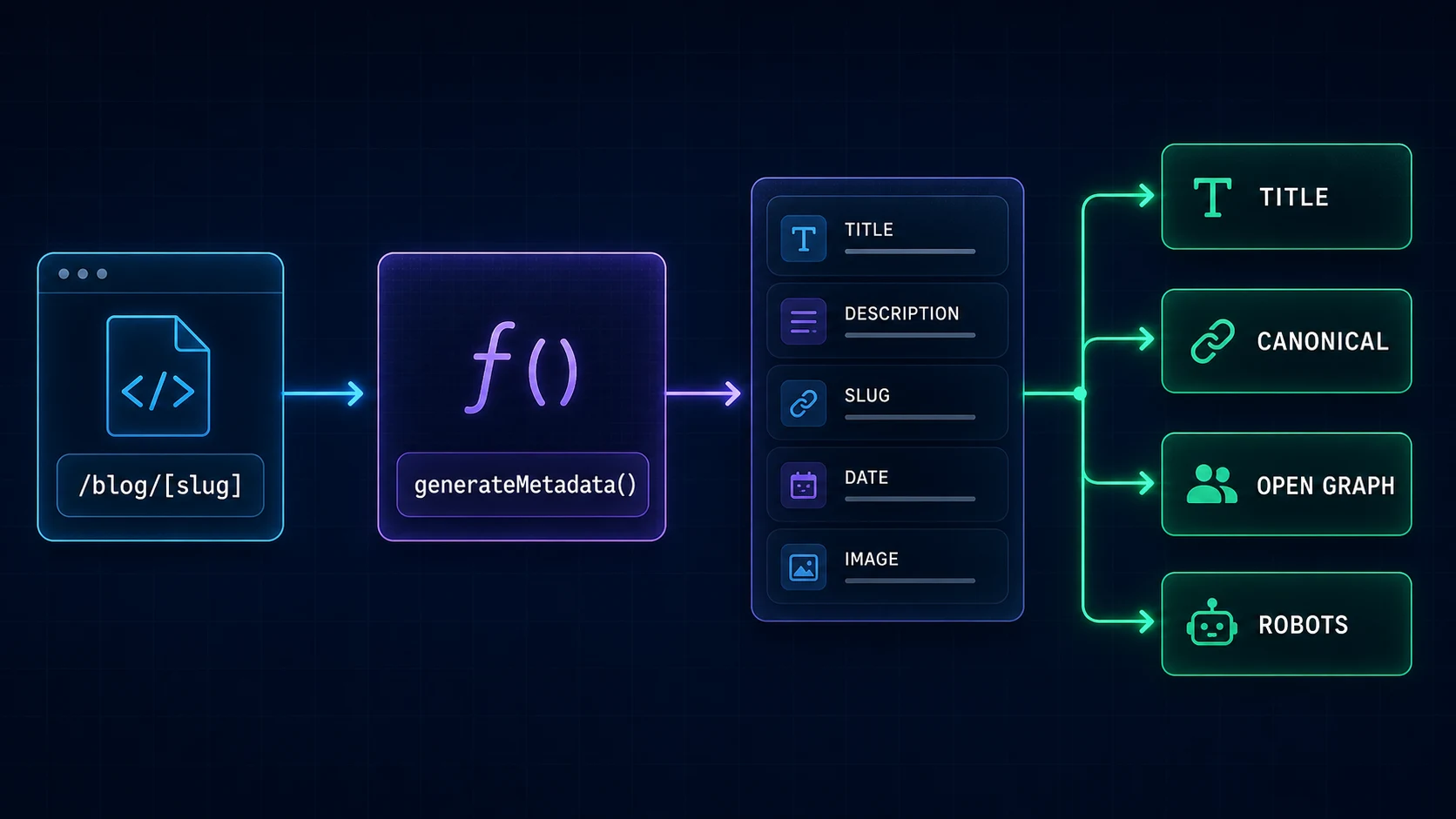
- /blog/slug
- await params
- generateMetadata
- load post
- render metadata
Canonical URLs and metadataBase
A canonical identifies the preferred URL for duplicate or substantially equivalent content. It is not a redirect and does not guarantee a search engine will select it. Configure the known production origin rather than reading an untrusted Host header or accidentally canonicalizing a preview domain.
export const metadata: Metadata = {
  metadataBase: new URL('https://navtechsolution.com'),
  alternates: { canonical: '/' },
}
metadataBase resolves relative URL-based metadata fields. An absolute field ignores it; a relative URL without a configured base can cause a build error. Keep the production site URL in validated server configuration when environments differ.
Open Graph and Twitter/X Metadata
Open Graph fields shape link previews on many services. Twitter/X metadata provides platform-oriented card fields, although platforms can change their rendering and may fall back to Open Graph. Reference only real images with accurate dimensions and useful alt text.
export const metadata: Metadata = {
  openGraph: {
    title: 'Next.js Metadata Guide',
    description: 'Build accurate App Router metadata.',
    url: '/blog/nextjs-metadata',
    type: 'article',
    images: [{
      url: '/assets/images/blog/nextjs-metadata-seo/nextjs-16-metadata-seo.webp',
      width: 1672,
      height: 941,
      alt: 'Next.js Metadata Guide',
    }],
  },
  twitter: {
    card: 'summary_large_image',
    title: 'Next.js Metadata Guide',
    description: 'Build accurate App Router metadata.',
    images: ['/assets/images/blog/nextjs-metadata-seo/nextjs-16-metadata-seo.webp'],
  },
}
The example uses Blog #11's verified production asset rather than a placeholder URL. In a Next.js application, file-based opengraph-image and twitter-image conventions can use static JPG, PNG, or GIF files, or generated TSX routes. More specific segment images take precedence. For responsive delivery, layout stability, and format configuration, continue with the Next.js 16 Image Optimization guide.
Robots Directives and robots.txt
export const metadata: Metadata = {
  robots: { index: true, follow: true },
}
index permits indexing; noindex asks compliant crawlers not to index. follow and nofollow influence link-following behavior. Apply noindex intentionally to previews, internal search results, or private environments, not globally to production.
import type { MetadataRoute } from 'next'

export default function robots(): MetadataRoute.Robots {
  return {
    rules: { userAgent: '*', allow: '/', disallow: '/private/' },
    sitemap: 'https://navtechsolution.com/sitemap.xml',
  }
}
A static app/robots.txt is also valid. Robots rules express crawler preferences; they do not authenticate users or protect secrets. Sensitive routes need real authorization and should not expose private data even when directly requested.
Creating a Sitemap
import type { MetadataRoute } from 'next'

export default async function sitemap(): Promise<MetadataRoute.Sitemap> {
  const posts = await getPublishedPosts()
  return posts.map((post) => ({
    url: `https://navtechsolution.com/blog/${post.slug}`,
    lastModified: post.updatedAt,
  }))
}
Use real published records and actual modification dates. Do not stamp every URL with the build time. Exclude private, admin, preview, and parameter-noise URLs. A sitemap improves discovery; submission does not guarantee crawling, indexing, or ranking.
File-Based Metadata Conventions
| Convention | Purpose |
|---|---|
favicon.ico | Root browser icon |
icon.*, apple-icon.* | App and device icons |
opengraph-image.* | Open Graph image |
twitter-image.* | Twitter/X image |
manifest.json or manifest.ts | Web app manifest |
robots.txt or robots.ts | Crawler rules |
sitemap.xml or sitemap.ts | Public URL discovery |
File-based metadata has higher priority than configuration returned by metadata or generateMetadata. Avoid accidentally maintaining two competing sources for the same field.
Structured Data with JSON-LD
JSON-LD is separate from the Metadata object. It should describe real visible entities using real authors, dates, URLs, and images. Never add fabricated ratings, reviews, credentials, or freshness dates.
const jsonLd = {
  '@context': 'https://schema.org',
  '@type': 'Article',
  headline: post.title,
  description: post.description,
  datePublished: post.publishedAt,
  dateModified: post.updatedAt,
  url: `https://navtechsolution.com/blog/${post.slug}`,
}

<script
  type="application/ld+json"
  dangerouslySetInnerHTML={{
    __html: JSON.stringify(jsonLd).replace(/</g, '\\u003c'),
  }}
/>
Escaping less-than characters reduces script-breakout risk when values can contain user-controlled text. Follow the organization's sanitization policy. Visible breadcrumbs and BreadcrumbList should name and order the same Home → Blog → Next.js → article path.
Pagination, Duplicate Content, and Canonicals
Do not automatically canonicalize every paginated page to page one. Page two may expose distinct items and deserve its own self-referencing canonical. Decide how filters, sorting, tracking parameters, print views, syndication, and locale variants should be indexed before generating metadata. Canonicals should represent real equivalence, not hide architecture problems.
Build SEO for a Dynamic Blog Post
A practical post pipeline starts from one trusted content record containing title, description, slug, publication and modification dates, image, and indexability. The same record should drive generateMetadata, visible H1 and summary, Article JSON-LD, breadcrumbs, social image, and sitemap entry. This prevents contradictory titles, broken images, and fake freshness.

- Post content
- generateMetadata
- Canonical + social
- Page + JSON-LD
- Links + sitemap
- Search + social
Common Next.js Metadata and SEO Mistakes
- Using the same title or description on every page.
- Exporting metadata from a Client Component.
- Pointing canonicals to previews, staging, or the wrong protocol.
- Publishing nonexistent OG image URLs.
- Forgetting dynamic metadata for blog posts.
- Assuming nested metadata objects merge deeply.
- Keyword stuffing titles and descriptions.
- Adding fake
lastModifiedvalues to a sitemap. - Using robots.txt as authentication.
- Adding JSON-LD that does not match visible content.
- Fabricating ratings, reviews, authors, or dates.
- Canonicalizing all pagination to page one without analysis.
- Assuming sitemap submission guarantees indexing.
- Expecting metadata to compensate for weak content.
Next.js Metadata and SEO Best Practices
- Use static metadata for known values and dynamic metadata only when data requires it.
- Configure one trusted production site origin.
- Create unique, accurate titles and descriptions for important pages.
- Keep canonical, Open Graph, JSON-LD, and visible content consistent.
- Reuse real content records and shared metadata fragments.
- Verify every referenced image exists and has accurate dimensions.
- Keep private and preview URLs out of the public sitemap.
- Use real publication and modification dates.
- Test generated production HTML, sitemap, robots file, and share images.
- Maintain crawlable internal navigation and useful page content.
Inspecting Metadata
Inspect the production page source and rendered DOM, then verify the title, description, canonical, robots directives, social image URL, and JSON-LD script. Open the generated sitemap and robots.txt directly. Validate structured data with appropriate validators, but remember that passing a tool does not guarantee search visibility or ranking.
FAQ
What is the Metadata API in Next.js 16?
It is the App Router system for declaring titles, descriptions, canonicals, social metadata, robots directives, icons, and related head information through typed server-side APIs and file conventions.
How do I set a page title in the App Router?
Export a typed metadata object from a Server Component page or layout when the title is static, or return it from generateMetadata when it depends on route data.
What is generateMetadata?
generateMetadata is a server-only function that resolves metadata from route params, search params, parent metadata, or fetched content as part of rendering a page.
How do I set a canonical URL in Next.js?
Set alternates.canonical in metadata. Configure a trusted production metadataBase when using relative canonical values.
What does metadataBase do?
metadataBase resolves relative URL-based metadata fields, such as canonical and Open Graph image URLs, against one configured base URL.
How do I add Open Graph metadata?
Use the openGraph metadata field or a real opengraph-image file convention. Include an accurate title, description, URL, type, and existing image.
How do I create a sitemap in Next.js?
Add app/sitemap.ts returning MetadataRoute.Sitemap, or use a static app/sitemap.xml. Populate URLs and modification dates from real content.
How do I create robots.txt in Next.js?
Add a static app/robots.txt or return MetadataRoute.Robots from app/robots.ts. Robots rules are crawler preferences, not access control.
Can I generate metadata dynamically for blog posts?
Yes. Await the Promise-based slug params in generateMetadata, load the post, handle missing content, and return metadata built from its real fields.
How do I add JSON-LD in Next.js?
Render a script with type application/ld+json in the page or layout and safely serialize real structured data, escaping less-than characters to reduce injection risk.
Does metadata improve Google rankings?
Metadata helps systems understand and present pages, but it does not guarantee rankings. Content quality, crawlability, links, performance, accessibility, intent, and reputation also matter.
Should every page have a unique meta description?
Important indexable pages should normally have an accurate, useful description. Search engines may still generate a different snippet for a specific query.
Official Resources
- Next.js: Metadata and OG images
- Next.js: generateMetadata
- Next.js: Metadata files
- Next.js: robots.txt
- Next.js: sitemap.xml
- Next.js: JSON-LD
Next Steps
You can now build a trustworthy metadata system for static pages, dynamic posts, social previews, crawler discovery, and structured data. Continue with Blog #12: Next.js 16 Image Optimization to optimize the images users download.
