



You now know how to build pages, update data with Server Actions, and create Route Handlers. Once users can read private data or make changes, authentication and authorization become essential.
This guide explains identity, sessions, secure cookies, protected Server Components, actions and handlers, role and ownership checks, a server-only Data Access Layer (DAL), Proxy's limited role, common vulnerabilities, and a complete protected-dashboard pattern.
Authentication at a Glance
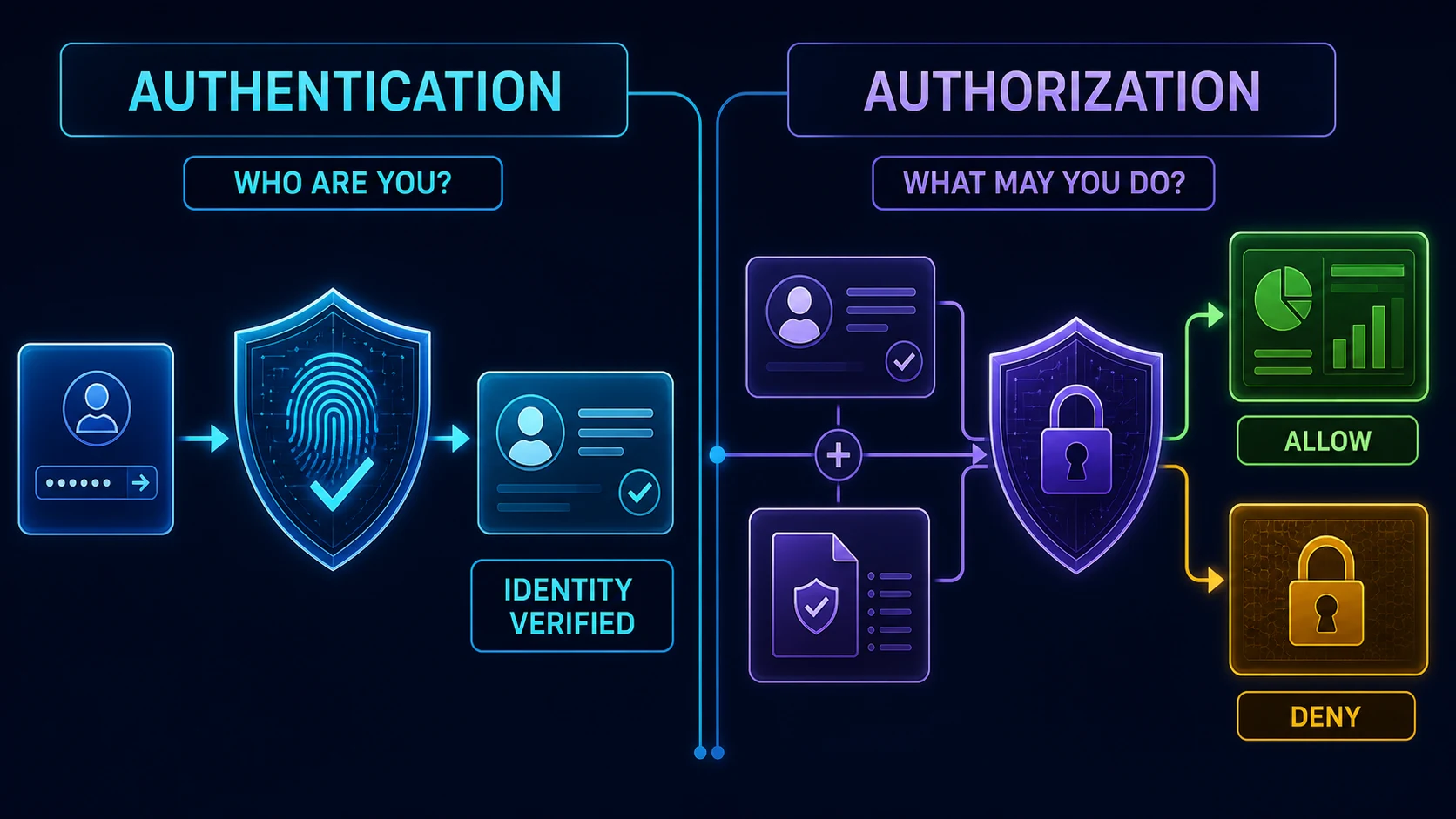
A secure flow has three separate jobs. Authentication verifies identity. Session management carries that verified state across requests. Authorization decides what the current user may access or change. A valid session is not automatic permission to every record.
The downloadable Next.js starter has no auth dependency, login route, session storage, user schema, DAL, Proxy, or environment configuration. Its package file declares only next, react, and react-dom as latest, with no lockfile. Therefore no exact patch or existing provider can be verified. This article defines provider-neutral boundaries and does not install or pretend to use Auth.js, Clerk, Better Auth, Supabase, or a custom token stack.
- Credentials
- Verify identity
- Create session
- Request + cookie
- Authorize action
- Protected data
Authentication vs Authorization
| Question | Authentication | Authorization |
|---|---|---|
| Meaning | Who is this user? | What may this user do? |
| Typical evidence | Password, passkey, OAuth result, provider identity | Role, permission, tenant membership, ownership, policy |
| Failure | 401 or login flow | 403, safe denied state, or 404 when policy hides existence |
| When | Login and session verification | Every protected read and mutation |
A user may be authenticated but forbidden from deleting another user's project. Conversely, a role copied from a hidden input is not authorization because the browser controls it. Load trusted identity and policy data on the server.
Which Authentication System Does This Project Use?
None is configured in the downloadable starter. That absence matters: provider APIs, callback routes, database schemas, cookie names, refresh behavior, and deployment requirements differ. The safest tutorial architecture is a small server-only adapter contract that a production project implements with one chosen, maintained library.
export type Viewer = {
  userId: string
  role: 'member' | 'admin'
  organizationId: string
}

export interface AuthAdapter {
  verifySessionToken(token: string): Promise<Viewer | null>
  createSession(userId: string): Promise<{
    token: string
    expiresAt: Date
  }>
  revokeSession(token: string): Promise<void>
}
Use one production adapter backed by the selected auth library. Do not write custom cryptography, password hashing, OAuth validation, token rotation, or recovery flows merely to satisfy this interface. Follow the provider's official server-side integration and threat model.
Sessions and Secure Cookies
A stateless session stores signed or encrypted claims in a cookie. A database session normally stores an opaque session identifier in the browser and authoritative state on the server. Database sessions make device lists, global logout, revocation, and security auditing easier; stateless sessions can reduce lookups but require careful expiry, rotation, and revocation strategy.
import 'server-only'
import { cookies } from 'next/headers'

export async function setSessionCookie(token: string, expiresAt: Date) {
  const cookieStore = await cookies()
  cookieStore.set('session', token, {
    httpOnly: true,
    secure: process.env.NODE_ENV === 'production',
    sameSite: 'lax',
    expires: expiresAt,
    path: '/',
  })
}

export async function clearSessionCookie() {
  const cookieStore = await cookies()
  cookieStore.delete('session')
}
In Next.js 16, cookies() is asynchronous. Server Components may read cookies, but setting or deleting them must happen in a Server Function or Route Handler before streaming starts. HttpOnly blocks JavaScript access, Secure restricts transport to HTTPS in production, SameSite affects cross-site sending, and expiry limits session lifetime. Cookie flags reduce risk; they do not replace session validation or CSRF analysis.
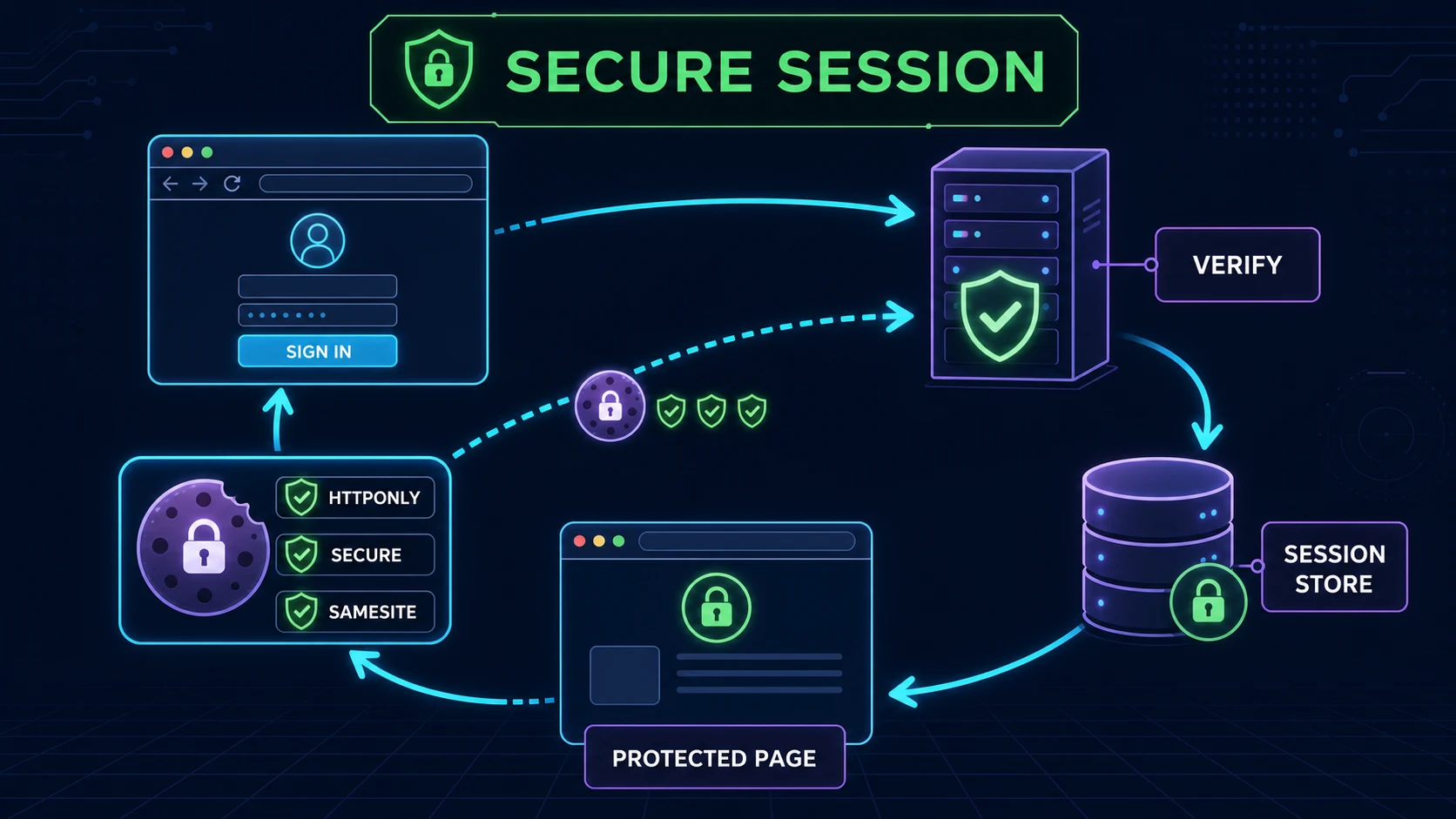
- Login POST
- Verify provider
- Create session
- Set-Cookie
- Validate request
- Return private UI
Security Checks Must Happen on the Server
Hiding a button, changing client state, or redirecting in the browser improves interface clarity but does not secure an endpoint. Attackers can call exported Server Actions and Route Handlers directly, edit form values, construct URLs, and replay requests. Every entry point must validate its own untrusted input and enforce identity plus authorization.
Use a Secure Data Access Layer
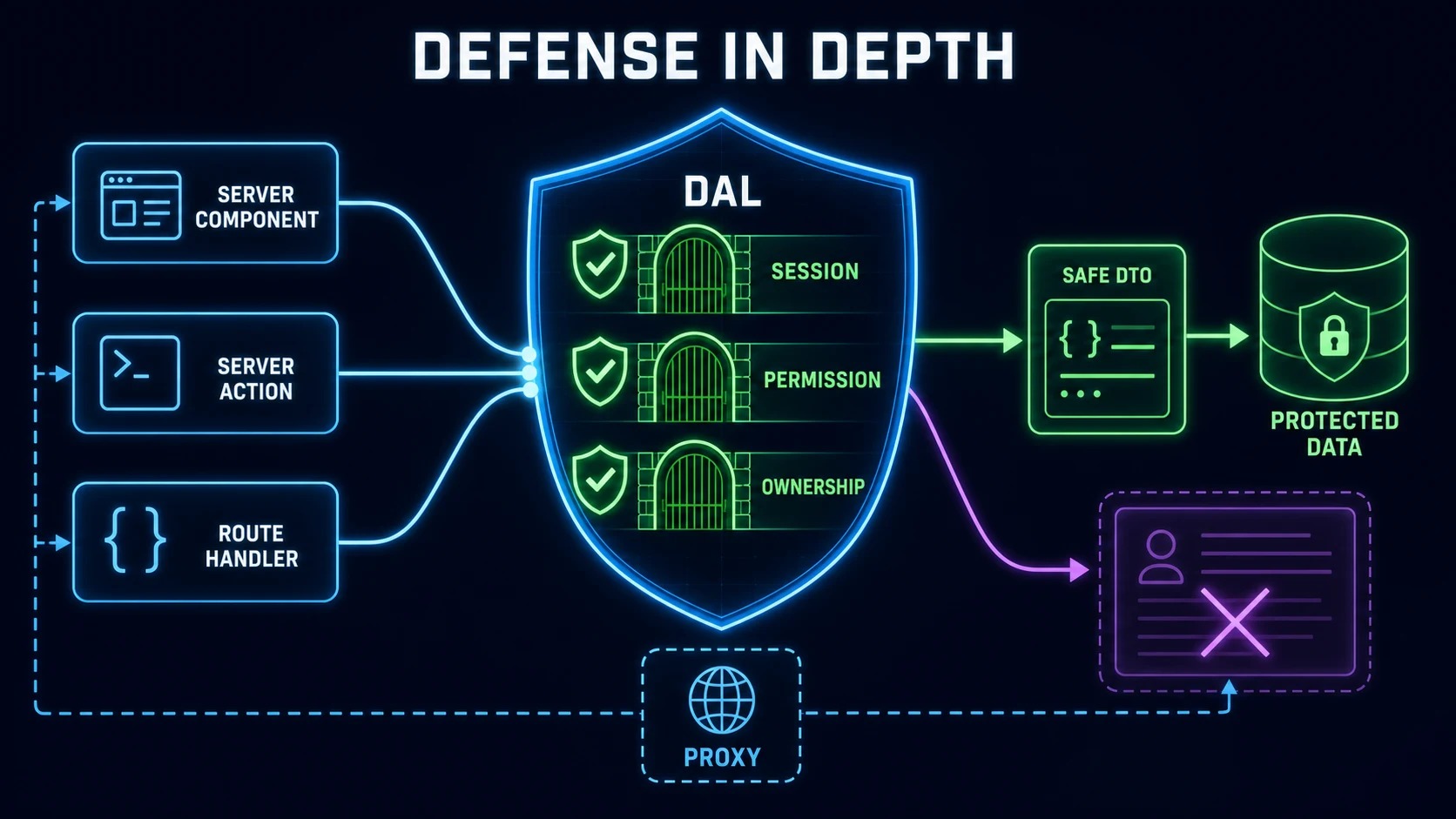
The official guidance recommends a server-only DAL for new applications. It centralizes session verification and authorization, then returns minimal Data Transfer Objects (DTOs). This prevents components from querying entire user rows and accidentally serializing password hashes, provider tokens, internal flags, billing data, or unrelated personal information.
import 'server-only'
import { cache } from 'react'
import { cookies } from 'next/headers'
import { redirect } from 'next/navigation'
import { authAdapter } from './configured-adapter'

export const getOptionalViewer = cache(async () => {
  const token = (await cookies()).get('session')?.value
  if (!token) return null

  return authAdapter.verifySessionToken(token)
})

export const requireViewer = cache(async () => {
  const viewer = await getOptionalViewer()
  if (!viewer) redirect('/login')

  return viewer
})
configured-adapter is intentionally not included because the repository has no provider. React cache can deduplicate verification during one render pass; it is not a global permission cache. Database access functions should call requireViewer, filter rows using trusted viewer fields, and map results into narrow DTOs.
export async function getProject(projectId: string) {
  const viewer = await requireViewer()
  const project = await projectRepository.findById(projectId)

  if (!project || project.organizationId !== viewer.organizationId) {
    return null
  }

  return { id: project.id, name: project.name, status: project.status }
}
projectRepository is an application boundary to implement with the actual database stack. The query must be parameterized, and a production design should push tenant or ownership constraints into the database query where possible.
Protecting Server Components, Pages, and Layouts
A page that renders private data can call the DAL directly. Keep the query and policy server-side, then pass only the DTO needed by the interface. This follows the server-first boundary described in Server and Client Components.
import { requireViewer, getDashboardSummary } from '@/lib/auth/dal'

export default async function DashboardPage() {
  const viewer = await requireViewer()
  const summary = await getDashboardSummary(viewer.organizationId)

  return <Dashboard userRole={viewer.role} summary={summary} />
}
Do not rely only on a shared layout check. With partial rendering, layouts do not necessarily rerender on every navigation, and other entry points can bypass the visual tree. Keep checks in the DAL, page, leaf component, action, or handler that touches the protected resource. Protect the data, not merely the page shell.
Protecting Server Actions
An exported Server Action creates a callable server endpoint. Secure action IDs and same-origin protections are defense-in-depth, not authorization. Validate every FormData value, authenticate inside the action, load the target resource, check permission or ownership, and mutate only after all checks succeed.
'use server'

import { requireViewer } from '@/lib/auth/dal'
import { revalidatePath } from 'next/cache'

export async function renameProject(formData: FormData) {
  const viewer = await requireViewer()
  const projectId = String(formData.get('projectId') ?? '')
  const name = String(formData.get('name') ?? '').trim()
  if (!projectId || name.length < 2 || name.length > 80) {
    return { ok: false, message: 'Check the submitted values.' }
  }

  const project = await projectRepository.findById(projectId)
  if (!project || project.organizationId !== viewer.organizationId) {
    return { ok: false, message: 'Project is unavailable.' }
  }

  await projectRepository.rename(project.id, name)
  revalidatePath('/dashboard/projects')
  return { ok: true }
}
The action ignores any submitted userId, role, or organizationId. Those values come from the verified server session. Apply rate limits and audit logging to sensitive actions such as login, recovery, password change, role changes, payments, and destructive operations.
- FormData
- Validate
- Verify session
- Load resource
- Authorize
- Mutate + refresh
Protecting Route Handlers
Treat a Route Handler as a public API. It may be called without your interface, so validate method, content type, body, path parameters, and query limits. Recheck session and permission inside the handler. Return 401 when valid identity is absent and 403 when an authenticated user lacks permission; use a safe 404 when revealing resource existence would leak information.
import { getOptionalViewer } from '@/lib/auth/dal'

export async function GET() {
  const viewer = await getOptionalViewer()
  if (!viewer) return Response.json({ error: 'Authentication required' }, { status: 401 })
  if (viewer.role !== 'admin') {
    return Response.json({ error: 'Forbidden' }, { status: 403 })
  }

  const reports = await reportRepository.listSafeSummaries(viewer.organizationId)
  return Response.json({ reports })
}
Use the response and validation patterns from the Route Handlers guide. Do not expose raw database errors, session tokens, authorization headers, cookies, password data, or provider responses in logs.
Role-Based Authorization and Ownership
RBAC assigns permissions to roles such as member, editor, and admin. Keep the role definition server-side and default to deny. Roles are coarse; many operations also need organization membership, subscription state, record ownership, or an explicit sharing policy.
type Permission = 'project:read' | 'project:update' | 'user:manage'

const rolePermissions: Record<Viewer['role'], Permission[]> = {
  member: ['project:read'],
  admin: ['project:read', 'project:update', 'user:manage'],
}

export function can(viewer: Viewer, permission: Permission) {
  return rolePermissions[viewer.role].includes(permission)
}
Never trust a role in React state, a cookie you have not cryptographically verified, a URL, a hidden field, or a JSON body. Even an admin permission may not cross tenant boundaries. For an ordinary member editing a project, require both the update permission and an ownership or organization match.
Proxy and Redirecting Unauthenticated Users
Next.js 16 deprecates the middleware.ts naming convention in favor of proxy.ts. Proxy can perform an optimistic cookie check and redirect obviously unauthenticated requests before a protected page renders. It should avoid database lookups and is not the final authorization boundary. Learn how route protection works with Next.js 16 Proxy, including matchers, redirects, rewrites, and request headers.
import { NextRequest, NextResponse } from 'next/server'

export function proxy(request: NextRequest) {
  const hasSession = request.cookies.has('session')
  if (!hasSession) {
    const login = new URL('/login', request.url)
    login.searchParams.set('next', request.nextUrl.pathname)
    return NextResponse.redirect(login)
  }
  return NextResponse.next()
}

export const config = { matcher: ['/dashboard/:path*'] }
The presence of a cookie does not prove validity, and Proxy cannot replace DAL checks. Validate the next destination against a strict internal-path policy before redirecting after login; never send users to an arbitrary submitted URL.
Login, Logout, and Stronger Authentication
A login form can call a Server Action that validates normalized input, invokes the chosen provider, creates or rotates a session, sets the cookie, and redirects to a validated internal path. Use generic failure messages to reduce account enumeration. Add throttling by account and network signals without locking out legitimate users permanently. Passwords require an established adaptive password-hashing implementation; never store plaintext or create custom hashing.
'use server'

export async function login(_state: LoginState, formData: FormData) {
  const credentials = validateLoginInput(formData)
  if (!credentials.ok) return { message: 'Check your sign-in details.' }

  const result = await configuredAuthProvider.signIn(credentials.data)
  if (!result.ok) return { message: 'Unable to sign in.' }

  const session = await authAdapter.createSession(result.userId)
  await setSessionCookie(session.token, session.expiresAt)
  redirect('/dashboard')
}
Logout is a mutation: revoke the server session where applicable, delete the cookie in a Server Action or Route Handler, then redirect. Rotate identifiers after login and privilege changes to reduce session fixation. For higher-risk systems, prefer provider-supported MFA or passkeys, recovery codes, device/session management, and recent-authentication checks.
Client Components and Auth State
A Client Component may receive a small DTO such as display name, avatar URL, or boolean capability for interface behavior. It must not receive session tokens, password fields, provider secrets, full user rows, or hidden admin policy. Client-side state can become stale or manipulated, so every mutation repeats authorization on the server.
Environment Variables and Secret Handling
Store provider secrets, session keys, OAuth client secrets, and database credentials in server-only environment variables managed by the deployment platform. Do not commit .env* files. Never prefix secrets with NEXT_PUBLIC_, because that exposes them to client bundles. Limit secret access to the auth adapter or DAL and import server-only in sensitive modules.
Use separate credentials for development, preview, and production; rotate compromised values; avoid printing raw environment variables during builds; and redact tokens, cookies, authorization headers, passwords, reset links, OAuth codes, and unnecessary personal data from logs. Continue with the dedicated Next.js environment variables and production security guide for build-time, runtime, Docker, Git, CSP, and rotation patterns.
Authentication and Caching
Reading cookies() is request-dependent. Keep personalized and permission-dependent data dynamic unless the project has a deliberately private, user-scoped cache design. A globally reusable cache key must never mix accounts or tenants, and a cache hit never proves current authorization. Review the detailed Caching and Revalidation guide.
Security Risks Beyond the Happy Path
- Open redirects: allow only normalized internal destinations; reject protocol-relative and external URLs.
- CSRF: use SameSite cookies, mutation methods, framework origin checks, and provider-recommended CSRF controls. Audit proxy/CDN host forwarding.
- XSS: prevent script injection with safe rendering, validation, dependency hygiene, and an appropriate CSP; HttpOnly helps reduce cookie theft but does not make XSS harmless.
- Session fixation: rotate session identifiers after authentication and privilege changes.
- Brute force and abuse: rate-limit login, recovery, MFA, invitations, and sensitive APIs; monitor without logging secrets.
- Email enumeration: return comparable responses and timing for existing and nonexistent accounts.
- OAuth: validate provider state, redirect URI, issuer, audience, nonce where applicable, and use provider libraries.
- Recovery: make reset tokens single-use, short-lived, securely generated, and invalidated after use.
Build a Protected Dashboard
A complete dashboard uses multiple reinforcing boundaries: Proxy for an optional fast redirect, a page or leaf component for request-time identity, a DAL for protected queries and DTOs, and independent checks inside every mutation and API endpoint.
proxy.ts                         // optional optimistic route filter
app/dashboard/page.tsx          // request-time viewer and safe DTO
app/dashboard/projects/page.tsx // protected resource list
app/actions/projects.ts         // validate + auth + ownership + mutate
app/api/projects/route.ts       // public API boundary with 401/403
lib/auth/configured-adapter.ts  // exactly one chosen provider
lib/auth/dal.ts                 // session + policy + safe DTO
lib/auth/session-cookie.ts      // server-only cookie mutation
lib/data/projects.ts            // parameterized repository queries
Test anonymous access, expired and revoked sessions, wrong roles, cross-tenant IDs, edited hidden inputs, direct action invocation, direct API calls, open redirect attempts, replay, rate limits, logout, and cached navigation. Use the safe error patterns from Error Handling and fetch only the minimum private fields described in Data Fetching.
Common Next.js Authentication Mistakes
- Hiding buttons instead of securing the action.
- Checking authentication but not authorization or ownership.
- Trusting user IDs, roles, tenant IDs, or prices from the client.
- Protecting only with Proxy or a layout.
- Fetching a complete private record and filtering in the browser.
- Exposing secrets or session tokens to Client Components.
- Storing browser session tokens in localStorage without a reviewed need.
- Globally caching personalized or permission-dependent data.
- Returning detailed login errors that reveal account existence.
- Missing rate limits on login, recovery, MFA, and sensitive actions.
- Writing custom cryptography, OAuth, hashing, or token code.
- Using outdated synchronous
cookies()ormiddleware.tstutorials. - Using redirects as if they were authorization.
- Relying only on roles when ownership or tenant isolation also matters.
Next.js Authentication Best Practices
- Choose one maintained authentication system and follow its official server integration.
- Keep authentication, session management, and authorization conceptually separate.
- Store browser sessions in protected cookies and keep lifetimes deliberate.
- Verify identity and permission at every protected server entry point.
- Centralize secure reads in a server-only DAL and return minimal DTOs.
- Validate all form, URL, header, cookie, and JSON input.
- Combine role checks with tenant, ownership, and resource-state rules.
- Use Proxy only as an optional optimistic filter.
- Keep secrets out of client bundles, source control, logs, and error messages.
- Rate-limit sensitive endpoints and maintain security audit events.
- Test direct requests and denied paths, not only the visible interface.
- Review authentication libraries, runtime dependencies, and threat controls regularly.
FAQ
How does authentication work in Next.js 16?
A provider or server-side identity flow verifies the user, creates a session, and stores a protected session reference or sealed value in a cookie. Server code validates that session before reading or changing private data.
What is the difference between authentication and authorization?
Authentication establishes who the user is. Authorization decides whether that authenticated user may access a route, perform an operation, or act on a specific resource.
How do I protect a route in the Next.js App Router?
Verify the session at request time and authorize access close to the protected data. Proxy may provide an early optimistic redirect, but the page, DAL, action, or handler must still enforce security.
Should authentication be checked in Server Components?
Yes when rendering private data, but the strongest reusable check belongs in the server-only data access layer. Layout-only checks are insufficient because layouts may not rerender on every navigation.
Do Server Actions need authentication checks?
Yes. Treat every exported Server Action as a public HTTP entry point: validate input, authenticate the caller, authorize the exact operation and resource, and return only safe results.
How do I secure a Next.js Route Handler?
Treat it like a public API endpoint. Validate inputs and content type, verify the session, check permission and ownership, apply rate limits where needed, and return 401 for missing identity or 403 for denied permission.
Is Proxy enough to secure a page?
No. Proxy is useful for fast optimistic redirects and broad route filtering, but secure checks must occur near protected data and mutations because applications have multiple entry points.
How should sessions be stored in Next.js?
Use an established authentication library where possible. Common designs use a signed or encrypted stateless session or an opaque database session ID stored in a Secure, HttpOnly, SameSite cookie.
Should I store JWTs in localStorage?
Avoid it for ordinary browser sessions unless the architecture has a specific, reviewed requirement. JavaScript-accessible storage increases token exposure during XSS; protected cookies are usually safer.
How do I implement role-based access in Next.js?
Load the trusted role or permissions on the server and enforce them in the DAL, Server Action, or Route Handler. Never trust role values supplied by Client Components, forms, URLs, or hidden inputs.
Can I cache authenticated user data?
Only with an explicitly private, user-scoped design. Do not place personalized or permission-dependent data in a globally reusable cache, and never treat a cache hit as proof of authorization.
Which authentication library should I use with Next.js?
Choose a maintained library or managed provider that fits your identity sources, session model, database, deployment, MFA needs, and compliance requirements. This repository has no provider configured, so this guide does not prescribe one.
Official Resources
- Next.js: Authentication guide
- Next.js: Data Security guide
- Next.js: cookies API
- Next.js: Proxy guide
- Next.js: Version 16 upgrade guide
Next Steps
You can now protect identity, sessions, server entry points, and individual resources with a provider-neutral defense-in-depth model. Continue with Blog #14: Next.js 16 Performance Optimization to improve rendering, data loading, bundles, media, caching, and real-user experience without weakening private-data boundaries.
