


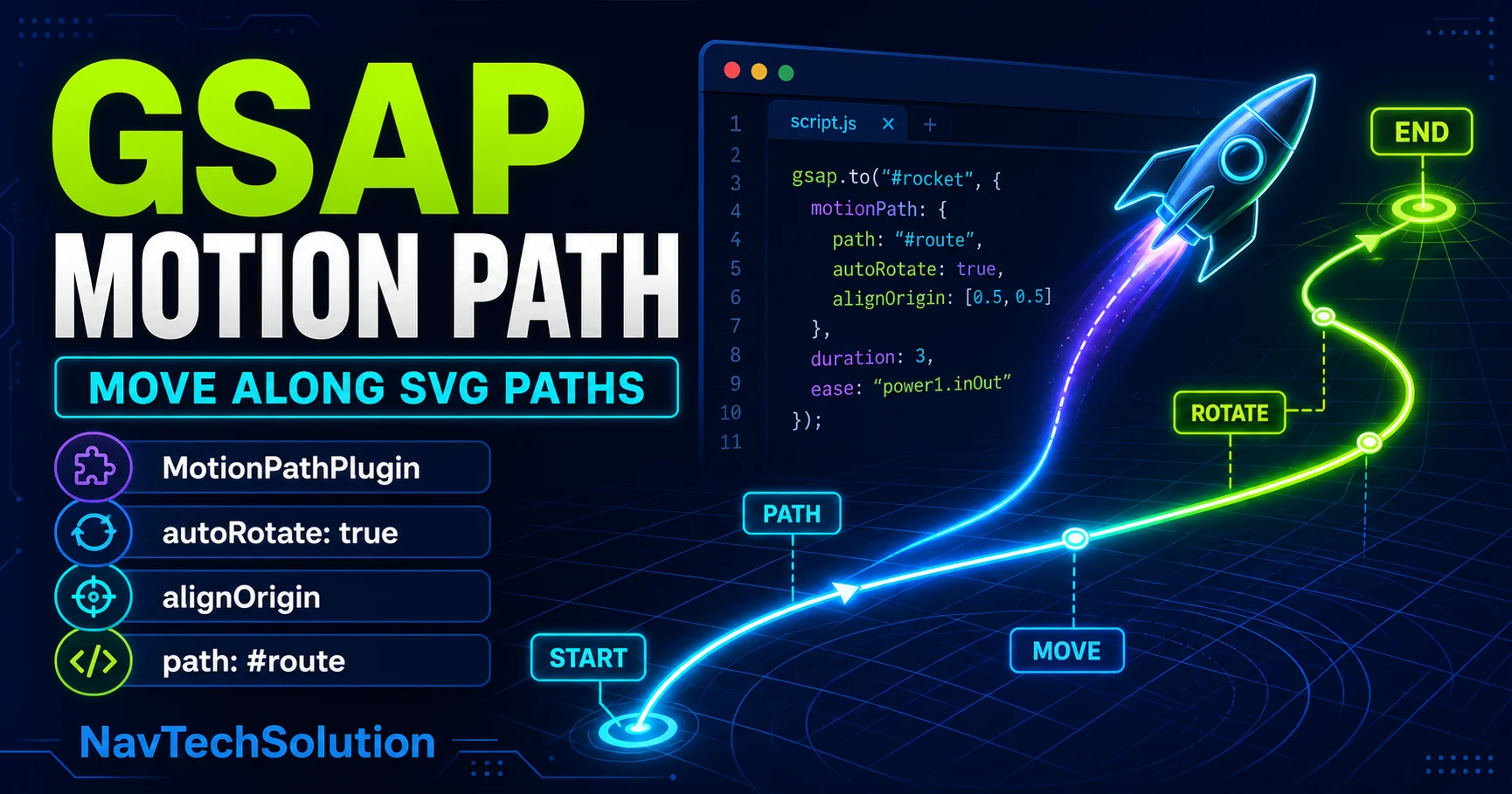
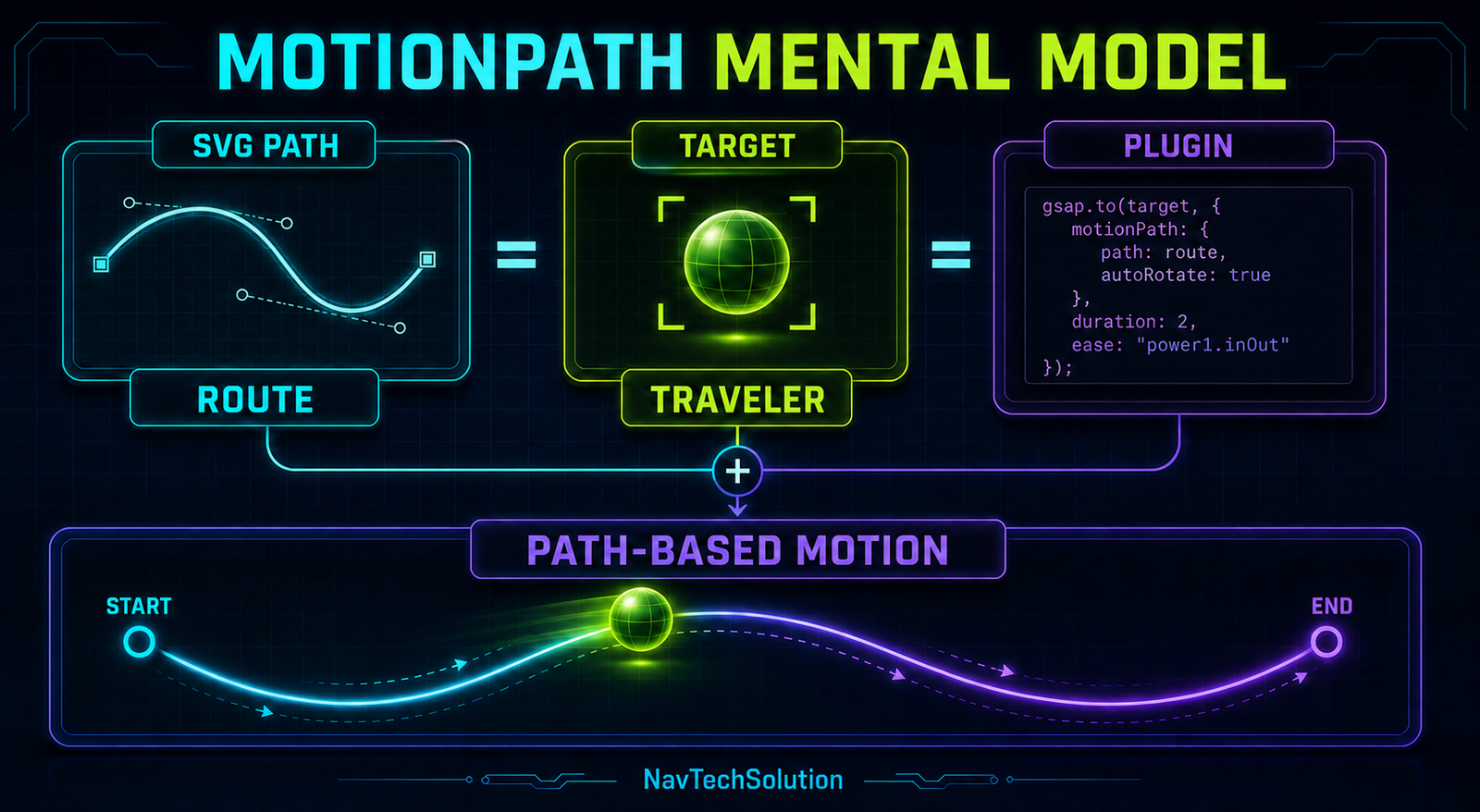
MotionPathPlugin answers “where should this element travel?” GSAP duration, easing, timelines and ScrollTrigger answer how and when it moves. Unlike DrawSVG from Article #27, MotionPath does not reveal the stroke—it moves a target along it.
1. What Is MotionPathPlugin?
MotionPathPlugin lets GSAP move an HTML or SVG target along a supported path. For a dependable beginner workflow, use an inline SVG path and keep the traveler in the same responsive SVG coordinate system introduced in the SVG animation tutorial, Article #26.
2. DrawSVG vs MotionPath
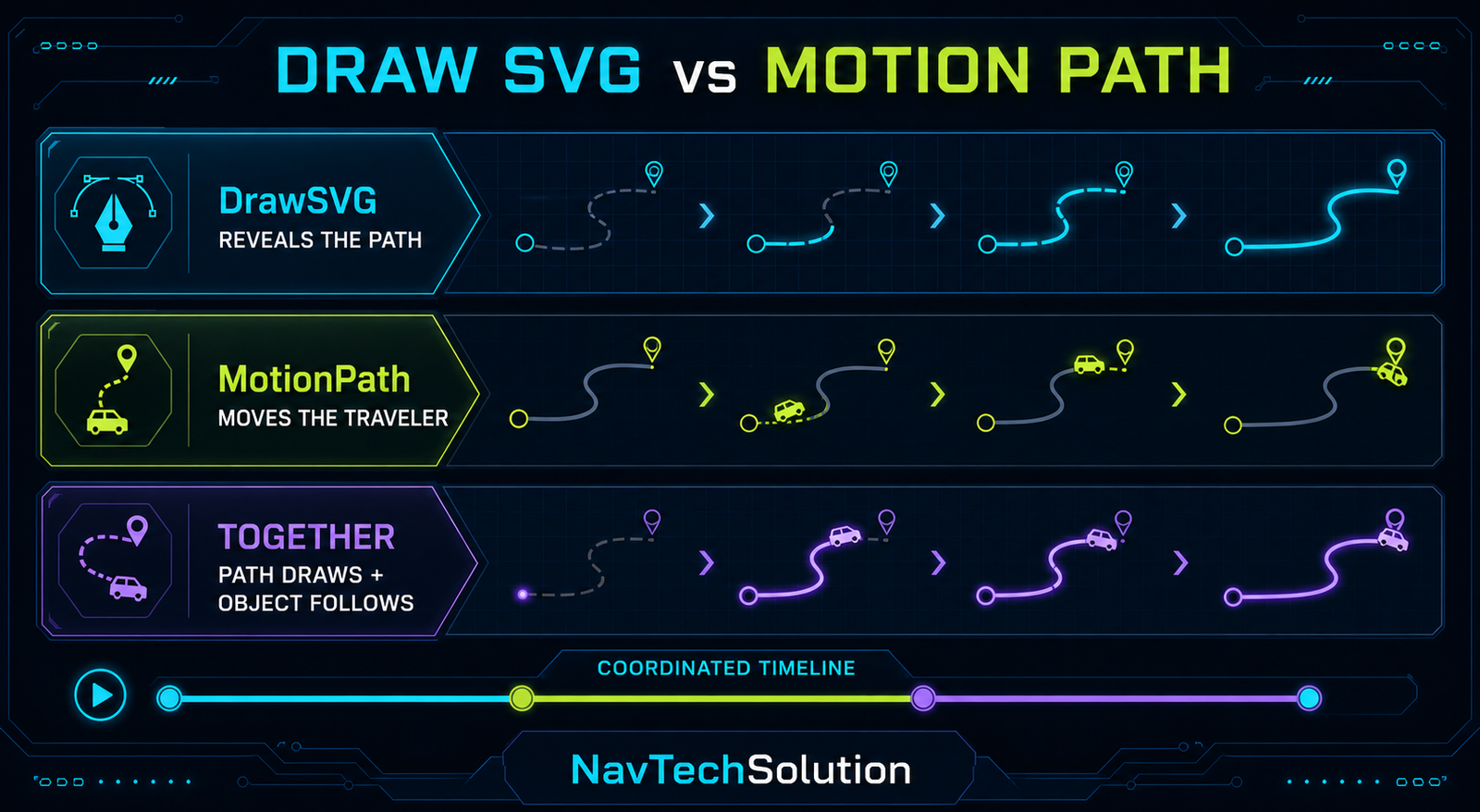
Reveals the path stroke.
Moves an object along the path.
A coordinated timeline can draw first and then move.
3. Plugin Setup
This site uses GSAP 3.13.0. The page loads the matching 3.13.0 MotionPathPlugin after core, then the matching ScrollTrigger file used by the scoped scroll demo. Each script appears once.
<script src="https://cdn.jsdelivr.net/npm/gsap@3.13.0/dist/gsap.min.js"></script>
<script src="https://cdn.jsdelivr.net/npm/gsap@3.13.0/dist/MotionPathPlugin.min.js"></script>
<script src="https://cdn.jsdelivr.net/npm/gsap@3.13.0/dist/ScrollTrigger.min.js"></script>

gsap.registerPlugin(MotionPathPlugin, ScrollTrigger);
4. First MotionPath Demo
MotionPath timeline ready.
5. First Animation
gsap.to(traveler, {
  duration: 4,
  ease: "none",
  motionPath: { path: route, align: route, alignOrigin: [0.5, 0.5] }
});
6. Understanding path
path defines the route. It can receive the scoped SVG path node directly, avoiding collisions with another diagram.
7. Straight, Curve and Wave Paths
8. Why ease: "none" Is Useful
Constant timing makes technical travel easy to read. Normal GSAP eases from Article #7 still work: they change timing along the route, not its geometry.
9. Easing Playground
CURRENT: none
10. autoRotate
With autoRotate: true, an arrow or rocket turns to follow the path tangent. Without it, the target keeps its own orientation.
11. autoRotate Visual
The visual orientation changes; the route geometry does not.
12. autoRotate Demo
autoRotate: true
13. The Alignment Problem
A target can appear offset when its own coordinate space and the route are not coordinated. align maps the target to the path while alignOrigin chooses which point on the target sits there.
14. align
motionPath: {
  path: route,
  align: route
}
15. alignOrigin
16. Alignment Playground
CURRENT: [0.5, 0.5]
17. Start and End
Normalized route progress uses 0 for the beginning and 1 for the end. start: 0.25, end: 0.75 travels only through the middle half.
18. Path Progress Graphic
19. Start/End Playground
start: 0, end: 1
20. Reverse Motion
start: 1, end: 0 defines backward route direction. tween.reverse() instead reverses the current playback from its playhead.
21. Looping Motion
ease: "none"Reserve infinite travel for small decoration and stop it for reduced-motion users.
22. Yoyo
repeat: 1, yoyo: true plays START → END → START. Yoyo changes playback, not the SVG path.
23. MotionPath + Timeline
Build on the timeline model from Article #10, reuse the player controls from Article #11, and place overlaps with the position parameter from Article #12.
const tl = gsap.timeline({ paused: true });
tl.from(title, { opacity: 0, y: 20 })
  .to(traveler, { duration: 3, motionPath: {
    path: route, align: route, alignOrigin: [0.5, 0.5], autoRotate: true
  }});
24. Timeline Checkpoints
25. Development Workflow Demo
26. MotionPath + DrawSVG
DrawSVG can reveal the route and MotionPath can then move the traveler. This page keeps the example conceptual rather than loading a second premium plugin solely for one demo.
tl.from(route, { drawSVG: "0%", duration: 1.5 })
  .to(traveler, { duration: 3, motionPath: { path: route, align: route } });
27. Draw and Follow Together
A traveler does not automatically follow the currently visible stroke. Coordinate both tweens on the same timeline when they must appear synchronized.
28. MotionPath + ScrollTrigger
This example extends the scoped trigger pattern from the ScrollTrigger tutorial, Article #14.
gsap.to(traveler, {
  ease: "none",
  motionPath: { path: route, align: route, alignOrigin: [0.5, 0.5], autoRotate: true },
  scrollTrigger: { trigger: section, start: "top 80%", end: "bottom 20%", scrub: true }
});
29. Scroll-Driven Traveler
SCROLL THROUGH THIS ROUTE
30. Scrub Mental Model
With linear easing and the scrub model from Article #16, animation progress follows scroll progress. Perceived geometric speed can still vary with path shape.
31. ScrollTrigger Start and End
ScrollTrigger start/end from Article #15 define viewport positions. They do not select a portion of the route.
32. Two Different Start/End Systems
start: 0
end: 1
Where on the path.
start: "top 80%"
end: "bottom 20%"
Where scroll control begins and ends.
33. Multiple Travelers
A timeline or stagger from Article #6 can offset travelers without creating separate timer logic.
34. Convoy Demo
35. Different Paths
Frontend, backend and database packets can each own a route and tween. Scope each selector to its diagram so repeated SVG classes never collide.
36. Technical Architecture Demo
37. API Request Animation
Ready. Educational sequence, not real network timing.
38. GSAP MotionPath Lab
Control How an Element Travels Along an SVG Path
- Path
- Curve
- Start / End
- 0 → 1
- Auto rotate
- true
- Align origin
- [0.5, 0.5]
- Duration
- 2s
- Ease
- none
39. Main Lab Controls
Every control maps to a supported MotionPathPlugin 3.13.0 value and rebuilds only this lab’s tween.
40. Main Lab Status
The status cards show the actual configuration used for the current lab tween.
41. Generated Code
The code preview is written with textContent, so control values are never interpreted as HTML.
42. Main Lab Lifecycle
function destroyLabTween() {
  if (labTween) labTween.kill();
  labTween = null;
  gsap.killTweensOf(labTraveler);
}
43. Safe Reset
The lab kills only its traveler tween. It never uses gsap.killTweensOf("*") and never destroys unrelated ScrollTriggers.
44. MotionPath Project: Development Journey
DEVELOPMENT JOURNEY
Journey ready.
45. Project Animation
One timeline advances the traveler and stage highlights from IDEA to GROW; no random timers are used.
46. Project Scroll Version
The large project remains button-controlled for stability on small screens. The smaller route above demonstrates scrub without pinning the article.
47. MotionPath and Responsive SVG
A stable viewBox plus width: 100%; height: auto preserves the shared route and traveler coordinate system as the graphic scales.
48. Responsive Alignment
These demos keep each traveler and path inside the same SVG, so uniform CSS scaling preserves their internal coordinates. If a breakpoint actually changes path geometry or moves the target into another coordinate space, rebuild or invalidate only that tween after layout; do not repeatedly recalculate alignment on every animation tick.
49. Mobile Strategy
Controls wrap into touch-friendly rows, code scrolls inside its block, labels stay outside the route where practical and the large journey remains in normal page flow.
50. Performance
Cost depends on traveler count, path complexity, active tweens, filters, shadows, DOM size, ScrollTrigger usage and device performance. Test the actual composition rather than assuming one technique is always faster.
51. Preferred Animation Properties
MotionPath primarily produces transform-based movement. Avoid stacking large blur, complex SVG filters and massive animated shadows on many travelers.
52. Accessibility
Motion never carries workflow meaning by itself: stage labels remain readable, meaningful SVGs have labels, controls are real buttons and status changes use restrained live regions.
53. Reduced Motion
When prefers-reduced-motion: reduce matches, long travel and scrub are skipped, looping is disabled and travelers are placed at a meaningful static endpoint while all labels remain visible.
54. Progressive Enhancement
Routes, stages and travelers render without JavaScript. JavaScript only enhances their state after GSAP and both required plugins load successfully.
55. Common MotionPath Mistakes
56. MotionPath Not Working?
- GSAP loaded?
- MotionPathPlugin loaded?
- Plugin registered?
- Versions compatible?
- Traveler exists?
- SVG path exists?
- Correct scoped selector?
- Valid path geometry?
- align correct?
- alignOrigin correct?
- autoRotate expected?
- start/end valid?
- Old tween running?
- ScrollTrigger controls same tween?
- SVG viewBox present?
- Reduced motion active?
- Console errors?
57. MotionPath vs DrawSVG
| Tool | Responsibility |
|---|---|
| MotionPath | Moves a target along a route. |
| DrawSVG | Reveals an SVG stroke. |
| ScrollTrigger | Connects animation to scroll. |
| Timeline | Controls sequencing. |
| Stagger | Offsets multiple animations. |
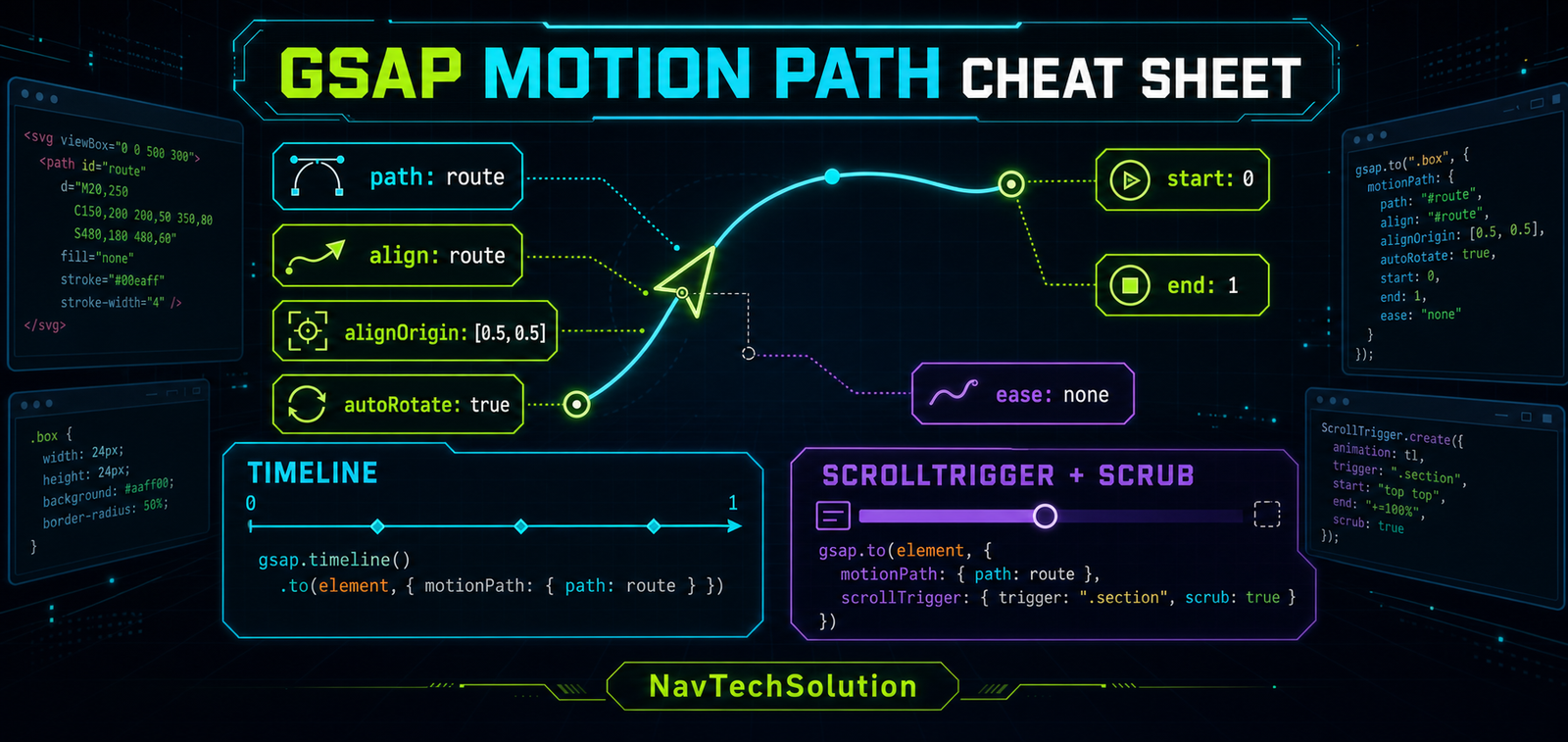
58. Quick Reference
| Feature | Example | Purpose |
|---|---|---|
| Motion path | motionPath: {...} | Move target along route |
| Path | path: route | Choose route |
| Align | align: route | Coordinate target/path space |
| Align origin | [0.5, 0.5] | Choose target alignment point |
| Auto rotate | true | Rotate with direction |
| Start | 0 | Route start progress |
| End | 1 | Route end progress |
| Reverse route | 1 → 0 | Travel backward |
| Ease | "none" | Control timing |
| Timeline | gsap.timeline() | Sequence path motion |
| ScrollTrigger | scrub: true | Connect travel to scroll |
59. Cheat Sheet Graphic
60. Final Mental Model
MotionPathPlugin answers “where should this element travel?” GSAP answers “how and when should it move?”
61. Continue to Blog #29
Frequently Asked Questions
What is GSAP MotionPathPlugin?
MotionPathPlugin moves a GSAP target along a path. This tutorial focuses on routes defined by inline SVG paths.
How do I register MotionPathPlugin?
Load the same version as GSAP core, then call gsap.registerPlugin(MotionPathPlugin).
Can GSAP move an element along an SVG path?
Yes. Pass an inline SVG path element or selector to the motionPath path property.
What does path do in MotionPathPlugin?
The path property identifies the route that the target follows.
What does align do?
Align maps the target into the path coordinate space so it sits on the route as expected.
What does alignOrigin do?
alignOrigin selects the normalized point on the target used for alignment, such as its center at [0.5, 0.5].
What does autoRotate do?
autoRotate turns the target to follow the direction of the path as it travels.
How do I move only part of a path?
Set normalized start and end values, such as start: 0.25 and end: 0.75.
Can MotionPath move backward?
Yes. Use start: 1 and end: 0 for reverse route direction, or reverse a tween to reverse playback.
Can I use easing with MotionPath?
Yes. Easing changes timing along the route; it does not change the path geometry.
Can I use MotionPath with a GSAP timeline?
Yes. A timeline can sequence path travel with headings, stages and other interface animation.
Can MotionPath work with DrawSVG?
Yes. They are separate tools: DrawSVG reveals a stroke while MotionPath moves a target along a route.
Can MotionPath work with ScrollTrigger?
Yes. ScrollTrigger can start a MotionPath tween or connect its progress to scrolling with scrub.
Can I control MotionPath with scroll?
Yes. Add a scoped ScrollTrigger configuration with scrub to the MotionPath tween.
What is the difference between MotionPath and DrawSVG?
MotionPath moves a target; DrawSVG changes which portion of an SVG stroke is visible.
Why is my object offset from the SVG path?
Check that path and target are scoped correctly, then use align and the appropriate alignOrigin.
Can MotionPath work responsively?
Yes. A stable SVG viewBox and responsive CSS preserve the shared coordinate system as the graphic scales.
Can I use MotionPathPlugin on a PHP website?
Yes. PHP renders the markup and scoped vanilla JavaScript runs GSAP in the browser.
