


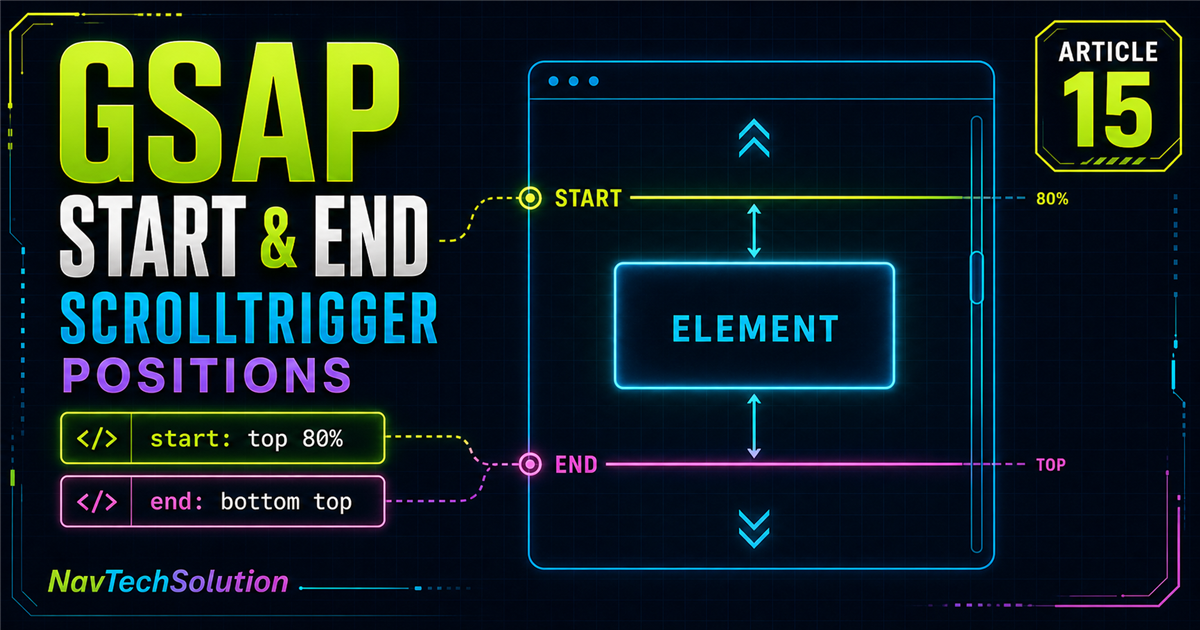
Blog #14 introduced start: "top 80%". But what does that string actually mean? A ScrollTrigger position usually describes a relationship between one point on the trigger element and one point on the viewport.
gsap.from(".card", {
  y: 60,
  opacity: 0,
  duration: 0.8,
  scrollTrigger: {
    trigger: ".card",
    start: "top 80%"
  }
});top 80% = trigger top meets viewport 80%What you will learn
Read start syntax from left to right
Map top, center, bottom and percentages
Understand start and end as an active range
Use markers and scoped playgrounds safely
Apply pixels, offsets and function values
Debug responsive and dynamic layouts
1. Start syntax anatomy
Read the first token as a point on the trigger and the second as a point on the scroller or viewport.
start: "top center"2. Trigger positions
top, center and bottom identify three useful points on the watched element.
3. Viewport positions
The same words can identify viewport points. Their role is determined by their position as the second token.
4. top top
The trigger element top meets the viewport top. While scrolling down, this generally activates later than a start line near the viewport bottom.
5. top center
The trigger top reaches the viewport center—a clear midpoint for focused sections.
6. top bottom
The trigger top reaches the viewport bottom, so activation usually occurs as the element begins entering from below. That can be useful, but may feel early for some reveals.
7. Compare top positions
Current: start: "top center" — trigger top meets viewport center.
8. Percentage viewport positions
A percentage is measured down the viewport: 0% is its top, 50% its center and 100% its bottom.
9. Why top 80% is common
A lower start line can begin an entrance shortly after content becomes visible. Eighty percent is not universal: element size, animation duration, reading flow, viewport size and design intent all matter.
10. center center
The trigger center meets the viewport center. This relationship can suit a large, focused interactive section.
11. bottom center
The trigger bottom reaches the viewport center, which happens later than top center for the same element.
top centerTop crosses centerbottom centerBottom crosses center12. bottom top
The trigger bottom reaches the viewport top. It is especially useful when reasoning about where a section's active range should finish.
13. Start position matrix
| Value | Trigger point | Viewport point |
|---|---|---|
top top | Top | Top |
top center | Top | Center |
top bottom | Top | Bottom |
center center | Center | Center |
bottom center | Bottom | Center |
bottom top | Bottom | Top |
top 80% | Top | 80% position |
14. What is end?
scrollTrigger: {
  trigger: ".section",
  start: "top 80%",
  end: "bottom 20%"
}
start opens ScrollTrigger's active range and end closes it. An ordinary entrance tween still plays according to its own duration. End becomes especially significant for progress, callbacks, toggle behavior and later lessons about scrub and pin.
15. end: "bottom top"
The range begins when the section top meets viewport 80%, and ends when its bottom meets viewport top.
16. Start and end together
The start and end strings create a scroll-space interval. They do not describe seconds.
17. ScrollTrigger markers
scrollTrigger: {
  trigger: ".marker-section",
  start: "top 80%",
  end: "bottom 20%",
  markers: true
}
Markers reveal start, end, trigger and scroller positions during development. Keep them scoped and remove them from production.
18. A production-safe marker graphic
19. Start position playground
- Trigger point
- Top of element
- Viewport point
- 80% of viewport
Start when the element's top reaches 80% of the viewport.
20. End position playground
Active range: top 80% → bottom top.
21. Start and end playground
Active range: top 80% → bottom top.
22. Pixel-based positions
ScrollTrigger also accepts numeric positions. A numeric value represents an absolute scroll position, while a string such as "top 300px" compares trigger top with a viewport position 300 pixels from the top.
scrollTrigger: {
  trigger: ".section",
  start: "top 300px"
}
23. Relative offsets
"top bottom-=100px" starts with a top-to-bottom relationship, then moves the scroller point 100 pixels above the viewport bottom. Use offsets deliberately and verify them on responsive layouts.
24. A relative end distance
end: "+=500" defines an end 500 pixels after the calculated start. This will become useful for scrub and pin, but it does not make an ordinary tween last 500 pixels.
25. Function-based start and end
Functions are evaluated when ScrollTrigger calculates positions, which helps when a value depends on runtime layout.
scrollTrigger: {
  trigger: section,
  start: () => "top 80%",
  end: () => "+=" + Math.max(300, section.offsetHeight)
}
26. Trigger element size matters
27. Viewport size matters
28. Practical heading reveal
Start When This Section Reaches 80%
The section is watched; its heading is animated.
29. Practical image reveal
The horizontal distance is reduced on small screens in the scoped JavaScript.
30. Practical card grid
Its end defines the range but does not control this stagger tween's duration.
31. A start that may feel early
top bottom can activate as an element begins entering. That is not wrong; it simply may feel early for some content reveals.
32. A start that may feel late
With top 20%, the user may scroll far into a section before its animation begins. Special designs may need it, while ordinary reading content often benefits from an earlier cue.
33. Find the right trigger position
- Start with a reasoned value such as
top 80%. - Temporarily inspect markers.
- Scroll at a natural reading pace.
- Test desktop and mobile.
- Adjust for the actual content.
- Disable production markers.
34. Trigger versus start
.servicestop 80%35. Start versus duration
start determines activation in scroll space. duration: 1 determines one second of time-based playback.
36. End versus duration
end is the range endpoint; duration belongs to the tween. This distinction is essential before learning scrub.
37. Start and end with a timeline
const tl = gsap.timeline({
  scrollTrigger: {
    trigger: ".start-end-timeline",
    start: "top 75%",
    end: "bottom 25%"
  }
});

tl.from(".timeline-title", { y: 40, opacity: 0 })
  .from(".timeline-card", { y: 30, opacity: 0, stagger: 0.1 });
The start and end belong to the ScrollTrigger controlling the complete timeline.
38. Multiple sections
A scoped loop can give each section its own trigger without affecting unrelated cards.
39. Dynamic content and refresh
ScrollTrigger calculates positions from layout. After a meaningful change—dynamic content, an opened accordion, a resized image, a font shift or inserted DOM—ScrollTrigger.refresh() may be appropriate. Do not call it on every scroll.
40. Resize behavior
Viewport changes affect percentages, element geometry and active ranges. ScrollTrigger handles common refresh behavior, but developers must still test real responsive layouts.
41. Common start/end mistakes
42. Debugging wrong positions
43. Main Start & End Lab
Master Scroll Positions
Understand exactly when scroll animations activate and when their active ranges end.
- Trigger
- Lab section
- Trigger point
- Top of element
- Viewport point
- 80% of viewport
- Meaning
- Start when the element's top reaches 80% of the viewport.
Lab ready. Debug markers are off.
44. Lab animation lifecycle
45. Live position explanation
The lab translates syntax into plain language. Choose top center and it reports “top of element” plus “center of viewport”; choose center center and both centers must meet.
46. Scoped marker toggle
The marker checkbox is off by default. When enabled, only the lab-owned ScrollTrigger is rebuilt with markers; no other trigger is killed or changed.
47. Mini challenge
Control the Trigger Point
Start this animation when the section top reaches 75% of the viewport.
Show suggested solution
const challenge = document.querySelector(".start-end-challenge");

if (challenge) {
  const tl = gsap.timeline({
    scrollTrigger: {
      trigger: challenge,
      start: "top 75%",
      end: "bottom 25%"
    }
  });

  tl.from(challenge.querySelector(".challenge-label"), { y: 15, opacity: 0 })
    .from(challenge.querySelector(".challenge-title"), { y: 35, opacity: 0 }, "-=0.1")
    .from(challenge.querySelector(".challenge-text"), { y: 20, opacity: 0 }, "-=0.3")
    .from(challenge.querySelectorAll(".challenge-card"), {
      y: 30, opacity: 0, stagger: 0.1
    }, "-=0.2");
}
48. Quick reference
| Value | Meaning |
|---|---|
top top | Trigger top meets viewport top |
top center | Trigger top meets viewport center |
top bottom | Trigger top meets viewport bottom |
top 80% | Trigger top meets viewport 80% |
center center | Trigger center meets viewport center |
bottom center | Trigger bottom meets viewport center |
bottom top | Trigger bottom meets viewport top |
end: "+=500" | End 500px after start |
markers: true | Show development markers |
49. Cheat sheet graphic
top 80%top = trigger80% = viewporttop toptop centercenter centerbottom top50. Final mental model
trigger: ".section"Which element do we watch?↓start: "top 80%"When does the range begin?↓end: "bottom top"When does the range finish?LEFT TOKEN = TRIGGER · RIGHT TOKEN = VIEWPORT51. Continue with Blog #16
We now understand trigger, start and end. Continue with GSAP ScrollTrigger Scrub to connect animation progress directly to scroll direction and distance.
gsap.to(".scrub-box", {
  x: 400,
  scrollTrigger: {
    trigger: ".scrub-section",
    start: "top center",
    end: "bottom center",
    scrub: true
  }
});
Continue the GSAP series
Review GSAP stagger, timelines, timeline controls, timeline position parameters, timeline + stagger, and the previous ScrollTrigger tutorial.
Frequently asked questions
What does start mean in GSAP ScrollTrigger?
Start defines the scroll position where a ScrollTrigger active range begins and its configured behavior can activate.
What does end mean in GSAP ScrollTrigger?
End defines where the active range finishes. It does not automatically change the duration of an ordinary time-based tween.
What does start: "top 80%" mean?
It means the top of the trigger element meets the point 80 percent down the viewport.
What does "top center" mean in ScrollTrigger?
The trigger element top must meet the center of the viewport.
What does "center center" mean?
The center of the trigger element meets the center of the viewport.
What does "bottom top" mean?
The bottom of the trigger element meets the top of the viewport.
What is the difference between start and end?
Start opens the active range; end closes it.
Does ScrollTrigger end control animation duration?
Not for an ordinary entrance tween. Duration still controls its time-based playback.
How do ScrollTrigger percentages work?
A viewport percentage describes a point from its top: 0 percent is top, 50 percent is center and 100 percent is bottom.
How do I debug ScrollTrigger start and end positions?
Check the trigger selector, temporarily enable markers for that trigger, inspect layout dimensions and test the position on multiple viewport sizes.
Should I use markers in production?
No. Markers are a development aid and should normally be disabled before release.
Does viewport size change ScrollTrigger positions?
Yes. Percentage positions and element geometry resolve to different pixels as the viewport changes.
Can I use pixel offsets in ScrollTrigger?
Yes. ScrollTrigger supports pixel values and relative offsets such as top+=100 center and an end distance such as +=500.
Can I use ScrollTrigger start and end on a PHP website?
Yes. PHP renders the HTML while GSAP and ScrollTrigger run in the browser.
