


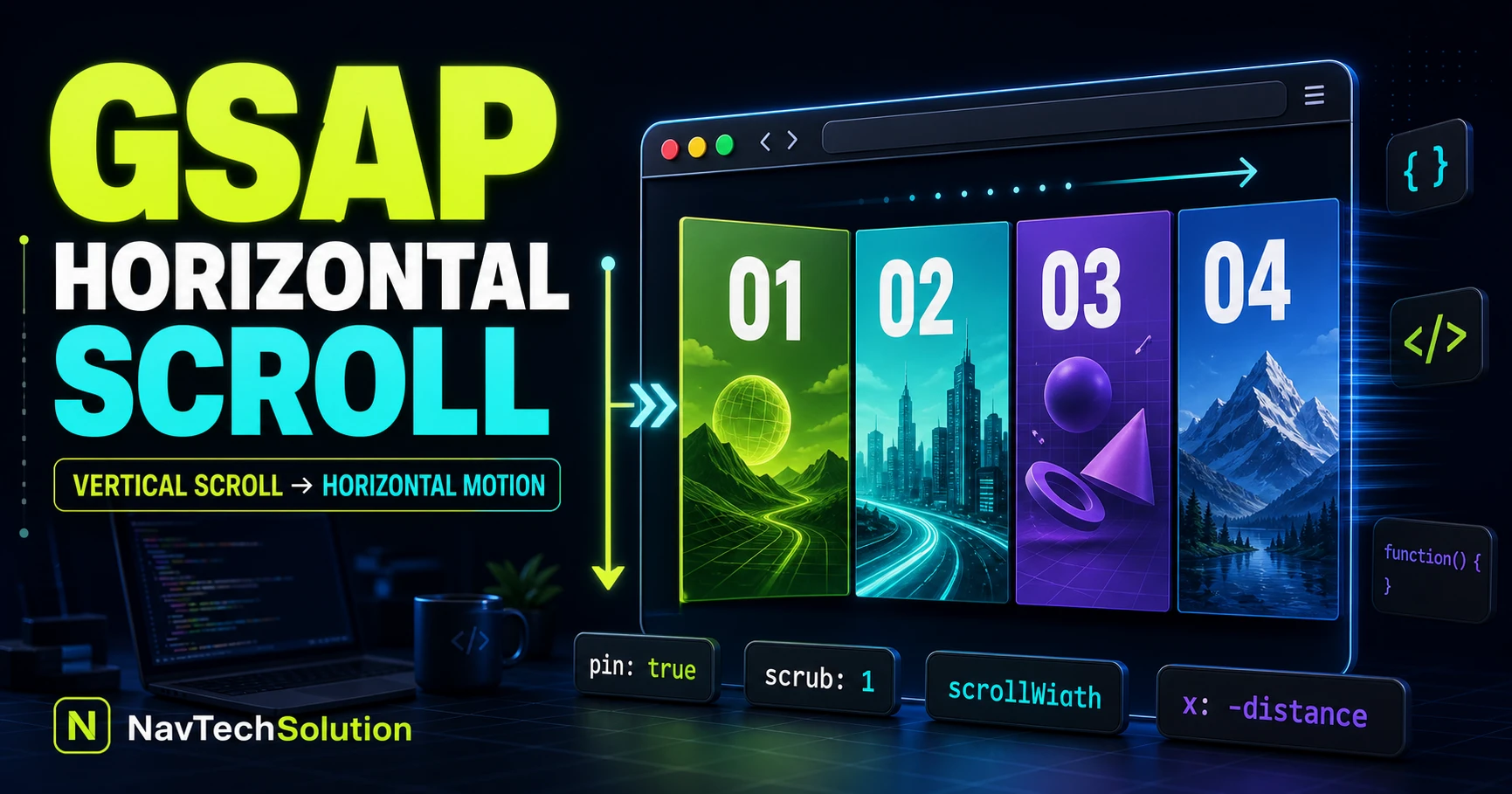
A portfolio can stack four panels vertically, but a focused desktop story can keep one stage in view while those same panels move sideways. The page never becomes a sideways document: native vertical progress remains the source of truth.
1. What Is Horizontal Scroll Animation?
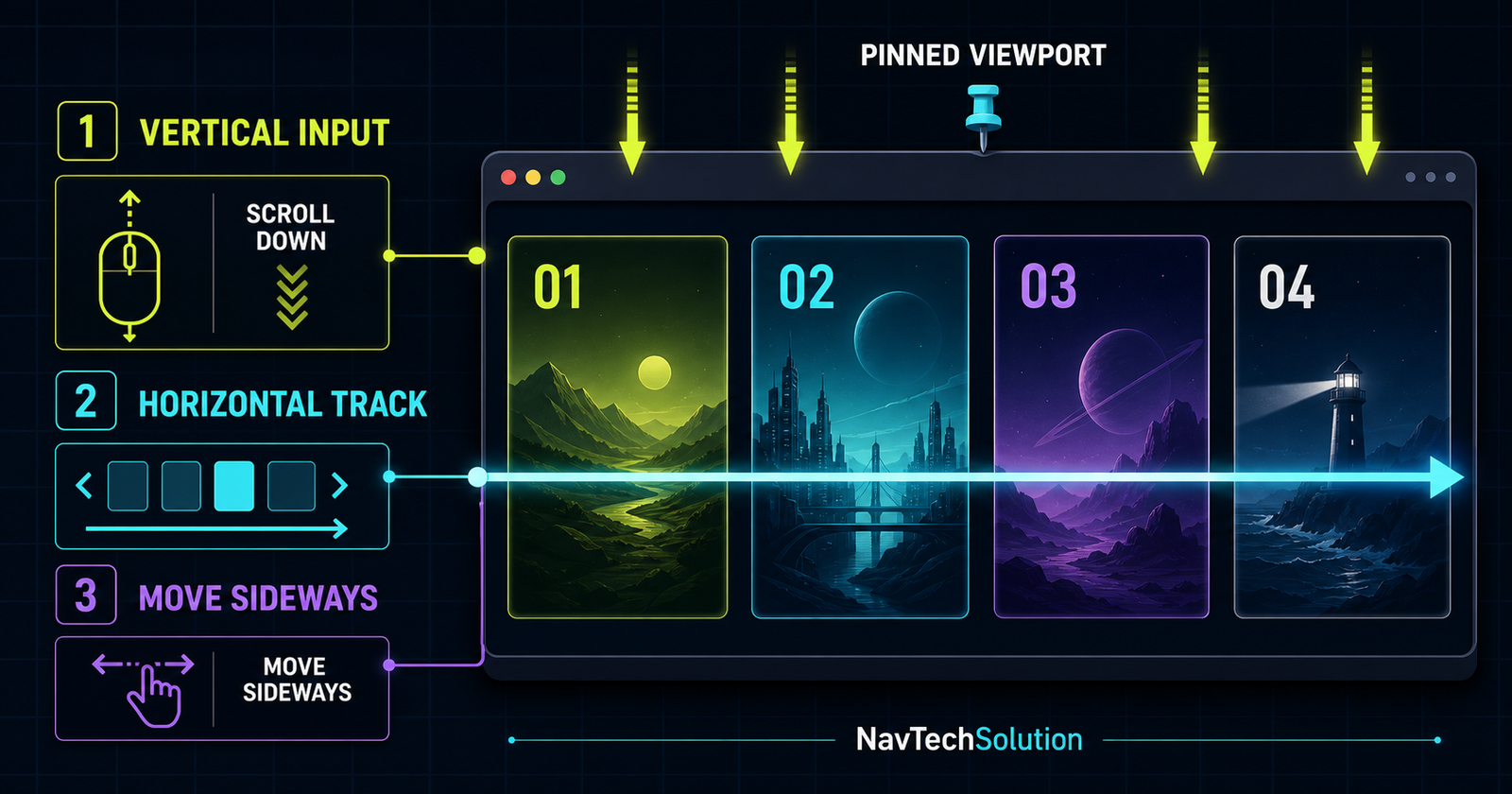
The user scrolls down, the section pins, and ScrollTrigger maps that vertical progress to the track's horizontal x transform. At the final panel, the stage releases.
2. Not True Horizontal Page Scrolling
The document still uses its vertical scrollbar. Only a clipped child track receives a transform, so the header, article and footer keep ordinary document flow.
3. Basic HTML Structure
<section class="horizontal-stage">
  <div class="horizontal-track">
    <article class="panel">01</article>
    <article class="panel">02</article>
    <article class="panel">03</article>
    <article class="panel">04</article>
  </div>
</section>
4. Horizontal Layout CSS
.horizontal-stage { overflow: hidden; }
.horizontal-track { display: flex; width: max-content; }
.panel { width: min(82vw, 760px); flex: 0 0 auto; }
Clip the stage, not the entire site. This keeps unrelated sticky or focus behavior intact.
5. scrollWidth
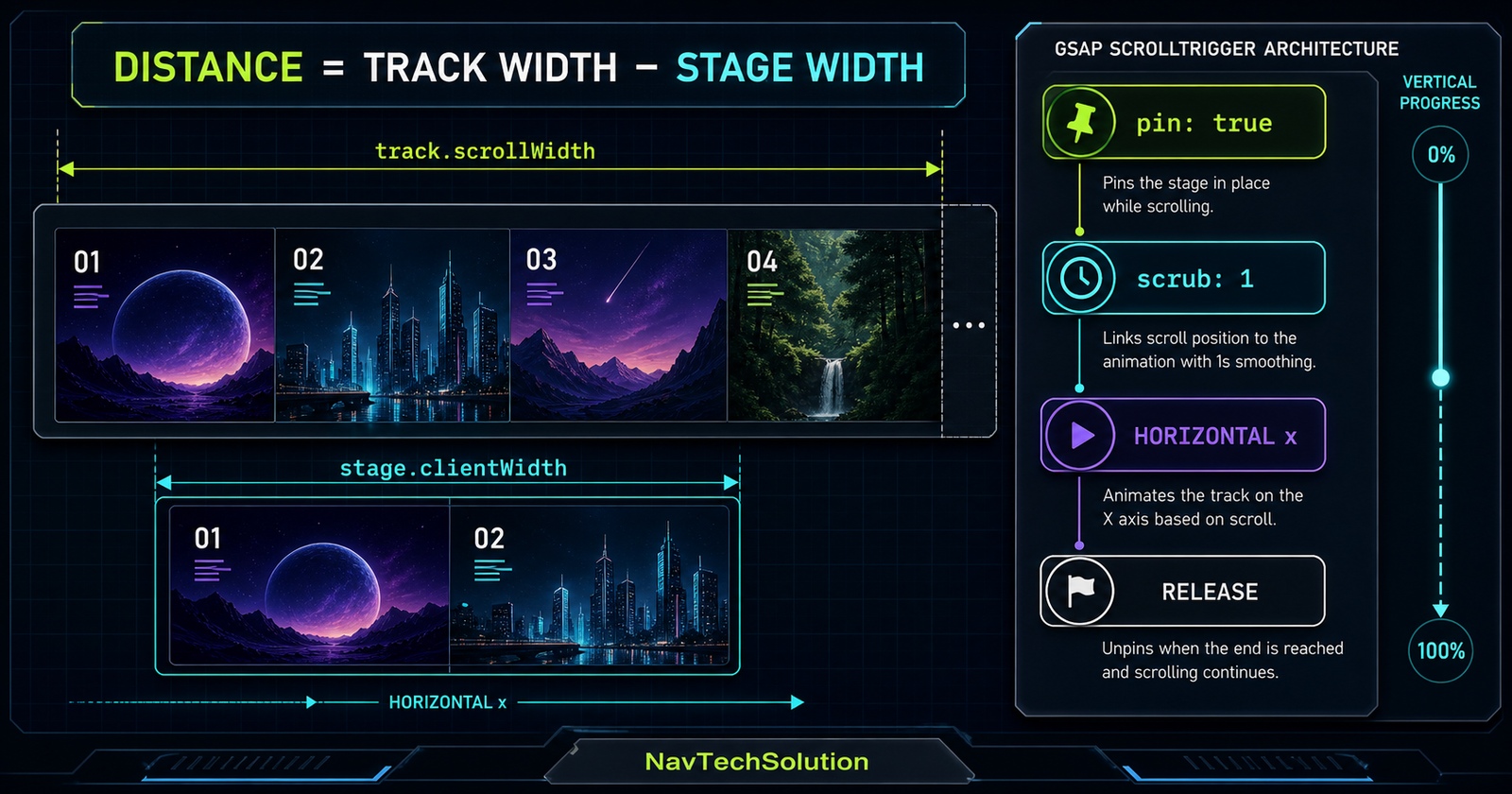
track.scrollWidth includes every panel, gap and off-screen pixel. stage.clientWidth is the visible window through which that track travels.
6. Calculate Horizontal Distance
const distance = () =>
  Math.max(0, track.scrollWidth - stage.clientWidth);
7. Why Dynamic Measurement Matters
Viewport changes, fonts and responsive images alter geometry. Function-based values plus invalidateOnRefresh: true calculate again when ScrollTrigger refreshes.
8. First Horizontal Scroll Demo
gsap.to(track, {
  x: () => -distance(),
  ease: "none",
  scrollTrigger: {
    trigger: stage,
    pin: true,
    scrub: 1,
    end: () => "+=" + distance(),
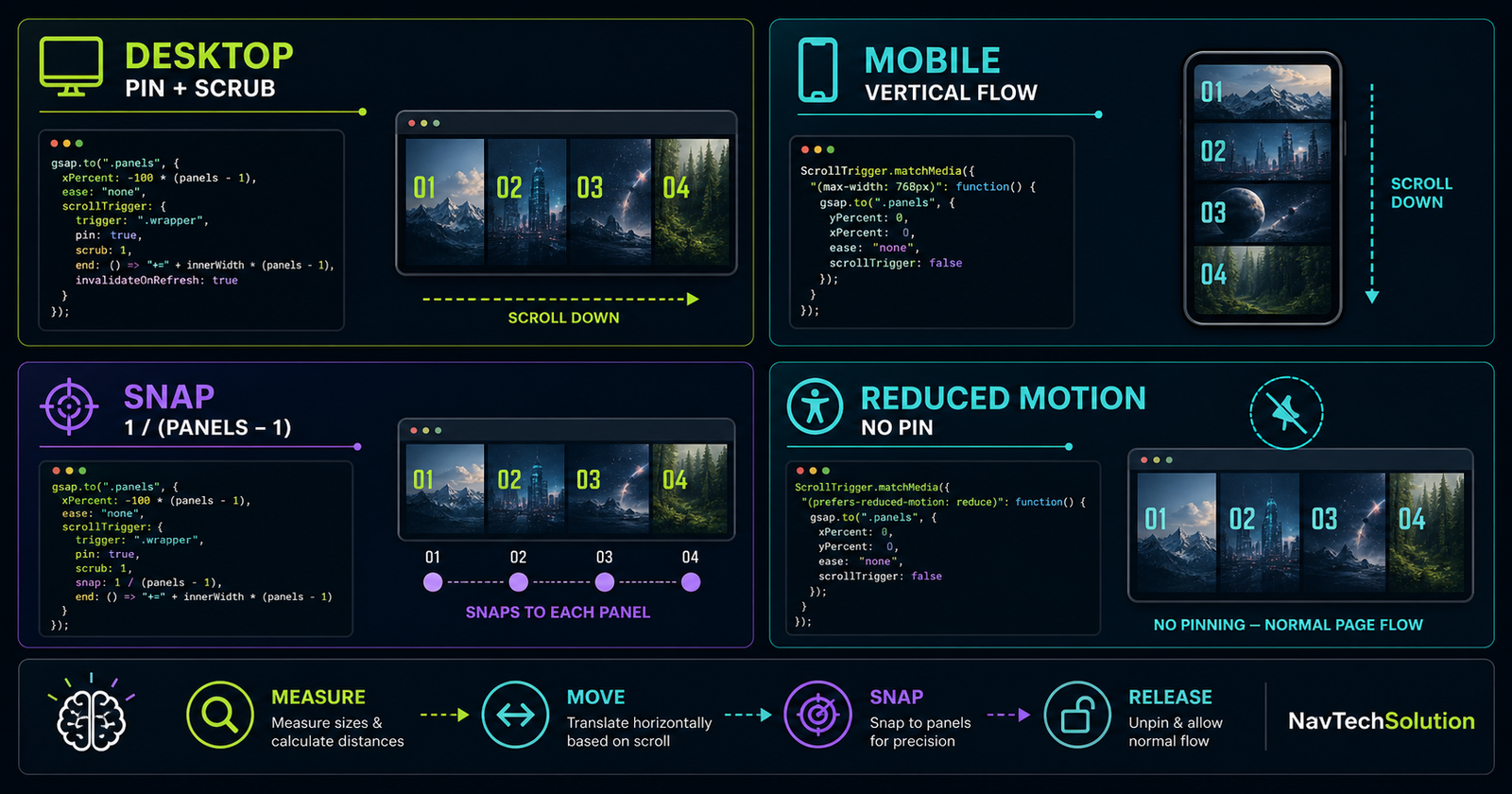
    invalidateOnRefresh: true
  }
});
9. Why Pin Is Needed
Without pin, the stage leaves the viewport before a wide track can finish. Pin keeps that visual window stationary only for the calculated range; review the same production principle in the complete ScrollTrigger project.
10. Why Scrub Is Needed
The dedicated ScrollTrigger scrub tutorial explains the progress mapping in depth.
scrub: trueDirect progress mapping.
scrub: 0.5Short catch-up.
scrub: 1Softer one-second catch-up.
11. Understanding the End Distance
The end creates enough vertical scroll range for the full horizontal transform. A function keeps the range tied to the real layout; see ScrollTrigger start and end positions for the coordinate model.
12. Scroll Distance Multiplier
A multiplier changes pacing without changing horizontal distance: end: () => "+=" + distance() * 1.25. Larger values feel slower.
13. Horizontal Progress
ScrollTrigger exposes normalized progress from 0 to 1. The lab uses it for a rail and panel counter without measuring scroll position manually.
14. Horizontal Progress Bar
15. Panel Counter
const index = Math.round(
  self.progress * (panels.length - 1)
);
16. Horizontal Snap
Four equal panels have three gaps, so the normalized snap interval is 1 / (4 - 1). The ScrollTrigger snap tutorial covers direction, duration and interruption behavior.
17. Horizontal Snap Demo
snap: {
  snapTo: 1 / (panels.length - 1),
  duration: { min: 0.15, max: 0.45 },
  delay: 0.05
}
18. x vs xPercent
Measured pixels; ideal for gaps and variable panel widths.
Percentage of each target; concise for equal full-width panels.
19. Pixel Distance vs xPercent
Choose one coordinate model. Mixing an x measurement with an unrelated xPercent offset makes refresh math hard to reason about.
20. Equal-Width Panel Version
gsap.to(panels, {
  xPercent: -100 * (panels.length - 1),
  ease: "none"
});
21. Variable-Width Panels
Use the measured track distance, then derive snap points from each panel's real offsetLeft / distance.
22. Practical Portfolio Horizontal Section
23. Original Panel Graphics
Use each panel to distinguish a stage with shape, color and concise copy. Keep essential explanation in text rather than decorative imagery.
24. Animate Content Within Each Panel
Animate small child details only after the main track is stable. The horizontal transform should remain the sole owner of track movement.
25. Timeline Inside Horizontal Scroll
A GSAP timeline can combine track movement with progress UI and restrained panel reveals while one ScrollTrigger owns the scroll range. Use the timeline position parameter when those details overlap.
26. ScrollTrigger Inside Horizontal Content
Ordinary viewport calculations do not automatically understand that an ancestor is translating sideways. Use the parent animation as context after mastering the ScrollTrigger fundamentals.
27. containerAnimation
const horizontalTween = gsap.to(track, { x: () => -distance(), ease: "none" });

ScrollTrigger.create({
  trigger: ".panel-feature",
  containerAnimation: horizontalTween,
  start: "left 70%"
});
28. containerAnimation Mental Model
29. Inner Panel Reveal
Use containerAnimation for reveals tied to a panel crossing a horizontal position. Keep the parent ease at none so progress remains linear.
30. containerAnimation Limitations
Pinning and snapping belong to the main ScrollTrigger; do not expect child containerAnimation triggers to own a separate pin range.
31. Horizontal Section + ScrollSmoother
If a root ScrollSmoother already exists, reuse it. The horizontal section still uses one ScrollTrigger and must not create a second smoother.
32. Horizontal Scroll with Fixed Header
Keep the global header outside the pinned stage and account for its height in the stage's available viewport space.
33. Full-Viewport vs Contained Horizontal Section
Immersive; needs stronger exit and mobile testing.
More article context; easier reading and navigation.
34. Horizontal Section Height
The visual stage can use min-height or a capped viewport value; vertical duration comes from ScrollTrigger's end, not an enormous CSS height.
35. Mobile Strategy
Below 900px this tutorial displays panels vertically. Users keep direct touch input, all content remains visible, and the footer stays reachable.
36. gsap.matchMedia()
const mm = gsap.matchMedia();
mm.add("(min-width: 900px) and (prefers-reduced-motion: no-preference)", initHorizontal);
mm.add("(max-width: 899px), (prefers-reduced-motion: reduce)", showVertical);
37. Reduced Motion Strategy
Skip pin, scrub, snap and sideways transforms. Semantic DOM order already supplies the complete vertical experience.
38. Progressive Enhancement
complete story+CSS
vertical layout+GSAP
desktop motion
39. Avoid Page-Level Horizontal Overflow
Do not set the body to the track width. Use overflow: clip or hidden on the local stage and verify keyboard focus outlines remain visible.
40. Track Overflow Architecture
normal widthSTAGE
clips overflowTRACK
wide + translated
41. Responsive Recalculation
Function-based x and end values plus invalidateOnRefresh cover normal resizing. Avoid calling refresh on every resize event yourself.
42. Images and Font Loading
Give images explicit dimensions. If late assets change track width, refresh once after they decode rather than continuously.
43. Horizontal Main Lab
Four-Panel Product Story
Scroll through the pinned stage or change the configuration before it enters.
Find the signal.
Turn user and business evidence into a focused direction.
Shape the system.
Build hierarchy, rhythm and a useful motion language.
Make it resilient.
Use semantic structure and progressive enhancement.
Ship and learn.
Validate performance, accessibility and real outcomes.
The vertical fallback is ready; desktop enhancement initializes when supported.
44. Main Lab Controls
Scrub, distance pacing and equal-panel snap can be changed without reloading. Each rebuild destroys only the lab's own tween and trigger.
45. Main Lab Status
The live region reports whether desktop motion, mobile fallback or reduced-motion fallback is active.
46. Main Lab Animation
One tween moves the track. Its ScrollTrigger owns pin, scrub, end, snap and progress updates.
47. Main Lab Safe Measurement
The lab clamps distance at zero, reads the local stage width and never measures against window.innerWidth.
48. Main Lab Distance Modes
Measured maps one vertical pixel to the required range; relaxed uses 1.25× the range so the same horizontal travel feels slower.
49. Main Lab Cleanup
function destroyLab() {
  if (labTween) labTween.kill();
  gsap.set(track, { clearProps: "transform" });
}
50. Panel Content Animation
Each panel has its own content hierarchy, but the fallback never hides it. Motion enhances reading; it does not unlock the copy.
51. Horizontal Navigation Dots
For a production story, dots can call ScrollTrigger.labelToScroll() or map a panel's normalized position back to the parent vertical range.
52. Scroll to Panel
const y = trigger.start +
  (trigger.end - trigger.start) * panelProgress;
window.scrollTo({ top: y, behavior: "smooth" });
53. Horizontal Timeline Labels
Labels make named panel stops easier to maintain when motion grows beyond a single track tween.
54. Horizontal Snap Alignment
Equal panels snap at equal normalized intervals only when their visual stops are equally spaced.
55. Variable Width Snap
Build an array from panel offsets, normalize by total distance and use gsap.utils.snap(points).
56. Horizontal Progress Math
57. Section Architecture Pattern
local nodesMEASURE
function valuesCREATE
one triggerCLEAN
own resources
58. Multiple Horizontal Sections
Create an isolated tween for each stage. Do not share selectors or kill all ScrollTriggers during one section's cleanup.
59. Horizontal Scroll vs Carousel
A scroll story uses page progress; a carousel is a discrete interactive control. Use a carousel when users should directly choose slides without scrolling the page.
60. Horizontal Scroll vs CSS Scroll Snap
CSS scroll snap is ideal for a genuine horizontally scrollable container. GSAP is useful when vertical page progress must choreograph a pinned story.
61. Good Use Cases
- Portfolio case-study stages
- Product feature storytelling
- Timelines and visual processes
- Galleries where sequence adds meaning
62. Poor Use Cases
- Long body copy
- Critical navigation
- Dense forms or tables
- Any layout that loses meaning without motion
63. Performance
- Animate transforms, not layout properties.
- Size media explicitly and lazy-load later posters.
- Keep
onUpdatework tiny. - Use one parent tween per section.
- Test mid-range mobile hardware even with fallback enabled.
64. Accessibility
Preserve DOM order, native scrollbars, visible focus, keyboard navigation and a complete no-JS layout. Never move focus as panels change.
65. Focusable Content in Panels
Focusable controls can sit inside panels, but avoid leaving them visually off-screen while keyboard focus reaches them. A vertical fallback is safer for control-heavy content.
66. Common Mistakes
67. Debugging Checklist
- Confirm GSAP loaded once
- Confirm ScrollTrigger loaded once
- Register ScrollTrigger
- Inspect track scrollWidth
- Inspect stage clientWidth
- Log calculated distance
- Enable markers temporarily
- Disable snap while debugging
- Check local overflow clipping
- Resize and refresh
- Test vertical fallback
- Reach the footer
68. Mini Project
Use the main lab as a starter: replace its four stages with one real case study, keep each article semantic, and retain the desktop-only matchMedia boundary.
69. Mini Project Code
const distance = () => track.scrollWidth - stage.clientWidth;
const tween = gsap.to(track, {
  x: () => -distance(),
  ease: "none",
  scrollTrigger: {
    trigger: stage, pin: true, scrub: 1,
    end: () => "+=" + distance(),
    snap: 1 / (panels.length - 1),
    invalidateOnRefresh: true
  }
});
70. Quick Reference
| Need | Use | Reason |
|---|---|---|
| Distance | scrollWidth - clientWidth | Exact overflow |
| Hold stage | pin: true | Preserve context |
| Follow input | scrub: 1 | Map progress |
| Recalculate | invalidateOnRefresh | Responsive geometry |
| Equal snap | 1 / (count - 1) | Normalized stops |
| Inner trigger | containerAnimation | Horizontal context |
71. Cheat Sheet Graphic
72. Final Mental Model
The page still scrolls vertically. GSAP simply maps that progress to horizontal visual movement.
73. Continue to Blog #24
GSAP ScrollTrigger Batch: Animate Large Groups of Elements Efficiently
Group cards, rows and repeated elements into coordinated callback batches, then control the reveal rhythm with stagger.
Frequently Asked Questions
How do I create horizontal scroll with GSAP?
Pin a clipped stage and animate its wider track on the x axis by the measured overflow distance.
Does GSAP horizontal scroll require horizontal page scrolling?
No. The document keeps normal vertical scrolling while ScrollTrigger maps vertical progress to a horizontal transform.
Why do I need pin for a horizontal scroll section?
Pin keeps the viewport stable while the track travels through it; the section releases after the final panel.
Why do I need scrub?
Scrub links ScrollTrigger progress to animation progress so the sideways movement follows vertical input.
How do I calculate horizontal scroll distance?
Subtract the visible stage width from the full track scrollWidth.
What is scrollWidth?
It is the complete rendered width of an element, including content outside its visible box.
What is the difference between x and xPercent?
x moves by pixels and fits measured or variable-width tracks; xPercent moves relative to each target width and suits equal panels.
How do I make horizontal ScrollTrigger responsive?
Create it inside gsap.matchMedia, measure with function values, enable invalidateOnRefresh, and return cleanup logic.
Can I snap horizontal panels?
Yes. Equal panels commonly use snapTo 1 divided by panel count minus one.
Why is snap 1/3 for four panels?
Four stops have three normalized gaps: 0, one third, two thirds and 1.
Can panels have different widths?
Yes, but measure their actual offsets and snap to normalized positions instead of assuming equal intervals.
What is containerAnimation in ScrollTrigger?
It lets triggers inside a horizontally animated container calculate their timing from the parent linear animation.
Can I use ScrollSmoother with horizontal ScrollTrigger?
Yes. Reuse the existing root smoother and keep the horizontal section on the normal window scroller.
Should I use horizontal scroll on mobile?
Usually use a vertical fallback so touch content stays direct, readable and easy to navigate.
How do I prevent horizontal page overflow?
Clip only the stage, keep the track inside it, and never give the body a horizontal animation width.
How do I support prefers-reduced-motion?
Do not create the pin or transform; show panels in normal vertical document order.
Is a GSAP horizontal scroll section accessible?
It can be when DOM order stays semantic, focus is not moved, controls remain usable and a no-motion fallback exposes all content.
Can I use horizontal scroll on a PHP website?
Yes. PHP renders the semantic HTML while GSAP and ScrollTrigger run in the browser.
