


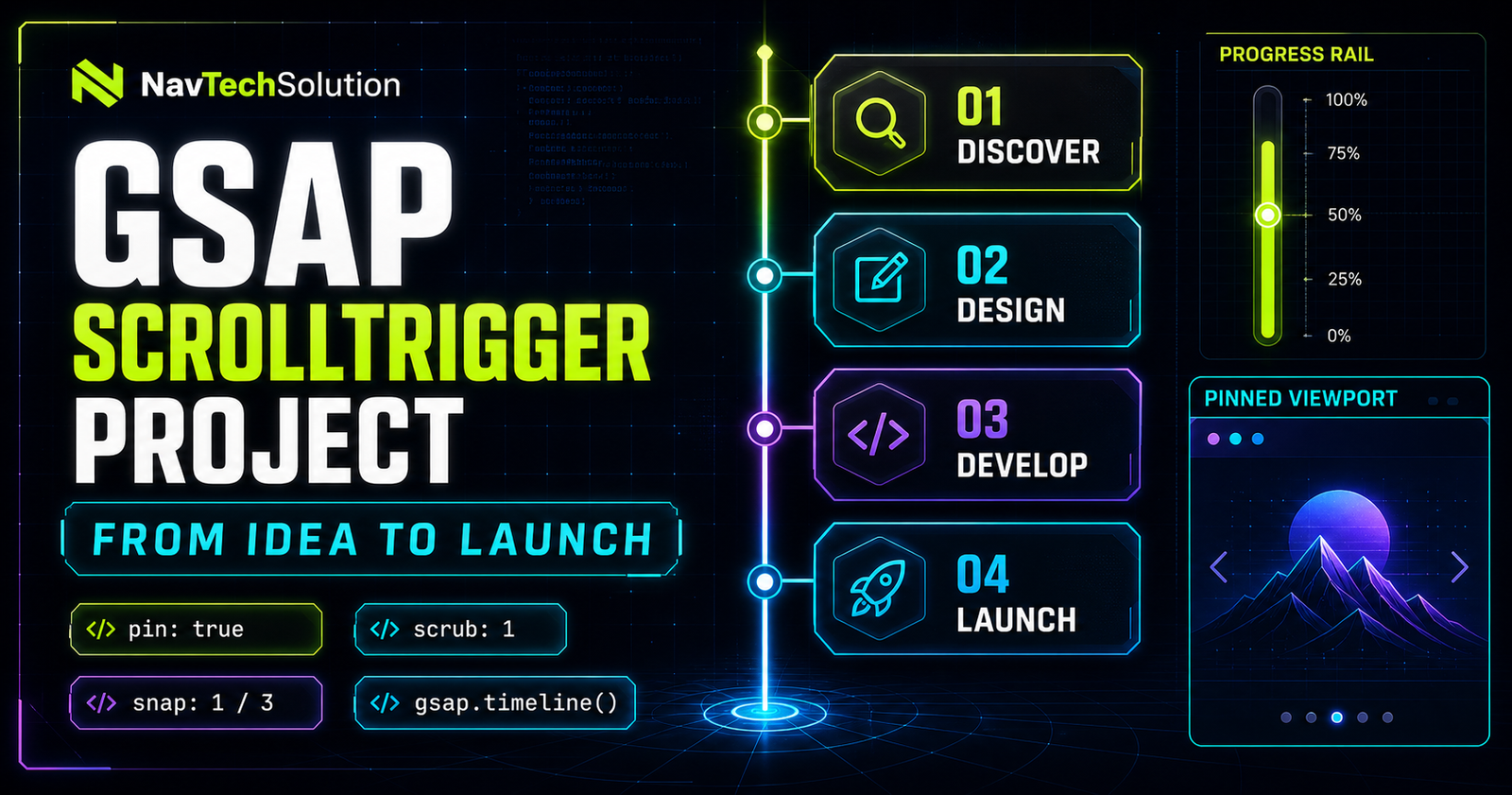
This capstone turns separate GSAP concepts into one coherent experience. The page begins as readable HTML, enhances to a pinned story on wide screens, follows native scroll with scrub, and settles at four named timeline states. Mobile and reduced-motion visitors get the same information without a long pinned sequence.
1. Project Preview
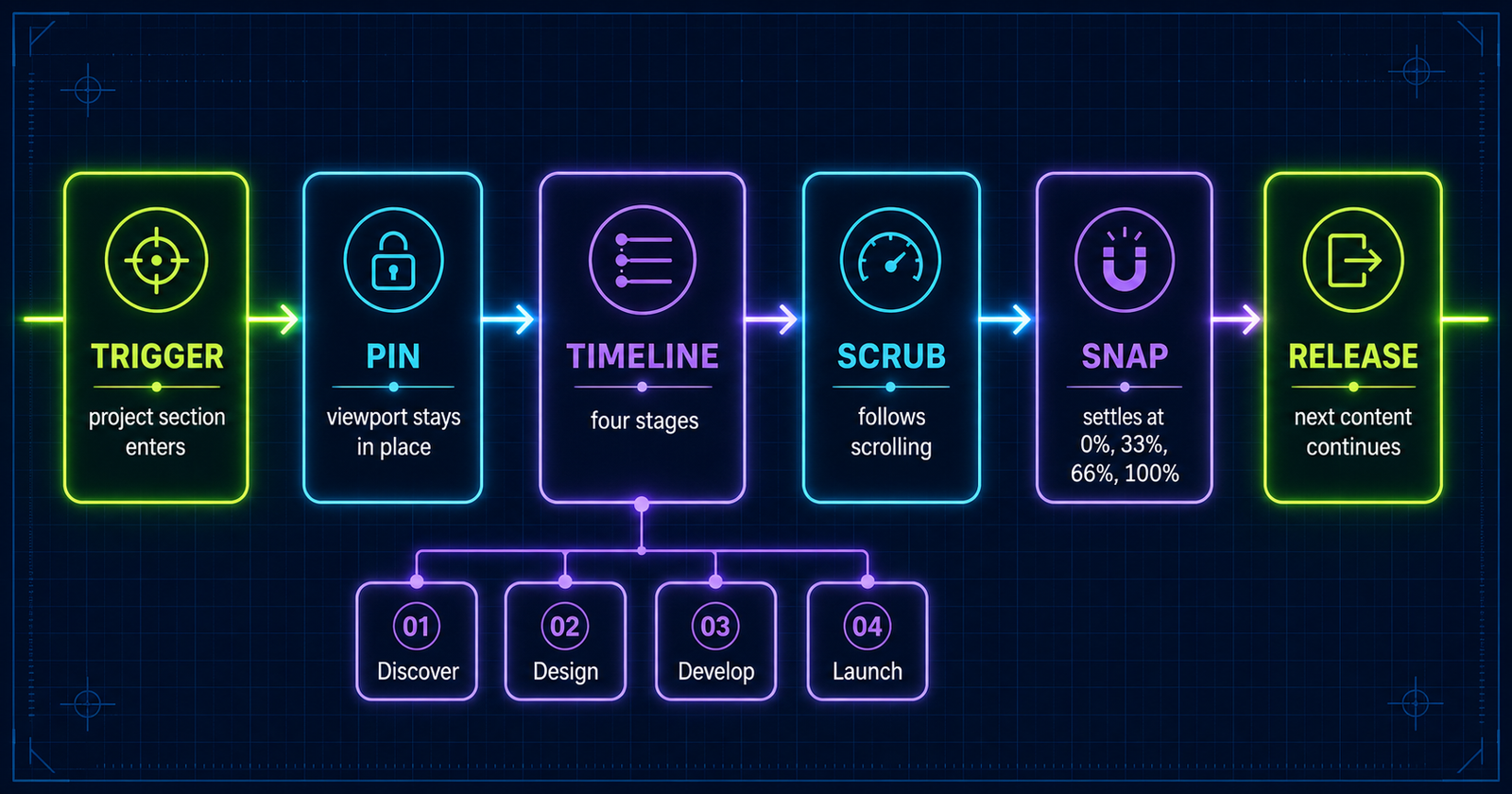
Scroll through the project on a desktop-sized viewport. The stage pins, the normalized timeline follows your scroll position, progress selects one of four states, and snap gently completes the nearest directional transition. After Launch, the pin releases and the article continues normally.
Discover
Research the audience, business goal and strongest story direction.
Research the audience, business goal and story direction.
Shape the content hierarchy, interface and motion language.
Build a resilient semantic and responsive implementation.
Test, optimize, release and measure the experience.
2. What We Are Building
The experience explains a real delivery process in four stages: Discover, Design, Develop and Launch. Each stage has content, a distinct CSS illustration and an exact point on one GSAP timeline. ScrollTrigger owns only the relationship between page scroll and that timeline.
Research, evidence and direction.
Structure, systems and prototypes.
Semantic, responsive implementation.
Testing, release and iteration.
3. Project HTML Structure
Keep the content layer boring—in the best sense. Use a section root, a copy region, progress UI, four buttons, four visual panels and a mobile stage list. Data attributes form the JavaScript contract while classes remain available for presentation.
<section data-story-project aria-label="From Idea to Launch">
  <div data-stage-number>01</div>
  <h3 data-stage-title>Discover</h3>
  <p data-stage-description>...</p>
  <span data-project-progress></span>
  <button data-project-dot>1</button>
  <div data-project-stage>...</div>
</section>
4. Story Data
Store stage names and descriptions in arrays or objects. The active-stage function reads this small model and updates the view. Centralized data prevents headings, status messages and navigation labels from drifting apart.
const stages = [
  { title: "Discover", number: "01" },
  { title: "Design",   number: "02" },
  { title: "Develop",  number: "03" },
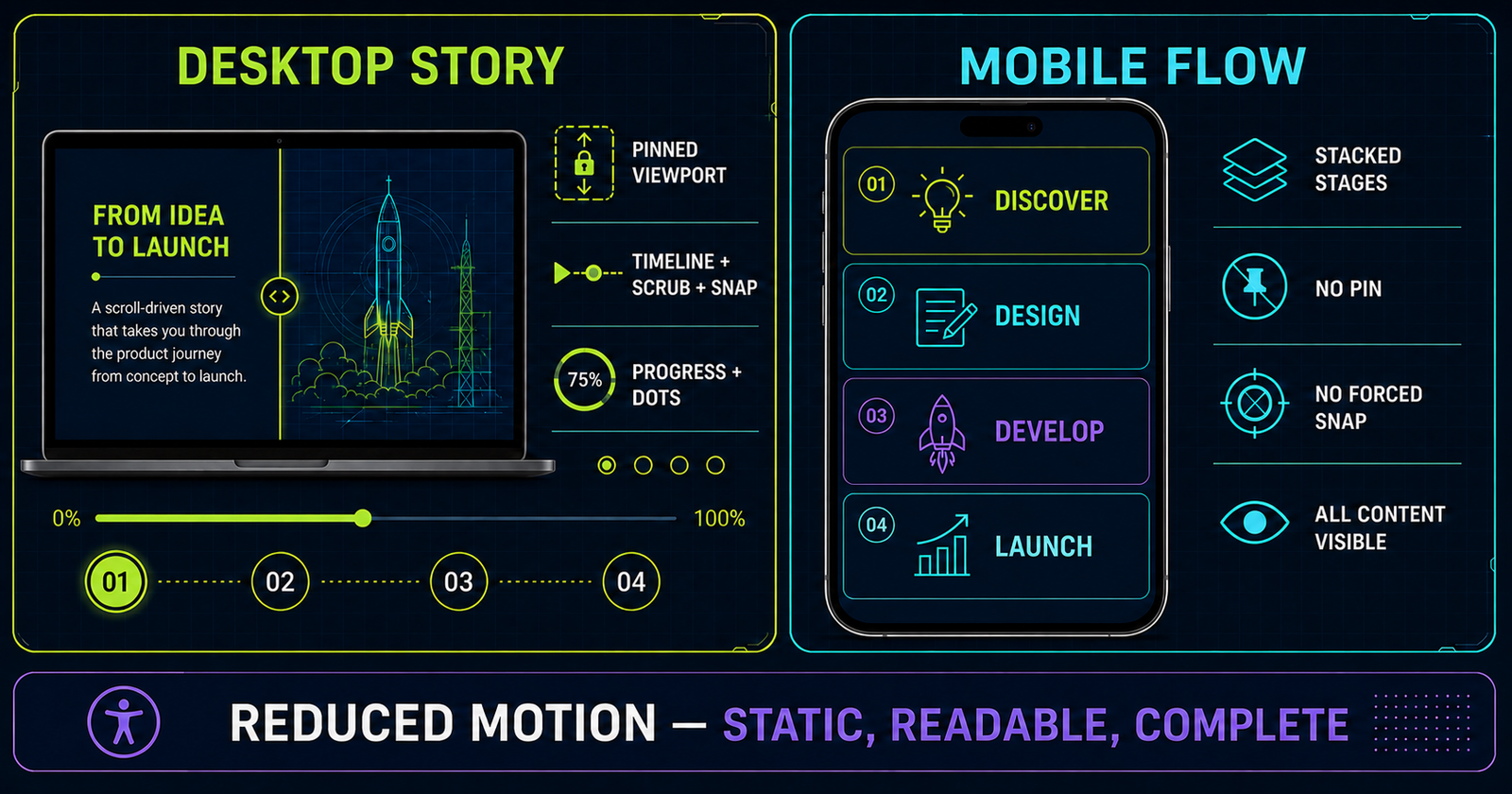
  { title: "Launch",   number: "04" }
];
5. Original Visuals for Each Stage
The live demo uses lightweight CSS-native visuals: a research radar, interface wireframes, a code window and a launch orbit. They reinforce meaning without downloading extra photographs or hiding essential content inside a canvas.
6. Basic Layout CSS
The desktop shell is a two-column grid. Copy occupies the left; the contained artwork occupies the right. A breakpoint removes the artwork panel and displays the semantic stage list so a narrow screen never depends on pinning.
.story-project__shell {
  min-height: 620px;
  display: grid;
  grid-template-columns: .85fr 1.15fr;
}
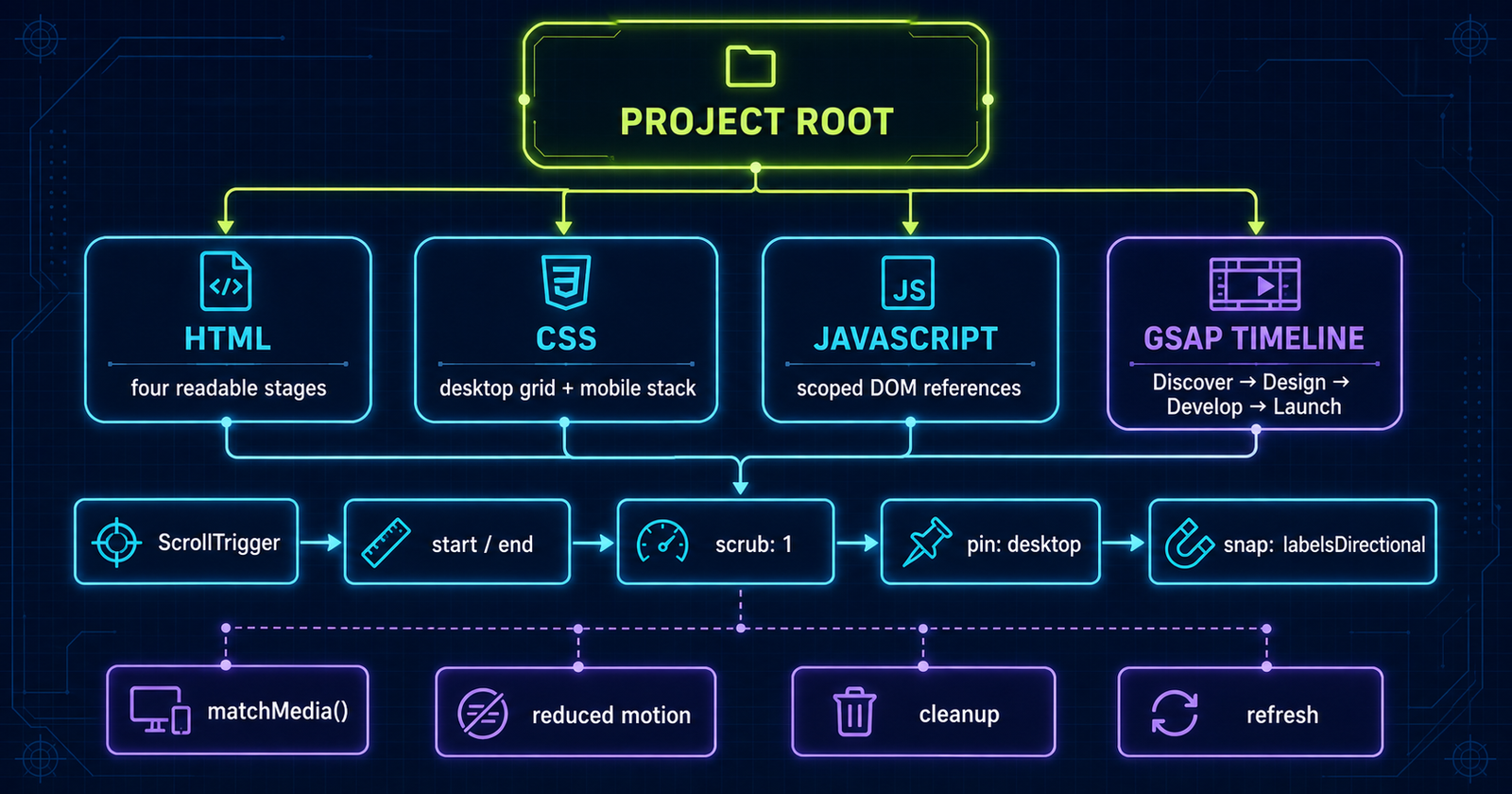
@media (max-width: 899px) {
  .story-project__shell { grid-template-columns: 1fr; }
  .story-stage-list { display: grid; }
}
7. First Non-Animated Version
Before loading GSAP, confirm the heading, four stages and continuation content are understandable. This baseline is your SEO, accessibility and failure-safe version. Animation should improve orientation—not manufacture the information.
8. Register ScrollTrigger
Load GSAP core first, then ScrollTrigger, and register the plugin once after both globals exist. The project script checks for missing dependencies before enhancement.
if (window.gsap && window.ScrollTrigger) {
  gsap.registerPlugin(ScrollTrigger);
}
9. Create the Project Timeline
One master timeline makes progress deterministic. It contains three equal transition intervals with labels at time 0, 1, 2 and 3. ScrollTrigger then normalizes the entire duration into progress from zero through one.
const story = gsap.timeline({
  scrollTrigger: {
    trigger: project,
    start: "top top",
    end: "+=2400",
    scrub: 1,
    pin: true,
    snap: { snapTo: "labelsDirectional" }
  }
});
10. Why 1 / 3 Snap?
Four story states create three gaps: Discover→Design, Design→Develop and Develop→Launch. Equal normalized points therefore sit at 0, 1/3, 2/3 and 1. Labels express the same idea more clearly when the timeline later gains unequal timing.
11. Build Stage 1: Discover
Discover is the stable initial state. It should exist before JavaScript changes anything. That removes a flash of blank content and gives the timeline a reliable origin.
12. Transition Discover → Design
Animate the radar out while the wireframe enters during the first timeline unit. Cross-fading with transforms avoids abrupt layout work and makes the handoff feel continuous.
13. Stage 2: Design
Design replaces uncertainty with a visible system. The purple wireframe panels use the same bounded artboard, so the stage change does not shift document layout.
14. Transition Design → Develop
Move from broad interface blocks to the focused code window. Because both panels occupy the same absolute layer, only opacity and transform need to change.
15. Stage 3: Develop
Develop represents implementation. The code graphic is decorative, while the adjacent HTML heading and paragraph preserve the actual meaning for every visitor.
16. Transition Develop → Launch
The final interval can lift the code panel and bring the orbit forward. Keep the easing quiet under scrub because scroll velocity already supplies a strong motion signal.
17. Stage 4: Launch
Launch is the final stable state at progress one. The pin releases only after this stage has enough scroll distance to be seen, then the rest of the document continues.
18. Timeline Position Parameters
Position parameters such as "<", ">" and relative offsets coordinate stage layers without arbitrary delays. Use them inside an interval while retaining equal label boundaries.
19. Timeline Labels
Labels name the intended states: discover, design, develop and launch. Named timing survives refactoring better than unexplained decimal values.
story.addLabel("discover", 0)
  .to({}, { duration: 1 })
  .addLabel("design", 1)
  .to({}, { duration: 1 })
  .addLabel("develop", 2)
  .to({}, { duration: 1 })
  .addLabel("launch", 3);
20. Align Snap with Story States
labelsDirectional settles toward a named stage in the current travel direction. If labels are not available, use snapTo: 1 / 3. Do not mix equal snap math with unequal stage timing unless the mismatch is intentional.
21. Progress Bar
Normalized ScrollTrigger progress maps directly to a bar from 0% through 100%. Transform scaling is ideal for animated bars, while this project updates width only when a discrete stage changes to minimize writes.
22. Stage Counter
The large 01–04 counter gives immediate orientation. It is visible text, not a pseudo-element, so the interface remains meaningful when styles are unavailable.
23. Navigation Dots
Use real buttons with stage-specific accessible names. On desktop, selecting a dot scrolls to the matching position inside the existing trigger range; it does not replace or trap native scrolling.
24. Active Stage State
One function updates title, description, counter, art, dot state and live status. It returns immediately when the index has not changed, preventing needless DOM work during continuous scroll updates.
function updateStage(index) {
  index = Math.max(0, Math.min(3, index));
  if (index === activeIndex) return;
  activeIndex = index;
  // Update the small set of stage-dependent nodes.
}
25. Visual Stage Changes
Only the active artwork is exposed visually. The panels share one positioned container, preventing document reflow. The complete text stage list remains separate for mobile and reduced motion.
26. Scrub Configuration
scrub: 1 lets the timeline catch up over roughly one second, softening wheel and touchpad input. scrub: true creates a more direct mapping. Test both on real hardware.
27. Snap Configuration
Use a short min/max duration, small delay and calm ease. Long snap animations feel like the page has taken control away from the visitor.
snap: {
  snapTo: "labelsDirectional",
  duration: { min: 0.18, max: 0.55 },
  delay: 0.08,
  ease: "power1.inOut"
}
28. Pin Configuration
pin: true pins the trigger element and lets ScrollTrigger manage spacing. Avoid manually animating the pinned wrapper itself; animate children inside it instead.
29. End Range
The example uses end: "+=2400" on desktop. That creates 800 pixels per transition, but it is a design choice—not a universal constant. Shorter content and smaller screens require less distance.
30. Project Progress Mental Model
31. Desktop Experience
Desktop gets the full two-column pinned narrative because it has enough viewport space to preserve context and show the artwork without covering the copy.
32. Tablet Experience
At intermediate widths, test both orientations. This implementation uses 900 pixels as the enhancement boundary; below it, the story becomes a fast vertical reading experience.
33. Mobile Experience
Mobile keeps every stage in normal flow and omits pin, snap and decorative stage switching. That preserves touch momentum, browser controls and predictable back/forward navigation.
34. gsap.matchMedia()
gsap.matchMedia() creates breakpoint-specific animation context and can revert it cleanly. Put the pinned trigger inside the desktop query instead of building it everywhere and trying to disable pieces later.
const mm = gsap.matchMedia();
mm.add("(min-width: 900px)", () => {
  const timeline = buildDesktopStory();
  return () => timeline.kill();
});
35. Reduced Motion
If prefers-reduced-motion: reduce matches, do not build the pinned timeline. Display the four static stage cards, stop smooth programmatic scrolling and remove nonessential transition effects.
36. Project Accessibility
Use semantic headings, visible focus, labelled buttons and a quiet live status. Never place essential explanations only inside artwork. Keyboard users must be able to pass through the project without extra keystrokes.
37. No Scroll Hijacking
The browser remains the scroller. We do not cancel wheel events, simulate momentum or lock the viewport. ScrollTrigger reads and maps native scroll position; snap is short, interruptible and disabled on small screens.
38. Project Performance
Animate transform and opacity, bound large decorative layers, avoid layout reads inside onUpdate, and do not initialize the same project twice. The heaviest assets on this article are lazy-loaded below the featured image.
39. Cache DOM References
Query the root once and cache counter, title, description, progress, dots and panels. Repeating selectors during every scroll update creates avoidable work and makes ownership less clear.
40. Avoid Rebuilding While Scrolling
Build at initialization, breakpoint changes or an explicit control-panel submission—not inside onUpdate. Updating state is cheap; recreating triggers is not.
41. Refresh Strategy
Call ScrollTrigger.refresh() after the layout is ready or after a real geometry change. Do not call it on every scroll. If web fonts or dynamically sized media alter the page, refresh once they settle.
42. Project Code Architecture
The implementation separates content, presentation and behavior. PHP emits semantic HTML and metadata, the dedicated stylesheet owns the project design, and one dedicated JavaScript file owns only this interaction.
43. Main Project Initialization
Wait for the DOM, find the project root, cache nodes, paint the first stage and exit safely if GSAP is missing. Defensive initialization keeps the rest of the page functional.
44. Timeline Construction
Create one timeline inside the desktop media context. Attach one ScrollTrigger to it. Store the reference on the project root only if external navigation needs access to its calculated range.
45. Equal Stage Timing
Three duration-one placeholders give the timeline a duration of exactly three. In a production motion pass, each placeholder can become a coordinated transition while the boundaries stay at 0, 1, 2 and 3.
46. Scroll Story Timeline Diagram
Discover
Design
Develop
Launch
47. Active Stage Calculation
Multiply normalized progress by the last index and round: Math.round(progress * 3). Clamping to 0–3 protects against floating-point edge cases.
48. Update Content Efficiently
Update only after the rounded index changes. This turns potentially hundreds of scroll callbacks into at most four meaningful interface state changes across the story.
49. Decorative Motion
Radar sweeps, wireframe lines and launch orbits may animate independently, but keep them subtle and scoped to the active panel. They should pause or disappear when reduced motion is requested.
50. Stage Transition Easing
Use ease: "none" for the timeline under scrub so the scroll-to-progress mapping remains honest. Use a gentle ease for the brief snap settling action.
51. Debug Mode
During development, add markers: true, outline the trigger and pin spacer, and log label times. Remove markers before publishing because they are development UI.
52. Project Control Panel
This compact lab rebuilds only the project trigger. Change scrub smoothing or disable snapping, then apply the settings. The controls appear in normal flow and do not mutate global ScrollTriggers.
53. Project Code Preview
const timeline = gsap.timeline({
  defaults: { ease: "none" },
  scrollTrigger: {
    trigger: project,
    start: "top top",
    end: "+=2400",
    scrub: 1,
    pin: true,
    snap: { snapTo: "labelsDirectional" },
    onUpdate: self => setStage(Math.round(self.progress * 3))
  }
});
54. Full Project Breakdown
SEO-friendly headings, paragraphs, stage cards and navigation.
One timeline, one trigger and four labels.
Media-query cleanup, reduced motion and no-JS readability.
55. Common Project Mistakes
- Creating a separate competing ScrollTrigger for every stage.
- Using four intervals for four states instead of three.
- Pinning long content on a narrow touch viewport.
- Hiding the entire story until JavaScript runs.
- Refreshing or querying the DOM continuously during scroll.
- Killing unrelated triggers during cleanup.
56. Debugging Checklist
- GSAP core loads before ScrollTrigger.
- The plugin is registered once.
- The trigger exists and has stable height.
- Labels match the four intended states.
- Start and end markers appear where expected.
- Only desktop creates the pin.
- Resize cleanup removes the old trigger.
- Content after the project remains reachable.
57. Testing the Project
Test wheel, touchpad, keyboard, touch and scrollbar dragging. Resize across 900 pixels repeatedly, toggle reduced motion, navigate the dots, interrupt a snap and confirm the article continues after release. Also test with JavaScript blocked.
58. SEO/Content Value
Search engines receive a canonical, indexable article with one H1, descriptive headings, structured BlogPosting and FAQ data, internal series links and visible text for every stage. The interaction is enhancement, so indexing does not depend on animation execution.
59. Mini Challenge
Add a fifth “Measure” stage. Update the model, navigation, accessible list, timeline label and artwork. Then recalculate equal snapping: five states create four intervals, so the numeric alternative becomes 1 / 4.
60. QUICK REFERENCE
matchMedia, one timeline, pin, scrub 1, labelsDirectional snap, +2400 end.
Normal document flow, all stages visible, no pin, no snap, no essential animated content.
61. PROJECT ARCHITECTURE GRAPHIC
The three original supporting designs in this article cover interaction flow, responsive strategy and code ownership. Together with the featured thumbnail, they form a consistent visual set for the post and social sharing.
62. FINAL MENTAL MODEL
63. CONTINUE TO BLOG #22
Continue with GSAP ScrollSmoother Tutorial: Create Smooth Scrolling Experiences to add controlled visual catch-up while keeping ScrollTrigger integrated with native page scrolling.
Frequently Asked Questions
How do I build a ScrollTrigger project with GSAP?
Start with semantic HTML and a complete non-animated layout, build one GSAP timeline for the story, then connect that timeline to ScrollTrigger with deliberate start, end, scrub, pin and snap settings.
How do I combine pin, scrub and snap?
Add them to the ScrollTrigger configuration attached to the main timeline. Pin holds the stage, scrub maps scroll progress to timeline progress, and snap settles the playhead at a meaningful stage.
How many snap intervals do four stages need?
Four stages create three intervals, so equally spaced stages use a normalized increment of 1 / 3.
How do I align snap points with timeline stages?
Give every stage equal timeline time or add timeline labels at the exact stage boundaries and use labelsDirectional for snapTo.
Should I use one timeline for a scroll storytelling project?
Usually yes. One timeline provides a single source of truth for sequence, progress, labels and cleanup while small independent decorative effects can remain separate.
How do I update a progress bar with ScrollTrigger?
Read the normalized progress in onUpdate and scale or resize the progress indicator. Avoid rewriting the DOM when the displayed state has not changed.
How do I update the active stage while scrolling?
Convert normalized progress into an index with Math.round(progress times the final stage index), clamp it, and update the interface only when that index changes.
Should I pin storytelling sections on mobile?
Not automatically. This project keeps normal content flow below 900 pixels because a long pinned touch experience can feel restrictive and consume valuable screen space.
How do I make ScrollTrigger projects responsive?
Use gsap.matchMedia to create desktop-only triggers, provide a readable mobile layout, and return cleanup logic for every breakpoint-specific animation.
How do I respect prefers-reduced-motion?
Detect the preference before building the scroll timeline, remove nonessential motion, avoid pin and snap, and expose all information in the normal document flow.
How do I prevent horizontal overflow?
Animate transforms instead of layout properties, keep art inside bounded containers, test at narrow widths, and avoid applying overflow rules globally.
How do I debug a pinned ScrollTrigger project?
Temporarily enable markers, verify the trigger and scroller, inspect start and end values, test without snap, and refresh after fonts and layout-dependent assets settle.
Can I use ScrollTrigger with a static PHP website?
Yes. PHP produces the HTML on the server and GSAP runs in the browser. No framework or build process is required.
Should essential content depend on GSAP?
No. Keep the complete story in semantic HTML so it remains available to search engines, assistive technology, reduced-motion users and visitors when JavaScript fails.
Is ScrollTrigger good for portfolio storytelling?
Yes, when motion clarifies a sequence and the experience remains fast, navigable and readable without the animation layer.
