


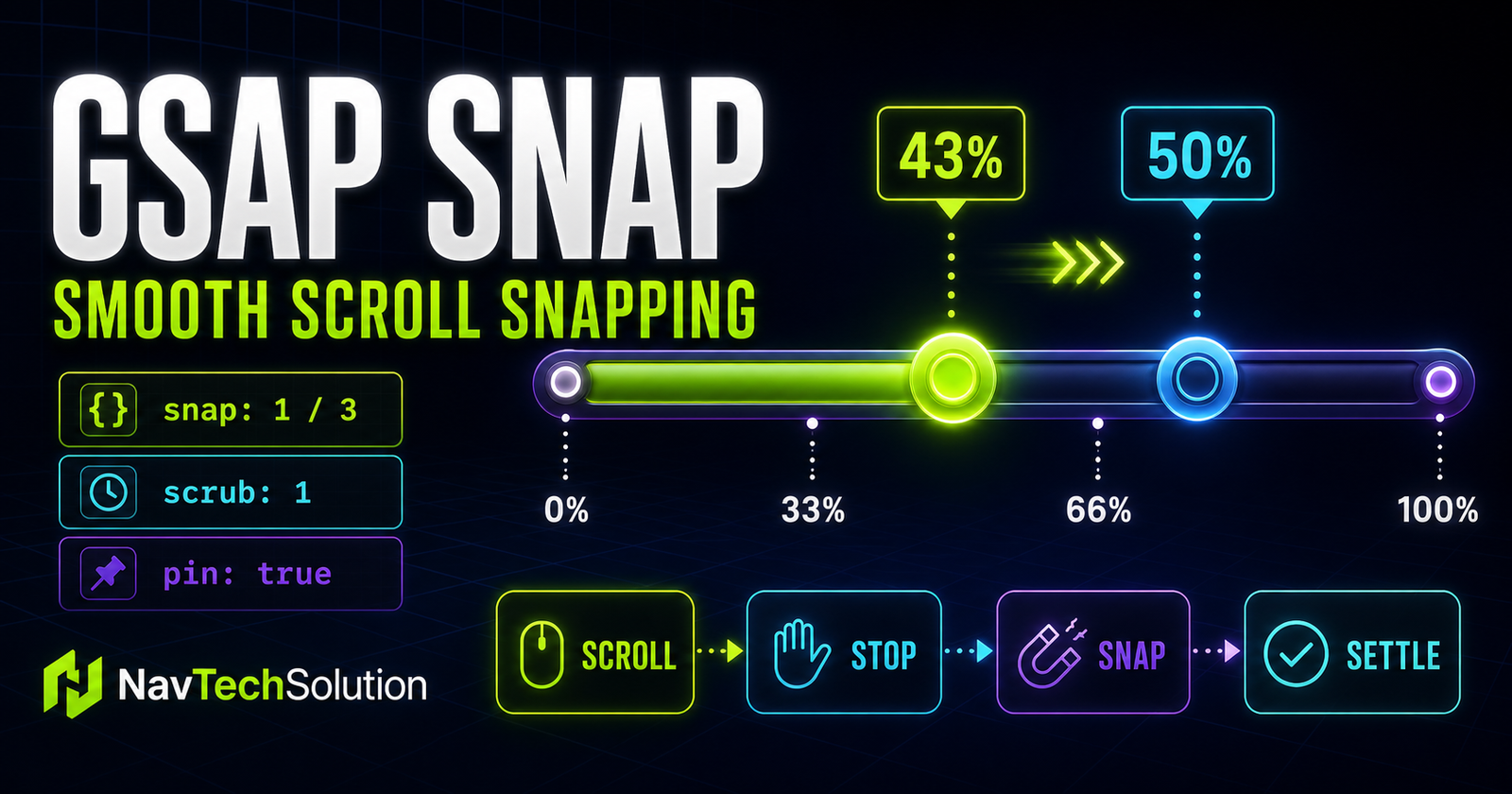
snap gives a scroll-driven animation a deliberate resting place. Without it, progress can stop at any value—43%, 71%, or 92%. With it, ScrollTrigger waits for scrolling to stop, selects an allowed progress point, and smoothly moves there.
This tutorial builds on real pages already present in the project: GSAP stagger, timelines, the timeline position parameter, timeline plus stagger, ScrollTrigger fundamentals, start and end, scrub, and toggleActions. The planned pin and ScrollTrigger-plus-timeline PHP pages are not linked because they are absent from this backup.
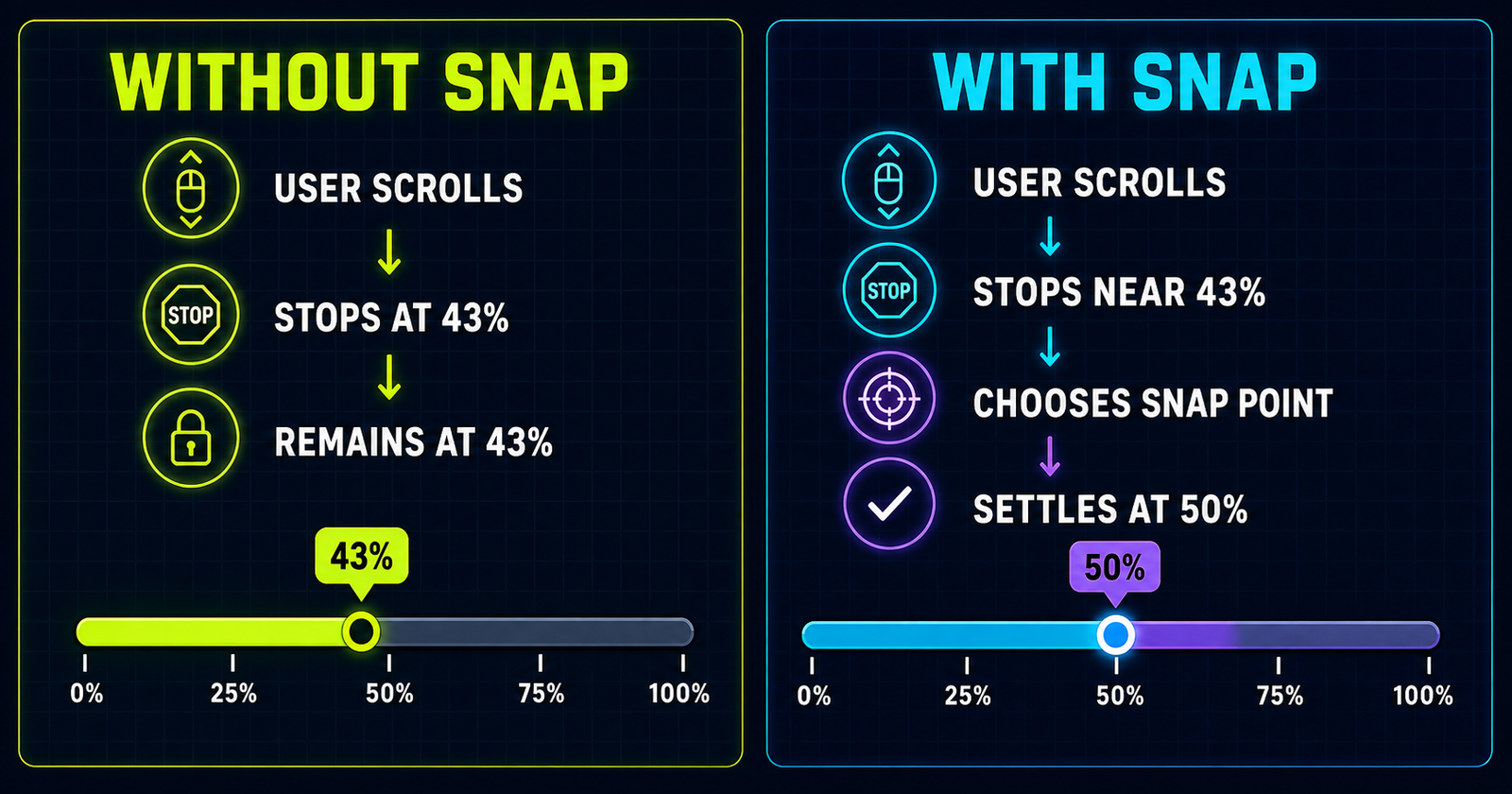
What is ScrollTrigger snap?
The snap property works in normalized ScrollTrigger progress from 0 to 1. Zero represents the trigger start, one represents its end, and 0.5 is halfway through that scroll range. A numeric value defines equal increments. An array defines specific points. A function can calculate a destination. A configuration object adds timing, easing, direction and callbacks.
1. Normalized progress
Normalized progress is a ratio, not pixels. If the active scroll range is 1,600 pixels, progress 0.25 is one quarter of that range. If the range changes after a resize, 0.25 still means one quarter. This makes snap logic portable across layout sizes.
2. First snap example
gsap.to(".snap-card", {
  xPercent: 220,
  ease: "none",
  scrollTrigger: {
    trigger: ".snap-section",
    start: "top top",
    end: "+=1200",
    scrub: 1,
    snap: 0.25
  }
});
The animation may follow scroll continuously, but after scrolling stops it settles at 0%, 25%, 50%, 75%, or 100%.
3. Understanding snap: 0.25
A value of 0.25 is an increment. It does not mean 25 pixels and it does not mean “make four panels.” Starting at zero and repeatedly adding 0.25 creates five points: 0, 0.25, 0.5, 0.75, and 1.
4. Calculate snap intervals
Count intervals, not visual panels. Two points have one interval. Four points have three intervals. For equally spaced points, use:
snap increment = 1 / (number of points - 1)

4 points = 3 intervals
snap: 1 / 3
5. Snap point calculator graphic
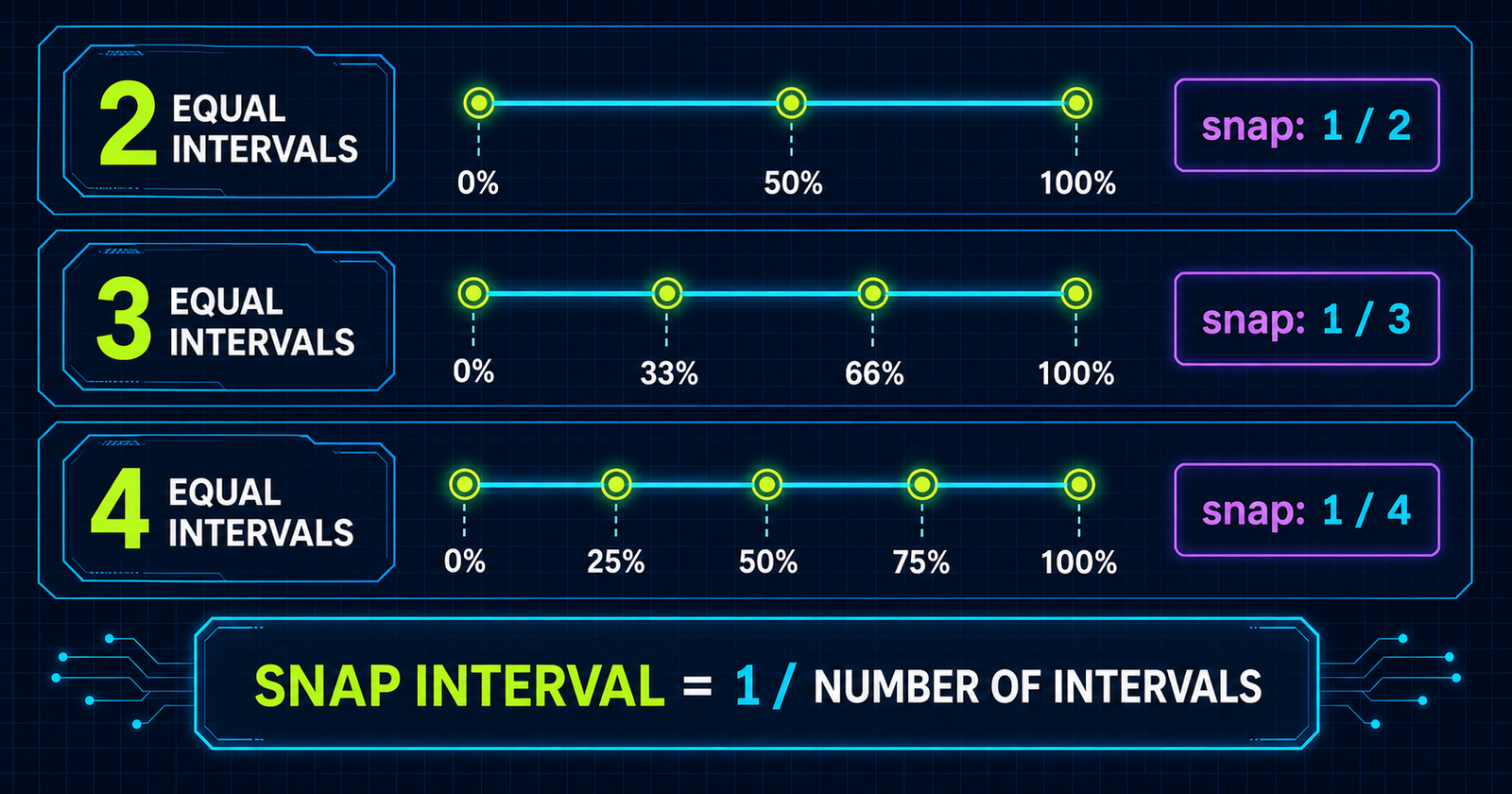
6. Interactive snap interval demo
7. Snap + scrub
scrub controls the playhead while scrolling. snap acts after scrolling pauses. Used together, the animation follows the scrollbar and then settles on a meaningful stage.
scrollTrigger: {
  trigger: ".story",
  start: "top top",
  end: "+=1600",
  scrub: 1,
  snap: 1 / 3
}
8. Scrub vs snap
9. Snap + timeline
A timeline organizes several visual changes under one progress value. Attach one ScrollTrigger to the timeline instead of creating a competing trigger for every card.
const timeline = gsap.timeline({
  scrollTrigger: {
    trigger: ".feature-story",
    start: "top top",
    end: "+=1800",
    scrub: 1,
    snap: 1 / 3
  }
});

timeline
  .from(".feature-label", { y: 20, opacity: 0 })
  .from(".feature-title", { y: 35, opacity: 0 })
  .from(".feature-card", { y: 30, opacity: 0, stagger: 0.12 });
10. Timeline snap mental model
Timeline duration is normalized into the ScrollTrigger range. Equal snap increments do not automatically match unequal visual stages. Design timeline timing deliberately or place labels at the moments that should become destinations.
11. Snap + pin
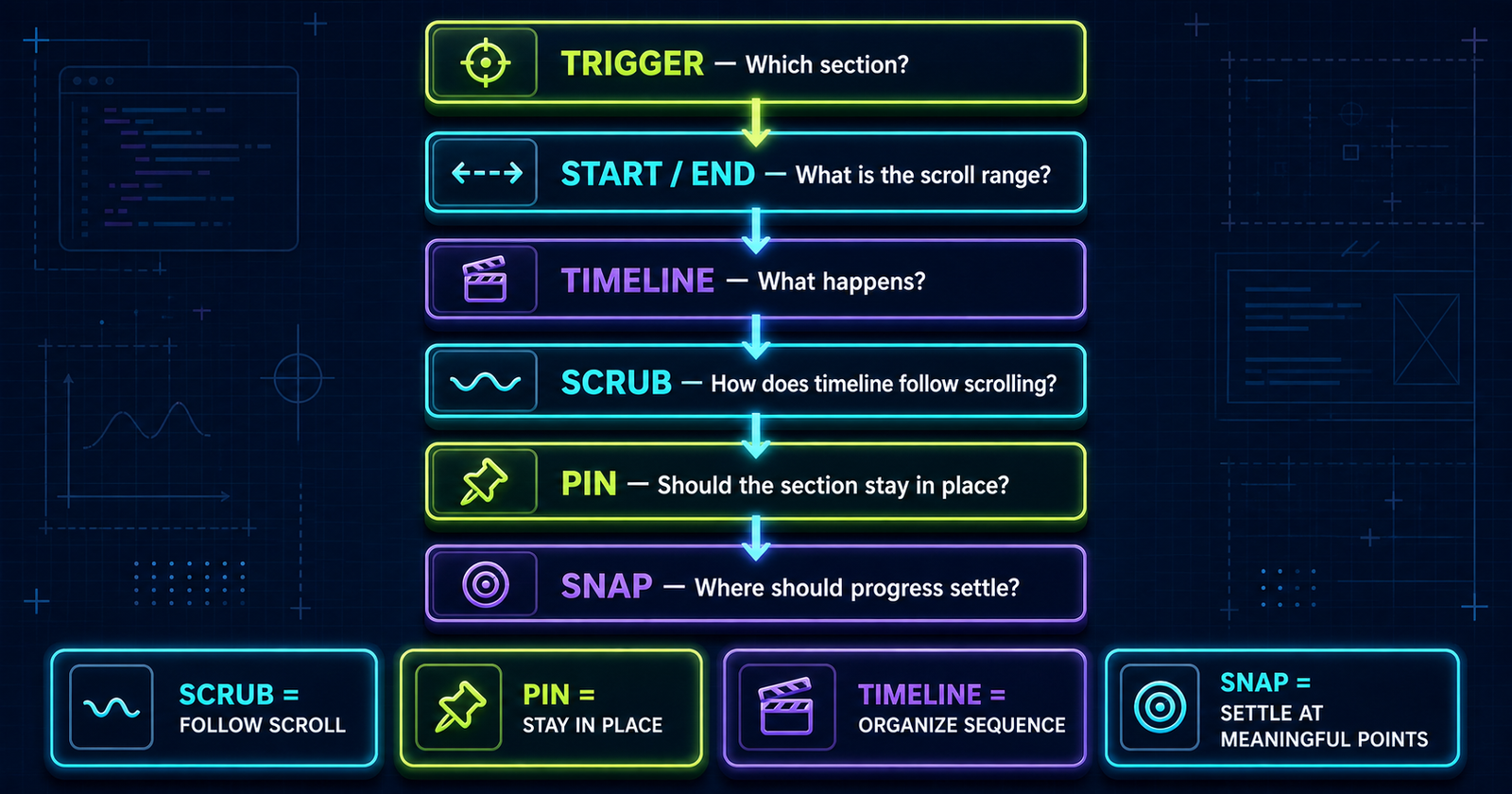
pin holds an element in place during the active range. It does not create a timeline, smooth progress, or choose snap points. A pinned story commonly combines all four features, but each should be justified independently.
12. Four responsibilities
13. Pinned story snap demo
From idea to a clear digital experience
14. Story layout
The story remains readable as ordinary HTML. Desktop may pin the container; smaller screens keep normal flow. When JavaScript fails or reduced motion is requested, no information disappears.
15. Snap configuration object
snap: {
  snapTo: 1 / 3,
  duration: { min: 0.2, max: 0.6 },
  delay: 0.1,
  ease: "power1.inOut",
  directional: true,
  inertia: true,
  onStart: () => console.log("snap started"),
  onInterrupt: () => console.log("snap interrupted"),
  onComplete: () => console.log("snap complete")
}
Only snapTo is required inside the object. Add options because the experience needs them, not because they exist.
16. snapTo
snapTo: 0.25[0, 0.2, 0.65, 1]17. Snap duration
A fixed duration feels consistent but can be too slow for a nearby destination. A range lets ScrollTrigger clamp the duration according to velocity and distance.
18. Interactive duration demo
The Main Snap Lab below exposes maximum duration. Test short and long values with slow scrolling, fast wheel input, touchpads and reversals.
19. Snap ease
Easing controls how the settling movement accelerates. power1.inOut is calm and understandable. Strong elastic or bounce easing can make the page feel as if it is fighting the user.
20. Snap delay
delay is the wait after the final scroll event before snapping begins. Too little can feel impatient; too much makes the interface appear unresponsive.
21. Direction and snap
Directional snapping respects the latest scroll direction by default in current GSAP 3 behavior. Set directional: false only when the closest point should win regardless of direction.
22. Snap to timeline labels
Labels are valuable when story stages are not equally spaced in timeline time. Use snapTo: "labels" for the closest label or "labelsDirectional" to respect the latest scroll direction.
23. Labels vs equal snap intervals
Equal intervals
Best when every stage occupies an intentionally equal share of the timeline.
Timeline labels
Best when stage timing varies and named moments represent the correct destinations.
24. Snap + timeline labels demo
const story = gsap.timeline({
  scrollTrigger: {
    trigger: ".story",
    start: "top top",
    end: "+=1800",
    scrub: 1,
    pin: true,
    snap: { snapTo: "labelsDirectional", duration: 0.4 }
  }
});

story.addLabel("intro")
  .from(".story-title", { opacity: 0 })
  .addLabel("features")
  .from(".story-card", { opacity: 0, stagger: 0.1 })
  .addLabel("complete");
25. GSAP snap vs CSS scroll snap
CSS scroll snap
Aligns native scroll-container positions. It is ideal for carousels, full-page sections and simple structural alignment without an animation timeline.
ScrollTrigger snap
Settles normalized animation progress and integrates with scrub, pin, timeline labels, velocity, callbacks and custom functions.
26. When CSS scroll snap is better
Choose CSS for straightforward native alignment where the browser scroll position and element boundaries are the feature. It is simpler and does not require JavaScript.
27. When ScrollTrigger snap is better
Choose ScrollTrigger when the destination is an animation stage rather than merely an element boundary, especially when a timeline coordinates several properties.
28. Snap story progress
A story can expose its current normalized progress without making the number the only signal. Pair the meter with visible stage text and an accessible live status.
29. Snap progress indicator
30. Card snap sequence
Cards should represent meaningful stages. Avoid snapping to every tiny card entrance; group related motion into a few understandable destinations.
31. Image or graphic snap story
Use one image region with accompanying text when each snap point explains a distinct feature. Preserve the images and captions in document flow for non-animated access.
32. Snap + scale
Small scale changes can emphasize the active stage. Avoid dramatic zooming during scroll because it increases motion intensity.
33. Snap + opacity
Opacity is inexpensive, but content should not remain hidden before JavaScript initializes. Set initial states from GSAP only after capability checks.
34. Snap + rotation
Rotation can clarify a diagram or playful object, but it rarely belongs on long-form text. Keep it purposeful and reduced-motion safe.
35. Main Snap Lab
Change the settings, rebuild only this lab, and scroll through its stage. The script keeps a reference to its own timeline and trigger, kills them with layout reversion, clears only its own inline properties, and leaves every unrelated ScrollTrigger untouched.
Build and test a snap sequence
Lab ready.
36. Main Lab controls
The controls expose point count, scrub smoothing, maximum settling duration, desktop pinning and a snap toggle. They are native form controls with visible labels and keyboard focus.
37. Main Lab visualization
The object and four cards show how one timeline distributes change over progress. The meter reports ScrollTrigger progress independently from the animated content.
38. Main Lab timeline
The demo uses labels for comprehension but numeric snapping for the selected equal point count. The timeline stages have deliberate durations; they are not assumed to match one tween per snap point.
39. Main Lab live status
The polite live region reports progress and the start, interruption, or completion of a snap without relying only on color.
40. Main Lab generated code
The output summarizes the active snap, scrub and pin settings. It is a teaching aid rather than a complete copy-and-paste configuration.
41. Main Lab cleanup
Rebuilding calls timeline.scrollTrigger.kill(true) and timeline.kill(), then clears only the lab object and cards. It never calls ScrollTrigger.killAll().
42. Pin spacer and layout cleanup
Killing the trigger with reversion restores pin-related layout changes. This matters when users repeatedly toggle pin or when responsive rules stop matching.
43. Responsive snap strategy
Desktop
- Pin only when the story benefits.
- Allow several intentional stages.
- Use an adequate end range.
- Test wheel and touchpad input.
Mobile
- Prefer normal content flow.
- Remove decorative pinning.
- Use fewer points and shorter ranges.
- Disable snap if it fights touch scrolling.
The demos use viewport checks and reduced-motion detection. In a larger application, gsap.matchMedia() can own responsive setup and automatically revert animations when media queries stop matching.
44. Why too much snapping feels bad
Snapping becomes frustrating when every movement triggers a long correction, distances are large, the user loses control, text reading feels sticky, or touch momentum conflicts with the effect. Use the fewest points that communicate the story.
45. Good snap use cases
Good fits
- Product feature storytelling
- Step-by-step processes
- Animated portfolio showcases
- Data visualization stages
- Educational sequences
- Pinned feature explanations
Use restraint
A visual stage must benefit from arriving at a precise state. If the page is primarily read rather than explored, native scrolling usually wins.
46. Poor snap use cases
Avoid forced snapping for ordinary blog paragraphs, FAQs, forms, navigation, legal documents, dense reading sections, or every section merely because the feature is available.
47. Snap and fast scrolling
Test fast downward scrolling, fast upward scrolling, direction changes, mouse wheels, touchpads and touchscreens. Directional snap and inertia can feel different across input hardware.
48. Snap and browser history
Do not change URLs or browser history for a simple animation stage. ScrollTrigger progress is not navigation unless the product deliberately models it as navigation.
49. Snap and the fixed header
This site already owns its header layout. The demos avoid inventing a fixed header height and use conservative start positions so content is not assumed to begin at an arbitrary offset.
50. Snap and overflow
Never apply overflow: hidden to the page to make a demo behave. Keep graphics contained locally, preserve native vertical scrolling, and verify that pinned content releases to the following content.
51. Common snap mistakes
- Thinking normalized values are pixels.
- Confusing point count with interval count.
- Using the wrong
1 / intervalsmath. - Confusing scrub, pin, timeline and snap responsibilities.
- Adding snap to every section or long reading content.
- Using too many points or a slow duration.
- Ignoring touch scrolling and fast reversals.
- Using unsupported object properties.
- Guessing label syntax without documentation.
- Using an end range too short for a pinned story.
- Rebuilding without killing the old instance.
- Calling
killAll()and breaking unrelated triggers. - Leaving pin-spacer layout behind.
- Ignoring fixed headers, markers or reduced motion.
52. Debugging checklist
- GSAP loaded
- ScrollTrigger loaded
- Plugin registered
- Trigger exists
- Start is reachable
- End range is long enough
- Scrub is intentional
- Snap value is valid
- Interval math is correct
- Timeline is attached
- Pin layout is healthy
- Old instance was removed
- Mobile behavior was tested
- Temporary markers clarified the range
53. Performance
Prefer transforms and opacity. Keep onUpdate work lightweight, avoid rebuilding while scrolling, and rebuild only after a control changes. ScrollTrigger already optimizes its observation cycle; heavy paint effects inside every stage can still create jank.
54. Accessibility
Respect prefers-reduced-motion. Disable decorative snapping and pinning, reduce distances, preserve focus behavior, and ensure every word is available in normal document flow. A user must never need motion to access the lesson.
55. Progressive enhancement
The article, code examples, diagrams, FAQ and challenge are semantic HTML before GSAP loads. Animation enhances relationships; it does not define the page’s information architecture.
56. Mini project: Build a Snapping Scroll Story
Build a Snapping Scroll Story
The desktop challenge uses a 1,600-pixel range, scrub: 1, pinning and directional timeline labels. Labels align the snap destinations with the actual story timing. On smaller screens or reduced motion, the same four steps remain normal content.
57. Quick reference
| Feature | Example | Purpose |
|---|---|---|
| Basic snap | snap: 0.25 | Snap to progress increments |
| Thirds | snap: 1 / 3 | Create three equal intervals |
| Snap object | snap: { ... } | Configure settling behavior |
| snapTo | snapTo: 0.25 | Define destination increments |
| Duration | duration: 0.5 | Control settling time |
| Ease | ease: "power1.inOut" | Control snap feel |
| Scrub + snap | scrub: 1 + snap | Follow, then settle |
| Pin + snap | pin + snap | Hold a story while snapping |
| Timeline labels | labelsDirectional | Snap to named story stages |
58. Snap formula cheat sheet
2 equal intervals: snap: 1 / 2
0% -------- 50% -------- 100%

3 equal intervals: snap: 1 / 3
0% ----- 33% ----- 66% ----- 100%

4 equal intervals: snap: 1 / 4
0% --- 25% --- 50% --- 75% --- 100%

SNAP INTERVAL = 1 / NUMBER OF INTERVALS
59. Cheat sheet graphic
scrollTrigger: {
  trigger: ".section",
  start: "top top",
  end: "+=1600",
  scrub: 1,
  pin: true,
  snap: 1 / 3
}
60. Final mental model
61. Preview Blog #21
GSAP ScrollTrigger Project: Build an Interactive Scroll Storytelling Website
The planned project will combine start/end, scrub, pin, timelines, stagger, position parameters, snap, responsive behavior and reduced motion in a “From Idea to Launch” story. No link is provided because Blog #21 does not exist.
Three original post designs
Frequently asked questions
What is snap in GSAP ScrollTrigger?
Snap moves ScrollTrigger progress to a configured progress point after scrolling stops, creating a controlled settling motion.
What does snap: 0.25 mean?
It creates progress increments of 0.25, so the available resting points are 0, 0.25, 0.5, 0.75 and 1.
How do I calculate ScrollTrigger snap values?
For equally spaced points, divide 1 by the number of intervals. Four points create three intervals, so use 1 / 3.
What is the difference between snap and scrub?
Scrub links animation progress to scroll progress while the user scrolls. Snap decides where progress settles after scrolling stops.
Can I use snap and scrub together?
Yes. Scrub handles continuous progress and snap settles that progress onto a meaningful point afterward.
Can I use snap with a GSAP timeline?
Yes. Attach ScrollTrigger to the timeline and snap its normalized progress or its labels.
Can I use snap with pin?
Yes. Pin can hold a story section in place while scrub controls its timeline and snap settles the story at defined stages.
What is snapTo?
snapTo is the required property inside a snap configuration object. It can be a number, array, function, or supported timeline-label mode.
How do I control snap duration?
Use duration in the snap object. A number fixes the time; a min/max object lets ScrollTrigger choose a duration based on velocity and distance.
Can I change the easing of a snap?
Yes. Set the ease property in the snap object, such as power1.inOut, and test it with mouse, touchpad, and touch input.
Can ScrollTrigger snap to timeline labels?
Yes. Use labels or labelsDirectional when the attached animation is a timeline with meaningful labels.
What is the difference between GSAP snap and CSS scroll snap?
CSS scroll snap aligns native scroll containers or page sections. ScrollTrigger snap settles animation progress and integrates with timelines, scrub, pin, and callbacks.
Should I use snap on mobile?
Only when it improves the task. Prefer normal content flow, fewer points, shorter ranges, and no decorative pinning when touch scrolling would feel constrained.
How do I make scroll snapping accessible?
Respect reduced-motion preferences, keep all content available without animation, avoid trapping the user, preserve native scrolling, and never require snap to access information.
Can GSAP ScrollTrigger snap work on a PHP website?
Yes. PHP renders the page on the server, while GSAP and ScrollTrigger run in the browser like they do on any HTML page.
Official reference
The option forms and cleanup behavior in this tutorial follow the official GSAP ScrollTrigger documentation. Verify the documentation again when changing the project’s GSAP version.
