



A normal website uses native scrolling, and that is usually the correct default. Highly visual pages can sometimes benefit from a small amount of visual smoothing without replacing the scrollbar, keyboard input or touch mechanics. ScrollSmoother adds that progressive-enhancement layer and remains integrated with ScrollTrigger.
1. What Is ScrollSmoother?
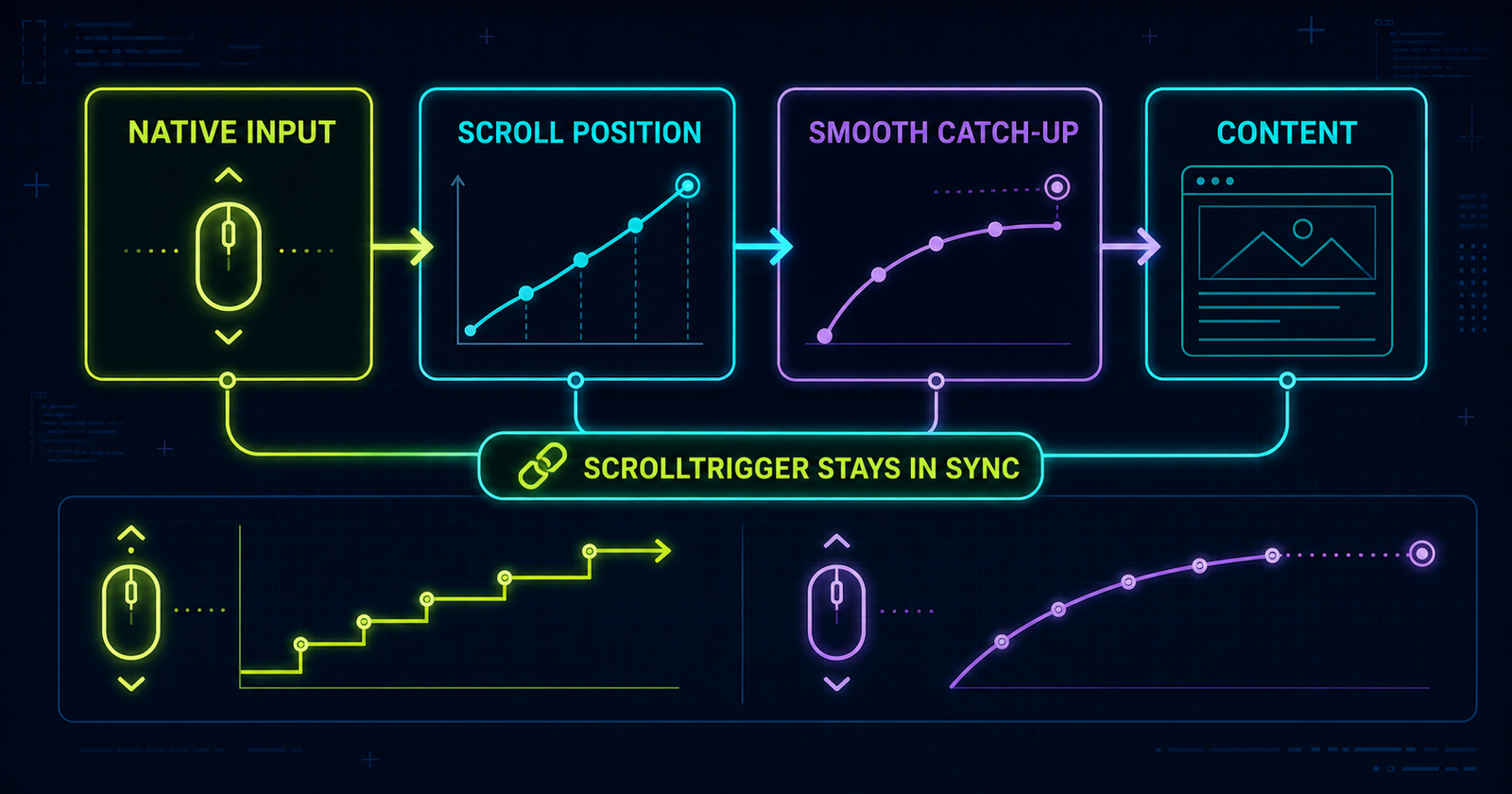
ScrollSmoother is GSAP's vertical smooth-scrolling plugin. Native scroll position changes first; ScrollSmoother then transforms one content element so its visual position catches up over a short duration.
2. ScrollSmoother vs ScrollTrigger
Controls how page scrolling feels.
Controls what happens at scroll positions.
They solve different problems and are designed to work together. A section can enter at top 80% while the overall page movement is visually smoothed.
3. ScrollSmoother vs CSS scroll-behavior
Smooths anchor and scripted navigation jumps.
Smooths continuous visual response to page scrolling.
Immediate browser-controlled movement.
4. Load ScrollSmoother
This page pins all three files to GSAP 3.13.0 so core and plugins stay compatible. Load core first, then ScrollTrigger, then ScrollSmoother, and register both plugins.
<script src="https://cdn.jsdelivr.net/npm/gsap@3.13.0/dist/gsap.min.js"></script>
<script src="https://cdn.jsdelivr.net/npm/gsap@3.13.0/dist/ScrollTrigger.min.js"></script>
<script src="https://cdn.jsdelivr.net/npm/gsap@3.13.0/dist/ScrollSmoother.min.js"></script>

gsap.registerPlugin(ScrollTrigger, ScrollSmoother);
5. Required Page Structure
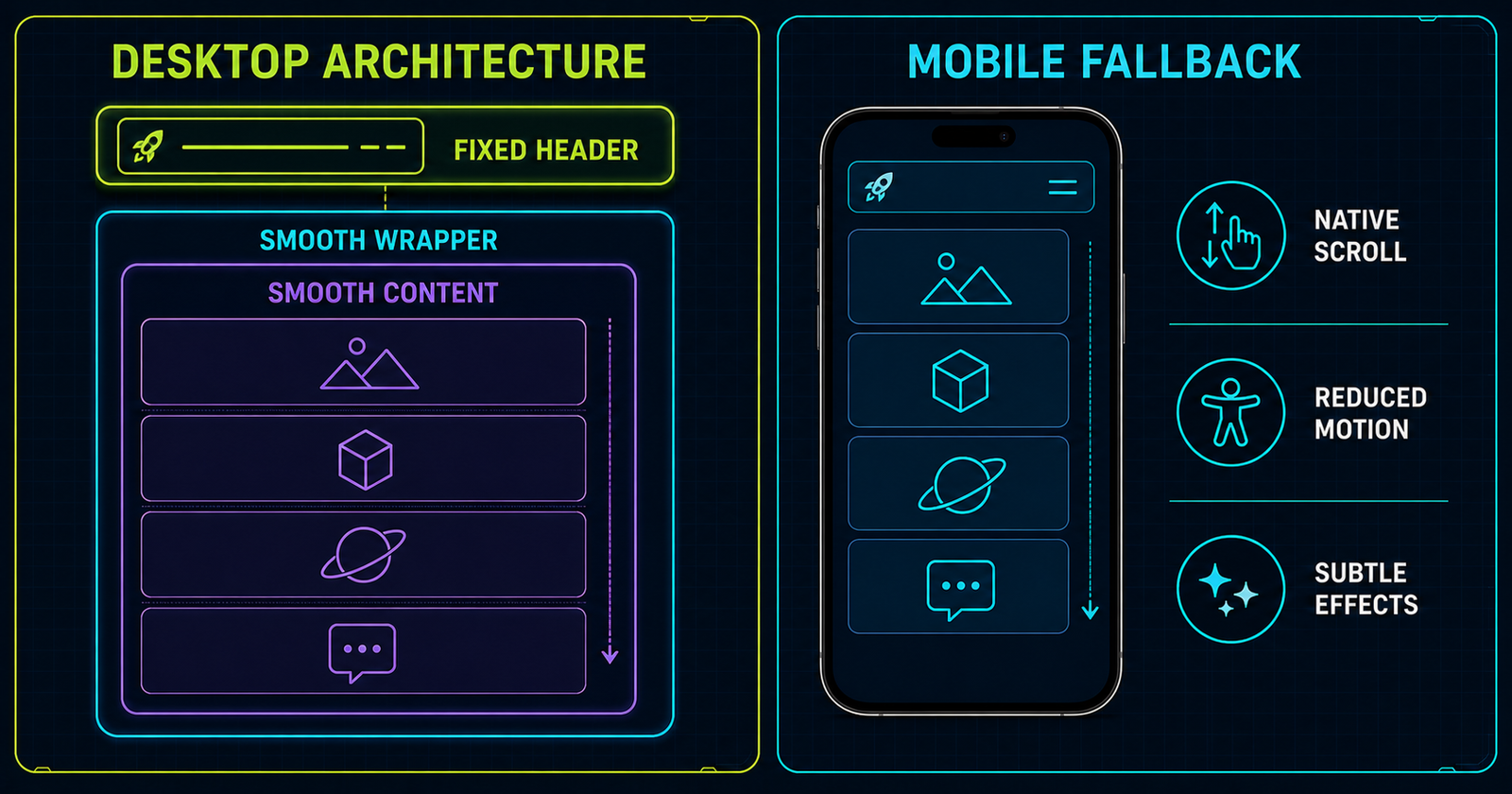
One wrapper acts as the viewport and its only child is the content element ScrollSmoother transforms. Fixed interface elements belong outside this transformed pair.
<header class="site-header">...</header>
<div id="smooth-wrapper">
  <div id="smooth-content">
    <main>...</main>
    <footer>...</footer>
  </div>
</div>
6. Wrapper vs Content
Defines the viewport used by the smoother.
Contains the page flow and receives the transform.
7. First ScrollSmoother Instance
const smoother = ScrollSmoother.create({
  wrapper: "#smooth-wrapper",
  content: "#smooth-content",
  smooth: 1,
  effects: true
});
effects: true is necessary only when the page uses speed or lag effects.
8. Only One Instance
Creating competing root smoothers produces unpredictable ownership and cleanup. Retrieve and reuse the active instance.
9. ScrollSmoother.get()
let smoother = ScrollSmoother.get();

if (!smoother) {
  smoother = ScrollSmoother.create({ smooth: 1 });
}
10. Understanding smooth
The number is the approximate catch-up time in seconds. A larger value feels softer but also creates more separation from the user's input.
11. smooth() Getter and Setter
const current = smoother.smooth();
smoother.smooth(1.5);
Change the setting deliberately rather than updating it continuously during scroll.
12. Smooth Value Comparison
Start near 1, test with wheel, touchpad and scrollbar dragging, then reduce the value if navigation feels delayed. This article's live controls expose 0.5, 1, 1.5 and 2 seconds.
13. ScrollSmoother + Existing ScrollTrigger
ScrollSmoother is built on ScrollTrigger. Existing triggers can keep their normal window-scroller architecture.
gsap.from(".feature-card", {
  y: 40,
  opacity: 0,
  scrollTrigger: {
    trigger: ".feature-card",
    start: "top 80%"
  }
});
14. ScrollSmoother + Timeline
A timeline still organizes animation sequence; the smoother only changes the page's visual scrolling feel.
15. ScrollSmoother + Scrub
A scrubbed animation still maps ScrollTrigger progress to animation progress. The smoother and scrub values are separate catch-up systems, so avoid making both excessively slow.
16. ScrollSmoother + Pin
Pin remains available, but transformed ancestors, fixed children and long mobile pin ranges require testing. Read the complete ScrollTrigger project for a production-minded pin fallback.
17. ScrollSmoother + Snap
Snap can settle a ScrollTrigger at meaningful progress points while ScrollSmoother controls the page feel. Keep snap gentle and interruptible. The snap tutorial explains normalized interval math.
18. progress
smoother.progress reports overall smoothed page progress from 0 to 1. It is suitable for a page rail, not for determining every section's business state.
19. Overall Page Progress UI
ScrollSmoother.create({
  smooth: 1,
  onUpdate(self) {
    progressBar.style.transform =
      `scaleX(${self.progress})`;
  }
});
20. getVelocity()
The method returns smoothed velocity in pixels per second. Positive and negative values indicate direction; the magnitude indicates intensity.
21. Velocity Demo
The main lab below updates velocity through ScrollSmoother's onUpdate. The code writes only small text and transform changes; it does not rebuild the DOM on every frame.
22. scrollTo()
smoother.scrollTo(
  "#mini-project",
  true,
  "top 110px"
);
The second argument enables the configured smoothing and the third aligns the target relative to the viewport.
23. Scroll-to Section Navigation
24. Fixed Header Offset
Use a position such as "top 110px" so the destination is not hidden under a fixed header. The precise value should match the real header at each breakpoint.
25. scrollTop()
const currentPixels = smoother.scrollTop();
smoother.scrollTop(500);
The getter reads pixels; the setter jumps immediately. Prefer scrollTo() when a smooth visible transition is intended.
26. offset()
const targetY = smoother.offset(
  "#faq",
  "top 110px"
);
offset() calculates the numeric scroll position for a target and alignment.
27. ScrollSmoother Effects
Set effects: true to activate supported data-speed and data-lag attributes. Apply them to decorative layers, not essential paragraphs.
28. Speed Effect / Parallax Concept
29. data-speed
<div data-speed="0.8">Slow layer</div>
<div data-speed="1">Normal layer</div>
<div data-speed="1.2">Fast layer</div>
30. Effects Initialization
const smoother = ScrollSmoother.create({
  smooth: 1,
  effects: true
});
31. Parallax-Like Hero Graphic
Keep the movement subtle, clip oversized visual layers and verify that the page has no horizontal overflow. Above-the-fold effects may benefit from a clamped speed value in current GSAP versions.
32. Lag Effects
Lag makes a decorative element take a specified number of seconds to catch up. Avoid lag on controls or readable body copy.
33. Speed vs Lag
Changes how far an element moves relative to page scroll.
Changes how long an element takes to catch up.
34. Effects Playground
The layered cards in the main lab use restrained effects. On mobile and reduced-motion configurations they remain static and readable.
35. ScrollSmoother Main Architecture
36. Sticky and Fixed Header Considerations
The smooth content receives a transform, which creates a containing block. Put truly fixed headers outside the wrapper or replace the behavior with carefully tested pinning.
37. Modals and Overlays
Portals, lightboxes and modal overlays should also live outside transformed content when they must attach to the viewport. Test focus return, scroll locking and escape-key behavior independently.
38. ScrollSmoother and Anchor Links
Intercept only same-page hash links that need the smoother. Do not break normal links, keyboard activation or the URL fragment. This tutorial's lab uses buttons so the behavior is explicit.
39. ScrollSmoother vs Browser Native Scroll
40. When NOT to Use ScrollSmoother
- A simple text-heavy page gains no meaningful clarity.
- The effect delays navigation or makes touch input feel detached.
- The page cannot preserve focus, anchors or native fallback.
- Performance is already constrained by expensive visual effects.
- The design requires multiple competing root scrollers.
41. Smooth Scroll Is Not Scroll Hijacking
ScrollSmoother keeps native scroll mechanics underneath, but an extreme catch-up duration can still feel like control has been taken away. Modest settings and progressive enhancement matter more than the label.
42. Main ScrollSmoother Lab
Smooth Product Story
Change the catch-up duration, watch overall progress and velocity, or move to a named section.
Native scrolling is active until enhancement is ready.
43. Main Lab Controls
The four buttons call smoother.smooth(value) and expose their state with aria-pressed. The active instance is reused rather than recreated.
44. Main Lab Progress
The progress rail scales from the left using smoother.progress. Text is rounded for readability while the visual rail remains fluid.
45. Main Lab Velocity
Velocity is clamped only for the meter visualization; the text shows the signed value returned by GSAP.
46. Main Lab ScrollTo
Buttons call scrollTo() when the smoother exists and fall back to native scrollIntoView() when it does not.
47. Main Lab ScrollTrigger Card
This card animates independently while ScrollSmoother controls the root page feel.
48. Main Lab Effects Graphic
The three layers demonstrate normal flow, speed and lag. The text remains meaningful even if effects are disabled.
49. Main Lab Singleton Handling
let smoother = ScrollSmoother.get();
if (!smoother) {
  smoother = ScrollSmoother.create(options);
}
50. Creating Smoother Safely
This page creates one instance only on desktop with no reduced-motion preference. Its cleanup kills only the instance this article created.
51. Reduced Motion
Essential content never depends on the animation layer.
52. Mobile Considerations
This implementation keeps native scrolling below 900 pixels. It prioritizes direct touch response, readable content, working navigation and a reachable footer.
53. Touch Behavior
Test slow drag, fast flick, direction changes and browser-chrome resizing on real devices. Mouse-wheel behavior does not predict touch quality.
54. smoothTouch
Current ScrollSmoother supports a boolean or duration value, but its default is no smoothing on touch-only devices. This article does not force it because direct finger response is preferable.
55. ScrollSmoother and Refresh
Refresh after meaningful layout changes, not on every scroll. Fonts, decoded images and expanded components can change ScrollTrigger geometry.
56. Dynamic Content
After async content, accordions or image-size changes settle, call ScrollTrigger.refresh() deliberately so positions remain accurate.
57. Performance
- Prefer transforms and opacity.
- Avoid giant blur filters and many fixed backgrounds.
- Keep
onUpdatework small. - Use only a few subtle speed or lag effects.
- Measure on mid-range mobile hardware.
58. Accessibility
Do not trap scrolling, hide native scrollbars, delay focus, break anchors or conceal information. Preserve semantic headings and ensure controls work with keyboard and assistive technology.
59. Progressive Enhancement
60. Common ScrollSmoother Mistakes
61. Debugging Checklist
- Confirm GSAP core loaded
- Confirm ScrollTrigger loaded
- Confirm ScrollSmoother loaded
- Verify all versions match
- Register both plugins
- Check wrapper and content
- Check for an existing instance
- Inspect fixed UI placement
- Check JavaScript errors
- Test native fallback
- Test reduced motion
- Check horizontal overflow
62. Mini Project: Smooth Product Story
Discover
Frame the user need and the outcome worth improving.
Design
Turn evidence into a clear hierarchy and motion language.
Build
Implement semantic content with optional smooth enhancement.
63. Mini Project Code
const smoother = ScrollSmoother.create({
  wrapper: "#smooth-wrapper",
  content: "#smooth-content",
  smooth: 1,
  effects: true
});

gsap.utils.toArray(".smooth-story article").forEach(section => {
  gsap.from(section, {
    y: 40,
    opacity: 0,
    scrollTrigger: { trigger: section, start: "top 80%" }
  });
});
64. Quick Reference
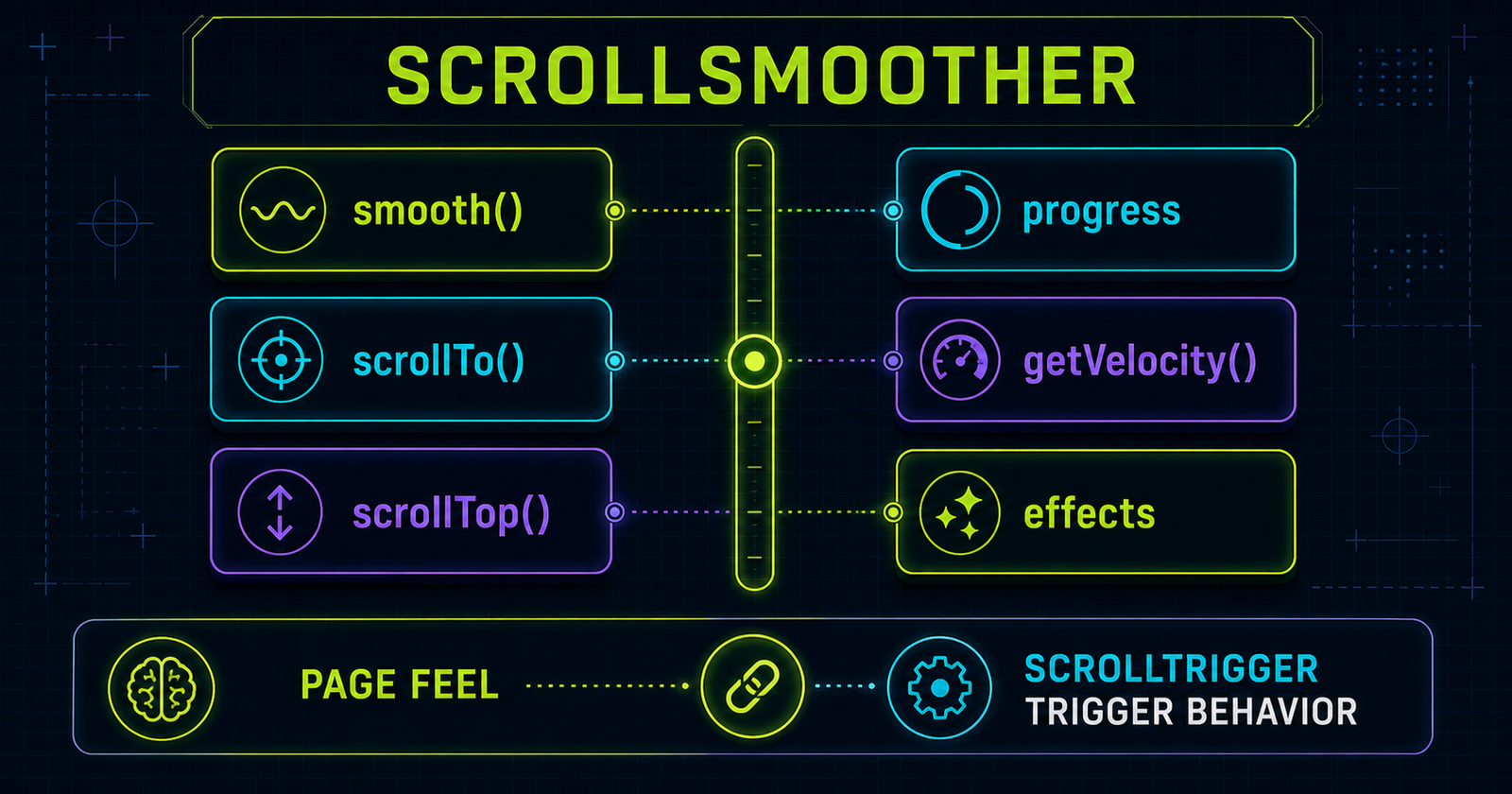
| Feature | Example | Purpose |
|---|---|---|
| Create | ScrollSmoother.create() | Create one smoother |
| Get | ScrollSmoother.get() | Retrieve active instance |
| Smooth | smooth: 1 | Catch-up duration |
| Getter/setter | smoother.smooth() | Read or change duration |
| Progress | smoother.progress | Overall page progress |
| Velocity | getVelocity() | Pixels per second |
| Navigate | scrollTo() | Move to target |
| Position | scrollTop() | Read/set pixels |
| Offset | offset() | Calculate target position |
| Effects | effects: true | Enable speed and lag |
65. Cheat Sheet Graphic
66. Final Mental Model
How page scrolling feels
When scroll animations happen
Animation sequence
Animation ↔ scroll progress
Sticky scroll range
Where progress settles
67. Continue to Blog #23
GSAP Horizontal Scroll Animation
Use vertical page progress to drive a measured horizontal panel track through a pinned ScrollTrigger section.
Frequently Asked Questions
What is GSAP ScrollSmoother?
ScrollSmoother is a GSAP plugin that adds smooth visual catch-up to native vertical scrolling and integrates directly with ScrollTrigger.
Does ScrollSmoother require ScrollTrigger?
Yes. ScrollSmoother is built on top of ScrollTrigger, so load and register GSAP, ScrollTrigger and ScrollSmoother together.
Is ScrollSmoother free to use?
Current GSAP distributions include ScrollSmoother. Use a modern GSAP release and follow the official GSAP license for your project.
What does smooth: 1 mean?
It means the visual content takes about one second to catch up with the native scroll position. It is not simply a browser scroll-speed setting.
Can I change ScrollSmoother smoothness dynamically?
Yes. Call smoother.smooth() to read the current duration or smoother.smooth(1.5) to set a new duration.
Can I use ScrollSmoother with ScrollTrigger?
Yes. ScrollSmoother is designed to keep ScrollTrigger calculations and animations synchronized with the smoothed page.
Can I use ScrollSmoother with pin?
Yes, but test fixed and pinned layouts carefully because ScrollSmoother transforms its content element.
Can I use ScrollSmoother with scrub and snap?
Yes. Existing scrubbed and snapping ScrollTriggers can work with ScrollSmoother when they use the normal window scroller.
What is ScrollSmoother progress?
The progress property reports overall page progress from 0 at the top to 1 at the bottom.
How do I get scroll velocity?
Call smoother.getVelocity() to receive the current smoothed scroll velocity in pixels per second.
How do I scroll to an element?
Call smoother.scrollTo(target, true, position), for example smoother.scrollTo("#faq", true, "top 100px").
What are ScrollSmoother speed effects?
With effects enabled, data-speed values let elements move at a different rate from normal content to create restrained parallax.
What are lag effects?
A data-lag value makes an element take a specified number of seconds to catch up with the smoothed content position.
Can I disable ScrollSmoother on mobile?
Yes. This tutorial keeps native scrolling below 900 pixels and does not force smoothing on touch devices.
How do I support prefers-reduced-motion?
Do not create the smoother when reduced motion is requested, remove decorative motion and keep all content visible in normal document flow.
Can ScrollSmoother break fixed headers?
A fixed element inside transformed smooth content can behave unexpectedly. Keep fixed headers outside the wrapper when practical.
Can I create multiple ScrollSmoother instances?
No. Only one ScrollSmoother instance can control the root page at a time. Reuse ScrollSmoother.get() when an instance exists.
How is ScrollSmoother different from CSS smooth scrolling?
CSS scroll-behavior smooths navigation jumps. ScrollSmoother continuously smooths the visual response to native page scrolling.
Is ScrollSmoother scroll hijacking?
Used responsibly, it keeps the native scrollbar and input model. Excessive smoothing can still feel disconnected, so use modest settings.
Can ScrollSmoother work on a PHP website?
Yes. PHP renders the HTML and the GSAP plugins run in the browser with ordinary script tags.
