


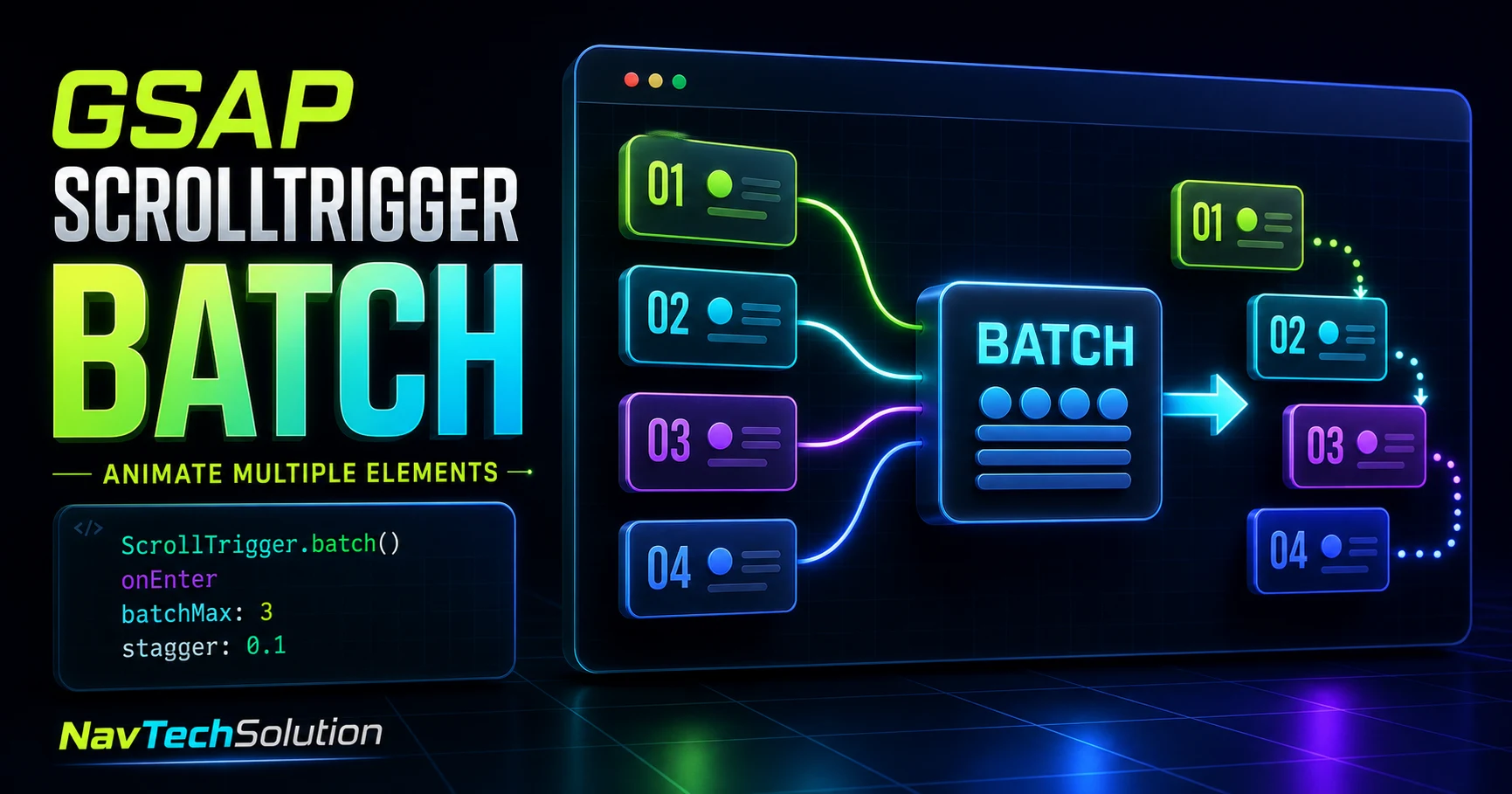
Animating one card is simple. Animating dozens of repeated cards becomes easier to reason about when nearby entries are collected into callback groups. ScrollTrigger.batch() gives you that grouping layer; GSAP still owns the animation.
1. The Repeated-Element Problem
A services grid may contain twelve cards with the same reveal. Building custom callback logic for every card adds repetition without adding meaning.
2. What Is ScrollTrigger.batch()?
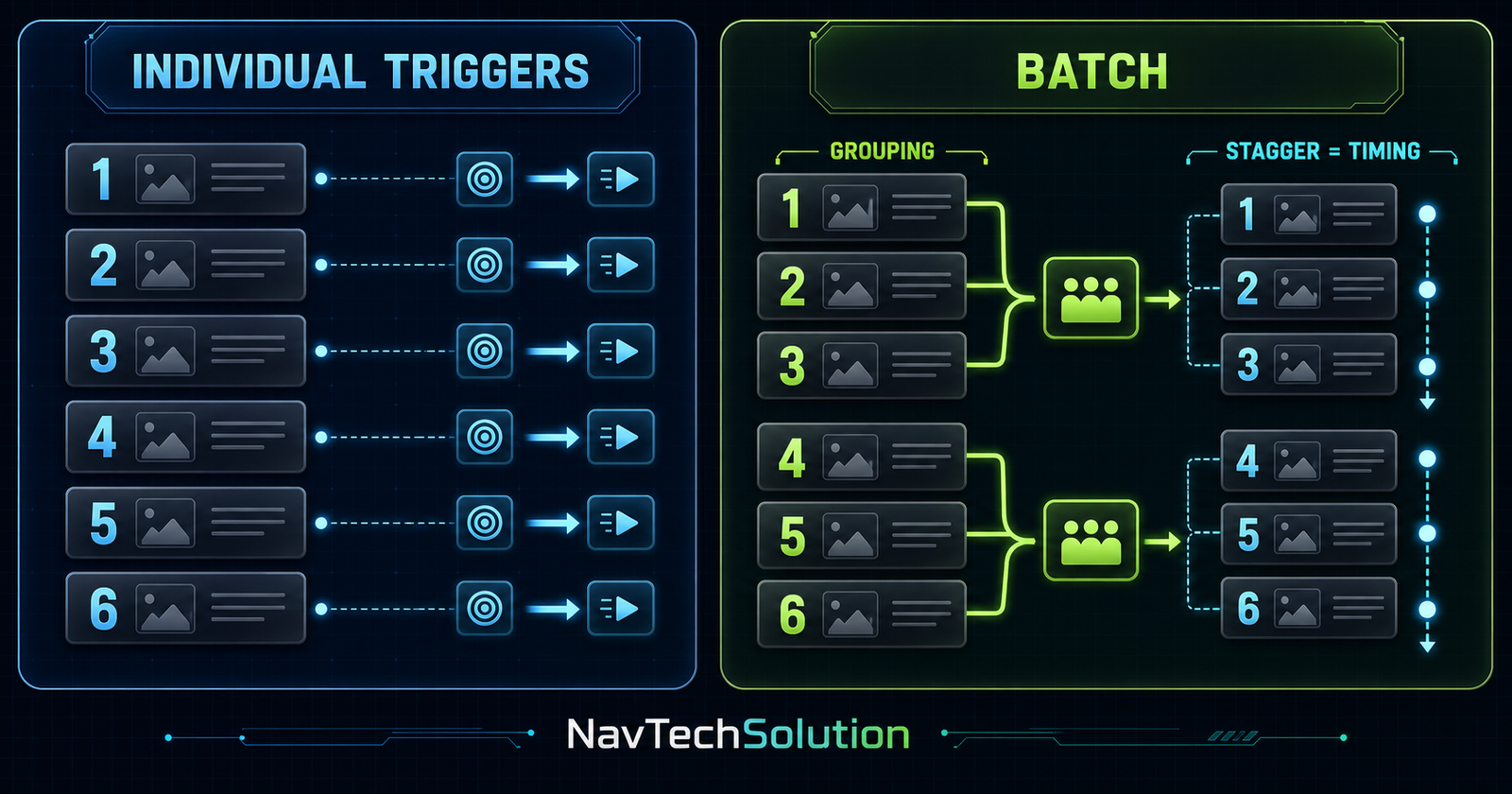
It creates coordinated ScrollTriggers for repeated targets and accumulates elements that hit the same callback near one another. The callback receives the collected array.
3. Batch Mental Model
4. Register ScrollTrigger Once
gsap.registerPlugin(ScrollTrigger);This project uses GSAP 3.13.0 and loads GSAP plus ScrollTrigger once at the end of this page.
5. Your First Batch Reveal
ScrollTrigger.batch(".card", {
  start: "top 85%",
  onEnter: (batch) => gsap.to(batch, {
    autoAlpha: 1,
    y: 0,
    stagger: 0.1
  })
});Feature card
One repeated target in a scoped batch.
Feature card
One repeated target in a scoped batch.
Feature card
One repeated target in a scoped batch.
Feature card
One repeated target in a scoped batch.
Feature card
One repeated target in a scoped batch.
Feature card
One repeated target in a scoped batch.
Feature card
One repeated target in a scoped batch.
Feature card
One repeated target in a scoped batch.
6. Understanding onEnter
onEnter fires while scrolling forward when targets cross start. The parameter is an array, even when the group contains one element.
7. The Batch Array
8. Batch + Stagger
The stagger tutorial controls how animation start times are distributed after batching has already selected the group.
9. Batch vs Stagger
Which elements belong to this callback?
When does each animation in that group start?
10. A Safe Initial State
Normal CSS leaves cards visible. JavaScript adds .batch-ready only after GSAP is available, then sets scoped starting properties.
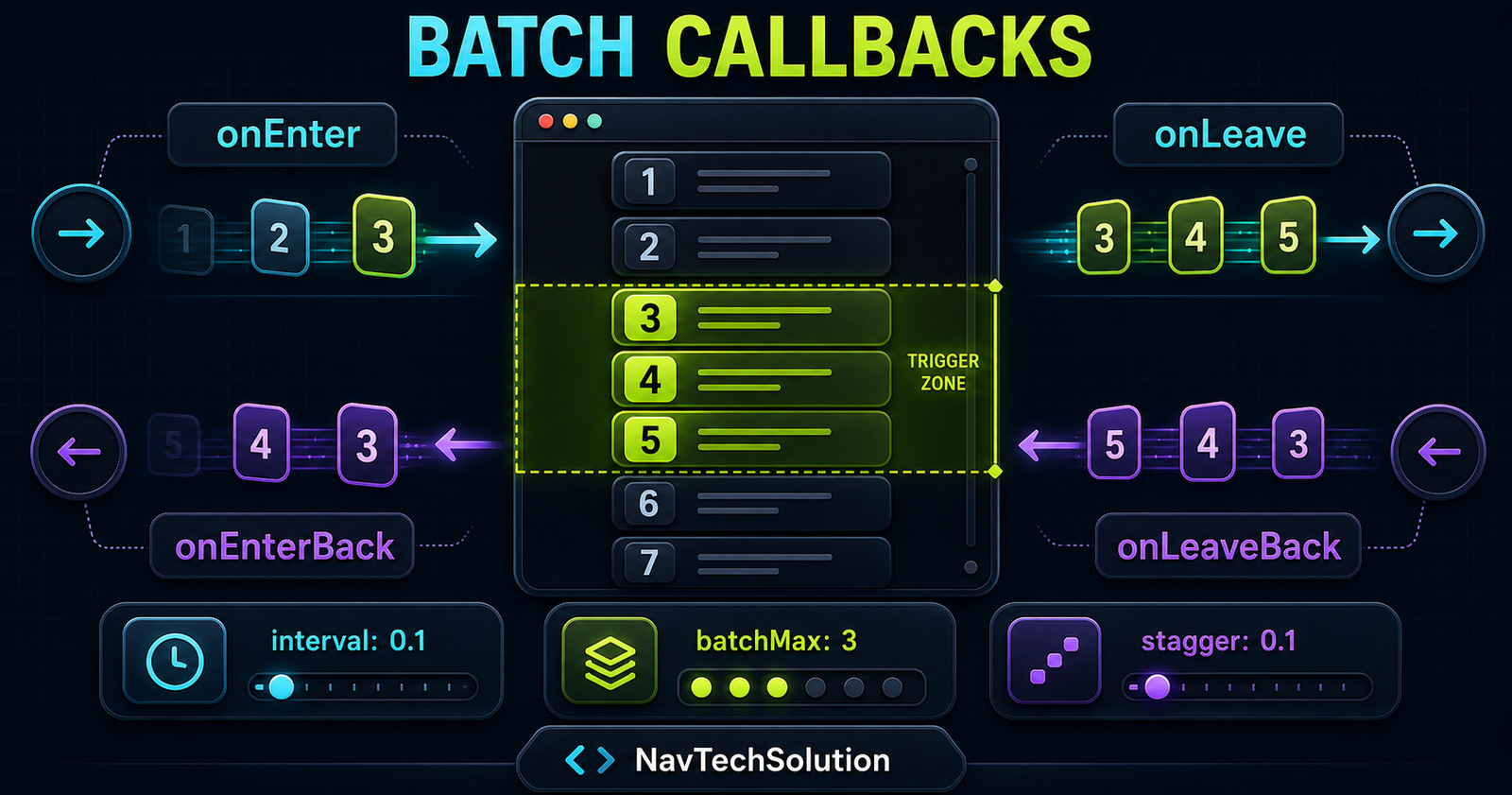
11. Four Callback Directions
12. onLeave
Use it for non-essential exit effects. Avoid hiding important cards simply because they move beyond the viewport.
13. onEnterBack
Reverse scrolling can restore a prior state or replay a restrained reveal.
14. onLeaveBack
This fires when an element exits through the start boundary while moving upward.
15. Reveal Once
For content cards, a one-time reveal is usually calmer and keeps focusable children visible after their first entry.
ScrollTrigger.batch(cards, {
  once: true,
  onEnter: (batch) => gsap.to(batch, {
    autoAlpha: 1, y: 0, stagger: 0.08,
    overwrite: true
  })
});
16. Understanding interval
interval is the maximum time window used to collect callback targets. It does not set the visual delay between card animations.
17. Interval Playground
Fast scrolling can place more entries inside one collection window. Slow scrolling may produce smaller groups; that is expected.
18. Understanding batchMax
batchMax: 3 limits each delivered group to three elements. It does not restrict the total grid size.
19. Dynamic batchMax
Use a function when the desired size depends on current layout, and refresh after meaningful layout changes.
20. Interval + batchMax
The first controls collection time; the second caps group size. Test the combination with real scroll speeds.
21. Why Batch Size Varies
Viewport height, card size, grid columns, scroll velocity and the interval all affect which items cross near one another.
22. Technology Grid
23. Service Cards
Hierarchy, systems and prototypes.
Accessible, resilient interfaces.
Measured speed and clarity.
24. Gallery Tiles
25. List Rows
01Scope the selector
02Keep CSS visible
03Animate transforms
04Test reverse scroll
26. Scoped Selectors
Query each demo from its own root. Generic site-wide selectors can accidentally include cards from navigation, related posts or the footer.
27. Batch Start Position
start: "top 85%" means the card top meets a viewport line 85% from the top. Review the start and end guide for the coordinate model.
28. Start Playground
Use the main lab below to compare 70%, 80%, 85% and 90% without rebuilding unrelated triggers.
29. Batch Is Not a Timeline Replacement
A timeline organizes sequencing. Batch organizes repeated callback groups. Combine them only when a group needs a genuine multi-step sequence.
30. Batch Is Not Scrub
Batch is callback-based. Scrub maps continuous scroll progress to animation progress.
31. Batch vs Individual ScrollTriggers
Unique behavior, per-item scrub, different boundaries.
Repeated behavior, grouped callbacks and staggered reveals.
32. GSAP ScrollTrigger Batch Lab
Control How Repeated Elements Enter
Batch card
Repeated content with one scoped behavior.
Batch card
Repeated content with one scoped behavior.
Batch card
Repeated content with one scoped behavior.
Batch card
Repeated content with one scoped behavior.
Batch card
Repeated content with one scoped behavior.
Batch card
Repeated content with one scoped behavior.
Batch card
Repeated content with one scoped behavior.
Batch card
Repeated content with one scoped behavior.
Batch card
Repeated content with one scoped behavior.
Batch card
Repeated content with one scoped behavior.
Batch card
Repeated content with one scoped behavior.
Batch card
Repeated content with one scoped behavior.
33. Main Lab Controls
Every control rebuilds only the lab. Defaults are batchMax: 3, interval: 0.1, stagger: 0.1 and start: "top 85%".
34. Real Runtime Status
The status and callback inspector update from the actual callback array rather than a decorative timer.
35. Replay Without Global Cleanup
Replay kills only the lab triggers and tweens, resets only its cards, then rebuilds the batch without jumping the page.
36. Lab Lifecycle
function destroyBatchLab() {
  labTriggers.forEach((trigger) => trigger.kill());
  labTriggers = [];
  gsap.killTweensOf(labCards);
}
37. Safe Reset
Use gsap.killTweensOf(cards). Never use gsap.killTweensOf("*") or globally kill all ScrollTriggers.
38. Generated Code
The lab’s code panel is rendered with textContent, so current values cannot inject markup.
39. Callback Inspector
The inspector reports the real element numbers and keeps one bounded record instead of flooding the DOM or console.
40. Batch + ScrollSmoother
If the site already has a root smoother, reuse it. This article does not create another instance.
41. Batch + Horizontal Scroll
Blog #23’s horizontal scroll architecture changes coordinate calculations. Keep primary batch examples in normal vertical flow unless translated triggers are deliberately measured.
42. Batch + Timeline
A timeline is optional for a simple reveal, but useful when card, icon, title and description need a meaningful internal sequence.
43. Batch Child Elements
Prefer one card trigger and a small internal sequence rather than excessive nested ScrollTriggers.
44. Performance Depends on the Whole Page
Target count, DOM size, callback work, images, filters, layout calculations and device speed matter. Batch is an organizational tool, not a guaranteed multiplier.
45. Preferred Animation Properties
46. Large Grid Strategy
Use simple transforms, moderate groups, short staggers, optimized images and real-device testing. First ask whether every repeated item needs motion.
47. Mobile Strategy
48. Reduced Motion
When prefers-reduced-motion: reduce is active, the script leaves cards visible and does not make readers wait for staggered entrances.
49. Accessibility
DOM order remains logical, focus never moves automatically, controls are native form controls and animation is only enhancement.
50. Focusable Cards
For linked cards, reveal once and never keep focusable children invisible after they become keyboard reachable.
51. Progressive Enhancement
CSS starts visible. Only a successfully initialized lab receives animation starting states; JavaScript failure still exposes all content.
52. Common Mistakes
53. Debugging Checklist
- GSAP loaded once
- ScrollTrigger loaded once
- Plugin registered
- Targets exist
- Selector is scoped
- Start is reachable
- Callback fires
- Batch array has elements
- Cards are not already final
- No competing tween owns the property
- interval is valid
- batchMax is valid
- Old local triggers were killed
- Reduced-motion mode checked
54. Mini Project: NavTechSolution Tech Stack Reveal
55. Mini Project Mental Model
56. Quick Reference
| Feature | Example | Purpose |
|---|---|---|
| Batch | ScrollTrigger.batch(...) | Group repeated callbacks |
| onEnter | (batch) => {} | Forward entry |
| Start | "top 85%" | Trigger position |
| Interval | 0.1 | Collection window |
| Batch max | 3 | Maximum group size |
| Stagger | 0.1 | Animation timing |
| Once | true | One reveal |
57. Cheat Sheet Graphic
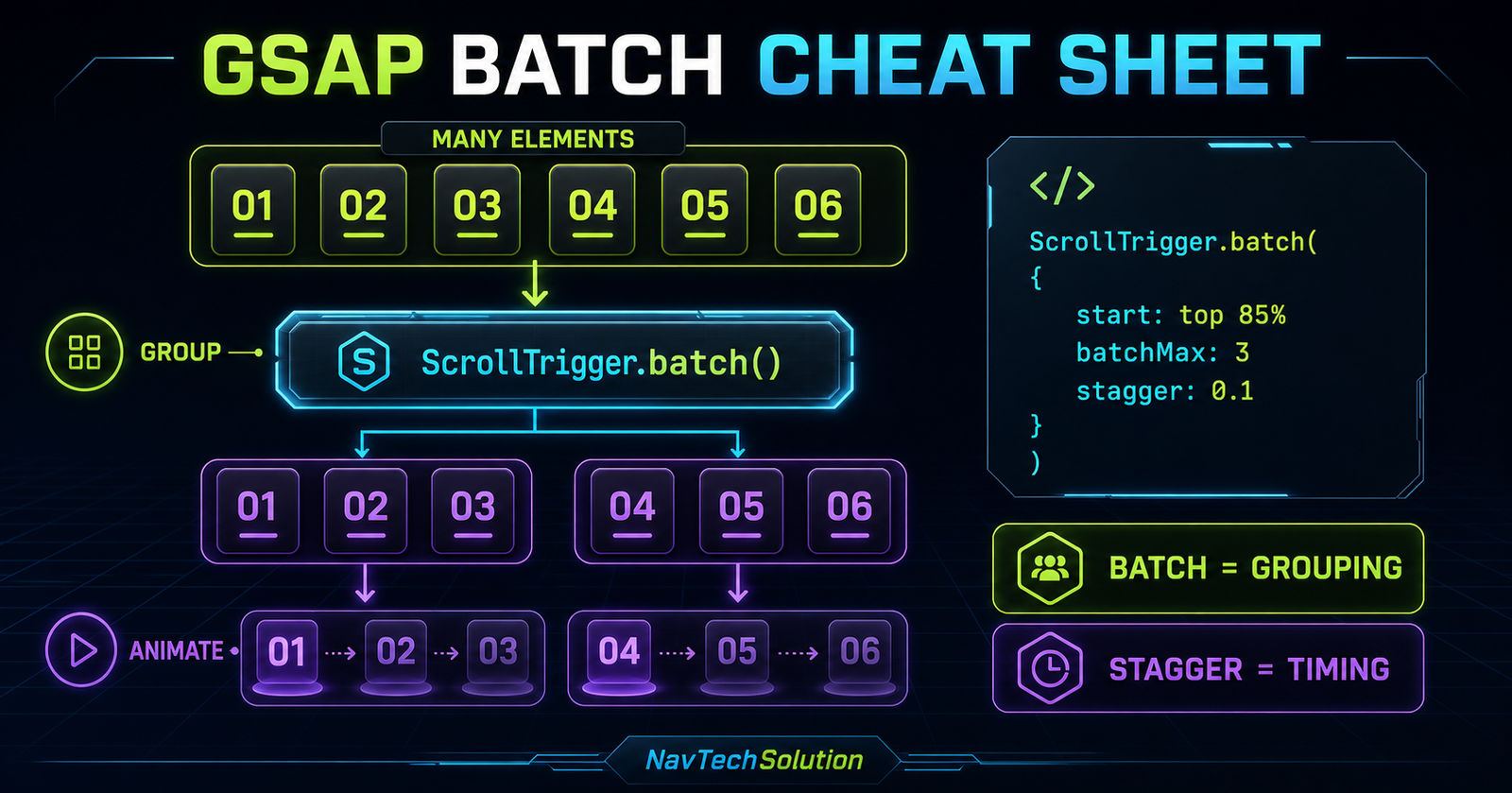
58. Final Mental Model
59. When to Use Batch
Use it for service cards, portfolio grids, galleries, technology tiles, list rows, team cards and repeated blog cards. Use individual triggers when behavior, scrub or boundaries differ per item.
60. Batch Does Not Replace Design Judgment
A grouped reveal should clarify hierarchy and rhythm. If it delays access to content or adds visual noise, keep the cards static.
61. Production Checklist
Scope selectors, keep a local trigger registry, test different scroll speeds, support reduced motion and verify the footer remains reachable.
62. Key Takeaway
63. Frequently Asked Questions
What is ScrollTrigger.batch() in GSAP?
It groups repeated elements that cross matching ScrollTrigger boundaries within a short collection window and passes each group to callback functions.
Why should I use ScrollTrigger.batch()?
Use it when many similar cards, tiles or rows need the same entry or exit behavior and grouped callbacks make the implementation clearer.
What does the batch parameter contain?
The callback receives an array of the elements collected for that callback.
What is the difference between batch and stagger?
Batch decides which elements are handled together. Stagger distributes animation start times inside that group.
What does onEnter do?
It runs when a collected group crosses the configured start boundary while scrolling forward.
What is onEnterBack?
It runs when elements re-enter the active region while scrolling back toward the top.
What does interval do?
Interval controls the maximum collection window, in seconds, before a pending group is delivered to its callback.
What does batchMax do?
batchMax limits how many elements can be delivered in one callback group.
Can I animate cards with ScrollTrigger.batch()?
Yes. Card and grid reveals are common uses because the elements share structure and animation behavior.
Can I use stagger inside a batch?
Yes. Apply stagger to the callback array with gsap.to() or gsap.fromTo().
Can batch animations run only once?
Yes. Use once where suitable or disable each element trigger after the first reveal, depending on the behavior you need.
Is batch always better than individual ScrollTriggers?
No. Individual triggers are better when items need different starts, scrub values, callbacks or animation logic.
Can I use batch with ScrollSmoother?
Yes. Reuse the existing ScrollSmoother and ScrollTrigger ecosystem; do not create a second smoother for the batch.
Can I use batch on mobile?
Yes. Test the real column layout because mobile elements normally enter in smaller groups.
How do I support prefers-reduced-motion?
Skip the batch setup and leave all content immediately visible, or use only a very small non-blocking fade.
Is ScrollTrigger.batch() useful for large grids?
It can simplify grouped callbacks, but total performance still depends on DOM size, properties, images and callback work.
How do I reset a batch demo?
Kill only the triggers returned for that demo, kill tweens of its cards, reset those cards and rebuild the scoped batch.
Can ScrollTrigger.batch() work on a PHP website?
Yes. PHP renders the markup and GSAP runs the progressive enhancement in the browser.
64. Continue to Blog #25
GSAP Advanced Portfolio Animation Project: Build a Premium Developer Portfolio Experience
Combine timelines, stagger, ScrollTrigger, scrub, pin, snap, horizontal scrolling, Batch and responsive animation in one complete portfolio.
