


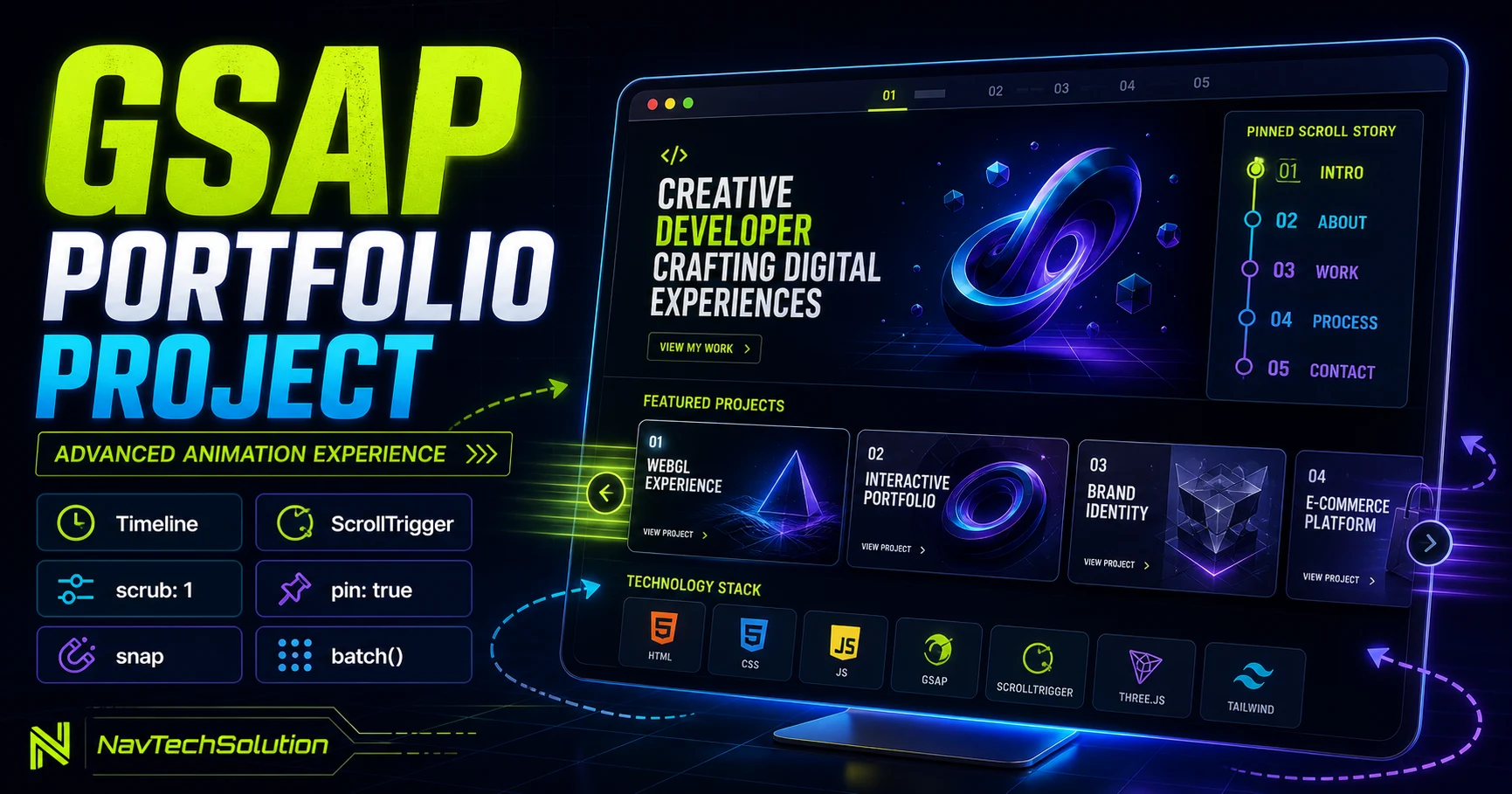
This is not another isolated API exercise. We will give every portfolio section a clear animation owner, connect the systems through one visual language, and keep the entire project readable when JavaScript or motion is unavailable.
1. Project Preview
The isolated demo moves from a concise hero through content-driven reveals, a measured project track, a four-stage story and a closing CTA.
2. Plan Animation Before Coding
Write the reading order, decide what must remain static, identify measured geometry and assign one owner to every animated property.
3. Project HTML Structure
<section data-portfolio-demo>
  <header data-portfolio-hero>...</header>
  <section data-portfolio-services>...</section>
  <section data-horizontal-projects>...</section>
  <section data-portfolio-story>...</section>
</section>
4. Project JavaScript Architecture
5. GSAP Initialization
gsap.registerPlugin(ScrollTrigger);

const context = gsap.context(() => {
  initPortfolioProject();
}, portfolioRoot);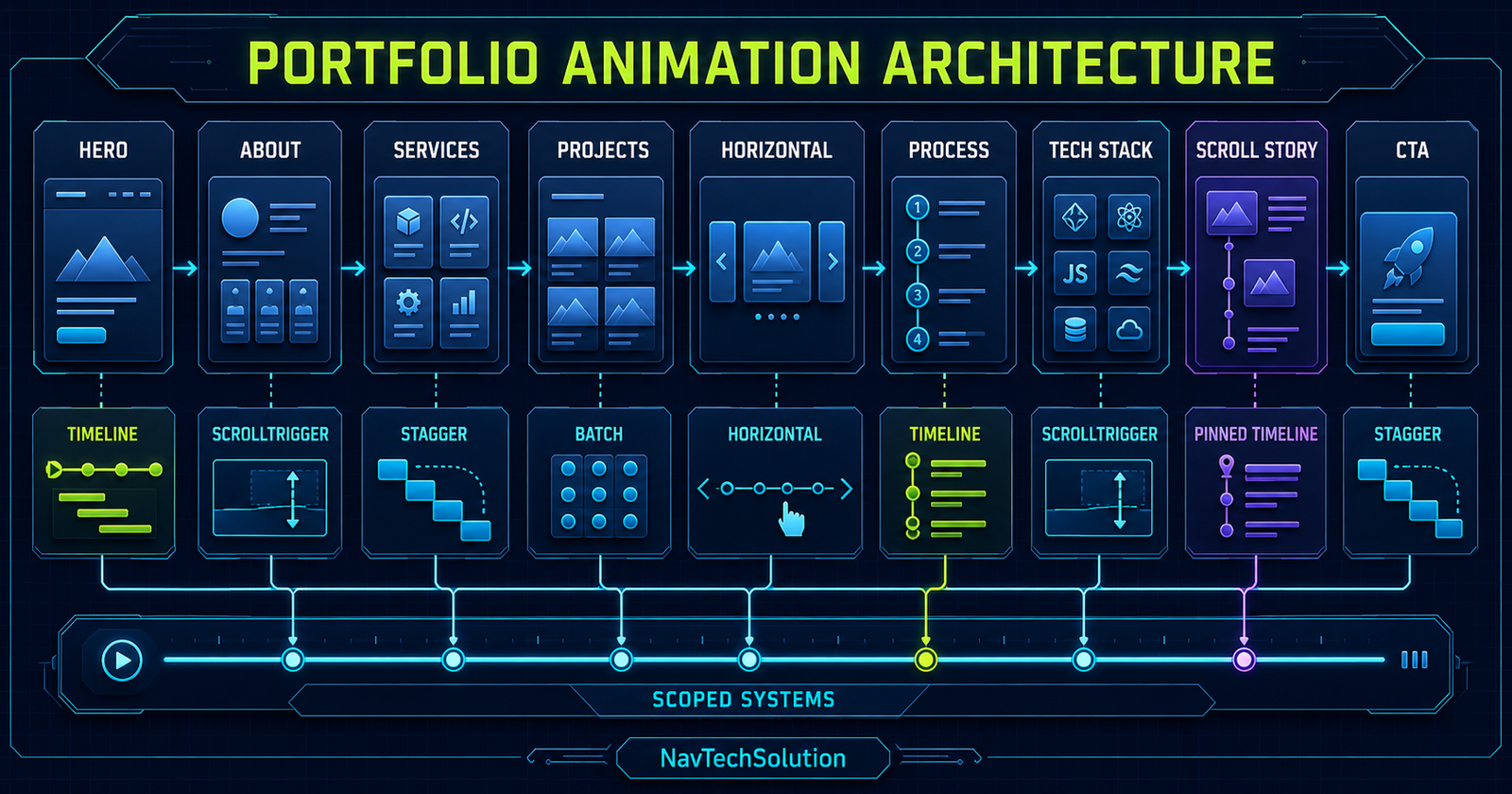
6. Hero Section
The hero communicates role, value and next action before decoration. Motion reinforces that hierarchy.
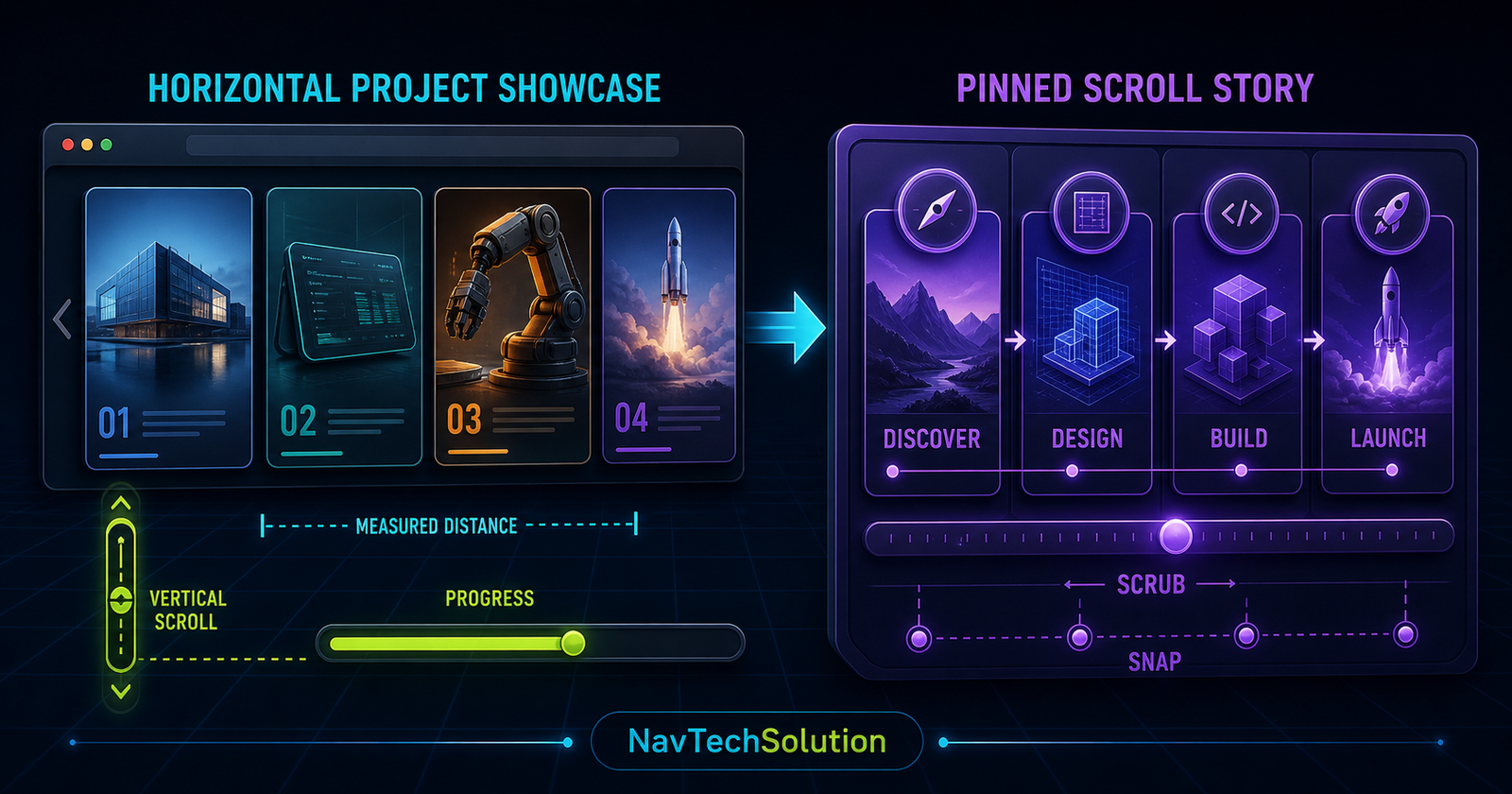
7. Hero Timeline
const heroTl = gsap.timeline({ defaults: { ease: "power3.out" } });
heroTl.from(eyebrow, { y: 18, autoAlpha: 0 })
  .from(titleLines, { yPercent: 110, stagger: 0.08 }, "<0.08")
  .from(heroCopy, { y: 24, autoAlpha: 0 }, "-=0.35")
  .from(heroActions, { y: 18, autoAlpha: 0 }, "-=0.25");
8. Hero Text Mask Effect
Wrap each line with an overflow-hidden mask and animate the child line. Do not apply overflow clipping to the entire hero.
9. Hero Decorative Motion
Use a small looping transform only after the entrance timeline finishes, and omit it under reduced motion.
10. About Section
Pair one portrait or abstract visual with a focused statement and three proof points.
11. About ScrollTrigger
gsap.from(aboutContent, {
  y: 40, autoAlpha: 0, duration: 0.75,
  scrollTrigger: { trigger: about, start: "top 80%", once: true }
});
12. About Visual
13. Services Section
Repeated cards are a strong fit for a restrained grouped reveal because their hierarchy and animation are shared.
14. Services Stagger
15. Services Hover Animation
Keep hover motion independent from the scroll reveal. Animate a local icon or border rather than the card transform already owned by the entrance.
16. Featured Projects
Project cards need title, role, outcome and clear action. Images support the story but do not replace meaningful text.
17. Project Card Reveal
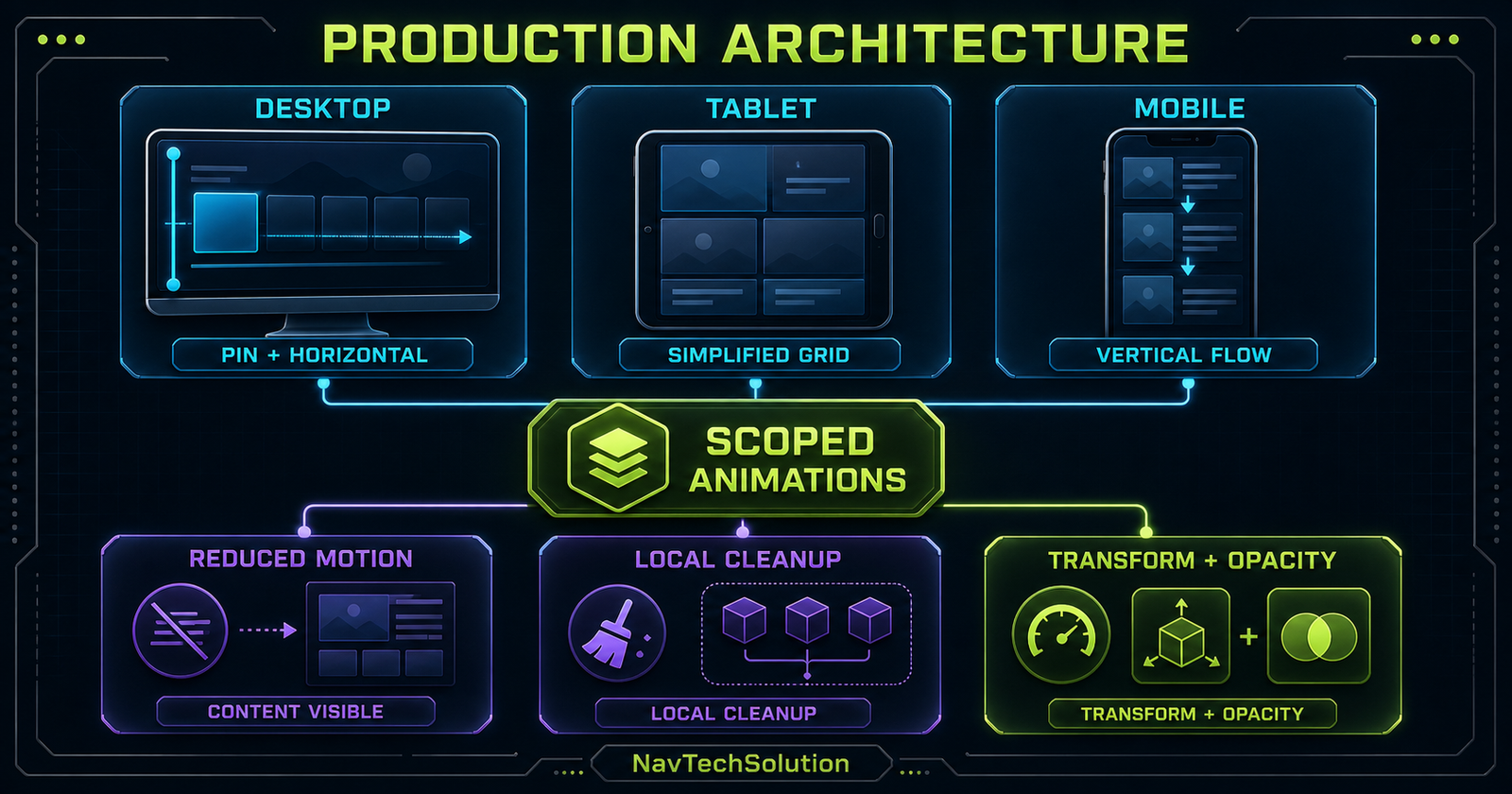
Reveal the visual and copy with one card-scoped timeline so they never compete for the same transform.
18. Horizontal Project Showcase
Desktop vertical input can drive a clipped track while tablet and mobile retain a direct vertical project list.
19. Horizontal Structure
<section class="project-stage">
  <div class="project-track">
    <article class="project-panel">...</article>
  </div>
</section>
20. Horizontal Scroll Animation
gsap.to(track, {
  x: () => -(track.scrollWidth - stage.clientWidth),
  ease: "none",
  scrollTrigger: { trigger: stage, pin: true, scrub: 1,
    end: () => "+=" + (track.scrollWidth - stage.clientWidth),
    invalidateOnRefresh: true }
});
21. Horizontal Progress Indicator
Use the owning ScrollTrigger’s normalized progress for the rail—do not add a second scroll listener.
22. Horizontal Snap
For four equal panels, normalized stops are separated by 1 / 3. The snap tutorial covers interruption and duration.
23. Mobile Horizontal Fallback
Below 900px the demo uses a responsive grid with no pin, x transform or artificial scroll distance.
24. Process Section
Discover, design, build and launch form a semantic ordered list before animation is applied.
25. Process Timeline
26. Process Pin
Pin only when the stage gains meaning from controlled focus. The mobile process remains in normal document flow.
27. Technology Stack
The stack uses repeated semantic cards with the same reveal behavior.
28. ScrollTrigger Batch
ScrollTrigger.batch(techCards, {
  start: "top 85%", batchMax: 4, interval: 0.1, once: true,
  onEnter: (batch) => gsap.to(batch, {
    autoAlpha: 1, y: 0, stagger: 0.08, overwrite: true
  })
});
29. Batch vs Regular Stagger
Collects nearby ScrollTrigger callbacks.
Distributes starts inside the collected group.
30. Scroll Storytelling Section
The final story turns four process chapters into one controlled desktop stage without changing DOM reading order.
31. Pinned Story Architecture
32. Story Timeline
One timeline advances the active visual, copy and progress indicator together.
33. Story Labels
Use labels such as discover, design, build and launch to expose intentional chapter positions.
34. Story Progress
35. Story Visuals
Each visual represents one chapter. Essential explanation stays in live text and is never trapped inside decoration.
36. CTA Section
Close with one confident message and one primary action rather than a noisy collection of motion.
37. CTA Animation
A short upward fade is enough; the CTA should not wait behind a long stagger.
38. Optional ScrollSmoother Integration
If a root ScrollSmoother instance already exists, reuse it. This article does not load the premium plugin or create another smoother.
39. ScrollSmoother Effects
Restrained speed or lag effects belong to decorative layers, never essential controls or reading content.
40. Master Animation Architecture
41. Why Not One Giant Timeline?
Sections enter at different scroll positions, depend on different geometry and require independent responsive cleanup.
42. Reusable Section Function
function revealSection(root) {
  const items = gsap.utils.toArray("[data-reveal]", root);
  return gsap.from(items, { y: 30, autoAlpha: 0, stagger: 0.08,
    scrollTrigger: { trigger: root, start: "top 80%", once: true } });
}
43. Scope Everything
Resolve elements from the portfolio root or section root. Never let demo selectors target actual site cards.
44. Project State and Instances
Keep references for the horizontal tween, story timeline, batch triggers, context and media-query manager.
45. Cleanup Strategy
function destroyLocal(triggers, tweens) {
  triggers.forEach((trigger) => trigger.kill());
  tweens.forEach((tween) => tween.kill());
}
46. Responsive GSAP Strategy
Desktop gets measured horizontal and pinned systems; tablet simplifies layout; mobile stays vertical and immediate.
47. gsap.matchMedia()
const mm = gsap.matchMedia();
mm.add("(min-width: 900px) and (prefers-reduced-motion: no-preference)", () => {
  const tween = buildHorizontalProjects();
  return () => tween.kill();
});
48. Reduced Motion
Do not build pinned, scrubbed or horizontal systems when reduced motion is requested. Keep every panel visible.
49. Progressive Enhancement
Normal CSS renders the complete project. JavaScript adds initial states only after the dependencies and targets are verified.
50. Performance Strategy
Prefer transforms and opacity, optimize portfolio imagery, keep callbacks small and measure before claiming improvement.
51. DOM Read and Write Strategy
Read horizontal dimensions together, then update transforms through GSAP. Refresh after fonts and responsive images settle.
52. Accessibility
Keep semantic order, visible focus, reachable controls, ordinary links and meaningful content outside decorative graphics.
53. Fixed Header
Account for the real header height in start positions and scroll-margin; never hide the global header for the demo.
54. Main Portfolio Demo
Digital experiencesbuilt with intent.
Strategy, interface engineering and motion systems for ambitious digital products.
Design clarity.
Engineering depth.
One practice connecting brand direction, usable interfaces and resilient front-end systems.
Focused systems, not decoration.
Strategy
Purposeful decisions shaped around content and outcomes.
Interface
Purposeful decisions shaped around content and outcomes.
Motion
Purposeful decisions shaped around content and outcomes.
Development
Purposeful decisions shaped around content and outcomes.
Projects designed to move.
LUMEN
ORBIT
NORTH
SIGNAL
From signal to shipped system.
- 01Discover the real constraint
- 02Design the useful system
- 03Build for resilience
- 04Launch and learn
A stack chosen for the work.
Discover
Find the signal before choosing the effect.
Design
Turn direction into hierarchy and interaction.
Build
Make every system scoped and resilient.
Launch
Measure, learn and refine the experience.
Build something worth remembering.
Let’s talk55. Project Feature Map
56. Animation Debug Panel
The demo control shows local trigger guides and live initialization status without changing the rest of the page.
57. ScrollTrigger Markers Mode
During development, rebuild a single system with markers: true. Never ship global markers or rebuild every trigger for one section.
58. Testing the Hero
Reload, replay, resize during and after the timeline, tab through the CTA and confirm reduced motion skips the entrance.
59. Testing Services
Test slow and fast scroll, one-column mobile layout and hover after the entrance completes.
60. Testing Horizontal Projects
Verify measured distance, refresh, snap interruption, footer reachability and the vertical fallback below 900px.
61. Testing the Batch Tech Stack
Change viewport columns and scroll velocity; group sizes can vary without changing DOM order.
62. Testing the Storytelling Section
Confirm progress reaches 100%, every chapter appears, the stage releases and reverse scrolling remains coherent.
63. Common Large-Project Mistakes
64. Debugging Checklist
- GSAP loaded once
- ScrollTrigger loaded once
- Plugin registered
- Portfolio root exists
- Selectors scoped
- Measurements are positive
- Desktop media query matches
- Local trigger references stored
- No property conflicts
- Refresh after layout settles
- Mobile fallback visible
- Footer reachable
65. Performance Checklist
66. Accessibility Checklist
67. Mini Challenge
Add one new project panel, keep equal snap stops accurate and verify the mobile grid needs no JavaScript change.
68. Advanced Challenge
Add a project-detail child reveal using containerAnimation while preserving a linear parent tween and scoped cleanup.
69. Quick Reference
| System | Owner | Fallback |
|---|---|---|
| Hero | Timeline | Visible immediately |
| Services | Batch + stagger | Static grid |
| Projects | Horizontal tween | Vertical grid |
| Story | Pinned timeline | Stacked chapters |
| Tech | Batch | Static cards |
70. Architecture Cheat Sheet
71. Final Mental Model
Frequently Asked Questions
What is a GSAP portfolio animation project?
It is a portfolio interface whose motion is organized with GSAP timelines, ScrollTrigger and responsive animation systems rather than isolated effects.
Which GSAP features are used in this project?
The project combines from, to, fromTo, timelines, stagger, easing, position parameters, ScrollTrigger, scrub, pin, snap, horizontal movement and batch callbacks.
Should every portfolio section use the same timeline?
No. Give each section a scoped animation owner so it can initialize, refresh and clean up independently.
How should a portfolio hero animation start?
Use one short load timeline with clear hierarchy: eyebrow, heading, supporting copy, actions and restrained decoration.
How do I animate service cards?
Reveal repeated cards with a scoped batch or stagger after their section crosses a reachable start boundary.
How do I build a horizontal project showcase?
Measure track overflow, pin the stage on desktop and map vertical scroll progress to the track x transform.
Should horizontal portfolio scrolling be used on mobile?
Usually provide a vertical or swipe-friendly fallback so projects remain direct and readable.
How does pinning help a portfolio story?
Pinning holds the visual stage while scroll progress advances through a bounded sequence of story chapters.
When should I use ScrollTrigger.batch()?
Use it for repeated technology, service or project cards that share the same entry behavior.
Can I use ScrollSmoother in this project?
Yes if it is already available, but reuse one root instance and keep all ScrollTriggers in the same scrolling ecosystem.
How do I make advanced GSAP animation responsive?
Use gsap.matchMedia to create desktop systems only where geometry supports them and provide simpler tablet and mobile flows.
How do I support reduced motion?
Skip nonessential timelines, pinning, scrubbing and horizontal transforms while leaving every section visible and usable.
How do I prevent animation conflicts?
Scope selectors, assign one owner per property and keep section-specific trigger and tween references for cleanup.
What properties are best for portfolio animation?
Prefer transforms and opacity because they avoid unnecessary layout work in most reveal and motion patterns.
How do I debug a large GSAP project?
Test one section at a time, add temporary local markers, inspect measured geometry and verify cleanup before combining systems.
Should animations hide content in CSS?
No. Keep content visible by default and apply starting states only after JavaScript and GSAP initialize successfully.
Can this project work in a static PHP website?
Yes. PHP renders semantic markup while scoped vanilla JavaScript enhances it with GSAP in the browser.
Does this tutorial replace the real NavTechSolution homepage?
No. It is an isolated educational portfolio demo embedded inside the article.
72. Continue to Blog #26
GSAP SVG Animation Tutorial: Animate SVG Elements Step by Step
Move from page architecture to inline vector transforms, groups, colors, strokes, timelines and scroll-driven SVG graphics.
