


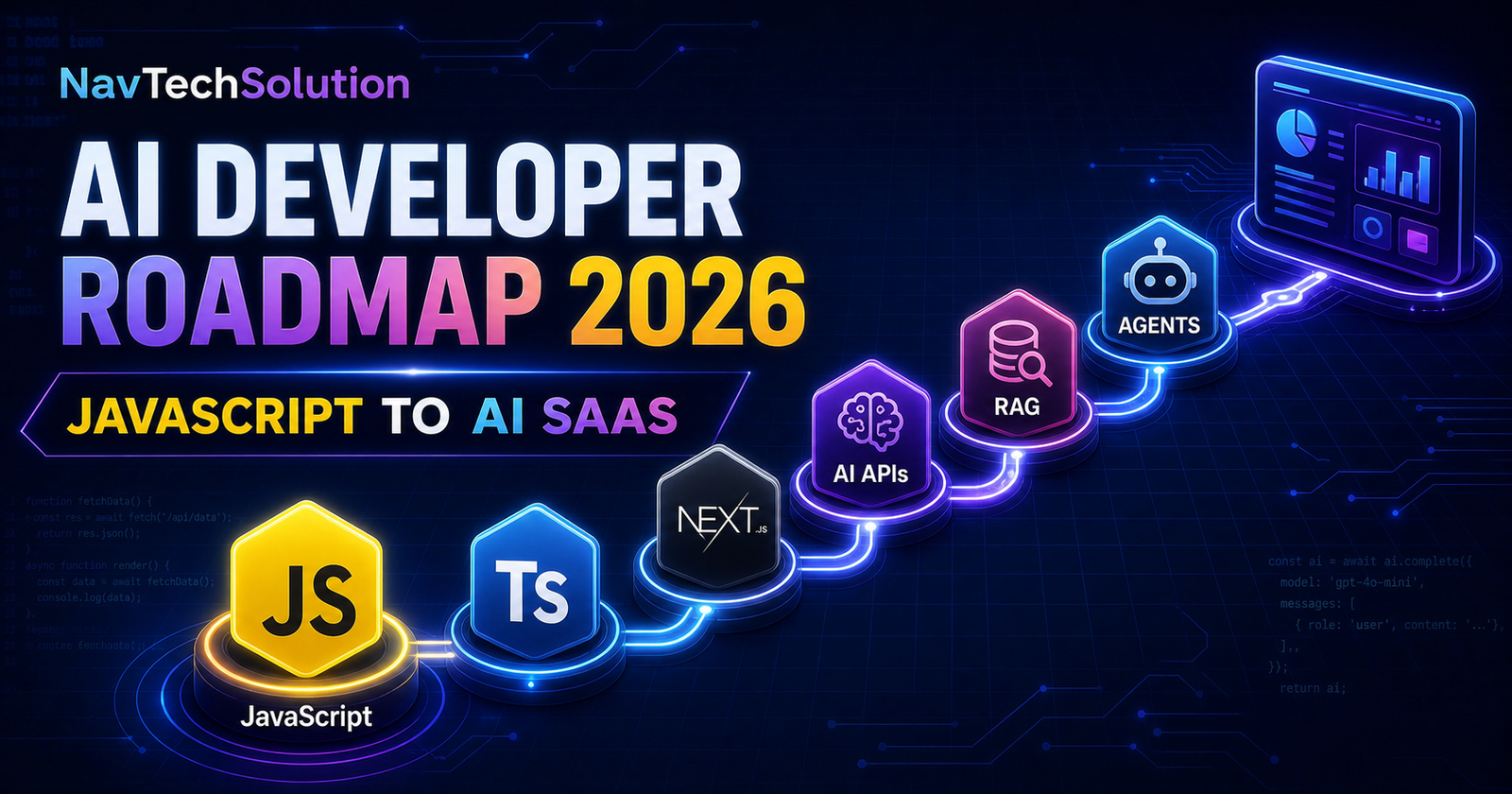
JavaScript developers are already well positioned to build modern AI products. The browser, Node.js and full-stack frameworks give you everything needed to create chatbots, document search, AI agents, voice assistants and subscription-based AI software. You do not need to stop and become a Python developer before making your first useful application.
This roadmap focuses on application engineering: connecting models to real users, data and business workflows. It does not pretend that calling an API once makes an application production-ready. You will learn the layers in a sensible order, build projects at each stage and add security, validation, observability and cost controls as your work becomes more serious.
If you prefer a guided learning path alongside this roadmap, explore the NavTechSolution AI Courses. Use the plan below to choose a course or project that matches your current level.
1. JavaScript Fundamentals
AI applications are still software applications. Before adding a model, be comfortable with ES6+, let and const, arrow functions, arrays, objects and transformations such as map, filter and reduce. Most AI calls are asynchronous, so Promises, async/await, fetch and reliable error handling are essential.
Learn REST APIs and JSON, then practice reading documentation and inspecting network responses. Use environment variables for configuration, npm for packages and Node.js for server-side code. Git and GitHub give you version history, review and a portfolio that shows how your projects developed.
export async function getProject(id) {
  const response = await fetch(`/api/projects/${id}`, {
    headers: { Accept: "application/json" }
  });

  if (!response.ok) {
    throw new Error(`Request failed: ${response.status}`);
  }

  return response.json();
}
This pattern—send a request, check status, parse structured data and surface an error—appears in nearly every AI integration.
2. Learn TypeScript
AI output can be uncertain, but your application boundaries should not be. TypeScript catches mistakes in message objects, database records, tool arguments and API responses before deployment. Learn primitive types, interfaces, type aliases, unions, generics and typed asynchronous functions.
Types disappear at runtime, so pair TypeScript with Zod or another schema validator. Validate user input before sending it to a model and validate structured output before using it in a database or interface.
import { z } from "zod";

const SummarySchema = z.object({
  title: z.string().min(3),
  summary: z.string().min(20),
  tags: z.array(z.string()).max(5)
});

type Summary = z.infer<typeof SummarySchema>;

export function parseSummary(value: unknown): Summary {
  return SummarySchema.parse(value);
}
3. Learn Node.js and Next.js
Node.js lets JavaScript run securely on the server, where it can use secrets, databases and private business logic. Next.js provides an integrated full-stack structure: Server Components for server-rendered data, Client Components for interaction, Route Handlers for APIs and Server Actions for controlled mutations.
Learn authentication, authorization, forms, database queries, streaming responses and deployment. A strong starting stack is Next.js + TypeScript + Tailwind CSS + PostgreSQL + Drizzle ORM. It is simple enough for one developer but can grow into a serious product.
4. Understand AI and LLM Fundamentals
Artificial intelligence is the broad field of systems performing tasks associated with human intelligence. Machine learning learns patterns from data; deep learning uses multi-layer neural networks; large language models predict and generate sequences of tokens. You do not need advanced mathematics to integrate a model, but you must understand its limits.
Tokens are pieces of input and output. A context window limits how much the model can consider at once. Temperature influences variation, while hallucinations are confident but unsupported outputs. Embeddings represent meaning as vectors. Prompts, system instructions, structured output, function calling and multimodal input are the application developer's core tools.
5. Connect AI APIs with JavaScript
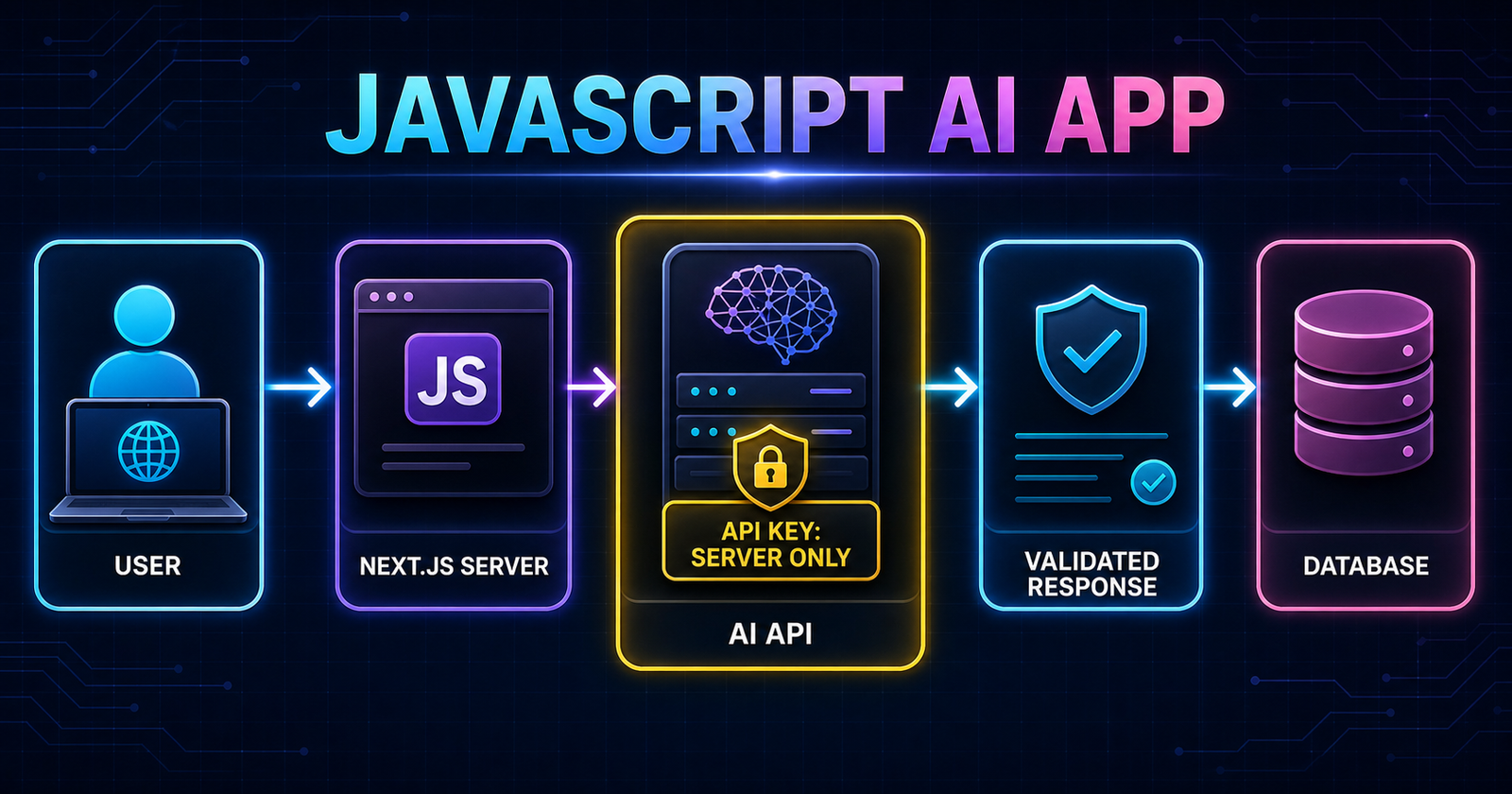
Keep model calls on the server. Store the API key in a deployment secret or local .env file that is excluded from Git. Never send it to a Client Component, browser bundle or public repository.
The following provider-neutral Route Handler validates input, checks server configuration, calls an AI endpoint and returns a controlled response. A real integration should also add authentication, request limits, timeouts, logging and a schema for model output.
import { z } from "zod";

const RequestSchema = z.object({
  message: z.string().min(1).max(4000)
});

export async function POST(request: Request) {
  try {
    const { message } = RequestSchema.parse(await request.json());
    const apiUrl = process.env.AI_API_URL;
    const apiKey = process.env.AI_API_KEY;

    if (!apiUrl || !apiKey) {
      return Response.json({ error: "Server not configured" }, { status: 500 });
    }

    const response = await fetch(apiUrl, {
      method: "POST",
      headers: {
        "Content-Type": "application/json",
        Authorization: `Bearer ${apiKey}`
      },
      body: JSON.stringify({
        instructions: "Answer clearly and return valid JSON.",
        input: message
      }),
      signal: AbortSignal.timeout(30_000)
    });

    if (!response.ok) throw new Error(`AI request failed: ${response.status}`);
    return Response.json(await response.json());
  } catch (error) {
    console.error("AI route failed", error);
    return Response.json({ error: "Unable to complete request" }, { status: 400 });
  }
}
6. Build Your First AI Chat Application
Your first project should be small enough to finish. Build a chat interface with a message list, composer, loading state, cancel option and accessible error message. Send messages to a server route, add a focused system prompt and stream the response when the provider supports it.
Store conversation history under an authenticated user or anonymous session. Limit how much history you resend, because every extra token affects latency and cost. Make retry behavior explicit and never leave a user staring at a silent failed request.
AI Chat Assistant
Learn message state, secure API routes, streaming UI, conversation storage, loading states and error recovery.
7. Learn Prompt Engineering
A system prompt defines stable behavior; a user prompt describes the current task. Few-shot examples demonstrate desired input and output. Prompt templates make instructions repeatable, while structured JSON output makes the result easier to validate and use.
Also learn context management, prompt injection risks and evaluation. Treat retrieved documents and user text as untrusted data, not hidden instructions. Do not spend months collecting prompt tricks. Build, test results against a small evaluation set and improve the complete system.
8. Learn Embeddings and Vector Databases
An embedding converts content into a vector: a list of numbers representing semantic characteristics. Similar meanings tend to produce nearby vectors. Semantic search compares a query vector with stored vectors, often using cosine similarity.
Documents must be split into useful chunks. Store metadata such as source URL, title, section and access rules beside every vector. Options include PostgreSQL with pgvector, Pinecone, Qdrant and Supabase Vector. Start with the database your product already needs unless scale or operations justify another service.
9. Learn RAG
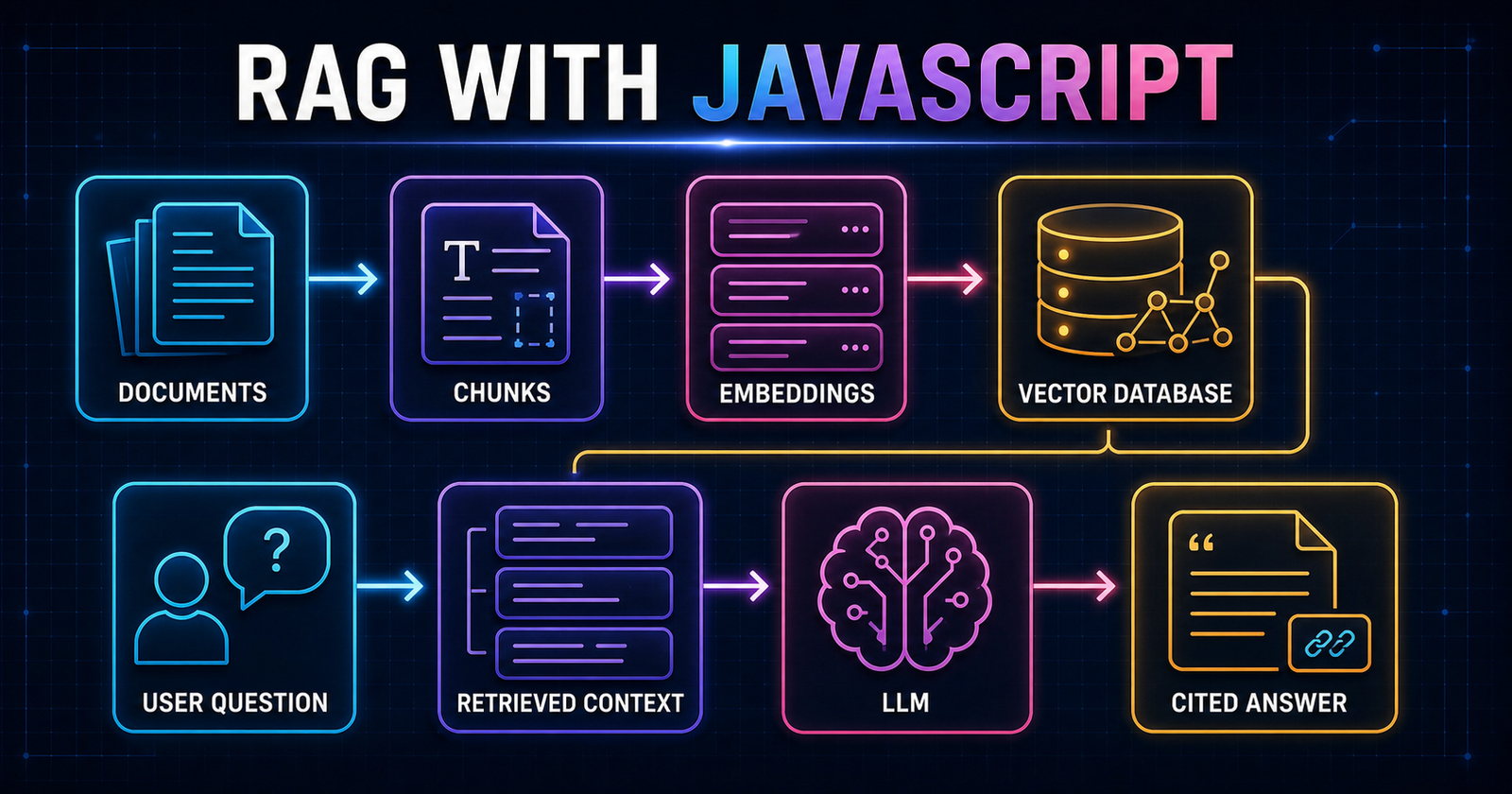
Retrieval-Augmented Generation grounds a model with relevant information selected at request time. Ingestion extracts text from PDFs, websites or documents, divides it into chunks, creates embeddings and stores them. At question time, retrieval finds useful chunks and supplies them as context for the final answer.
Good RAG requires careful loaders, text extraction, chunk boundaries, metadata, retrieval filters, access control and citations. It can reduce hallucinations, but it cannot make weak or outdated source material trustworthy. Log which chunks were retrieved so you can debug bad answers.
Chat With PDF
Learn extraction, chunking, embeddings, retrieval and source citations.
Website Knowledge Base Chatbot
Learn crawling, metadata, content updates, filters and support workflows.
10. Learn AI Agents
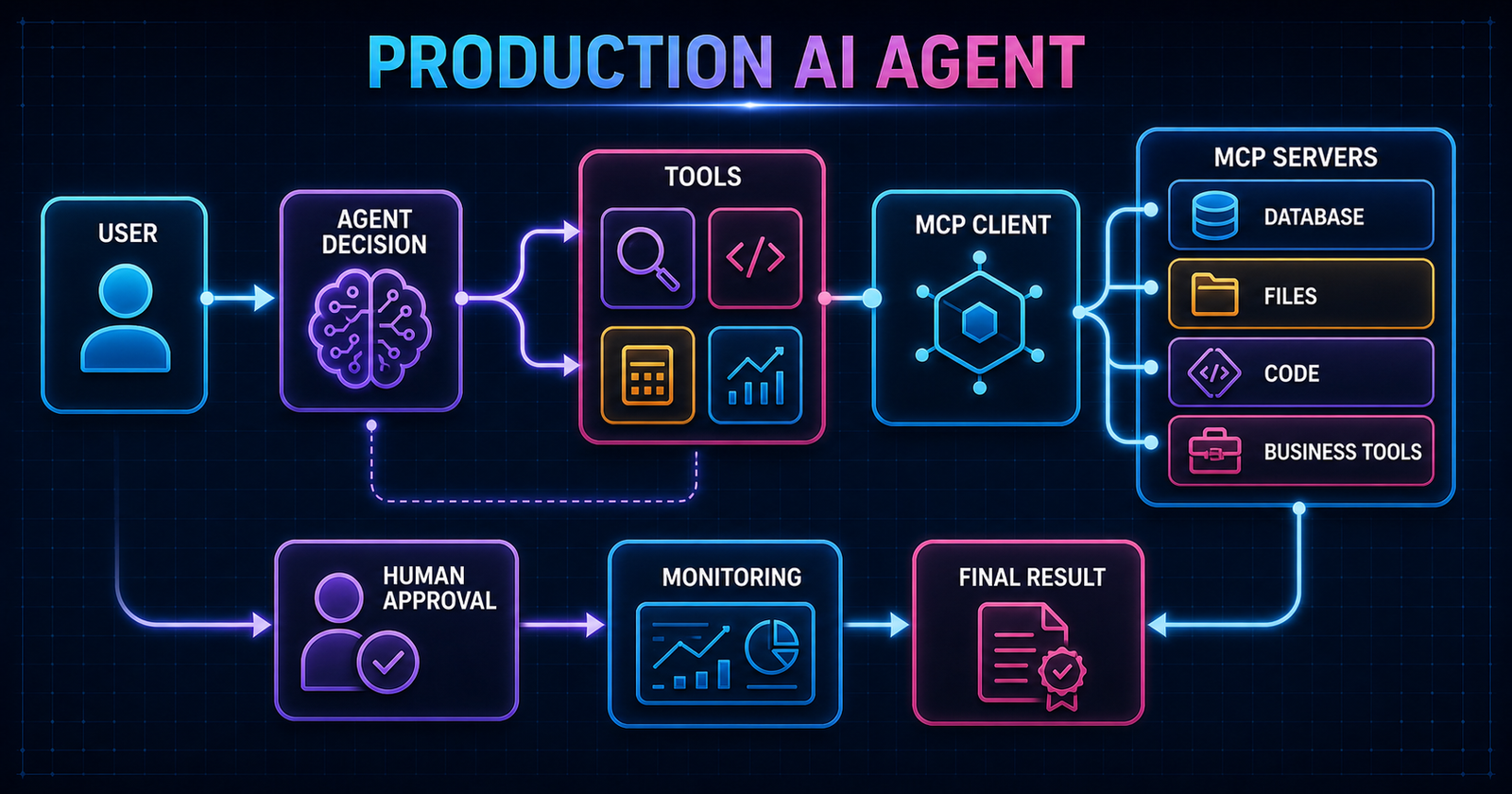
A normal chatbot generates a response. An agent can choose tools, observe results and continue until a goal or stop condition is reached. Tool calling connects the model to functions such as search, database queries, email or internal APIs.
Reliable agents need explicit state, limited loops, retries, timeouts and human approval before risky actions. Planning is useful only when the task requires it. Many business workflows are safer as a predictable sequence with one or two model decisions rather than an open-ended autonomous loop.
AI Research Agent
Collect sources, summarize findings and preserve links for review.
Business Assistant Agent
Use approved tools for records, drafts and repeatable business tasks.
11. Learn LangChain and LangGraph
Understand direct API calls, retrieval and tools before adopting a large abstraction. LangChain provides components such as loaders, splitters, embeddings, retrievers, tools and agents. LangGraph models longer workflows with shared state, nodes, edges, conditional routing and checkpoints.
Use a graph when the workflow needs durable state, branching, retries or human approval. Nodes do work; edges decide what runs next. Keep termination conditions explicit so a tool loop cannot continue indefinitely.
const workflow = new StateGraph(State)
  .addNode("classify", classifyRequest)
  .addNode("retrieve", retrieveContext)
  .addNode("answer", createAnswer)
  .addEdge(START, "classify")
  .addConditionalEdges("classify", chooseNextStep)
  .addEdge("retrieve", "answer")
  .addEdge("answer", END)
  .compile();
12. Learn MCP
Model Context Protocol is an open standard for connecting AI applications to external systems. An MCP client inside your application communicates with MCP servers. Servers can expose tools for actions, resources for contextual data and prompts for reusable interaction templates.
Permissions are part of the architecture. Show users which tools are available, require approval for meaningful side effects and keep activity logs. MCP reduces custom integration work, but it does not remove the need for authentication, authorization and careful tool design.
MCP Developer Assistant
Read approved project resources and call safe tools through one standardized client.
13. Learn Voice AI
Voice applications combine speech-to-text, model reasoning and text-to-speech. Realtime experiences usually use WebSockets or WebRTC to reduce delay. Design for interruptions, partial transcripts, network changes, conversation state and tool calls that take longer than speech.
Latency is a product feature. Stream audio and text, keep responses concise and let the user interrupt naturally. Clearly indicate when audio is being captured and obtain consent before recording or storing conversations.
AI Customer Support Voice Agent
Practice realtime transport, interruptions, tool calling, escalation and conversation summaries.
14. Learn Production AI Engineering
A production AI product needs more than a model response. Add authentication and authorization, rate limiting, caching, token and cost tracking, structured logs, traces, retries, queues and monitoring. Build evaluations for common tasks and important failure cases.
Validate model output, defend against prompt injection, scope tools to the current user and keep secrets in managed configuration. Use Docker when it improves portability, CI/CD for repeatable releases and a suitable cloud platform or VPS. Guardrails should be layered: input checks, permission checks, constrained tools, output validation and human approval.
15. Recommended JavaScript AI Stack for 2026
Build upward only when the previous layer is comfortable. The early layers are mandatory; later layers depend on the product.
16. AI Projects to Build in Order
A portfolio should show increasing depth rather than nine copies of the same chat screen.
AI Chat App
Learn: APIs, messages and streaming. Stack: Next.js, TypeScript, PostgreSQL. Level: beginner. Add authentication, retry and saved conversations.
AI Writing Assistant
Learn: structured output and templates. Stack: Next.js, Zod, editor UI. Level: beginner. Add tone controls and version history.
Chat With PDF
Learn: extraction, chunks and vectors. Stack: Node.js, pgvector. Level: intermediate. Add citations and re-indexing.
Website RAG Chatbot
Learn: crawlers, metadata and retrieval filters. Stack: Next.js, PostgreSQL. Level: intermediate. Add content freshness.
AI Research Agent
Learn: tools and source review. Stack: TypeScript, search API. Level: intermediate. Add approval and evidence panels.
Customer Support Agent
Learn: workflows and escalation. Stack: RAG, tools, ticket API. Level: intermediate. Add confidence and handoff.
MCP Assistant
Learn: clients, servers and permissions. Stack: TypeScript MCP SDK. Level: intermediate. Add tool approvals and logs.
Voice AI Agent
Learn: realtime audio and interruptions. Stack: WebRTC, server tools. Level: advanced. Add transcript and escalation.
Full AI SaaS
Learn: billing, teams and operations. Stack: complete recommended stack. Level: advanced. Add usage limits, evaluations and analytics.
17. Six-Month AI Learning Plan
JavaScript + TypeScript + APIs
- Week 1: ES6+, arrays and objects
- Week 2: async, fetch and errors
- Week 3: TypeScript and Zod
- Week 4: Node APIs and Git project
Next.js + AI Chat
- Week 1: App Router and server/client boundaries
- Week 2: secure AI route
- Week 3: streaming chat UI
- Week 4: authentication and history
Embeddings + RAG
- Week 1: vectors and semantic search
- Week 2: chunking and metadata
- Week 3: pgvector retrieval
- Week 4: PDF chatbot with citations
Agents + Tools
- Week 1: structured tool calling
- Week 2: state and retries
- Week 3: approval workflow
- Week 4: research agent
LangGraph + MCP
- Week 1: nodes, edges and state
- Week 2: checkpoints and routing
- Week 3: MCP clients and servers
- Week 4: MCP assistant
Voice + Production SaaS
- Week 1: realtime transport
- Week 2: monitoring and evaluation
- Week 3: billing, limits and deployment
- Week 4: launch and portfolio case study
Use the NavTechSolution AI Courses page to supplement the month where you need more structure. Keep one main project running throughout the six months so every new skill improves something real.
18. Do JavaScript Developers Need Python for AI?
JavaScript/TypeScript is enough for
- AI SaaS products
- Chatbots and RAG
- Agents and automation
- Web and API integrations
- Realtime interfaces
Python becomes valuable for
- Machine-learning research
- Training or fine-tuning models
- PyTorch and TensorFlow
- Data science and notebooks
- Advanced ML pipelines
Learn Python when a project gives you a reason. Starting with your strongest language helps you reach real users sooner and learn AI concepts through working software.
19. Common Mistakes Beginners Make
- Learning several agent frameworks before mastering one direct API call.
- Skipping JavaScript fundamentals and struggling with asynchronous state.
- Exposing API keys in client-side code or public Git history.
- Starting autonomous agents before understanding tools and permissions.
- Using LangChain before understanding the basic RAG pipeline.
- Ignoring token usage, latency and provider costs.
- Trusting model output without runtime validation.
- Publishing hallucinated answers without sources or review.
- Following tutorials without finishing independent projects.
- Adding AI where a normal search, form or rule would be clearer.
20. Final Roadmap
You do not become an AI developer by watching every tutorial or memorizing every framework. You become one by shipping a small application, observing where it fails, learning the next layer and improving it. Start with the chat app, keep your API key on the server and move toward RAG or agents only when the product needs them.
Frequently Asked Questions
Can I become an AI developer using JavaScript?
Yes. JavaScript and TypeScript are enough to build AI web applications, chatbots, RAG systems, tool-using agents, voice interfaces and production AI SaaS products.
Do JavaScript developers need Python for AI?
Python is useful for model training, research and data science, but it is not required to begin building AI-powered web products with APIs and existing models.
What should a JavaScript developer learn first for AI?
Strengthen modern JavaScript, async programming, TypeScript, Node.js, APIs and secure server-side development before adding LLM APIs, embeddings, RAG and agents.
How long does it take to become an AI developer?
A focused JavaScript developer can build useful AI applications within a few weeks and complete a strong project portfolio in about six months. Production judgment continues developing through real projects.
What is the best JavaScript stack for AI applications?
A practical stack is Next.js, TypeScript, Tailwind CSS, PostgreSQL, Drizzle ORM, a trusted AI API, Zod validation and pgvector or another vector database when retrieval is needed.
Should beginners learn LangChain immediately?
No. First understand direct API calls, prompts, structured output, embeddings, retrieval and tool calling. Frameworks become easier to evaluate after you understand the underlying flow.
What AI project should I build first?
Start with a small server-side AI chat assistant that includes loading, error handling, conversation history and secure environment variables.
Is RAG possible with JavaScript?
Yes. JavaScript and TypeScript libraries can extract text, create chunks and embeddings, store vectors, retrieve relevant context and send grounded prompts to an LLM.
Continue Learning
Learn AI With JavaScript
Choose a practical NavTechSolution course and turn this roadmap into a project-based learning plan.
Explore AI Courses