


AI has changed blogging from a blank-page exercise into a guided production process. A blogger can now turn a rough idea into research questions, a search-focused outline, an early draft, metadata, social copy, and even a coded page. That speed is useful, but speed is not the same as quality. The best article still needs a clear point of view, trustworthy evidence, original examples, and careful editing.
Different tools are strong at different stages. One may be excellent for shaping a complicated outline, another for locating current sources, and another for keeping a marketing team’s tone consistent. The smartest approach is not asking one chatbot to do everything. It is choosing a tool for the job, giving it useful context, and keeping a human responsible for the final result.
AI can support topic research, keyword discovery, structure, first drafts, rewriting, coding tutorials, fact checking, and content optimization. It can also confidently produce a weak claim or an invented source. Treat every generated paragraph as editable material—not as a finished article.
Key takeaways
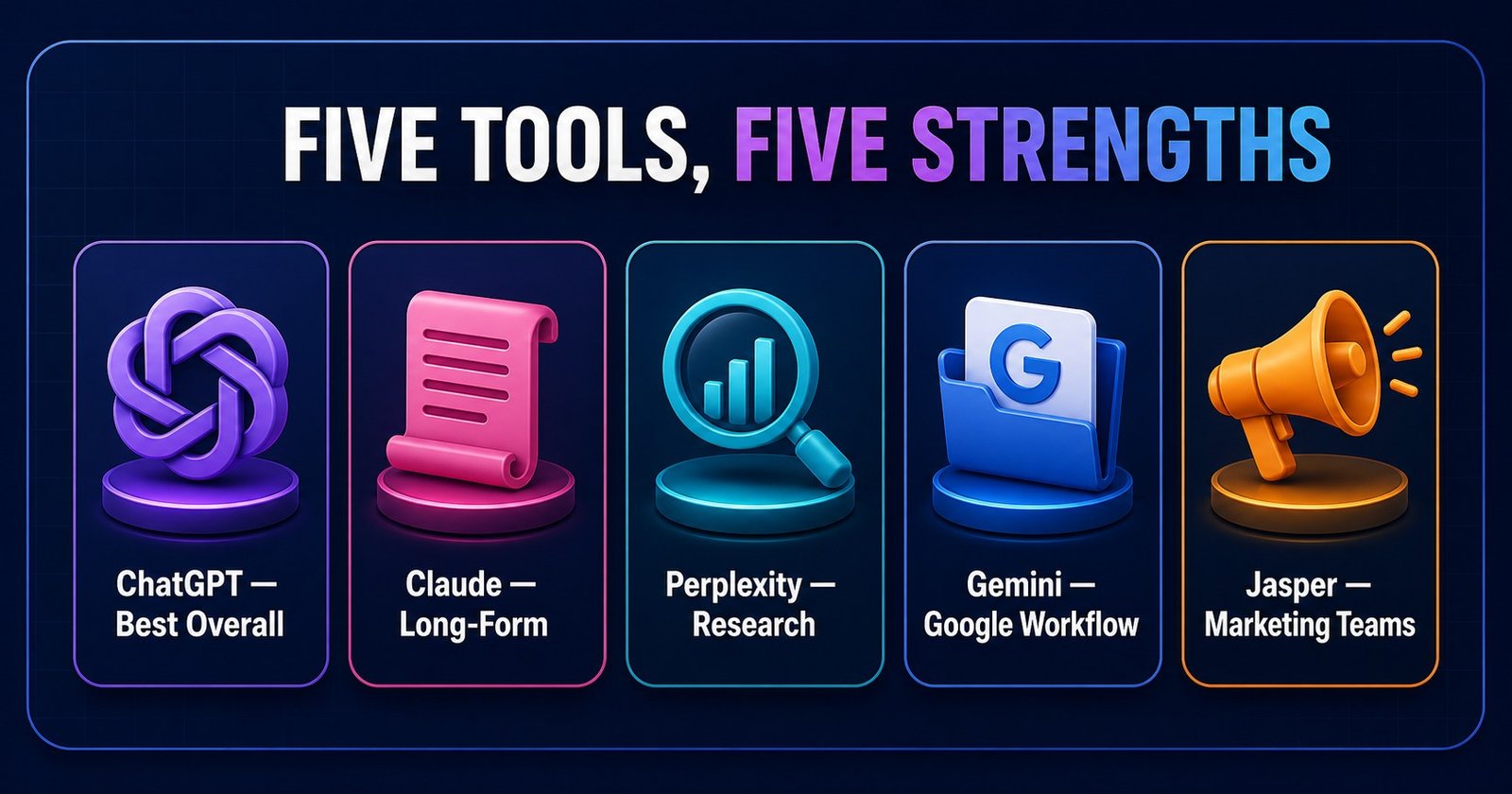
- Best overall: ChatGPT
- Best for long-form writing: Claude
- Best for research: Perplexity
- Best for the Google ecosystem: Gemini
- Best for marketing teams: Jasper
1. ChatGPT – Best Overall AI Blog Writing Tool
ChatGPT is the most flexible option in this comparison. Bloggers can use it to develop topic angles, group keyword ideas by search intent, produce outlines, draft introductions, expand sections, explain code, create FAQs, write metadata, and review an existing draft. Its greatest advantage is continuity: one structured conversation can move from audience research to a publishing checklist.
For a strong result, provide the audience, goal, tone, evidence rules, desired sections, and examples of what good writing looks like. Ask for an outline before requesting prose. Then draft one section at a time and review it. ChatGPT’s Canvas is designed for writing and coding projects that need direct editing, targeted feedback, length changes, and polishing, which makes it useful for iterative article work.
Developers can also ask it to explain a JavaScript or PHP example at a beginner’s reading level. Test every snippet locally. A plausible code block may still use a wrong API, omit an edge case, or depend on a different package version. For SEO, use ChatGPT to understand and organize intent—not to repeat a keyword in every paragraph.
Pros
- Strong all-round planning, writing, editing, and coding support
- Good at changing tone, length, format, and reading level
- Useful for repeatable prompt-based workflows
Cons
- Can produce confident inaccuracies
- Long drafts become generic without specific context
- Sources and code always require verification
Best for
Beginners, solo bloggers, developers, SEO writers, and small businesses that want one capable tool across most stages.
Example workflow
Describe the reader and goal, request search-intent groups, approve an outline, draft sections separately, add examples, run a repetition audit, then fact-check and edit manually.
Create a 2,000-word SEO-friendly article about GSAP ScrollTrigger for beginners. Include code examples, FAQs, meta title, meta description, and internal-link suggestions.2. Claude – Best for Natural Long-Form Writing
Claude is a strong choice when the draft is long, the source material is extensive, or the main task is editorial. It can help restructure an uneven article, simplify a technical explanation, compare two versions, remove repetition, and preserve a consistent voice across many sections. This makes it particularly useful after research has been collected but before the final line edit.
A practical method is to create a project for one publication or content series, add editorial instructions and approved reference material, and work section by section. Claude Projects support focused workspaces with their own chats and knowledge bases, allowing writers to provide relevant documents and project-specific instructions. That context can reduce the need to repeat the same tone and audience guidance.
Claude should not be asked to “make this human” as a vague final step. Give an editorial diagnosis: shorten slow openings, replace abstract claims with examples, vary sentence rhythm, preserve technical terms, and flag any claim that needs a citation. Specific editing instructions produce more controlled output.
Pros
- Comfortable with long documents and substantial context
- Often produces calm, readable long-form prose
- Strong at restructuring and simplifying complex material
Cons
- May still invent facts or smooth over uncertainty
- Can over-explain without firm length constraints
- Not a replacement for source verification or expert review
Best for
Writers editing long guides, technical explainers, reports, thought-leadership drafts, and content that must maintain a natural voice.
Example use case
Upload a draft and editorial guide, request a structural critique first, approve the recommended changes, and then revise one section at a time while preserving verified facts and links.
3. Perplexity – Best for Research and Sources
Perplexity is most useful before drafting. It searches the web, summarizes findings, and links its answer to sources. A blogger can use it to map a topic, identify recent terminology, locate official documentation, compare competing viewpoints, and build a research brief. Its Research mode is intended for deeper multi-source investigation and report creation.
The citations are a starting point, not proof that every sentence is correct. Open each important source. Confirm its date, author, scope, and whether it genuinely supports the claim. Prefer product documentation for features, original studies for statistics, and official organizations for policies. Avoid citing a summary when the primary source is available.
For competitor research, analyze themes and gaps rather than copying headings. Ask which reader questions are answered poorly, which claims lack examples, and which subtopics deserve first-hand testing. This creates a useful editorial opportunity without producing duplicate content.
Pros
- Fast topic discovery with visible source links
- Useful for current information and research briefs
- Good for comparing claims across several sources
Cons
- A citation can be weak, secondary, or misunderstood
- Research summaries can remove important context
- Not the strongest choice for a polished final article voice
Best for
SEO researchers, journalists, technical bloggers, marketers, and anyone writing about fast-changing subjects.
Example workflow
Ask for a topic map and source list, open the best references, record verified notes in your own words, identify disagreements or missing evidence, and only then hand the brief to a writing tool.
4. Google Gemini – Best for Google Ecosystem
Gemini is a practical option for people whose work already lives in Google services. It can brainstorm angles, summarize documents, organize notes, produce draft sections, and assist with planning. Gemini Apps can connect to supported Workspace services such as Gmail, Docs, Drive, Calendar, Keep, and Tasks, depending on the account and administrator settings.
That integration can simplify a content operation: gather approved notes from Drive, summarize a brief, turn meeting decisions into a checklist, and plan deadlines. It is especially helpful when the bottleneck is moving information between research, documents, communication, and scheduling.
Review connected-source answers carefully. Google’s own guidance notes that Gemini can provide outdated or incorrect information and encourages users to inspect the listed sources. Be cautious with confidential client data, permissions, and organizational policies.
Pros
- Natural fit for Google-centered productivity workflows
- Useful for summaries, planning, and early drafts
- Convenient when source material already lives in Workspace
Cons
- Capabilities depend on account type and settings
- Connected information may still be incomplete or outdated
- Final prose needs the same editorial review as any AI draft
Best for
Google Workspace users, small teams, students, and businesses that want research and drafting close to their everyday documents.
5. Jasper – Best for Marketing Teams
Jasper is designed around organized marketing production rather than one-off chatbot conversations. Its Brand Voice and Jasper IQ features let teams define tone, knowledge, audiences, style guidance, and other brand context. Campaigns can group blog posts with related email, social, and promotional assets around one goal.
This focus matters when several writers or channels must sound consistent. A marketing lead can establish approved messaging, audience definitions, product facts, and voice guidance before production begins. The team can then create blog drafts, landing-page copy, email sequences, and social posts within a shared campaign context.
Setup is the tradeoff. Brand systems only help when the source material is accurate and maintained. A weak voice sample or outdated knowledge asset can make wrong output more consistent. Smaller teams that publish occasionally may prefer a flexible general-purpose assistant.
Pros
- Built for campaign and team workflows
- Strong emphasis on brand voice and audience consistency
- Useful for repurposing one idea across marketing channels
Cons
- Requires deliberate brand and knowledge setup
- May be more process than a solo blogger needs
- Marketing output still needs factual and legal review
Best for
Marketing departments, agencies, multi-brand teams, and organizations producing coordinated campaigns at scale.
AI blog writing tools comparison
These ratings describe practical fit, not permanent product limits. AI products change quickly, so test the same real assignment in two tools before adopting one.
| AI Tool | Best For | Research | Long-Form Writing | SEO | Coding Content | Ease of Use |
|---|---|---|---|---|---|---|
| ChatGPT | All-round workflow | Very Good | Excellent | Excellent | Excellent | Excellent |
| Claude | Long-form editing | Good | Excellent | Very Good | Very Good | Excellent |
| Perplexity | Sources and research | Excellent | Good | Very Good | Good | Excellent |
| Gemini | Google workflows | Very Good | Very Good | Very Good | Very Good | Excellent |
| Jasper | Marketing teams | Good | Very Good | Very Good | Good | Very Good |
Which AI tool is best for you?
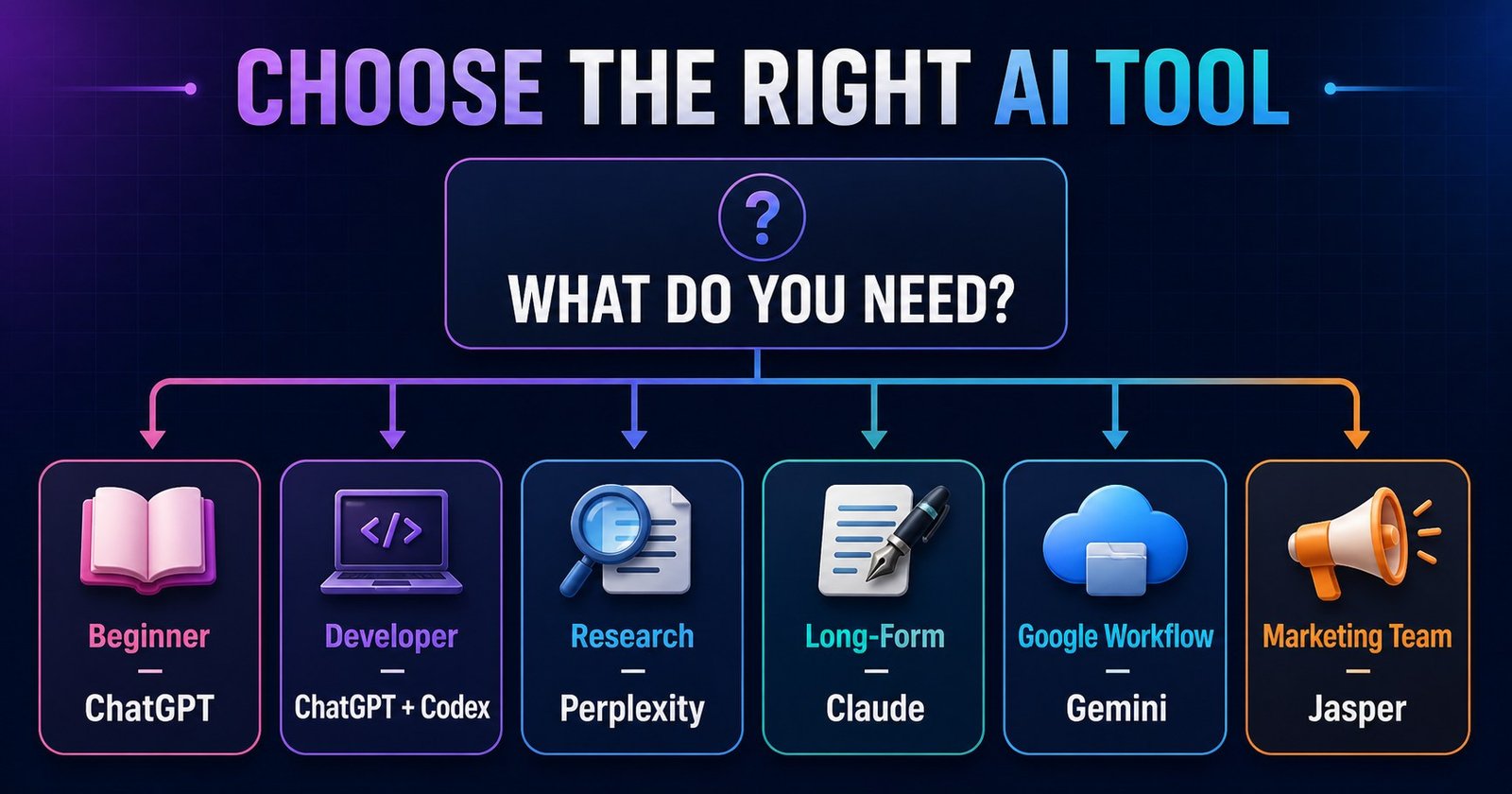
Best for beginners
ChatGPT offers the easiest path from an idea to a structured draft, with room to learn prompting gradually.
Best for developers
ChatGPT plus Codex combines editorial help with project-aware PHP, CSS, metadata, and integration work.
Best for SEO bloggers
ChatGPT is flexible for intent mapping and structure; pair it with verified search data and your own expertise.
Best for research
Perplexity makes source discovery visible and fast, provided you open and verify every important reference.
Best for long-form content
Claude is well suited to large drafts, structural editing, simplification, and consistency across sections.
Best for marketing agencies
Jasper is the strongest fit when brand voice, shared knowledge, campaigns, and team coordination matter.
Best free option
Start with the free tier of ChatGPT, Gemini, or Perplexity and compare it using one real brief. Plans and limits change, so verify current terms directly.
Best AI blog writing workflow
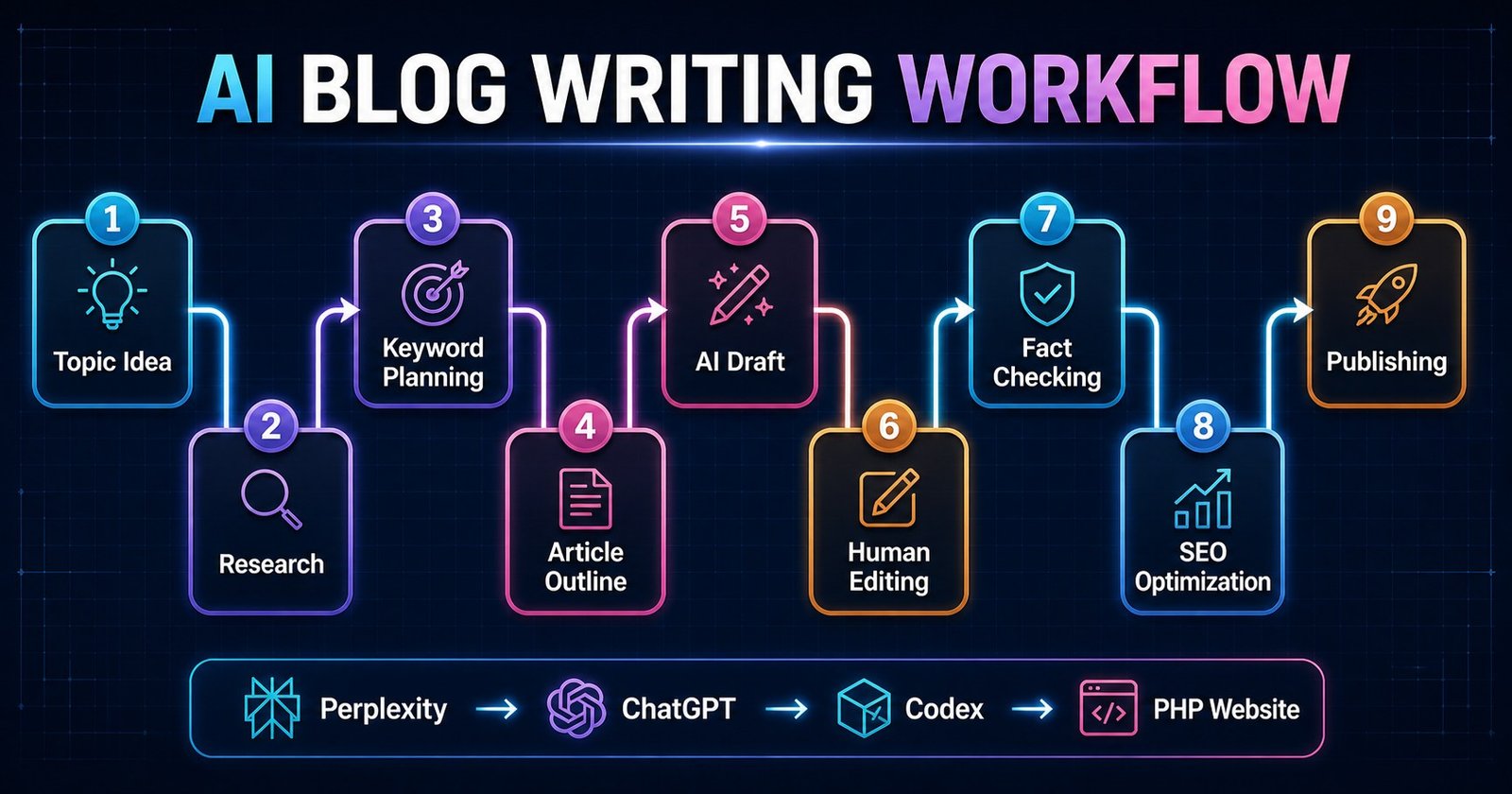
- Topic idea: Start with a real audience problem, customer question, or skill you can demonstrate.
- Research: Collect primary sources, current documentation, definitions, examples, and competing viewpoints.
- Keyword planning: Group related searches by intent and select one clear primary question instead of stuffing variants.
- Article outline: Arrange sections in the order a beginner needs them, removing headings that do not serve the reader.
- AI draft: Draft section by section from verified notes. Mark uncertain claims rather than filling gaps with guesses.
- Human editing: Add experience, screenshots, opinions, transitions, and a voice readers can recognize.
- Fact checking: Reopen every source, test every code example, and remove claims that cannot be supported.
- SEO optimization: Improve the title, description, headings, internal links, alt text, canonical, and structured data.
- Publishing: Preview on mobile and desktop, check links and metadata, then monitor how real readers use the page.
NavTech workflow: Perplexity → ChatGPT → Codex → PHP website
Perplexity gathers source leads and current context. ChatGPT turns the verified research brief into a useful structure and working draft. Codex inspects the existing project, creates the PHP page, integrates local images, adds scoped CSS and metadata, and performs available checks. The PHP website publishes the human-reviewed article in the site’s established design system.
How developers can use Codex for blogging
Codex is valuable when the task is no longer just writing. Inside a coding workspace it can inspect real files and follow the project’s conventions. For a static PHP site, that may include reusing header and footer includes, matching article classes, creating responsive CSS, adding tested examples, inserting local images, updating a blog array, and adding the canonical URL to the sitemap.
It can also locate related posts that genuinely exist, check whether a proposed internal link is valid, create JSON-LD from the visible FAQ content, count H1 elements, and identify mobile overflow risks. This project-aware work is different from pasting a disconnected HTML template into a site.
A developer remains responsible for reviewing changes. Check include paths, escaping, form behavior, deployment rules, generated copy, accessibility, and server compatibility. If PHP is unavailable locally, use static checks and test again in a matching development or staging environment.
Inspect this PHP website's existing blog layout. Create a new accessible article page using the current header, footer, CSS classes, and local assets. Add valid BlogPosting and FAQPage JSON-LD, update the blog listing and sitemap, verify internal links, and do not change unrelated design or functionality.Common mistakes when using AI for blog writing
- Publishing without editing: raw output often repeats ideas and lacks a distinctive point of view.
- Trusting incorrect information: fluent language can hide an unsupported claim.
- Using fake statistics: never publish a number unless you can open and evaluate its original source.
- Keyword stuffing: repetitive phrasing makes an article harder to read and does not improve usefulness.
- Creating duplicate content: summarizing existing pages without original value gives readers no reason to choose yours.
- Writing a weak introduction: begin with the reader’s problem, outcome, and what the guide actually covers.
- Providing no examples: a workflow, prompt, screenshot, or tested code sample turns advice into something usable.
- Ignoring visuals: purposeful screenshots and diagrams can explain relationships faster than another paragraph.
- Missing internal links: connect readers to relevant guides such as What is ChatGPT?, SEO services, digital marketing, and the Next.js 16 guide.
- Not testing code: run examples in the documented version and explain assumptions.
How to make AI blog content better
Add what the model cannot know: your experience, customer questions, screenshots from the real workflow, measurements, failed attempts, and decisions. Build small code demos and test them. Use an original comparison table rather than a list copied from product pages. Link related site content where it genuinely helps, and cite authoritative external documentation for changing product capabilities.
Use FAQs to answer follow-up questions, not to repeat the introduction. Use diagrams for a process or decision with several branches. Add video only when motion or a live demonstration makes the idea clearer. Most importantly, read the finished article aloud. Remove sentences that sound polished but say little.
Frequently asked questions
What is the best AI tool for blog writing?
ChatGPT is the best all-round choice for most beginners because it can support planning, drafting, editing, coding examples, metadata, and reusable workflows. The best choice still depends on whether research, long-form prose, or team governance matters most.
Is ChatGPT good for SEO blog writing?
Yes, ChatGPT can help create search-focused outlines, titles, descriptions, FAQs, and internal-link ideas. It cannot guarantee rankings, and its output still needs human editing, fact checking, search-intent review, and original experience.
Can AI-written blogs rank on Google?
Useful AI-assisted content can rank when it genuinely answers readers, demonstrates accuracy and experience, and follows search quality guidelines. Publishing unedited, repetitive, or misleading text at scale is unlikely to build lasting search visibility.
Which AI tool is best for research?
Perplexity is a practical research starting point because its answers link to sources. Bloggers must open those sources, confirm that each one supports the claim, and prefer primary or authoritative references.
Is Claude better than ChatGPT for writing?
Claude is often a strong fit for editing long drafts and maintaining a natural voice across large documents. ChatGPT is usually the more flexible all-round workflow tool. Test both with the same brief and judge the result against your own editorial standards.
Can Codex create blog pages?
Yes. Inside a coding workspace, Codex can inspect an existing site, create PHP and HTML structure, add scoped CSS, connect local assets, update listings and sitemaps, and run available checks. A developer should review every change before deployment.
Should I edit AI-generated content before publishing?
Always. Check every factual claim, remove repetition, add original experience, test code, improve examples, verify links, and make sure the final article sounds like your brand rather than a generic template.
What is the best free AI option for bloggers?
Free access changes frequently. Start with the free version of the tool that fits your main task, then compare output quality and usage limits before paying. Do not build a publishing workflow around a temporary plan limit.
Official product references
- OpenAI: using Canvas for writing and coding
- Anthropic: Claude Projects
- Perplexity: search and source transparency
- Google: connecting Workspace apps to Gemini
- Jasper: Brand Voice
Need Help Building an AI-Powered Website?
NavTech Solution helps businesses combine practical AI solutions with web development, Next.js development, SEO, and digital marketing.
Discuss your project