

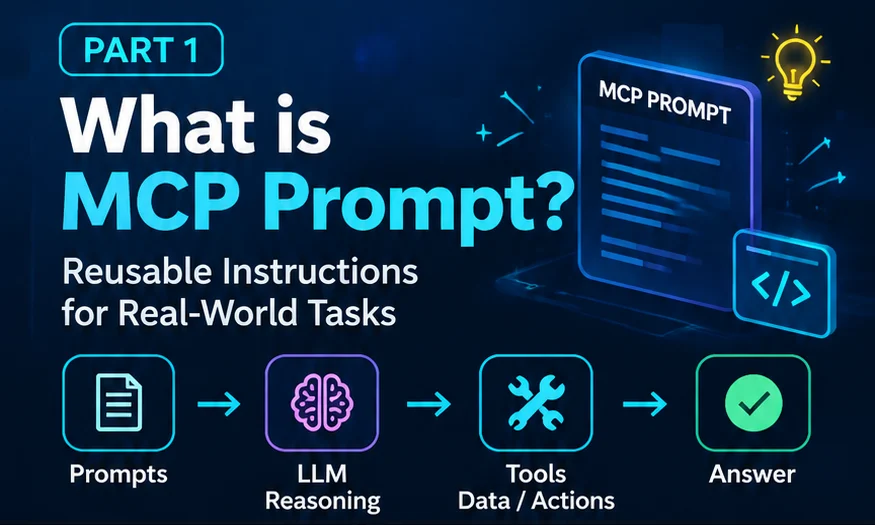
An MCP prompt is a reusable instruction template that an MCP server offers to an AI application. The user picks it (often as a slash command), fills in a few arguments, and the application sends the resulting messages to the language model. The prompt tells the model what procedure to follow; it does not run any tools by itself.
What is an MCP prompt?
MCP stands for Model Context Protocol, an open protocol that lets AI applications connect to external systems in a standard way. An MCP server exposes capabilities; an MCP client inside an AI application (the host, such as a chat app or an IDE) connects to it.
A server can expose three kinds of features: tools (actions the model can call), resources (data the application can read), and prompts. According to the official MCP specification, prompts are prompt templates: structured messages and instructions for working with a language model. Clients can discover them, retrieve their contents, and supply arguments to customise them.
In plain terms, an MCP prompt is a saved, named procedure. Instead of typing "please read the ticket, then check the last deployment, then…" every time, a team writes that procedure once on the server, gives it a name such as investigate_production_bug, and lets anyone choose it when they need it.
The specification describes prompts as user-controlled: the user decides when a prompt is used, typically by selecting it in the interface. The prompt's content is defined by the server. That is the key difference from tools, which the specification describes as model-controlled.
Why do developers need MCP prompts?
Most useful AI tasks at work are not one-off questions. They are repeatable procedures: review this pull request, summarise this incident, draft release notes, investigate this bug. Each procedure has steps that experienced people follow, and steps that beginners forget.
MCP prompts give those procedures a home. Developers need them because they:
- Capture team knowledge. The procedure lives on the server, versioned like code, instead of in someone's notes.
- Work across AI applications. Any MCP-compatible client can list and use the same prompts, so the procedure is not tied to one chat app.
- Make tasks discoverable. A client can show available prompts as a menu or slash commands, so users find the right workflow instead of guessing.
- Accept structured input. Arguments such as
bug_idlet the same template fit many cases.
The problem with unstructured AI workflows
Without shared prompts, every person writes their own instructions. Two developers asking an assistant to "look into BUG-4821" can get very different investigations:
- One remembers to check the deployment history; the other does not.
- One asks for evidence; the other accepts the first plausible explanation.
- Instructions get longer and inconsistent as people copy and edit them in chat.
- Nobody can review or improve "the procedure", because there isn't one.
The result is not necessarily wrong answers every time, but unpredictable ones. An MCP prompt does not make the model smarter. It makes the starting instructions the same for everyone, so results are easier to compare, review, and improve.
How do MCP prompts work?
At a high level, five things happen. The user makes a request, an MCP prompt supplies the procedure, the language model reasons about it, tools provide data or perform actions, and the model produces an answer.
- User requestInvestigate BUG-4821
- MCP promptProcedure
- LLMReasoning
- ToolsData / actions
- AnswerWith evidence
Under the hood, the client asks the server which prompts exist with a prompts/list request, then retrieves the chosen one with prompts/get, passing any arguments. The server returns a list of messages that the application adds to the conversation. Part 2 explains prompts/list and prompts/get with real JSON-RPC examples.
MCP prompt vs LLM vs tools
Beginners often blur these three together. A simple mental model keeps them apart:
- MCP PromptProcedure
Reusable instructions and steps, chosen by the user.
- LLMReasoning
Reads the instructions, plans, and interprets evidence.
- ToolsData / Actions
Fetch data or act on systems, when the client allows it.
| MCP prompt | LLM | MCP tools | |
|---|---|---|---|
| Role | Reusable instructions | Reasoning and language | Data and actions |
| Who decides to use it | The user (user-controlled) | The application sends it the conversation | The model proposes calls (model-controlled) |
| Defined by | The MCP server | The model provider | The MCP server |
| Protocol methods | prompts/list, prompts/get | Not part of MCP | tools/list, tools/call |
| Changes external systems? | No, it only returns messages | No, it only produces text | It can, depending on the tool |
If you are new to language models in general, our guide What is ChatGPT? covers the basics of how a chat-based LLM responds to instructions.
Four benefits of MCP prompts
- Reusable
Write the procedure once and use it for every similar task, with arguments for the parts that change.
- Consistent
Everyone starts from the same instructions, so results are easier to compare and review.
- Fewer missed steps
A written checklist makes it less likely that an important step, such as checking deployments, is skipped.
- Saves time
Users pick a named prompt instead of rewriting long instructions in every chat.
Note the careful wording: a prompt reduces the chance of mistakes; it cannot guarantee correctness. The model can still misread evidence, and tools can still return incomplete data. That is why good prompts ask for evidence, not just conclusions.
Real-world example: investigating a production bug
Imagine a payments team. A developer types: "Investigate BUG-4821 and tell me the root cause." Instead of improvising, they select the team's investigate_production_bug prompt and enter BUG-4821. The prompt returns this procedure to the model:
- Read the ticket.
- Identify the affected service.
- Check the deployment history.
- Review recent code changes.
- Inspect relevant team discussions.
- Cross-check the evidence.
- Identify the likely root cause.
- Recommend a fix.
The model then uses whatever tools the application has connected, such as a ticket tracker, the deployment log, or the code repository, to gather evidence for each step. In our example (fictional data), it finds that updated code expects a field called transaction_id while the webhook still sends payment_id: a likely data contract mismatch.
Part 3 walks through this BUG-4821 investigation step by step, including how to verify the hypothesis before calling it the root cause.
MCP prompts vs ordinary prompts
| Ordinary prompt | MCP prompt | |
|---|---|---|
| Where it lives | Typed into a chat, or kept in personal notes | Defined on an MCP server |
| Reuse | Copy and paste | Listed and retrieved by name |
| Input | Free text | Named arguments, some required |
| Discoverability | Users must know it exists | Clients can show it in menus or as slash commands |
| Updates | Each copy drifts separately | Change it once on the server |
| Portability | Tied to one conversation | Works in any client that supports MCP prompts |
An MCP prompt is also different from a system prompt. A system prompt is set by the application to shape the model's overall behaviour. An MCP prompt is a task template the user chooses for a specific job.
What MCP prompts do not do
It is easy to over-estimate prompts. Keep these limits in mind:
- They do not execute tools.
prompts/getreturns messages. Any tool use happens later, through separatetools/callrequests that the model proposes and the client sends. - They do not enforce policy. Writing "never deploy on Fridays" in a prompt is guidance, not a control. Permissions, approvals, and access rules must be enforced by the systems and tools themselves.
- They are not autonomous agents. A prompt has no memory, schedule, or goals of its own. It is text that starts a conversation.
- They do not guarantee correct answers. They improve the starting instructions; the model's reasoning and the quality of tool data still matter.
Best practices for writing MCP prompts
- Give it a clear name and title. Use a stable
namefor code (for exampleinvestigate_production_bug) and a readabletitlefor menus. - Describe when to use it. The
descriptionhelps users pick the right prompt. - Use arguments for what changes. Mark only truly necessary arguments as required.
- Write steps, not slogans. Numbered, concrete steps produce more consistent results than "be thorough".
- Ask for evidence and uncertainty. Request sources for each claim and ask the model to say when it is not sure.
- Validate inputs on the server. The specification asks implementations to validate prompt inputs and outputs to prevent injection and unauthorised access.
- Version and review prompts like code. A prompt is a team procedure; changes deserve review.
If you are building AI features as a JavaScript developer, our AI developer roadmap for JavaScript developers shows where protocols like MCP fit among the other skills worth learning.