

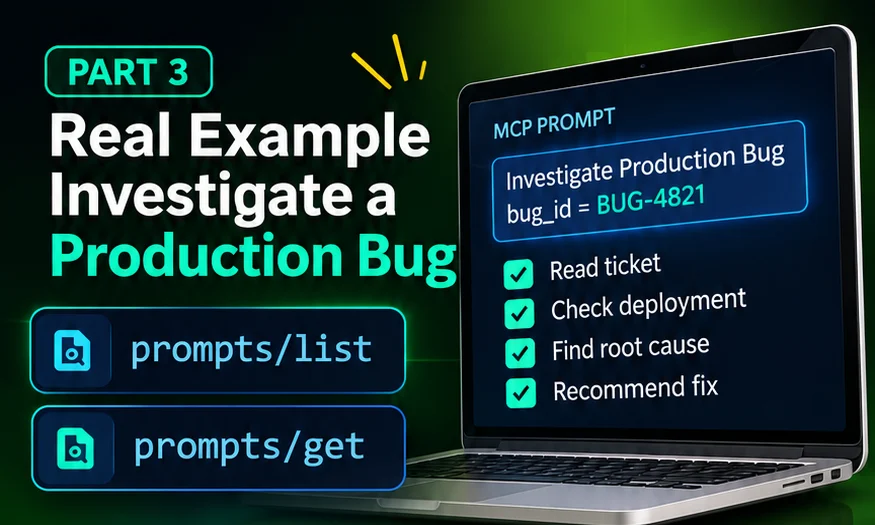
To investigate a production bug with an MCP prompt, the user selects an investigation prompt (here investigate_production_bug) and enters the bug ID. The client retrieves the procedure with prompts/get, the model follows it step by step, and each step gathers evidence through tools the application has authorised. The model forms a hypothesis, the team verifies it, and only then is it called the root cause.
BUG-4821, the services, tool names, timestamps, and messages in this tutorial are fictional. They are realistic so you can follow the reasoning, but they are not from a real system. Simulated values are marked Simulated data.
The scenario
It is a busy afternoon for a payments team. Support reports that customers are being charged, but their orders stay in the pending state. A developer opens their AI assistant and writes:
"Investigate BUG-4821 and tell me the root cause."
Rather than letting the model improvise an investigation, the team has an approved procedure on their MCP server. This tutorial follows it from start to finish. If you are new to the concepts, start with what an MCP prompt is; for the protocol messages used here, see how prompts/list and prompts/get work.
What is connected
The investigation needs two kinds of MCP features. The prompt supplies the procedure:
The tools supply data. In this example the application has connected read-only tools Simulated data:
| Tool (fictional) | What it returns | Used in step |
|---|---|---|
get_ticket | Ticket text, reporter, timestamps | 1, 2 |
list_deployments | Recent releases for a service | 3 |
get_commit_diff | Code changes in a release | 4 |
search_discussions | Matching team chat messages | 5 |
search_logs | Matching log lines in a time window | 6 |
Read-only is a deliberate choice: an investigation should gather evidence, not change production. That limit is enforced by the tools and their credentials, not by the wording of the prompt.
Step 0: select and retrieve the prompt
The user picks Investigate Production Bug from the client's prompt menu (the client found it earlier with prompts/list) and enters BUG-4821. The client then sends:
{
  "jsonrpc": "2.0",
  "id": 7,
  "method": "prompts/get",
  "params": {
    "_meta": {
      "io.modelcontextprotocol/protocolVersion": "2026-07-28",
      "io.modelcontextprotocol/clientCapabilities": {}
    },
    "name": "investigate_production_bug",
    "arguments": {
      "bug_id": "BUG-4821"
    }
  }
}
The server answers with messages containing the eight-step procedure. Nothing has been investigated yet: so far there are only instructions.
The approved investigation procedure
- Read ticket
- Identify service
- Deployments
- Code changes
- Discussions
- Cross-check
- Root cause
- Fix
Following the procedure step by step
1. Read the ticket
The model proposes a call to get_ticket. The client shows the call to the user, who approves it, and sends:
{
  "jsonrpc": "2.0",
  "id": 8,
  "method": "tools/call",
  "params": {
    "_meta": {
      "io.modelcontextprotocol/protocolVersion": "2026-07-28",
      "io.modelcontextprotocol/clientCapabilities": {}
    },
    "name": "get_ticket",
    "arguments": {
      "id": "BUG-4821"
    }
  }
}{
"jsonrpc": "2.0",
"id": 8,
"result": {
"resultType": "complete",
"content": [
{
"type": "text",
"text": "BUG-4821: Paid orders stuck in 'pending'. First report 14:12 UTC. Customers are charged, but order status never changes to 'paid'. Affects card payments only."
}
],
"isError": false
}
}What we learn: money is taken, but the system never records the confirmation. That points at the step where the payment provider notifies us, not at checkout itself.
2. Identify the affected service
Card payment confirmations arrive as webhooks: HTTP requests the payment provider sends to us. In this system they are handled by payments-webhook-service Simulated data. The model records that as the service to investigate.
3. Check the deployment history
Calling list_deployments for that service returns Simulated data:
| Version | Deployed (UTC) | Change |
|---|---|---|
| v2.14.0 | Today 13:58 | Refactor webhook payload parsing |
| v2.13.2 | 3 days ago | Dependency updates |
A deployment at 13:58 and a first report at 14:12 is a timing match worth following. It is not proof: correlation in time is a lead, not a conclusion.
4. Review the code changes
get_commit_diff for v2.14.0 shows the parsing change Simulated data:
- const paymentId = payload.payment_id;
+ const transactionId = payload.transaction_id;
+ if (!transactionId) {
+   throw new ValidationError("transaction_id is required");
+ }The updated code expects a field named transaction_id and rejects payloads without it.
5. Inspect relevant discussions
search_discussions for "payment_id" finds a message from the integration channel Simulated data:
"Heads up: the provider plans to rename
payment_idtotransaction_idin their next API version. Today's sample webhook still usespayment_id."
The webhook payload the provider actually sends still contains payment_id, not transaction_id.
6. Cross-check the evidence
The procedure asks the model to check that the clues agree before drawing conclusions. A log search for the period after the deployment returns Simulated data:
14:01:07 ERROR payments-webhook ValidationError: transaction_id is required
14:01:09 ERROR payments-webhook ValidationError: transaction_id is required
14:01:15 ERROR payments-webhook ValidationError: transaction_id is required
Now three independent sources line up: the code expects transaction_id (A), the provider sends payment_id (B), and the logs show validation failures starting minutes after v2.14.0 went live.
Forming the hypothesis
From the evidence, the model proposes a hypothesis, clearly labelled as such:
Release v2.14.0 changed the webhook handler to require transaction_id, but the payment provider still sends payment_id. Every card-payment webhook is rejected, so orders are never marked as paid.
A data contract is the agreement about which fields a message contains and what they mean. Here, one side changed its expectations before the other side changed its messages. A good investigation also records the alternatives it considered and why they are less likely:
- Provider outage? Unlikely: webhooks are arriving; they are being rejected.
- Database problem? Unlikely: the error is a validation error before any database write.
- Only some customers? The ticket says card payments only, which matches the one webhook path that changed.
Verifying the root cause
A hypothesis that fits the evidence is still not a verified root cause. Before calling it one, the team checks it directly:
- Reproduce it. Replay a recorded provider webhook that contains
payment_idagainst v2.14.0 in staging. Expected: the sameValidationError. - Test the opposite. Replay the same webhook against v2.13.2. Expected: the order is marked as paid.
- Check the timeline. Confirm there are no matching errors before 13:58 and that the first error follows the deployment.
If all three behave as expected, the evidence now supports calling the data contract mismatch the root cause. If any check fails, the hypothesis is revised and the procedure continues. The model can suggest these checks; people with access to staging decide and run them.
Recommending a fix
The procedure ends with a recommendation, separated into immediate and lasting actions:
- Immediate: roll back to v2.13.2, or ship a hotfix that accepts both field names, so new payments are recorded again.
- Recovery: reprocess the webhooks rejected since 13:58 (if the provider supports redelivery), so pending orders are completed.
- Lasting: treat the provider's payload as a contract, with tests that fail when the code and the real payload disagree.
// Accept the current field and the provider's planned new name until the
// provider confirms the migration date.
const transactionId = payload.transaction_id ?? payload.payment_id;
if (!transactionId) {
  throw new ValidationError("transaction_id or payment_id is required");
}
Regression testing
A regression test makes sure the same mistake cannot ship again. Use real (sanitised) provider payloads as test fixtures:
import { describe, expect, it } from "vitest";
import { parseWebhook } from "./webhook-handler";
import currentPayload from "./fixtures/provider-webhook-current.json";

describe("payment webhook contract", () => {
  it("accepts the payload the provider sends today", () => {
    expect(parseWebhook(currentPayload).transactionId).toBeDefined();
  });

  it("accepts the provider's planned field name", () => {
    const next = { ...currentPayload, transaction_id: "txn_123" };
    expect(parseWebhook(next).transactionId).toBe("txn_123");
  });
});
For setting up tests like this in a Next.js project, see Next.js 16 testing with Vitest and React Testing Library; for checking the full checkout flow in a browser, see Next.js 16 E2E testing with Playwright.
Final incident report example
The model's final answer follows the structure the prompt asked for. A shortened version Simulated data:
Incident report: BUG-4821 (simulated)
- Summary
- Card-payment confirmations were rejected after release v2.14.0, leaving paid orders in "pending".
- Impact
- Card payments from 13:58 UTC until the fix. Customers were charged; orders were not completed.
- Root cause
- Data contract mismatch: the handler required
transaction_id; the provider sendspayment_id. Verified by replaying a recorded webhook in staging against both versions. - Evidence
- Diff of v2.14.0 (A), provider payload and team discussion (B), validation errors in logs from 14:01 UTC.
- Resolution
- Hotfix accepting both fields; rejected webhooks reprocessed.
- Follow-up
- Contract tests with real payload fixtures; confirm the provider's migration date before removing
payment_idsupport.
Notice the word verified next to the root cause, with the check that justified it. Without the staging replay, the honest wording would be "likely root cause".
What this example teaches
- The prompt provided the structure. Every investigator follows the same eight steps, so nothing important is skipped.
- The model provided the reasoning. It connected the timing, the diff, the payload, and the logs into one explanation.
- The tools provided the facts. Each claim traces back to a tool result the team can check.
- People stayed in control. Tool calls could be approved or denied, as the MCP tools specification recommends, and verification and the fix were human decisions.
For the observability side of incidents like this one, such as logs, metrics, and alerts, read Next.js 16 monitoring and observability.