


Docker makes a Next.js deployment repeatable: the application runs with the same operating-system layer, Node.js runtime, dependencies, and start command on a developer machine, in testing, and on a VPS. Docker Compose adds a versioned description of how that application container should run.
This guide starts from the application created in the Next.js 16 installation tutorial. If the folders and route files are unfamiliar, review the Next.js project structure guide before containerizing the project.
Docker and Docker Compose
A Dockerfile is a recipe for building an image. The image is an immutable package containing the application and its runtime requirements. Starting an image creates a container, the isolated running process.
A Compose file describes services, networks, volumes, environment values, restart behavior, and port mappings. Compose can manage one container, but its real advantage appears when an application adds a reverse proxy, database, cache, or worker.
Prerequisites
- Node.js 20.9 or newer for the current Next.js 16 project
- Docker Engine or Docker Desktop
- Docker Compose v2, invoked as
docker compose - An App Router application with a lockfile
node --version
docker --version
docker compose version
1. Configure Next.js Standalone Output
Next.js can trace the files required by the production server and place them in .next/standalone. That allows the final image to copy a focused runtime instead of the complete development workspace.
import type { NextConfig } from 'next'

const nextConfig: NextConfig = {
  output: 'standalone',
}

export default nextConfig
After npm run build, Next.js creates .next/standalone. The standalone server does not automatically include the complete public folder or .next/static, so the Dockerfile copies those directories explicitly.
2. Create the Production Dockerfile
This example uses four named stages. It installs dependencies from the lockfile, builds the application, and copies only the standalone server and static assets into a non-root runtime stage.
FROM node:22-alpine AS base

FROM base AS deps
WORKDIR /app
COPY package.json package-lock.json ./
RUN npm ci

FROM base AS builder
WORKDIR /app
COPY --from=deps /app/node_modules ./node_modules
COPY . .
ENV NEXT_TELEMETRY_DISABLED=1
RUN mkdir -p public && npm run build

FROM base AS runner
WORKDIR /app
ENV NODE_ENV=production
ENV NEXT_TELEMETRY_DISABLED=1

RUN addgroup --system --gid 1001 nodejs \
  && adduser --system --uid 1001 nextjs

COPY --from=builder /app/public ./public
COPY --from=builder --chown=nextjs:nodejs /app/.next/standalone ./
COPY --from=builder --chown=nextjs:nodejs /app/.next/static ./.next/static

USER nextjs
EXPOSE 3000
ENV PORT=3000
ENV HOSTNAME="0.0.0.0"
CMD ["node", "server.js"]This Dockerfile assumes npm and package-lock.json. Adapt the dependency stage and lockfile copy when the project uses pnpm, Yarn, or Bun.
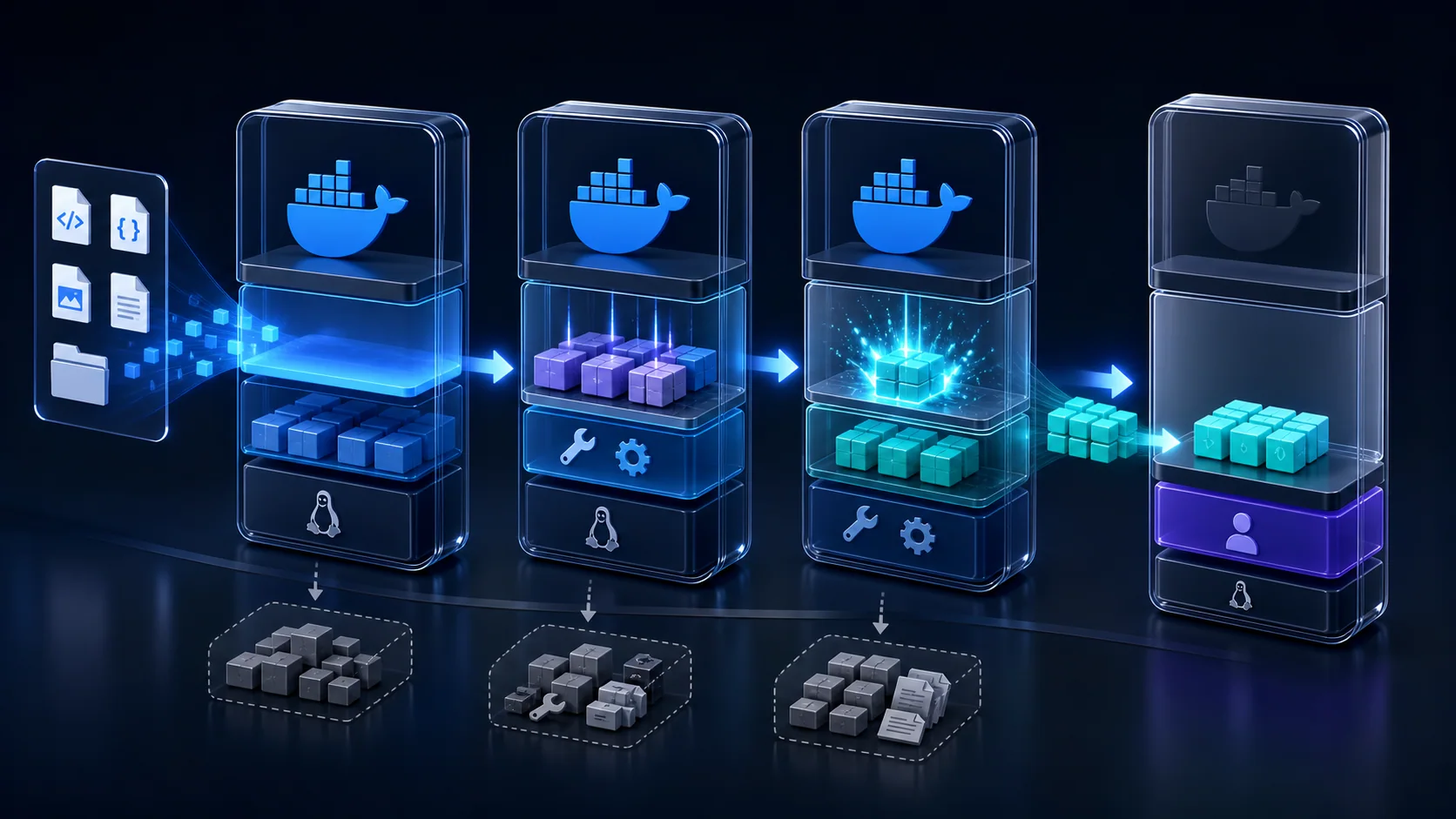
- 01baseNode.js runtime
- 02deps
npm ci - 03builder
next build - 04runner
server.js
Why the stages matter
The dependency stage improves cache reuse when source code changes but package files do not. The builder contains development dependencies needed to compile the app. The runner omits the source tree and build tools, uses a dedicated user, and starts the traced standalone server.
Multi-stage builds reduce unnecessary runtime contents, but a small image is not automatically secure. Keep the base image updated, scan dependencies and images, avoid secrets in layers, and rebuild regularly.
3. Add .dockerignore
A small build context is faster to transfer and less likely to include local secrets or generated files.
node_modules
.next
.git
.gitignore
npm-debug.log*
README.md
.env*
!.env.example
Do not bake private .env files into the image. If a public NEXT_PUBLIC_* value is required during next build, provide that non-secret build configuration deliberately; runtime environment variables cannot rewrite JavaScript that was already inlined into a browser bundle.
4. Create compose.yaml
Modern Compose does not require a top-level version field. Define the application as a service, publish its port for this direct-access example, and attach it to a named bridge network.
services:
  nextjs:
    build:
      context: .
      dockerfile: Dockerfile
    container_name: nextjs-app
    restart: unless-stopped
    ports:
      - "3000:3000"
    environment:
      NODE_ENV: production
    networks:
      - nextjs-network

networks:
  nextjs-network:
    driver: bridge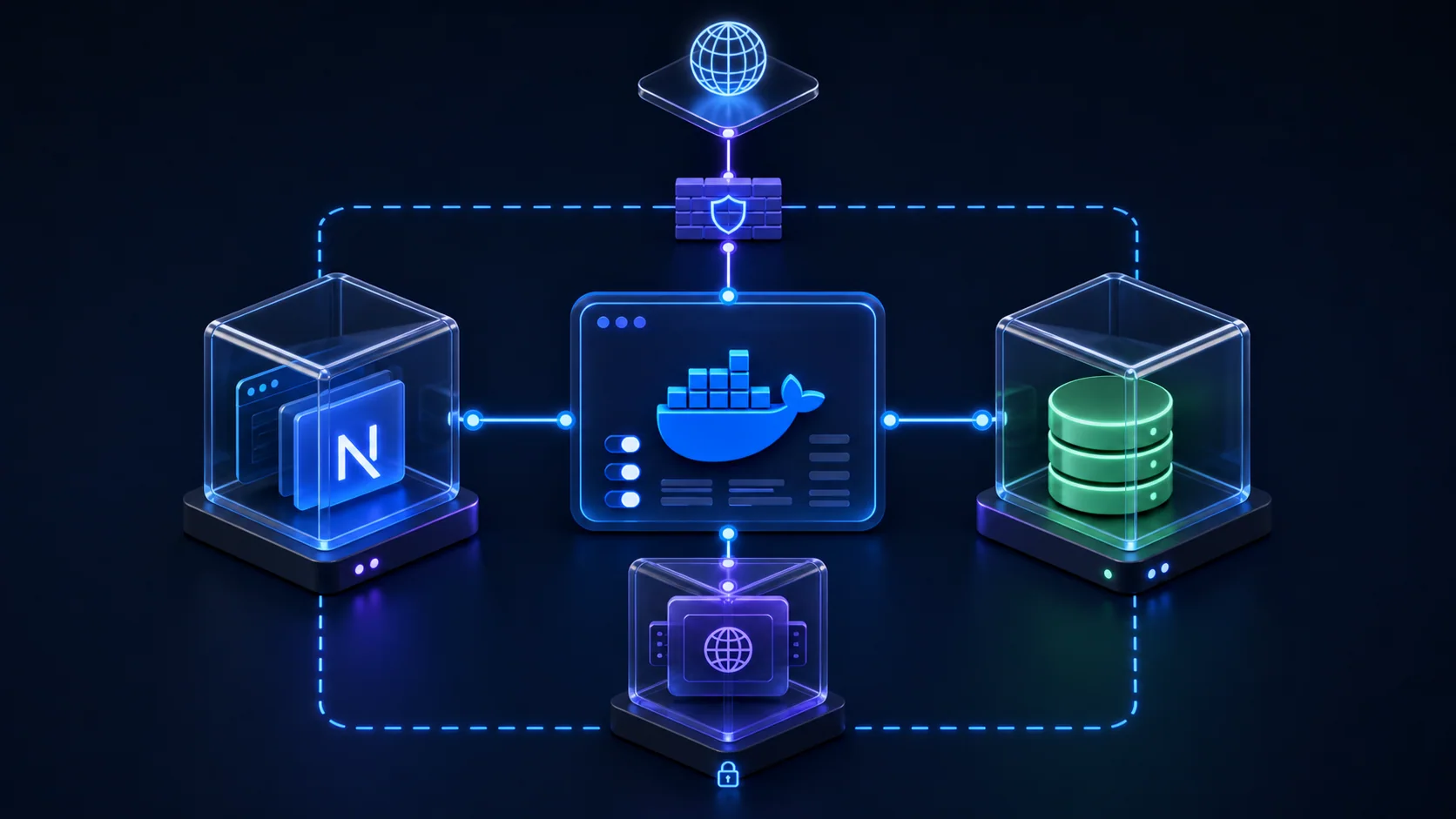
5. Build and Start the Container
docker compose build
docker compose up -d
docker compose ps
Open http://localhost:3000. The mapping 3000:3000 sends host port 3000 to port 3000 inside the container. Detached mode returns control to the terminal while the service continues running.
6. Logs, Rebuilds, and Lifecycle Commands
| Task | Command |
|---|---|
| Show service status | docker compose ps |
| Stream application logs | docker compose logs -f nextjs |
| Rebuild and recreate | docker compose up -d --build |
| Restart the service | docker compose restart nextjs |
| Open a shell | docker compose exec nextjs sh |
| Stop and remove the stack | docker compose down |
For a targeted production update, rebuild the service and recreate it without restarting its dependencies:
docker compose build nextjs
docker compose up --no-deps -d nextjs
7. Runtime Environment Variables
Compose can load runtime values from a file that is present on the server but excluded from Git and the image build context.
DATABASE_URL=your_database_url
NEXT_PUBLIC_APP_URL=https://example.comservices:
nextjs:
env_file:
- .env
environment:
NODE_ENV: productionNever print credentials merely to prove they exist. Validate the presence of required variables without logging their values. Remember that NEXT_PUBLIC_ variables are intended for browser-visible data and are commonly inlined at build time; never use that prefix for secrets.
8. Connect Next.js to a Database Container
Inside the Next.js container, localhost means that same Next.js container. It does not mean another Compose service. Use the database service name as the hostname:
services:
  nextjs:
    build: .
    depends_on:
      - mongodb

  mongodb:
    image: mongo:8

# Connection hostname from the nextjs service:
# mongodb://mongodb:27017/mydatabaselocalhost:27017×mongodb:27017✓depends_on controls startup order, but the short form does not guarantee the database is ready to accept connections. Add a database health check and retry transient connection failures in the application when readiness matters.
9. Prepare for a Production VPS
Publishing port 3000 is useful for local testing. A public VPS normally places a reverse proxy in front of the application so the proxy owns ports 80 and 443, handles TLS, and forwards requests over a private Docker network.
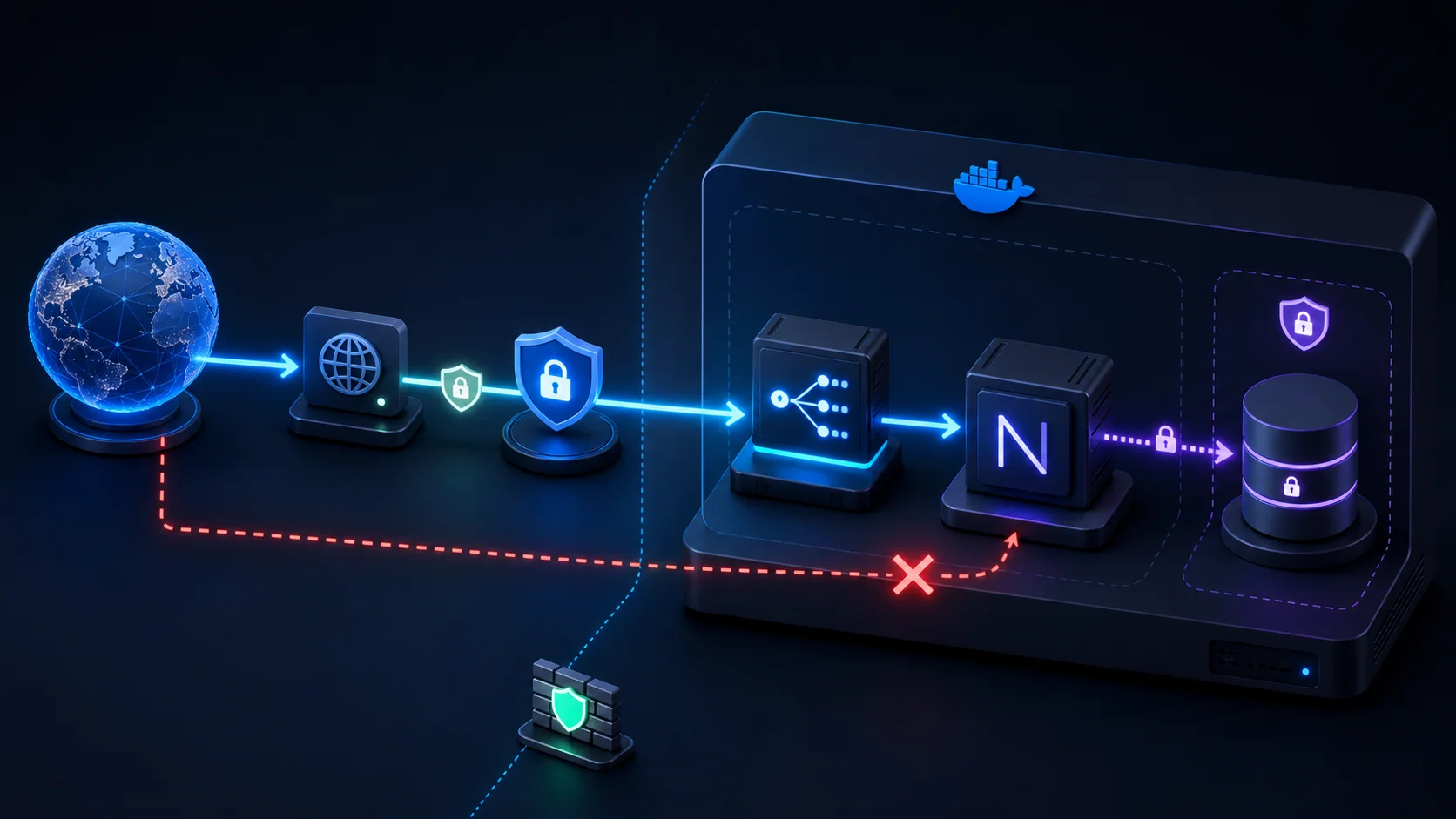
- 1Domain
- 2HTTPS
- 3Reverse proxy
- 4Next.js
- 5Database
With a proxy attached to the same Docker network, the application can use expose instead of publishing a host port:
services:
  nextjs:
    build: .
    restart: unless-stopped
    env_file:
      - .env
    expose:
      - "3000"
    networks:
      - web

networks:
  web:
    driver: bridge
expose documents the container port for connected services; it does not publish the port on the host. Firewall rules, TLS configuration, backups, monitoring, and secret management remain separate production responsibilities.
Common Next.js Docker Errors
server.js is missing
Confirm output: 'standalone', run a successful production build, and verify the runner copies from /app/.next/standalone. Then rebuild the image.
The application cannot be reached
Confirm the container is running, inspect logs, check the port mapping, and bind the standalone server to 0.0.0.0 instead of loopback inside the container.
Port 3000 is already allocated
Stop the conflicting service or map another host port such as 3001:3000, then browse to http://localhost:3001.
npm run build fails
Run the same build locally, inspect the first actionable error, confirm required build-time variables, and make sure the lockfile matches package.json.
The container keeps restarting
Use docker compose ps and docker compose logs nextjs. Common causes include a missing runtime variable, incorrect startup command, database failure, or missing standalone files.
Database connection is refused
Use the Compose service hostname instead of localhost, confirm both services share a network, and handle database readiness rather than assuming startup order means ready.
Production Checklist
- Production build succeeds
- Standalone output is enabled
- Multi-stage Dockerfile uses a non-root runtime user
- Build context excludes secrets and generated folders
- Runtime environment variables are configured outside the image
- Image and dependencies are scanned and updated
- Container startup and health are monitored
- Database readiness and backups are tested
- Reverse proxy and HTTPS are configured
- Only required firewall ports are open
Frequently Asked Questions
Can Next.js run inside Docker?
Yes. Current Next.js deployment guidance supports Docker containers with full framework feature support.
Does Next.js need Docker?
No. You can deploy to a managed platform or directly to a Node.js server. Docker is valuable when you need environment consistency and infrastructure control.
Do I need Docker Compose for one Next.js app?
No, but it keeps commands and runtime configuration repeatable. It also provides a clean path to adding a database, cache, proxy, or worker.
What port does Next.js use?
Next.js commonly listens on port 3000. Docker can map any available host port to container port 3000.
Should I use standalone output?
It is a strong Docker option because it produces a focused runtime directory. You must still copy public and .next/static when the application uses them.
