

Table of contents

Project and Git
Prepare Next.js, create commits, and push a private repository.
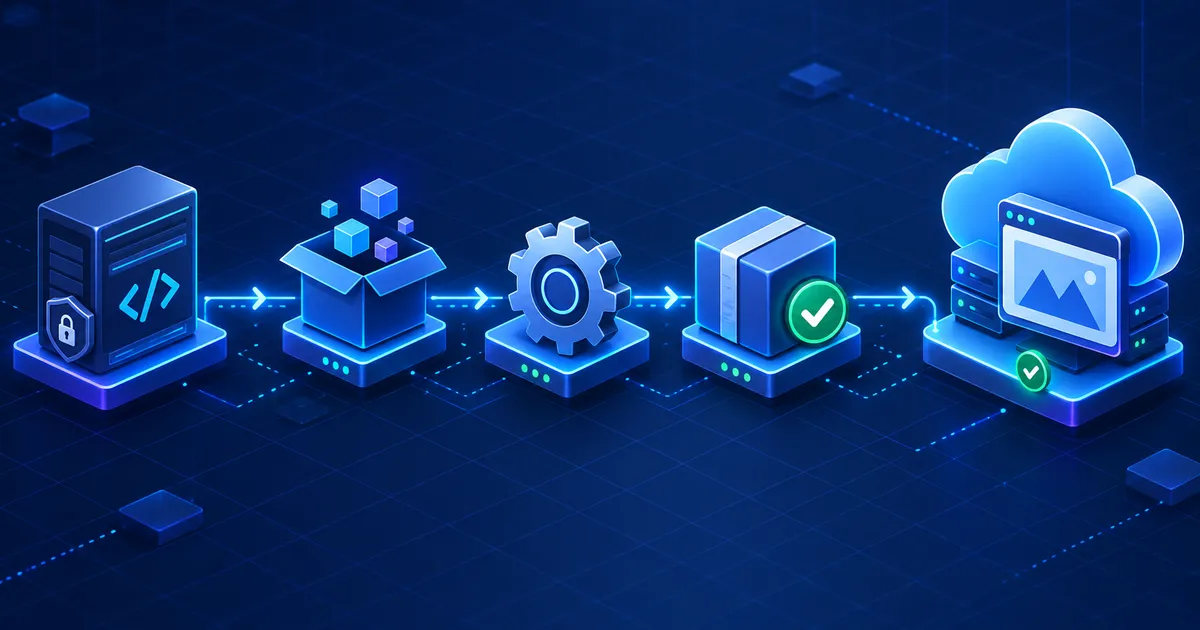
CI/CD Pipeline
Install, build, package, and deploy only from the main branch.

Secure Deployment
Protect variables, restrict identity, verify, and troubleshoot.
1. Deployment workflow
This tutorial connects tools that solve different parts of deployment. You write and test a Next.js application locally. Git records each meaningful change. GitLab stores the private repository and starts a pipeline when code reaches the main branch. The pipeline installs exact dependencies, builds the application, creates a deployable ZIP artifact, authenticates to Azure, and sends that artifact to App Service.
2. Prerequisites
Prepare the following before creating the pipeline. Confirm the local project builds first; CI/CD cannot reliably repair a broken application.
- Node.js supported by your Next.js version
- npm and a committed package-lock.json
- Git installed locally
- GitLab account and private project
- Azure account and active subscription
- Existing Next.js application
- Azure App Service web app
- Permission to create deployment identity
Node.js runs the development and production server. npm installs packages and runs project scripts. Git creates local history; GitLab stores that history remotely and supplies CI/CD runners. Azure App Service manages the web-server infrastructure, TLS endpoint, deployment storage, runtime process, scaling controls, and logs.
3. Create or prepare the Next.js project
Open a terminal in the folder containing package.json. Install the dependencies recorded by the project and start the development server:
npm install
npm run dev
npm install reads package.json, resolves packages, and updates or creates the lockfile. For repeatable automated builds, the pipeline will later use npm ci, which requires an existing lockfile and installs its exact versions. npm run dev starts the Next.js development server, normally at http://localhost:3000.
Open that local address and test the routes you expect to deploy. Stop the development server with Ctrl + C, then verify a production build:
npm run build
npm run start
A successful local production build is not a guarantee that Azure will work, but it separates application errors from pipeline and hosting errors. Ensure package.json contains build and start scripts. For more background, use the existing Next.js 16 deployment guide.
4. Initialize Git
git init
git status
git add .
git commit -m "Initial commit"
Working directory
Your editable files. Git reports changed and untracked files here.
Staging area
The exact changes selected by git add for the next snapshot.
Commit and HEAD
A commit is a saved snapshot. HEAD points to the commit currently checked out.
Before git add ., inspect git status. Your .gitignore should exclude node_modules, .next, local environment files, editor data, and other generated or sensitive files. If .env appears in the staged list, stop and remove it from staging before committing.
5. Connect the project to GitLab
Create an empty private project in GitLab without adding a README if the local project already has commits. Then connect the local repository:
git remote add origin https://gitlab.com/USERNAME/PROJECT.git
git branch -M main
git push -u origin main
origin is the conventional local nickname for the remote repository URL. It is not a server or branch. git branch -M main renames the current branch to main. The -u option records origin/main as the upstream, so later you can often run only git push.
GitLab may require a personal access token, SSH key, credential helper, or browser-based authentication depending on your account settings. Do not place a token in committed files or paste it into the remote URL shown in documentation.
6. Update the application
After editing a page, review and stage only the intended file:
git status
git add app/about/page.tsx
git commit -m "Update about page for Azure deployment"
git push origin main
The flow is code change → staging → commit → GitLab. A commit exists only in the local repository until it is pushed. A push does not automatically mean production deployment unless the pipeline configuration contains a deploy job whose rules match the branch.
7. Create Azure App Service
In the Azure portal, create or select a Resource Group. A resource group is a management container for related Azure resources. Create an App Service Plan inside it; the plan defines the operating system, region, compute tier, and shared capacity. Then create the Web App that will run the Next.js process.
Publish
Choose Code for this ZIP-based workflow.
Runtime stack
Select a Node.js version compatible with the project and CI image.
Operating system
This example assumes Linux App Service.
Region
Choose a permitted region near users and dependent services.
Available regions and SKUs can vary by subscription, quota, organizational policy, and service availability. If the portal blocks a region, review the displayed policy or quota message rather than repeatedly recreating the app.
Under the web app configuration, set NODE_ENV=production. Confirm that the startup command is compatible with npm start and that the application listens on the port supplied by App Service through its environment. Avoid hard-coding a production port.
8. Why a private GitLab repository needs authentication
Public repository
Anyone with the URL can usually read its source. A deployment service may clone it without repository credentials, though deployment to Azure still requires Azure authorization.
Private repository
Only authorized users and jobs can read it. GitLab Runner receives the project securely when a pipeline job starts; an unrelated Azure service cannot anonymously clone it.
This tutorial does not configure Azure to pull the repository. GitLab Runner already has the checked-out source, builds it, and pushes only the deployment artifact to App Service. That keeps repository access inside GitLab and gives the pipeline a clear build record.
Never put GitLab passwords, access tokens, Azure credentials, or publish-profile XML inside source code, .gitlab-ci.yml, screenshots, or build artifacts.
9. Configure GitLab CI/CD variables
Open the GitLab project, then go to Settings → CI/CD → Variables. Add sensitive values in the UI, not in the YAML file. Mark secrets masked and hidden when GitLab accepts their format, protect production variables, and scope them to the production environment where your plan supports environment scopes.
AZURE_CLIENT_IDAZURE_CLIENT_SECRETAZURE_TENANT_IDAZURE_SUBSCRIPTION_IDAZURE_RESOURCE_GROUPAZURE_WEBAPP_NAMEThe first four values authenticate a Microsoft Entra service principal. Scope that identity as narrowly as practical—for example, to the intended web app or its resource group instead of the whole subscription. AZURE_RESOURCE_GROUP and AZURE_WEBAPP_NAME are configuration rather than passwords, but keeping environment-specific values in GitLab avoids hard-coding deployment targets.
Some older publishing workflows use AZURE_DEPLOY_USERNAME and AZURE_DEPLOY_PASSWORD. Those are safe placeholder names, but App Service SCM basic authentication may be disabled by policy and Microsoft recommends deployment methods that can use Microsoft Entra authentication. The pipeline below therefore uses a service principal rather than publishing credentials.
10. Create .gitlab-ci.yml
Create .gitlab-ci.yml in the repository root. GitLab reads this file to decide which runner image to use, which stages and commands to execute, what artifact moves between jobs, and which branch may deploy.
stages:
  - build
  - deploy

variables:
  NEXT_TELEMETRY_DISABLED: "1"

build_nextjs:
  stage: build
  image: node:22-bookworm-slim
  before_script:
    - apt-get update && apt-get install -y --no-install-recommends zip
  script:
    - npm ci
    - npm run build
    - npm prune --omit=dev
    - zip -r app.zip .next public node_modules package.json package-lock.json next.config.* -x ".next/cache/*"
  artifacts:
    paths:
      - app.zip
    expire_in: 1 day

deploy_production:
  stage: deploy
  image: mcr.microsoft.com/azure-cli:latest
  needs:
    - job: build_nextjs
      artifacts: true
  environment:
    name: production
  script:
    - az login --service-principal --username "$AZURE_CLIENT_ID" --password "$AZURE_CLIENT_SECRET" --tenant "$AZURE_TENANT_ID"
    - az account set --subscription "$AZURE_SUBSCRIPTION_ID"
    - az webapp deploy --resource-group "$AZURE_RESOURCE_GROUP" --name "$AZURE_WEBAPP_NAME" --src-path app.zip --type zip
  rules:
    - if: '$CI_COMMIT_BRANCH == "main"'
Adjust the package list. If the project has no public directory or uses a differently named Next.js config file, the ZIP command must be changed. The files must be at the root of the archive—not inside an extra parent folder. Projects with native dependencies should build on an environment compatible with the App Service Linux runtime.
What each pipeline part means
stagesfixes the order: build before deploy.imageselects the container used by each runner job.scriptlists shell commands executed in that job.artifactskeepsapp.ziplong enough for the deploy job.needsdownloads the build artifact into the deployment job.variablesdefines safe, non-secret defaults. Secrets remain in GitLab settings.rulesallows production deployment only frommain.
11. Understand the GitLab CI/CD pipeline
Commit and push the new YAML file. GitLab creates a pipeline and assigns each job to an available runner. The build job checks out the commit, installs locked dependencies, builds Next.js, removes development-only packages, and creates app.zip. If any command returns a non-zero exit code, the job fails and deployment does not begin.
The deployment job downloads that exact artifact, authenticates with Microsoft Entra ID, selects the intended subscription, and calls az webapp deploy. App Service extracts the ZIP into the application content area and restarts the app. It does not need repository credentials because GitLab supplies the artifact.
12. Verify the deployment
- Open Build → Pipelines in GitLab and confirm both jobs are green.
- Open each job log. Verify the commit SHA, dependency installation, build output, artifact creation, Azure login target, and deployment response.
- In Azure, open the web app and review Deployment Center, deployment logs, Log stream, and application settings.
- Open the default
https://YOUR_APP_NAME.azurewebsites.netURL shown by Azure. - Test more than the home page: navigation, dynamic routes, images, forms, API handlers, and a hard refresh.
Do not report success merely because the pipeline icon is green. A package can deploy successfully while the runtime process crashes. Confirm a real HTTP response and inspect logs for startup errors.
13. Common problems and solutions
Everything up-to-date
- Symptoms
- Git push sends nothing and no new pipeline appears.
- Likely cause
- No new commit exists on the branch being pushed.
- Solution
- Run
git status, save the file, stage it, create a commit, and confirm the current branch withgit branch --show-current.
Changes not staged for commit
- Symptoms
- Git status lists modified files below this heading.
- Likely cause
- The files changed in the working directory but were not selected for the next commit.
- Solution
- Review the diff, run
git add PATHfor intended files, check status again, and commit.
Repository not found
- Symptoms
- Push returns 404, not found, or access denied.
- Likely cause
- The remote URL is wrong, the project moved, or the account lacks access.
- Solution
- Run
git remote -v, copy the clone URL from GitLab, and authenticate with an approved token, SSH key, or credential helper.
Private repository authentication fails
- Symptoms
- A user can view the project but Git or an integration cannot clone it.
- Likely cause
- Private source requires explicit authorization and the credential may be missing, expired, or under-scoped.
- Solution
- Keep cloning inside GitLab Runner when possible. Otherwise create a narrowly scoped deploy token or supported integration and store it outside source.
No deployments found
- Symptoms
- Azure Deployment Center has no record for the expected release.
- Likely cause
- The deploy job never ran, targeted another app or subscription, or failed before
az webapp deploy. - Solution
- Inspect GitLab rules and job logs, then verify subscription, resource group, and web-app variables without printing secret values.
npm build failure
- Symptoms
- The build job stops during
npm ciornpm run build. - Likely cause
- The lockfile is stale, code has type or lint errors, a build-time variable is missing, or memory is insufficient.
- Solution
- Reproduce with
npm ciandnpm run buildlocally, fix the first real error, and commit the corrected lockfile or code.
Node.js version mismatch
- Symptoms
- The build passes in one environment but fails or crashes in another.
- Likely cause
- Local, runner, and App Service Node major versions differ.
- Solution
- Check the Next.js requirement, pin a compatible CI image, and select the matching supported App Service runtime.
Azure region policy restriction
- Symptoms
- Azure blocks web-app or plan creation in a selected region.
- Likely cause
- Subscription policy, quota, SKU availability, or organizational governance disallows the selection.
- Solution
- Read the Azure error details, review policy and quota, then choose an allowed region or ask the subscription administrator.
CI/CD variable problems
- Symptoms
- Azure CLI receives an empty value or authentication fails.
- Likely cause
- A key is misspelled, protected variables are unavailable to an unprotected branch, the environment scope does not match, or a secret expired.
- Solution
- Compare key names exactly, protect the main branch, check the production scope, rotate expired credentials, and never echo secrets.
SCM/basic-auth deployment error
- Symptoms
- Kudu, ZIP deploy, or publishing-credential requests return 401 or 403.
- Likely cause
- SCM basic authentication is disabled by App Service policy or the publishing credential is invalid.
- Solution
- Use Azure CLI with Microsoft Entra authentication as shown. Enable SCM basic auth only when policy permits and the chosen legacy method truly requires it.
14. Security best practices
- Keep
.env*files out of Git unless a deliberately safe example file is used. - Never commit Azure credentials, GitLab tokens, publish profiles, or their XML contents.
- Store secrets as protected, masked/hidden GitLab CI/CD variables and restrict their environment scope.
- Grant the deployment identity only the permissions needed for the intended App Service target.
- Protect the production branch and require review before merge where the team workflow supports it.
- Prefer workload identity federation and short-lived tokens for production where supported.
- Pin and review runner images and dependencies instead of silently trusting every latest release.
- Rotate credentials immediately if a value appears in Git history, logs, artifacts, screenshots, or chat.
Deleting it from the current file is not enough because copies can remain in Git history and logs. Revoke or rotate it first, then clean the history and investigate where it was used.
15. GitLab vs GitHub deployment
GitLab path
GitLab repository → GitLab CI/CD runner → Azure App Service. Pipeline behavior lives in .gitlab-ci.yml.
GitHub path
GitHub repository → GitHub Actions → Azure App Service. Workflow behavior normally lives under .github/workflows.
Both platforms can build the same Next.js application and authenticate to Azure. Neither is universally better. Compare where the source already lives, team permissions, runner requirements, protected environments, secret management, audit needs, and existing operational knowledge.
16. Conclusion
The complete deployment story is straightforward when every boundary is visible: code → Git → GitLab → CI/CD → Azure → production. Git records the change, GitLab protects the private source, the pipeline creates a repeatable build artifact, Microsoft Entra authorizes deployment, and App Service runs the Node.js application.
Start with a local production build and a narrow deployment identity. Keep credentials outside source, allow only the main branch to deploy, and verify the live runtime rather than trusting a status icon. Once the basic workflow is reliable, add tests, approval gates, staging environments, health checks, rollback artifacts, and federation.